

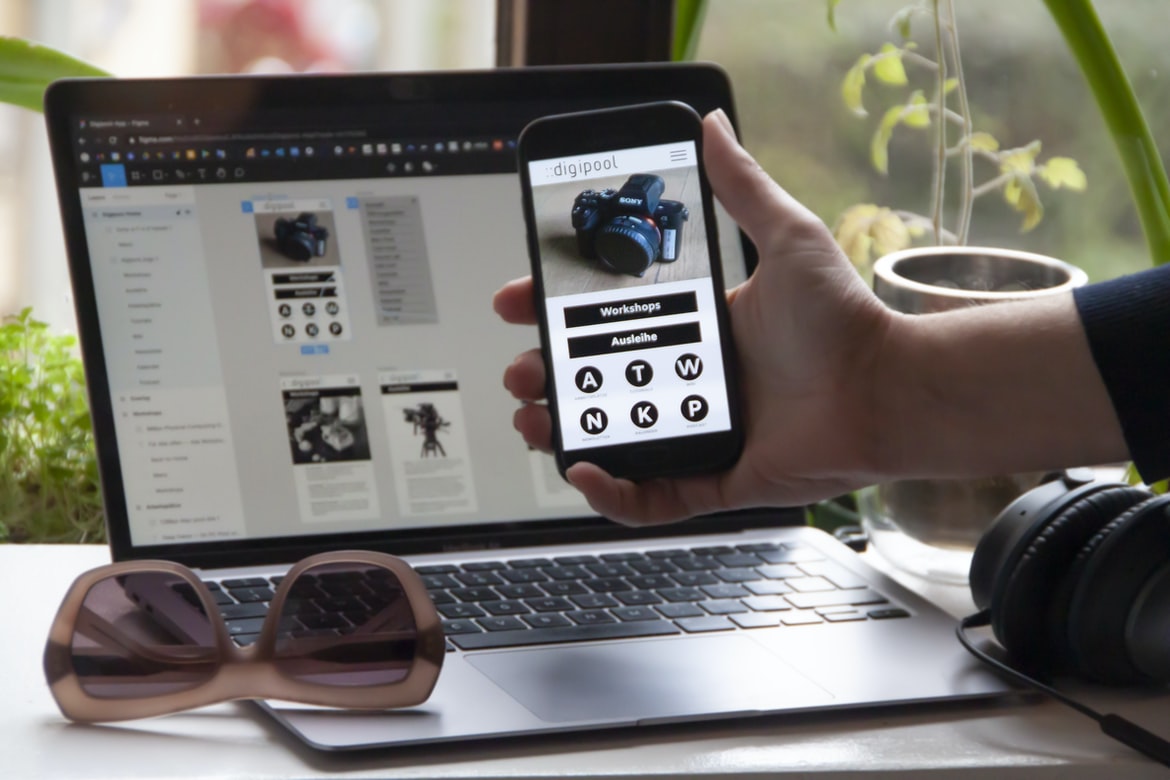
There is no denying that the user interface (UI) and user experience (UX) of a website are vitally important. Good web design will make sure that the user can find what they are looking for without having to scroll through a long list of articles or pages. In this article, we will be discussing some tips on how to design a UI and UX that will make your website easy to use.
What is web design UI UX, and what are its benefits?
Web design UI UX is the process of designing a user interface that is user-friendly and attractive. It offers many benefits, such as making it easier for users to interact with a website, improving conversion rates, and increasing brand awareness.
Web design has become increasingly complex, with interfaces that must be easy to use and visually pleasing. Good web design can be done without a degree in UI/UX, but there are certain skills and techniques that are needed.
Components of a good web design UI UX: layout, design, typography, colour, and navigation
A good web design UI UX should include a careful layout, well-thought-out design, top-notch typography, and vibrant colour. Navigation can also play a crucial role in creating a user experience that is both efficient and easy to use. By following these eight essential components of a good web UI UX, your users will be able to navigate your site with ease and find the information they’re looking for quickly and easily.
Layout: A well-designed layout will make it easy for users to find what they’re looking for on your site. Make sure all elements are placed where they should be, and don’t overcrowd any part of the screen.
Design: Your website’s design should reflect the brand you’re trying to create. Be sure to use clean and modern designs that are easy to understand and visually appealing.
How to create a good web design UI UX: start with the basics
Creating a user interface (UI) for your web design can be daunting. There are so many different ways to do things, and it can be hard to know where to start. But don’t worry! By following these simple tips, you can create a user interface that is both beautiful and easy to use.
1. Start with the basics. Before you start designing your UI, it’s important to understand the basics of web design. This includes understanding how HTML works and knowing how to use CSS and JavaScript. Once you have a basic understanding of these languages, you can start building your UI using them.
2. Use colour sparingly. One of the most common mistakes people make when designing their UI is overusing colour. When colour is used too much, it becomes difficult for users to see what’s going on.
Tips for improving your web design UI UX: use grid systems, use icons effectively, be concise and organized
Designing a web interface can be a daunting task, but with a little bit of planning and UX design tips, the process can be made much smoother. One of the most important things to remember is to use grid systems in your designs. This will help to keep everything organized and concise. Additionally, consider using icons effectively in order to make your user interface more user-friendly. Finally, make sure that you focus on the important aspects of your website and don’t spend too much time on superfluous elements. By following these simple guidelines, you can create an effective web design UI UX that will meet the needs of your users.
Graphic Design
Graphic design is more than just designing beautiful visuals. Graphic designers must be able to understand user needs, create a positive user experience, and communicate effectively with clients. Here are tips for creating a great user interface and UX in web design:
1. Make sure all elements of your website are optimized for mobile devices. This includes making sure your fonts are legible on small screens, using grid systems to organize content, and testing your website on different devices.
2. Use clear, concise language when writing copy for your website. Users will quickly become frustrated if they can’t understand what you’re saying or if the text is difficult to read.
3. Ensure all buttons, forms, and drop-downs have clear labels that explain their function. This will help users avoid frustration when trying to complete tasks on your website.
4. Use a clear navigation system. This will help your users to find their way around your site and prevent them from getting lost in the process. 5. Provide clear information about pricing and ordering on your website.
Visual Communication
In today’s society, it is important to be able to communicate with others through visuals. From online profiles to advertisements, visuals are becoming increasingly common. And while there are many different ways to create visual communication, there are a few key principles that should always be followed.
First and foremost, the visuals should be simple and easy to understand. They should not require too much thought or effort to interpret. Second, the visuals should be consistent throughout the entire piece of communication. Third, the visuals should be designed in a way that is both attractive and functional. Finally, visual communication must be timed carefully in order not to come across as intrusive or overwhelming.
Visual Communication Vs Graphic Design
Visual communication is all about creating a meaningful image that can be represented with words or symbols. Graphic design, on the other hand, is all about creating a visually appealing layout and interface for information. Which one is better? Well, that depends on what you’re looking for.
If you’re looking to communicate your ideas quickly and easily to a wide audience, then visual communication will be your best bet. Visual communication is typically easier to understand and can be more effective when it comes to getting your message across quickly. Graphic design may be more aesthetically pleasing, but it can take longer to create a lasting impression and can be less accessible to people who are not familiar with graphic design terminology.
Ultimately, the choice comes down to what you want the end result of your project to look like.
Application of Graphic Design: Adobe Photoshop, Adobe Illustrator, Adobe InDesign
Graphic design has become an essential part of the user interface (UI) for most web applications. Adobe Photoshop, Adobe Illustrator, and Adobe InDesign are three of the most commonly used graphic design software programs. This article will discuss the different techniques that can be used in designing a UI using these programs.
Adobe Photoshop is used to create mockups and wireframes. It can be used to create simple or complex designs, depending on the needs of the project. Adobe Illustrator is used to creating vector illustrations and logos. It can be used to create detailed or simplified designs, depending on the needs of the project. Adobe InDesign is used to create e-books, webpages, and magazines.
Figma, Adobe XD, WordPress, Elementor.
Designers are always looking for new and innovative ways to design web pages, and one of the newer applications being used more and more is Figma. Figma is a software application that allows designers to create mockups and prototypes for websites. It’s popular with Adobe XD users because it has a similar interface, making it easier for them to transition from designing in Adobe XD to website design. WordPress also has a strong user base, so many designers use it as the foundation for their websites. Elementor, on the other hand, is used by video editors and graphic designers who need to quickly create mockups of videos or designs.
What is Visual Communication in graphic design?
Visual communication is the process of conveying meaning through images. In graphic design, visual communication is essential to creating a well-designed website or application. Good visual communication can help users understand the content on a page, improve user experience, and increase retention rates.
Graphic designers use a variety of techniques to achieve visual communication goals. Some common methods include using typography, layout, colour, and imagery. Graphic designers also use visual effects (e.g., drop shadows, blurs) to make elements look more realistic or appealing.
Visual communication is an important part of graphic design. It can help users understand the content on a page, improve user experience, and increase retention rates. Graphic designers use a variety of techniques to achieve visual communication goals, including using typography, layout, colour, and imagery. Visual effects (e.g. Visual communication is the use of images, typography, and layout techniques to communicate ideas. Visual communication can take many forms in graphic design, including web design and UI UX. In web design, visual communication can help users understand a site’s purpose and content. It can also help users navigate a site, find what they’re looking for, and make decisions. Additionally, good visual communication can make a website look attractive and inviting.
What Is A Prototype?
Prototypes are a crucial part of any web design process. They allow designers to test out different designs and see how users interact with them before committing to a final product. Prototypes can be simple mockups or full-blown websites, but they all have one common goal: to help designers create the best possible user experience.
What processes should be followed when designing a user interface?
Designing a user interface for a website can be a daunting task. There are many different processes that should be followed in order to create an effective and user-friendly interface. Some of the key steps that should be taken include research, sketching, and prototyping. Here are some other key considerations:
-User feedback is essential when designing a user interface. Make sure to ask people what they find confusing or difficult to use on your website. This will help you improve your design before it’s even completed.
-It’s important to consider the overall layout of your website when designing the user interface. Make sure all elements work well together and look visually appealing.
-When creating sketches or prototypes, it’s important to keep in mind how users will interact with the interface. Try out different scenarios and see how users respond.
How do colours and typography affect UX and UI design?
Colour can be a powerful tool when it comes to user experience (UX) and user interface (UI) design. A study published in The Journal of Experimental Psychology: Human Perception and Performance found that colours can have a significant impact on how users interact with a website or app. In fact, the researchers found that red and green icons are the most effective in increasing website or app engagement.
While colour alone cannot create a beautiful UX or UI, using complementary colours can help to create harmonious designs that are easy on the eyes. Additionally, using typography to improve legibility can also be helpful in enhancing user experience. For example, using larger typefaces for headings and subheadings can make it easier for users to read.
What challenges do designers face when creating an intuitive user experience?
Designers are constantly faced with the challenge of creating an intuitive user experience. This is especially difficult when it comes to older or less tech-savvy users, as they may not be as familiar with newer technology features or may need assistance in using them. One way to overcome this difficulty is by creating easy-to-use menus and toolbars that are accessible at all times while still providing users with the necessary information they need to complete their tasks. Additionally, designers should focus on making sure each screen presents all relevant information at a glance without requiring excessive scrolling or clicking and that user feedback is always taken into account when redesigning screens. By following these tips, designers can create an efficient and user-friendly interface for their users.
Are there any tools available to help with UX/UI design?
There are a few different tools that can be used to help with UX UI design. One of the most common is Axure, which is software that allows designers to create mockups and prototypes. Another tool that is commonly used for UX UI design is Balsamiq, which is software that helps with wireframing and prototyping. Both of these tools have their own advantages and disadvantages, so it’s important to choose one that will work best for the project at hand. Additionally, there are also a number of online resources that can be used to help with UX UI design. For example, UXPin offers free resources such as templates and tutorials on how to create effective user interfaces.
How important is accessibility in UX/UI design?
There is no question that accessibility is an important factor in web design UI UX. Ensuring that all users can access and use your website efficiently, safely, and effectively is crucial to the success of your business. Poorly designed or inaccessible websites can frustrate visitors and even lead to lost sales. In order to ensure that all users have a positive experience when visiting your website, it’s essential to take accessibility into account from the outset. Here are some tips for ensuring that your web design UI UX is accessible:
1. Make sure your website conforms to international standards for accessibility. This includes making sure all images, videos, and other content are accessible via screen readers and other assistive technologies.
2. Use clear navigation menus and labels throughout your site. These should be easy to see and navigate even with reduced vision or hearing abilities.
3. Ensure that all text is also accessible via screen readers and other assistive technologies. Use a standard set of fonts, and ensure that they are large enough to be clearly legible, especially for people with impaired vision, such as those with low vision or age-related macular degeneration. 4. Ensure that all text is also accessible via screen readers and other assistive technologies. Use a standard set of fonts, and ensure that they are large enough to be clearly legible, especially for people with impaired vision, such as those with low vision or age-related macular degeneration.
What are some of the best UX and UI tips?
Looking to improve your web design or user experience? Here are a few tips to help you out:
1. Keep your content concise. Longer pages are more difficult to navigate and can be frustrating for users. Try to stick to around 500-700 words per page, and break up your text into manageable chunks. This way, users can find what they’re looking for quickly and have a smoother experience overall.
2. Use typography effectively. Effective typography can not only make your content look better, but it can also help users understand it more easily. Consider using fonts that are easy on the eyes, such as Arial or Verdana, and make sure all of your text is properly spaced out, so it doesn’t look cramped or illegible.
3. Use simple backgrounds and colours.
How important is UX/UI design to website development?
UX, or User Experience, is an important part of website design. Websites are designed to be accessible and easy to use for the average person. Good UX means that the user can understand the information on the screen, find what they’re looking for, and complete their task without difficulty. Poor UX can make a website difficult to use and frustrate the user. Good UX also makes sure that all content on a website is well organized and easy to find.
What are some key elements of good UX and UI design?
Good web design and user interface (UI) design require a good understanding of both the user and the web platform. Here are some key elements of good UX and UI design:
– User research is essential for understanding what users want and need from your website or app. This involves talking to actual users as well as observing how they use other websites or apps.
– A well-designed interface should be easy to use and look pleasing to the eye. Navigation should be logical and straightforward, with buttons that are clearly labelled. The text should be legible without cluttering up the screen.
– Effective use of colour can help make a website or app more appealing to users. Bright colours can energize an interface, while darker colours can signal important information. Fonts should also be chosen carefully to ensure that they are legible across different devices and browsers.
What are the differences between UX and UI design?
UX design is about creating a better user experience, while UI design is about creating a beautiful and usable interface. They both have their own challenges and benefits, so it’s important to know what separates them before starting a project. Here are some key differences:
1. UX design focuses on the entire user experience, from the moment someone clicks on your website to the moment they leave it. UI design concerns itself with the look and feel of individual elements on the page, like buttons and menus.
2. UX designers often focus on solving problems that users face while using a website or app, while UI designers focus more on how an interface looks and feels. This means that UX designers might be more likely to come up with creative solutions to difficult problems, while UI designers are more likely to simply improve upon existing designs.
3. UX designers are often involved in the entire user experience of a product, from research and brainstorming to writing and testing. UI designers may be more involved with only one aspect of the development process, such as creating mockups or wireframes. 4. What is a UX designer’s term for what a developer does?
A. QA engineer
B. Developer
C. Software engineer Developer, software engineer, or software architect are all accurate terms for what a developer does.
Are there any tools that can help improve my understanding of UX/UI design?
There are many different tools that can help improve your understanding of user interface (UI) design. Some of the more popular tools include Adobe Photoshop, Axure, and Inkscape. Photoshop is a widely used program for creating digital artwork and graphics. Axure is software that allows users to create mockups of interfaces and websites. Inkscape is used for creating vector illustrations and logos. All three of these programs are available free of charge. Another tool that can be helpful in UI design is paper prototyping. Paper prototyping is a technique that uses paper as a medium to test the functionality of an interface before it is developed into a computer application or website. This method allows for more accurate testing because it eliminates the need for time-consuming online interactions between users and developers.
Does UX/UI design affect user experience?
UX UI design affects user experience; this is a fact. Good UX design makes the user’s interaction with the website or app easier and more convenient. The goal of good UX design is to make the user’s experience as positive as possible, no matter what they are doing on the site or app. User experience is a key component of any website or app, and good UX design can help improve it significantly.
What are some common mistakes to avoid in UX/UI design?
There are a few common mistakes that UX/UI designers make when creating a user interface. Here are tips for avoiding them:
1. Not considering how users will interact with the interface. This can lead to clunky or unresponsive designs. Make sure to test your design concepts in advance and consider how users will interact with the interface.
2. Not considering the context of the UI elements. When designing an interface, be sure to take into account the surrounding context (e.g., menu items, labels, etc.). This will help you create cohesive and visually appealing designs.
3. Not using appropriate typography and layout techniques. Poor typography can create difficult reading conditions and unattractive UIs overall. Use typefaces that are legible at various sizes, and use grid systems or other layout techniques to improve readability.
4. Not testing your design. Take the time to test your designs before you start building them. It’s a great way to get a real-life feel for how users will interact with your UI and make meaningful changes to improve your designs before you spend too much time building them. 5. Not understanding the user. A poorly designed site can be a real turn-off for visitors and potential users. It’s important to understand your end user’s needs and wants so that you can design websites that are intuitive and easy to use. 6. Not testing your designs.
What are the key differences between user experience (UX) and user interface (UI)?
User experience (UX) and user interface (UI) are two very different aspects of web design. UI is the look and feel of the website, while UX focuses on how the site is used by users. Some of the key differences between UX and UI include the following:
1. UX focuses on how users interact with the site, while UI only considers how it looks.
2. UX considers all aspects of a site’s design, from layout to branding, while UI only deals with the look and feel of a website.
3. UX takes into account what people want from a website, while UI often follows convention or designer intuition.
4. UX is often more time-consuming than UI, as it requires more research and planning.
5. UX focuses on the needs of users, while UI simply considers what looks nice. The key difference between UX and UI is that UX involves the entire user experience, which includes all aspects of a site s design.
How can UX/UI design impact a user’s experience?
User experience (UX) is the overall feeling or psychological experience that a person has when using a product, service, system, or website. User interface (UI) design is the process of creating an effective and appealing user interface for a product, system, or website. A good user experience can improve customer satisfaction and loyalty, while a poor UX can lead to customer abandonment and decreased profits.
There are several ways that good UI design can impact a user’s experience. For example, well-designed menus can help users find what they’re looking for more quickly and easily. Clear labels and easy-to-understand icons can make it easier for users to navigate the site. And smart layout choices can keep users on the page longer, improving engagement rates. All of these factors play into how successful a site will be in terms of attracting and keeping customers.
What techniques can be used to create a great UX/UI design?
When it comes to web design, creating a great user interface (UI) is essential. There are a variety of techniques that can be used to produce an effective UI, and the following are five of the most popular.
1. Use Clear and Concise Graphics
Layout and graphics should be clear and concise so that users understand what they need to in order to interact with the design. For example, use large icons for main menu items rather than small text labels. Additionally, make sure all elements of the layout are easy to access and navigate.
2. Use Simple Navigation Patterns
Users should be able to easily navigate your site using common navigation patterns such as breadcrumbs or tabs. Keep in mind that users might have different levels of experience when it comes to web navigation, so make sure all elements are easy for them to understand and use.
The user interface of a web design can be easy for them to understand and use. Elements such as menus, buttons, and labels are often placed in easily accessible locations on the page. This makes it easy for users to find what they are looking for and eliminates the need to search through long lines of text.









