

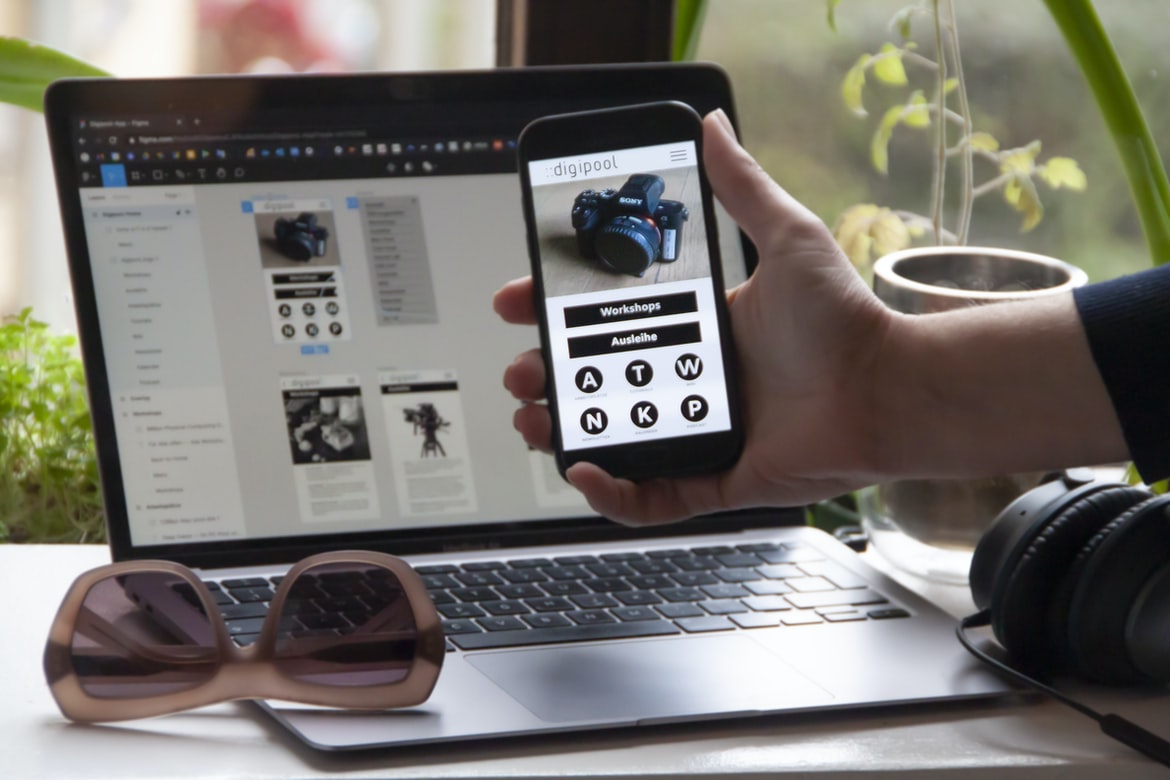
User interfaces are the physical or logical layouts of a computer system. They can be as simple or complex as is necessary for the task at hand. User interfaces vary depending on the type of application being used, but they all have one common goal: to make using the application easier for the user.
There are many different types of user interfaces, but they all share a few common elements. Every user interface has a surface upon which the user interacts with it and often contains menus and buttons that allow the user to control how the application behaves. User interfaces also typically have a look and feel that is specific to the application being used.
What is application design UI UX? How do you achieve a good user experience when designing an application’s user interface?
Application design UI UX is the process of designing the user interface for an application. It is important to consider how the user will interact with the application’s features in order to achieve a good user experience. There are several key factors that must be taken into account when designing an application’s UI, including readability, usability, and accessibility.
To achieve a good user experience, it is important to simplify the user interface so that it is easy to navigate and understand. Additionally, the focus should be placed on making sure all buttons and menus are accessible from all areas of the screen. Finally, ensure that all elements within the UI are properly formatted and styled so that they look professional and attractive. By following these tips, designers can create a user interface that is both easy to use and visually appealing.
The 4 Cs of User Experience: Context, Convenience, Customizability, and Completeness.
Context: User experience is all about creating an environment that is both convenient and comfortable for the user. This means taking into account the individual’s surroundings, preferences, and level of knowledge.
Convenience: When designing user interfaces, it is important to consider how users will interact with the interface. This includes things like how easy it is to find what they are looking for, how quickly they can access the information they need, and how simple it is to complete their task.
Customizability: By ensuring that user interfaces are customizable, designers can create an experience that is tailored specifically to the individual user. This allows them to take into account their own preferences and customize the interface accordingly.
Completeness: Ensuring that a user’s task is completed properly is essential for a good user experience.
Guidelines for User Interface Design: Keep it simple, keep it clean, and make it easy to use.
UI design is an important part of any application. It needs to be simple, clean, and easy to use. Here are some guidelines for keeping your UI design simple and effective.
Keep buttons and text big and legible. Use fonts that are easy to read at a distance. Keep the layout simple so that users can easily see what they need to see. Don’t clutter the screen with too many menus or icons. Keep the design consistent throughout your app. You should use similar designs in different parts of the app so that users don’t have to learn new interface conventions every time they open an app. Make it easy for users to customize their experience by providing settings or preferences in easy-to-find places.
Tips for Improving Application Design UI UX: Use visual metaphors, use effective icons, and make your user interface adaptable to different devices.
Application design is an essential step in the development of any software application. User interface (UI) usability is one of the most important factors in determining user satisfaction with an app. The following tips can help improve the UI UX for your software applications:
1. Use visual metaphors to create a more intuitive and easy-to-use interface. For example, use icons that represent common tasks or features within your app. This will make it easier for users to understand and navigate your app.
2. Make sure your UI is adaptable to different devices and screen sizes. This means that you should consider how users will interact with your app on different devices, such as smartphones, tablets, and laptops. This will ensure that users have an enjoyable experience no matter what device they are using.
3. Make sure that your app is responsive and optimized for touch, mouse, or keyboard input. Your app should feel natural in all of these scenarios. 4. Use colour and contrast to enhance the user experience by making it easier to read and distinguish UI elements on the screen.
Applying these guidelines will help you create a user experience that is both easy to use and pleasing to the eye.
Creating an easy-to-use and pleasing user experience is essential for any application. Fortunately, there are a number of guidelines to follow when designing an interface. These include using colour wisely, keeping elements organized, and creating a fluid layout. By following these tips, you can create an interface that is both easy to use and visually appealing.
One of the most important things to consider when designing an interface is the use of colour. Colours should be used sparingly in order to keep a design cohesive and organized. When selecting colours, it is important to think about the overall mood of the application. For example, if the application is designed for a business environment, then darker colours may be more appropriate than lighter colours. Additionally, it is helpful to use different shades of each colour in order to create depth and interest.
Why Convert Web App To Mobile App?
There are many reasons to convert a web application to a mobile app. Here are three:
-More Users: More users on mobile devices means more opportunities for revenue.
-Easier Navigation: From the outset, creating a well-designed and intuitive mobile app will ensure faster navigation and increased engagement.
-Better Functionality: When dealing with tiny screens and tight deadlines, developers can rely on mobile apps to provide superior functionality.
E-Commerce Platform
E-commerce platforms provide a way for businesses to sell products and services online. These platforms allow businesses to create and manage their own websites, as well as to interact with customers through a digital storefront. E-commerce platforms can be used by small businesses and large corporations alike, and they are becoming increasingly popular among online shoppers.
Some of the most popular e-commerce platforms include Shopify, Magento, and WordPress. Each platform has its own features and advantages, so it’s important to choose the one that best fits your business needs. For example, Shopify is particularly suited for small businesses that don’t need a lot of customization options or storage space. Conversely, Magento is perfect for larger businesses that need more flexibility in terms of design and marketing tools.
Figma
Figma is a user interface design tool that has quickly become one of the most popular applications in the market. It is easy to use and has a wide variety of features for users to customize their designs.
Adobe XD
Adobe XD is a powerful application for designing user interfaces and UIs. It has a lot of features that can help improve the design process, such as vector illustrations and drag-and-drop tools. Adobe XD is also customizable, so you can create interfaces that look exactly the way you want them to.
Design Mobile App
Application design is becoming more and more important in the 21st century. With a rise in mobile app usage, it is essential that your application’s interface and user experience be impeccable. Here are some tips for designing a mobile app UI and UX:
1. Keep your app simple and easy to use. Make sure all of the buttons, menus, and icons are clear and concise. Avoid using too many obscure or difficult-to-understand icons or buttons. Also, ensure that all text is easily readable at a glance.
2. Balance functionality with aesthetics. Your app’s interface should be both visually appealing and functional. While it’s okay to include a little bit of bling here and there, don’t go overboard with unnecessary graphics or animations.
Graphic Design
Graphic design is often associated with creating attractive and eye-catching designs for advertisements, packaging, websites, and other commercial products. However, graphic design can be used for a variety of purposes outside of the commercial world. For example, graphic designers can create beautiful designs for magazine covers, marketing materials, or educational materials. Additionally, graphic designers can create unique and innovative designs for applications such as user interfaces (UI) or user experience (UX).
What is UI design?
First, what is “UI design”? UI design is the process of creating a user interface for an application or website. It involves creating the look and feel of the interface, as well as ensuring that it works smoothly and efficiently. UI designers also need to consider how users will interact with the interface and create layouts that are easy to navigate.
UI design can be challenging, but it’s an important part of creating a successful application or website. If done correctly, a well-designed UI can help users access the information they need quickly and easily, making their experience more enjoyable.
What is UX design?
User experience design is the process of creating a great user experience for a product or website. The goal is to make the user’s interaction with the product as enjoyable and efficient as possible. User experience design encompasses everything from how a website looks and feels to how users interact with it. UX designers must be able to think critically and come up with creative solutions that will make users happy.
Visual Communication
Visual communication is an important aspect of user experience design. It can help users understand the interface and interact with it more effectively. Good visual communication can also make a website or application more visually appealing. However, good visual communication doesn’t come automatically; it requires careful planning and execution. Here are some tips for creating effective visual communication:
1. Use concise, clear language. When designing a website or application, keep your text simple and easy to read. Avoid jargon and technical terms, and use plain English whenever possible. This will make your content more accessible to a wider audience, as well as improve the overall user experience.
2. Use images sparingly. Too many images can be confusing and overwhelming for users. Stick to using images when they’re really necessary (for example, when displaying a product or describing how to use the interface).
Visual Communication Vs Graphic Design
It has always been a debate, which is better? Visual communication or graphic design? Is one better than the other? The answer to this question is subjective. However, there are some basic principles that must be followed when creating a visual communication or graphic design project. One of these principles is referential integrity. Referential integrity means that all elements in a design must be linked to an underlying concept or theme. This ensures that the design is cohesive and makes sense. Another principle is functionalism. Functionalism dictates that designs should be intuitive and easy to use. It is important that users can understand and navigate the design easily without having to learn about specific functions or features. Designs should also be legible and look good on a variety of mediums, such as websites, print materials, etc. Finally, simplicity is key when it comes to designing visuals.
Application of Graphic Design: Adobe Photoshop, Adobe Illustrator, Adobe InDesign
Graphic design is one of the most popular application design disciplines. In this article, we will explore the various graphic design applications—Adobe Photoshop, Adobe Illustrator, and Adobe InDesign—and discuss their features and how they can be used to create user interfaces (UI) and user experience (UX) designs.
Adobe Photoshop is a versatile photo editing program that has been used for years to create layouts for websites and other digital projects. Its features include layers and masks, vector tools such as paths and shapes, Liquify tool for transforming images, adjustment layers for brightness, contrast, saturation and more. Adobe Illustrator is a vector drawing program that offers many similar features to Adobe Photoshop but also has its own unique capabilities. For example, Illustrator can create 3D objects or illustrations.
Figma, Adobe XD, WordPress, Elementor.
A growing trend in the application design world is the use of user interface (UI) and user experience (UX) design tools. Figma, Adobe XD, WordPress, and Elementor are all popular tools used for application design. In this article, we will explore each tool and how it can be used to improve the user experience of your applications.
Figma is a free and open-source tool that was created by Facebook. It is a vector drawing program that can be used for both general and application design work. The main advantage of using Figma over other UI design programs is that it has a wide range of features for drawing shapes, lines, arrows, and text. Additionally, Figma allows users to export their design’s assigned files which can be imported into other software such as Adobe Photoshop or Adobe Illustrator.
What Is A Prototype?
The prototype is a concept that has been around for a while now and usually refers to an early version of a product that is used to test the feasibility of developing it further. Prototypes can be static or interactive, but they are all designed to help you test what works and what doesn’t.
Prototype development can be time-consuming and expensive, but it can also be incredibly useful in helping you refine your design before launching a product into the market. There are many different types of prototypes, so make sure to choose one that will help you achieve your goals.
What is UI/UX design, and how does it affect an application?
UI UX design is the process of optimizing the user interface (UI) of a digital application to ensure that it is both easy to use and attractive. The goal of UI UX design is to make the application as user-friendly as possible while still retaining its aesthetic appeal. Improving the usability and attractiveness of an application can have a significant impact on its overall success.
One of the most important aspects of UI UX design is making sure that all elements of the UI are easy to understand and use. This includes ensuring that all buttons, text boxes, and menus are clearly labelled and that all interactions with the UI are straightforward and logical. It also helps to ensure that all elements of the UI respond quickly and smoothly when users interact with them.
Overall, UI UX design is essential for any digital application.
How important is the user experience when designing applications?
Application design is becoming increasingly important as users become more demanding. Users want applications that are easy to use and look good, no matter what device they are using. In order to make an application user-friendly, it is important to take into account the user experience (UX).
There are a number of different factors that can affect the UX of an application. For example, the layout and design of the menus can be difficult to understand on small screens. The placement of buttons and other controls can also be problematic if they are difficult to reach or if they are hidden behind other elements.
It is also important to consider how users will interact with the application. For example, will they need to use their hands or a keyboard and mouse? Will they need help from a friend or family member? These factors all play into the design of the application interface.
How can I ensure users have a good experience when using my application?
Users often have a good or bad experience with applications because of the design and user interface (UI). A good UI makes it easy for users to find what they are looking for, use the features of the application, and get their job done. The following tips will help you create a great UI:
– Use simple, clear graphics that are easy to understand.
– Make sure all buttons and menus are located where they are most easily accessible.
– Use consistent colours throughout your application.
– Use typography that is legible at a distance.
Users want to have a positive experience when using your application.
Users want to have a positive experience when using your application. They want to feel comfortable and confident in the decisions they make while using your product, and they want everything you provide to be intuitive and easy to use. Utilizing an effective user interface (UI) is essential for creating a positive experience for users. There are several things you can do to ensure that your UI is friendly and user-friendly:
-Ensure that all elements of the UI are clearly labelled and visually appealing. This will help users understand what they are looking at and make better decisions based on the information presented.
-Make sure all buttons, menus, and other interactive elements respond quickly and correctly. This will keep users from waiting too long or from frustration building.
-Keep things consistent across all screens within the application. Users want to have a positive experience when using your application. Applications that make users happy are more likely to be used again and again.
What are some of the most important principles for designing effective applications?
When creating an application, it is important to adhere to a few key principles in order to create an effective and efficient design. These principles include developing a well-thought-out user interface (UI) and User Experience (UX), as well as following general best practices for software development.
One of the most important factors in designing an application is ensuring that the UI is easy to use and understand. By creating a layout that is logically organized, users will be able to navigate the app with ease. In addition, making sure all elements are accessible via keyboard navigation or screen readers can make life much easier for those with disabilities.
Additionally, it’s important to consider how users will interact with the app. For example, if users will be using the app regularly, it might be beneficial to add features that make using it simpler.
What kind of feedback should I use to determine how successful my application’s UI/UX is?
When designing and developing an application, it is important to consider how well the user interface (UI) is executed. Feedback such as user satisfaction surveys or feedback from beta testers can help determine how successful the UI UX is. In order to get the most accurate feedback, it is important to keep track of what users say and do while using the application. Additionally, it is important to understand the user’s goals and needs in order to provide them with a usable and intuitive UI.
What tools are available to help me create a great UI/UX for my application?
There are many tools that can be used to help create a great user interface (UI) for an application. These tools can include Photoshop, Illustrator, Inkscape, and Sketch. Additionally, web development frameworks like AngularJS or React can be used to create a UI. Finally, Ajax and JavaScript libraries can be used to create interactions within the UI.
When creating a UI, it is important to consider the target audience. For example, if the application is meant for users who are not computer experts, it is important to simplify the design so that even those without extensive technical knowledge can use it. Similarly, if the application is meant for business users who need to maintain confidentiality, it may be necessary to omit certain features that would allow users access to personal information.
Is there a difference between mobile and web applications when it comes to UI/UX design?
When it comes to UI UX design, many people believe that there is a big difference between mobile and web applications. While both platforms have their own unique features, there are some elements that tend to be more prominent on one side or the other. In this article, we will explore the different aspects of UI UX design and see if there is a clear distinction between the two types of applications.
To start with, one of the most important factors when designing any type of interface is legibility. This means making sure all elements are easy to understand at a glance and that no information is hidden behind cluttered or confusing visuals. When it comes to mobile apps, spacing and layout can often be more limited, which can lead to difficult-to-read text and buttons. On the other hand, web interfaces usually have more breathing room, which allows for larger fonts and easier navigation.
What is the difference between UI and UX design?
UX design and UI design are two different but equally important fields of design that focus on the user experience. UI design is focused on the look and feel of the application, while UX design is focused on the overall usability of the application. While both fields have their own specific focuses, there are some key differences between them that should be taken into account when designing an application.
One major difference between UI and UX is that UI design is concerned with how a user will interact with the application, while UX design is concerned with how users will behave in general. For example, if a user can’t find what they’re looking for or has trouble using the interface, then it would fall under the category of UX issues.
What are the principles of good UI/UX design?
The principles of good UI UX design are simple, but they work. First and foremost, good UI UX design is user-centric. It focuses on what the user needs and wants, not on what the designer thinks the user should do. Second, good UI UX design is intuitive. It’s easy for users to understand and use the interface without having to learn about various buttons and menus. And finally, good UI UX design is effective. It delivers on its goals – whether that’s helping users complete tasks quickly or making them more effective at their jobs.
How can UI/UX design be used to improve user experience?
User experience (UX) is the overall feeling a user has after using a product or service. It can be broken down into five core areas – physical environment, interaction design, visible elements, feedback and navigation. When designing an application, it is important to pay attention to all five areas in order to create a positive user experience. User interface (UI) UX design can help improve the usability and feel of an application by focusing on the design of the user interface. By improving the layout and aesthetics of buttons, menus, and screens, the designer can make it easier for users to understand and use the application. In addition, by creating well-made animations and responsive designs, users will feel comfortable using the application, even when it changes rapidly or when their device is crowded.
What skills are necessary for an effective UI/UX designer?
Effective UI UX design requires proficiency in a variety of skills, including user research, wireframing, programming, and graphic design. In order to create an effective interface that users will love, it is important to have a strong understanding of how people interact with digital products. Additionally, UI UX designers must be adept at working with various software programs and have the ability to create high-quality visuals. With these skills under their belt, designers can create interfaces that are both user-friendly and aesthetically pleasing.
How does a designer create a successful user experience in an app?
Designing an effective user experience for an app can be a daunting task, but with a little creativity and attention to detail, it can be achieved. Here are some tips for creating a successful user experience:
1. Prioritize the design process. Start by identifying the key goals of the app and focusing on those first. All other elements should be based on achieving those goals.
2. Be aware of the app’s target audience. Consider who will be using the app and what their needs may be. This information can help you create features that appeal to them specifically.
3. Use intuitive designs and clear language. Make sure your designs are easy to understand and navigate, even if users don’t have any prior experience with the app. Use short sentences and simple icons or graphics to make sure everything is easy to understand at a glance.
Are there any common mistakes to avoid when creating a UI/UX design?
UI UX design is a critical part of any application, and it’s important to make sure that the design is effective and user-friendly. However, there are certain mistakes to avoid when creating a UI UX design. Here are tips:
1. Keep your designs simple. A complex UI can be difficult for users to understand and navigate, and it can also lead to errors. Keep your designs as simple as possible so that they’re easy to use and understand.
2. Make use of typography and colour. Both typography and colour can play an important role in enhancing the usability of a UI UX design. Use typefaces that are easy to read, and choose colours that are easily visible on different backgrounds. This will help users find what they’re looking for quickly and efficiently.
3. Be aware of functionality requirements.
What is the importance of UI/UX for applications?
There is no doubt that User Interface (UI) design plays an important role in applications. A well-designed UI can help users navigate and use the application more easily, making it easier for them to accomplish their goals. Additionally, a well-designed UI can make your application look appealing and help users feel confident about using it.
In order to create a good UI, you need to understand the different aspects of design. For example, you need to consider how people will interact with your application, what features are important to users, and how you can improve user experience overall. Furthermore, good UI design requires a lot of creativity and attention to detail. If you want your app to be successful, then you need to put in the hard work to craft a good UI UX.
How does UI/UX influence user experience?
User experience (UX) is a critical factor in the success of any application. Poor user interface design can quickly lead to frustrating and negative experiences for users, which can have a significant impact on their loyalty and willingness to return. UI UX is one of the most important factors in determining the overall user experience of an application.
UI UX encompasses not only the look and feel of an application’s graphical interface but also its interactions and functionality. A well-designed UI will be easy to understand and use while also providing the necessary features and functions needed by users. An effective UI will also be responsive and adaptive to user changes or preferences, ensuring that every user has an enjoyable experience regardless of their individual usage patterns. User interface (UI) design is one of the most important aspects of application design. The UI should be easy to use and navigate, and it should look good and feel natural. Factors that influence the usability of an application include the UI design, user experience (UX), and user interface (UI) feedback.
What are the best practices for developing an application’s UI/UX?
UI UX is a critically important part of any application’s design. It can make the difference between an application that is user-friendly and one that is not. Here are some best practices for developing UI UX:
1. Pay attention to the overall design of the application. Make sure that all elements work together to create a cohesive look and feel.
2. Use clear, concise icons and buttons. Users should be able to understand what each button does without having to read the label.
3. Make sure that your application’s layout flows well and is easy to navigate. Keep in mind how users will be using your app, whether they are browsing or searching for specific information.
4. Choose fonts that are easy to read and contrast well with your background colour palette.
What techniques help create a successful application UI/UX design?
A successful application UI UX design is all about creating a user experience that meets the needs of your users. There are many different techniques that can be used to achieve this, and below are some of the most effective ones.
1. Keep your target audience in mind from the beginning
It’s important to remember who you’re designing for from the start, as this will affect everything you do later on. If you don’t know who your target audience is, it can be hard to create a user experience that appeals to them.
2. Use primary colours and patterns wisely
Using bright, eye-catching colours and patterns can help draw attention to elements on the screen, making them more easily visible. This can help make information more easily accessible and make sure that users know where they are and what they need to do next.
What tools and methods can be used to test an application’s UI/UX?
According to a study by Nielsen, only 46% of users are “happy” with the user interface (UI) of their applications. This is in contrast to the satisfaction ratings for the application’s features and functionality. So, how do you make sure that your UI is top-notch and meets the expectations of your users? There are a number of ways to test an application’s UI UX, and each has its own pros and cons.
One way to test an application’s UI UX is to use user interviews. This method can help you understand why users are unhappy with the UI, what they would like to see changed, and how best to implement those changes. However, user interviews can be time-consuming and expensive, so they’re not always feasible or practical.
Another way to test an application’s UI UX is to use focus groups.
What elements should be considered when developing an application’s UI/UX?
When designing an application’s UI UX, it is important to consider the following elements:
-The application’s primary purpose
-Who will be using it
-How users will interact with it
-The design language is chosen for the UI
-The overall design aesthetic
To create a user interface that is both effective and appealing, it is important to understand the application’s primary purpose, who will be using it, and how users will interact with it. Additionally, the design language chosen for the UI should reflect the overall design aesthetic of the application. By taking all of these into consideration, designers can create an interface that is easy to use and visually appealing.
When developing an application’s UI, it is important to consider the overall user experience.
1. UX (user experience) is one of the most important aspects of app design. It should be taken into consideration from concept to finished product.
2. User interface (UI) design is a critical element of any app. It must be intuitive and easy to use while also pleasing the user.
3. A good UI can make or break an app, so it’s important to get it right from the start.
4. Communication between the app and the user should be clear, with a language that’s easy to understand. 5. User reviews are an important part of any app’s success. 6. Apps can also get better over time thanks to updates, which make them more useful or fun. 7. Users can also get in touch with apps thanks to social media or email. 8. Research suggests that between 33% and 50% of users will continue using an app after their first download. 9. 90% of users who use an app do so on the same device 10. Mobile phone owners send and receive over 1 billion emails every day 11. Email is the most popular form of communication for brands 12. 93% of mobile users have checked their email on their mobile phones.
1. UX is a process that helps design applications that are both effective and user-friendly.
UX is a process that helps design applications that are both effective and user-friendly. Ux is important because it can make or break the success of an application, so it’s important to get it right. There are different types of UX, which include visual, functional, and interactive design. Visual design involves creating an attractive and user-friendly interface. The functional design focuses on making sure the features of the application work as intended. The interactive design takes into account how users will interact with the application and makes sure their needs are met. All three types of UX play an important role in creating an effective and usable application.
2. There are many different ways to approach UX, but all of them involve understanding the user’s needs and wants.
There are many different ways to approach UX, but all of them involve understanding the user’s needs and wants. Understanding how users interact with your site or app is the first step in designing it correctly. There are a variety of methods you can use to find out what users need and want, and each has its own benefits.
Some popular methods include interviews, focus groups, surveys, and user testing. All of these methods have their own strengths and weaknesses, so it’s important to choose the right one for your project. User research is an important part of any UX process, so make sure you have a good team in place to help you carry out the research and analyze the results.
3. There are various techniques that can be used to create a UI that is both effective and user-friendly.
Effective User Interface Design relies on a number of techniques in order to be both user-friendly and effective. These include using well-placed icons, creating intuitive labels, and tailoring the layout to the specific device or browser being used. In addition, effective UI design takes into account the user’s needs and preferences. By doing this, users are more likely to become engaged with the application and stick around longer.
One of the most important aspects of UI design is always keeping users in mind. By catering to their needs and making sure that everything is easy to understand, developers can create an interface that is both engaging and useful. Furthermore, by incorporating feedback from beta testers into the development process, developers can ensure that their application is as user-friendly as possible.
4. One of the most important aspects of UX is making sure the design is easy to use and understand.
Users should be able to understand and use the design of an application easily. This is one of the most important aspects of user experience (UX). There are a few different ways to make an application easy to use. One way is to include clear and simple menus and buttons. Another way is to make sure all elements of the design are legible and organized. Finally, it’s important to consider how users will interact with the app. For example, will they be using a mouse or a touch screen?
How can user feedback be used to enhance an application’s UI/UX?
User feedback can be used to enhance an application’s UI UX. User feedback surveys can help gather information about how users interact with the interface and what features they would like to see added. This information can then be used to create prototypes or mockups that better reflect user needs. Additionally, user feedback can be used to improve the design of existing features. By understanding how users use the interface and what changes they would like to see, designers can create a more intuitive and pleasing experience for all users. User feedback can be used to enhance an application’s UI UX. By taking user feedback into account during the development process, developers can create interfaces that are easier to use and understand. This type of feedback is essential for creating applications that are both user-friendly and efficient.
User experience and efficiency are two of the most important factors when designing any type of application. In order to create applications that are both user-friendly and efficient, it is important to follow a few guidelines. One of the most important things to consider when designing an application is the layout. The layout should be simple and easy to understand while also ensuring that all information is easily accessible. Additionally, applications should be designed in a way that allows users to move around the screen quickly and easily. Finally, it is important to consider how users will use the application and make sure that features are accessible and easy to use.









