

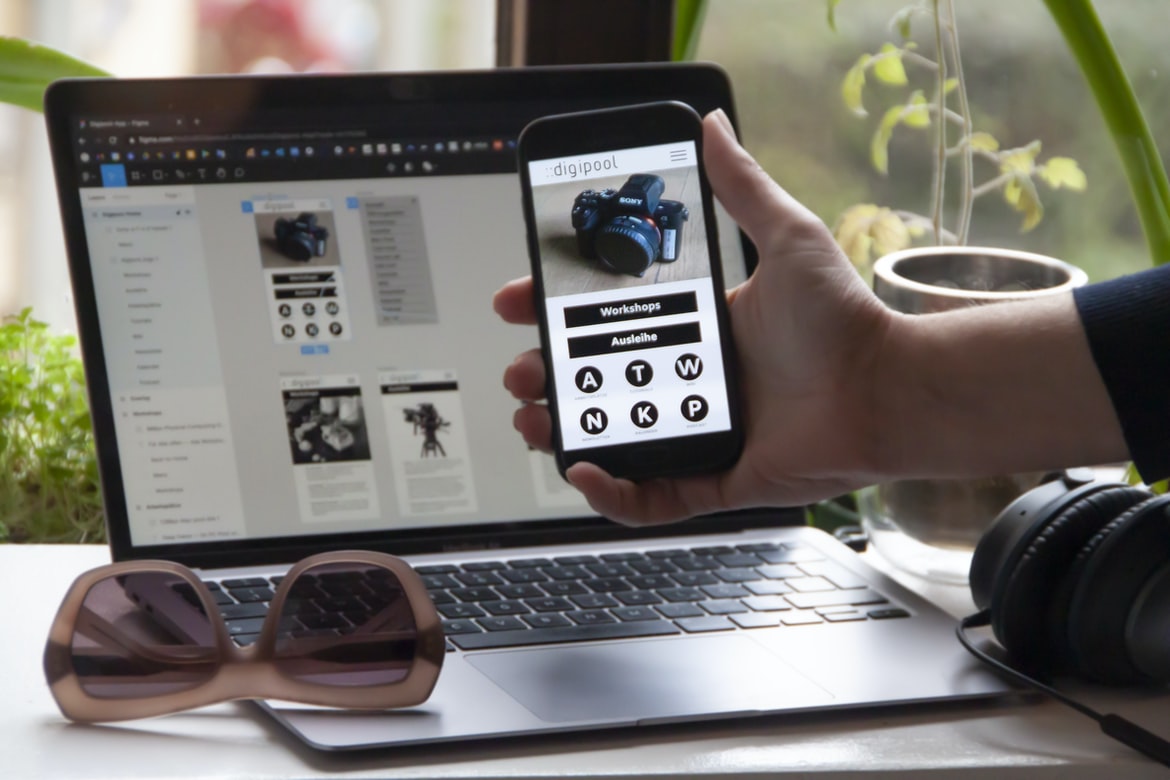
Web design has come a long way since the early days of the World Wide Web. Nowadays, there are a number of different web design styles that can be used to create beautiful and user-friendly websites. Some popular web design styles include modern, flat, and minimal designs.
However, it’s important to consider the user experience (UX) when designing a website. In order to create an effective and comfortable user experience, it’s important to pay attention to the layout, colour scheme, and font choice. Additionally, it’s important to consider how users will interact with the website. For example, will they be using a mouse or touch screen? Will they be using a desktop computer or a mobile device?
By paying attention to these factors, you can create an effective and beautiful web design that is also friendly for your users.
What is UI, and why is it important?
UI (User Interface) is the way users interact with a system. It encompasses everything from the look and feel of the system’s graphical elements to the interactions users can have with it. UI design is important because it affects how people use a system and can even have an impact on system performance. It’s also critical for user experience: if users don’t like what they see or feel when using a system, they’re likely to give up on it. UI designers need to pay close attention to both the visual design and functionality of their systems in order to create a well-rounded experience for their users.
The anatomy of a web page: What composes the web page interface?
Web pages are composed of different elements, and each one has a specific job to do. If you’re not familiar with the different elements, then it’s time to start learning! In this article, we’ll take a look at the anatomy of a web page interface and see what each element does.
Websites use HTML, CSS, and JavaScript to create their interface.HTML is the markup language used to structure a web page. It includes tags for headings, paragraphs, lists, images, and other content. Each tag corresponds to a specific element on the page.
CSS is used to style the content on a web page. It sets properties for fonts, colours, borders, and more. JavaScript is used to interact with the user and control the behaviour of elements on a web page. Web pages are composed of different elements that interact with each other to create an interface. This article provides an overview of the major web page interface components, including HTML, CSS, and JavaScript. Understanding how these elements work together will help you design web pages that look and function correctly.
Layout and typography: How do they affect the user experience?
Layout and typography can have a big impact on the user experience. Poorly designed pages can be frustrating to use, while well-designed pages can be easy to navigate and look pleasing to the eye. Here are some tips for taking good layout and typography into account when designing web pages:
1. Use consistent font sizes and point sizes throughout your site. This will make it easier for viewers to read the text and visually scan the page.
2. Use whitespace wisely. Too much white space can feel overcrowded and unprofessional, while too little can leave viewers feeling cramped and confused. Try to fill any open spaces with type or graphics rather than leaving them empty.
3. Keep paragraphs short and to the point.
Navigation: How are users directed around the page?
In order to direct users around a web page, designers typically use a variety of navigation elements. These can include simple links, dropdowns, and buttons. However, not all users will be familiar with these elements, so it’s important to consider how users will be directed.
Some navigation solutions are more effective than others. For example, if the main content of the page is organized into sections, a dropdown menu may be the best way to navigate between them. If the page contains a lot of information or visuals, links might be less effective, and buttons might be better options.
Ultimately, it’s important to consider how users will interact with the web page and choose the best navigation solution for them. Users need to be directed around the page in order to find what they are looking for. The three main ways that users are directed around a page are through navigation menus, links, and headings. Navigation menus are the most common way to direct users around a page, as they appear at the top of most pages. Links move users from one area of the page to another, and headings provide detailed descriptions of each section of a page.
Interaction: How do users interact with the interface?
User interface design can be divided into two categories: the visible and the hidden. Visible user interface design involves the layout, colours, and graphics that are seen by the user. Hidden user interface design involves how the user interacts with the interface, such as through menus or buttons.
UI designers must take both factors into account when designing an interface. For example, if a user is looking at a list of items on a page, they may want to see large text so that they can read it easily. However, if a user is trying to select an item from that list, they may want to see smaller text so that they have more control over their selection.
A good UI design will balance these two factors in order to provide an optimal experience for the users viewing it.
Application of Graphic Design: Adobe Photoshop, Adobe Illustrator, Adobe InDesign
There are many graphic design programs available on the market, but which one is the best for web design? In this article, we will be discussing the different graphic design applications and how they can be used to create beautiful and user-friendly interfaces. Adobe Photoshop, Adobe Illustrator, and Adobe InDesign are all popular graphic design programs that can be used to create user interfaces (UI) for websites.
Adobe Photoshop is a widely used program for creating images and graphics. It has a wide range of features that make it suitable for creating logos, icons, flyers, and website designs. Adobe Illustrator is a more versatile program than Photoshop that allows users to create vector illustrations and animations. It also has features that make it suitable for creating high-quality menus and buttons. Adobe InDesign is a powerful program that allows users to create PDFs and eBooks.
Figma, Adobe XD, WordPress, Elementor.
Figma, Adobe XD, and WordPress are three popular web design tools that allow users to create sleek, user-friendly interfaces. Elementor is a more general-purpose tool that can be used for designing websites, apps, and any type of digital project.
What are the key principles of UX and UI design?
UX (User Experience) and UI (User Interface) are two of the most important aspects of web design. They play an important role in helping people use the site easily, understand what they’re looking at, and get the most out of their browsing experience. Here are some key principles to keep in mind when designing UX and UI:
1. Make it easy to find what you’re looking for. Don’t bury your users beneath a mountain of menus and buttons. Make sure all the information they need is right at their fingertips.
2. Create a consistent look and feel for your site. This will help users orient themselves and make better decisions about where to focus their attention.
3. Keep things simple – don’t overcomplicate things unnecessarily.
What are the differences between UX and UI design?
UX design is about creating an experience for users, while UI design is about creating the look and feel of a website or app. UX designers focus on the end-user experience, while UI designers focus on the look and feel of the interface. There are many differences between UX and UI design, but here are just a few:
-UX designers typically work with clients to create a vision for their desired user experience, while UI designers work with clients to create a vision for the look and feel of their interface.
-UX designers often use research methods to understand how users interact with existing products or services before designing new ones. UI designers may instead focus on developing templates or working off existing designs.
-UX design typically focuses on improving usability and accessibility, while UI design more often focuses on aesthetic appeal and visual appeal.
How can I use UX and UI techniques to create an effective user experience?
User experience design (UXD) is the process of creating an effective user interface and user experience for a website or application. This involves understanding the needs of your users, designing the interface and controls to meet those needs, and testing the final product. There are a variety of UXD techniques you can use to create an effective user experience.
One technique is to focus on clarity and simplicity. Make sure all elements of your UI are easy to understand and use and don’t overcomplicate things. Additionally, keep all elements simple so that users don’t get bogged down in menus or buttons.
Another common technique is usability testing. Before releasing any new features or updates to your site or app, test them with real users to make sure they’re easy to use and meet their needs. This will help ensure that your users have a positive experience using your product.
What kind of tools do I need to create a successful user interface?
When designing a user interface for a website or application, it’s important to consider the different tools that are available to you. There are many different software packages and design tools available, and it can be difficult to decide which ones are right for your project. Here is a list of some common UI design tools and their benefits:
– Photoshop: Photoshop is one of the most popular graphics editing programs on the market and is often used to create user interfaces. It has a wide range of features that make it perfect for creating detailed interfaces, including layers, curves, text effects, and more.
– Sketch: Sketch is a vector graphic design program similar to Adobe Illustrator. It has features like support for vector drawings, ease of use with digital files, and customizable animations.
How can I ensure that my design meets the user’s needs?
There are a few things that you can do to ensure that your web design meets the user’s needs. One way is to make sure that all of the user interface elements are easy to use and understand. You can also make sure that all of the content is relevant and helpful and that the layout is visually pleasing. In addition, it’s important to test your designs thoroughly before launch in order to ensure that they work as intended. If you follow these tips, you’ll be sure to create a user interface that users will love! When designing a website, it is important to consider how the user will interact with the design. In order to create a design that meets the user s needs, it is important to understand their objectives and how they will use the website. One way to understand this is by conducting user research. User research can be done through interviews, surveys, or focus groups. By understanding the users’ needs and objectives, designers can create a more effective and efficient website.
What steps should be taken to ensure optimal usability?
1. Usability is one of the most important aspects of a website’s design. Improving usability can make a website more engaging and user-friendly, which can lead to increased traffic and revenue. There are a number of steps that should be taken to ensure optimal usability.
2. Ensuring that the site is easy to navigate is critical. Visitors should be able to find what they’re looking for quickly and easily without having to search through multiple pages or scroll through long lists of content. The site’s layout should be simple and organized, with headings and subheadings that are easily identifiable. Navigation buttons and links should also be placed where they will be easily noticed by users.
3. Site content must also be easy to access and understand.
What are the best practices for designing an engaging user interface?
There are a few things that you need to consider when designing an engaging user interface. One of the most important aspects is making sure that the layout is easy to follow and that all of the buttons and icons are easily recognizable. Additionally, make sure that your design looks good on any device or screen size and that it is responsive so that it scales well. Finally, keep in mind the user’s goals and needs when designing your UI so that you can create a system that is both useful and fun.
How can I measure user engagement with my design?
What is user engagement, and how can you measure it? User engagement is the percentage of time users spend on a website or app. There are multiple ways to measure user engagement, but one common way is by counting how many times users click on links or open pages. Another way to measure user engagement is by measuring how much time users spend using a product. There are also different types of user engagement, such as cognitive (thinking), emotional (feeling), behavioural (doing), and social. To improve your design, you need to know which type of user engagement your site or app is achieving. There are a number of ways to measure user engagement with your design.
In order to improve the user experience of your web design, it is important to measure how engaged users are with the design. There are a number of ways to do this, but some of the most common measures include the following:
– Visitor Sessions: This metric measures how long visitors spend on your site per session.
– Pageviews: This metric measures how many pages users view on your site during a given time period.
– Time on Site (TOS): This metric measures how long users spend on each page on your site.
– Click Through Rate (CTR): This metric measures how many clicks an ad receives compared to the number of times it is displayed.
What are some of the most common mistakes to avoid when designing a user interface?
When designing a user interface for a website or application, it is important to avoid common mistakes that can negatively impact users. Here are three of the most common UI design faux pas and how to avoid them:
1. Overloading the user interface with too many features. Users will quickly become overwhelmed and frustrated if they have to search through numerous menus and dialogue boxes to find what they’re looking for. Limit the number of features available in your user interface to those that are essential for users to complete their task at hand.
2. Making it difficult or impossible to find what you’re looking for. If users can’t easily find the information they need, they’ll likely abandon your site or application altogether. Make sure all elements of your user interface are well-organized and easy to access.
3. Making it difficult to perform a task. If users have to spend too much time performing a task, they’ll quickly lose interest and move on. Make sure that all user interface elements are intuitively arranged and easy to use.
How can I make sure my UX designs are intuitive and user-friendly?
There are a few things you can do to make sure your user interface (UI) designs are intuitive and user-friendly. First, keep in mind that users will only stick around if the interface is easy to use. Make sure all navigation is logical and easy to understand. Additionally, be sure to design your interface with feedback in mind. Make sure buttons and menus respond as expected when clicked, and provide feedback when a user changes their input or selection. Finally, consider how your interface will look on different devices. Remember that users will have different-sized screens, different browser windows, and different input methods. It’s important to design for all of these scenarios in order to create an intuitive experience for all users.
Users need an intuitive experience when using a web-based application. Creating a user interface that is easy to use and looks good will ensure that more people will use your site. Here are some tips for creating an intuitive experience for all users:
1. Use colour and typography to create a visually appealing interface.
2. Make sure the layout is simple and organized.
3. Use plain, basic designs that are easy to understand.
4. Try to eliminate any unnecessary buttons or menus.
5. Keep content short and to the point, so users can navigate quickly and easily.
6. Use consistent design throughout the site so users feel comfortable using it no matter where they are on the page.
Designing a site with an interface that is easy to use is important for any business. People need to be able to find what they are looking for and be able to use the site without any difficulty. One way to make sure that users have an easy time using your site is to make sure that the design is consistent throughout. This makes it easier for people who are using your site from different parts of the web or even from different devices. It also helps people who may not be familiar with web design or user interface design. By following some simple tips, you can create a site that is user-friendly and looks great at the same time.
When designing your website, keep in mind how users will interact with it. For example, if you have a blog, make sure that all of the posts are easily accessible on the home page.
What techniques can I use to ensure a good user experience?
User experience is important for any website or application, but it’s especially important for websites that are used by people with disabilities. There are a number of techniques you can use to ensure a good user experience for users with disabilities.
One technique is to provide clear instructions and navigation menus. Users with disabilities should be able to easily find what they need on your website, and the menus should be easy to navigate. You can also make sure all content is accessible through screen readers or other accessibility features.
Another technique is to design your website using visual cues. People with vision impairments rely heavily on visuals to understand what’s happening on a screen, so providing clear and well-designed graphics can help them stay focused while browsing your site. Additionally, using fonts that are particularly friendly to those with vision impairments can also improve the user experience.
Vision impairments can also improve the user experience when it comes to web design. The most common impairment is blindness or low vision, which can make navigating a website difficult without extra help. However, there are many different ways to provide assistance for users with vision impairments.
Some simple solutions include using larger fonts or headings that are easy to read, providing text transcripts of important pages, and creating separate pages for different types of information (like pricing information on a product page). More advanced methods include using screen readers and voice recognition software to provide full access to websites for people with limited vision.
All of these methods have their own benefits and drawbacks, so it’s important to choose the best option for each individual website. However, by taking these steps into account, websites can make the experience easier and more accessible for everyone who uses them.
How can I use UI elements to create a visually appealing design?
There are many ways to create a visually appealing design using UI elements. One way is to use typography to help set the mood and tone of the design. Another is to use images that represent the content of the page. Additionally, you can use buttons and menus to control how users interact with your site. Finally, you can use colour and layout to enhance user experience. Creating a visually appealing design requires more than simply using the right fonts and colours. It takes careful consideration of how UI elements work together to create a cohesive experience for the user.
One way to improve your web design is by using UI elements that are both modern and functional. For example, instead of a traditional menu bar at the top of your page, try incorporating a sleek and lightweight navigation bar with rounded corners and easy-to-use buttons. Alternatively, you could use large image tiles or illustrations as your main content presentation element, keeping everything simple and clear without any unnecessary bells or whistles.
By taking these simple steps, you can create an attractive and user-friendly web design that will impress almost anyone who visits your site.
What tools can I use to optimize my user interface design process?
When designing a user interface, it’s important to use the right tools to help you streamline your process. Here are some of the most common tools used in web design: wireframes, mockups, and prototypes.
Wireframes are a great way to get a visual representation of your user interface before you start coding. They can be created using paper or digital tools and can be used to test different interactions and designs.
Mockups are similar to wireframes, but they include more realistic graphics and details. They’re useful for presenting your user interface to clients or co-workers and can help them understand how your design will look in real life.
Prototypes are a last resort option for testing user interfaces. There are many different tools that can be used to optimize your user interface design process. Some popular tools include wireframing software, prototyping tools, and A/B testing software. It is important to choose the right tool for the task at hand and to use it in a systematic and efficient manner. By using these tools correctly, you can create an effective and user-friendly interface design.
What factors should I consider when creating an effective UX/UI design?
When creating an effective Web design UI, it’s important to consider a variety of factors. First, the design should be easy to navigate. Second, the layout should be visually appealing and consistent across all devices. Third, the user interface should be responsive and allow users to interact easily with the site. Fourth, feedback mechanisms should be in place so that users can provide feedback about their experience. Fifth, a strong branding strategy is essential for successful Web design UI UX. Finally, it’s important to maintain a balanced perspective when designing UI interfaces; don’t fall into too much dogma or become overly restrictive. User experience (UX) design is all about creating an effective user interface that makes users feel comfortable and confident using the product. There are a number of factors to consider when designing an effective UX UI, including:
1. User needs and goals. Understanding what users want and need from the product is essential in designing an effective UX UI. This includes understanding their task goals, how they use the product, and any preferences or habits they may have.
2. Interface design principles. Following interface design principles such as hierarchy, focus, and affordances will help create an effective UX UI. These principles help organize elements on the screen and promote ease of use for the user.
3. Screen layout and structure. The layout and structure of the screen can affect how users interact with the product.









