

What is user experience, and what are its components?
User experience is the totality of a person’s overall experience with a product or service. The term encompasses not only the visible aspects of an interface but also the emotional response to it. User experience is composed of five key components: functionality, aesthetics, accessibility, conventions, and feedback.
Functionality refers to how well the product or service meets the needs of its users. A product that is too difficult to use will be unpopular and may lose customers. A product that is too easy to use may be less effective because users will not learn how to use it effectively. A product that meets all user needs exactly will be inflexible and likely unusable by most people.
Aesthetics are the features and design elements that make a product or service look good.
The human factor: How do we design for humans?
Designing for humans can be difficult, but there are a few things to keep in mind when creating an interface. One of the most important things is to understand how users interact with the design. This involves tracking user behaviour and studying how people use the design. It also means considering how people feel about the design, both good and bad. In some cases, it may be necessary to make changes based on user feedback. Overall, understanding human behaviour is essential when designing anything for use by humans.
Interface design: What goes into creating an interface?
Interface design is the process of designing the look and feel of an interface, including the layout, colours, fonts, buttons, tabs, and graphics. Interface design can be done by a graphic designer or user experience specialist. There are many different considerations that go into designing an interface, such as how easy it is to use, how appealing it is to look at, and how comfortable it is to use.
Some of the most important factors to consider when designing an interface are usability and accessibility. Usability refers to how easily an interface can be used by users. It includes things like making sure all buttons are located where they’re supposed to be and that all menus are easy to navigate. Accessibility refers to making sure the interface is accessible to people with disabilities. This includes things like making sure all text is legible and that there are no confusing menu items or controls.
Usability Testing: How can we ensure that our designs are easy to use?
Usability testing is one way to ensure that the designs of a website or application are easy to use. When it comes to usability, there are several factors that need to be taken into account. One important factor is how well the design conforms to common user interface (UI) conventions. Another aspect is how quickly and easily users can find what they’re looking for on the page. And finally, it’s important to test how users interact with the site’s features and functionality. By doing usability testing, you can ensure that your designs are easy for people to use and understand.
Visual design: How do visuals influence user experience?
Visual design is an umbrella term that refers to the creation of a visual representation of a communication or product. It can have a significant impact on user experience, as visuals can communicate the intended message to users in ways that words cannot. Good visual design can help improve user focus and engagement, while bad visuals can actually decrease user engagement and satisfaction. In order to create good visuals that influence user experience, it’s important to understand how users interact with products and communicate with one another.
What is user experience, and what is the user interface?
User experience (UX) is the whole experience that a user has while using a product or service. This includes everything from how easy it is to find what you’re looking for to how satisfying the results are. User interface (UI) is the look and feel of a product or service, including the buttons and labels onscreen. They work together to create an overall experience for users. Good UX and UI make sure users can find what they need and understand how to use the product or service.
Definition of user experience:
Designing a user experience is all about creating an interface that is easy to use and makes the user feel comfortable and in control. User experience encompasses all aspects of how a user interacts with a product or service, including how well it looks, where it’s located on the screen, and how easy it is to navigate.
A good user experience should be designed with the end user in mind, taking into consideration their needs and wants. It can be divided into four main categories: physical design, visual design, interaction design, and feedback design. The physical design includes things like layout and colour scheme; visual design concerns itself with elements like graphics and fonts; interaction design focuses on how users interact with the product, and feedback design considers ways to give users immediate feedback on their interactions.
To create a great user experience, all of these areas must be taken into account.
Definition of user interface:
The user interface, or UI for short, is the way in which a user interacts with a computer or another electronic device. It encompasses all the elements of graphic design that are responsible for creating an intuitive and comfortable experience for the user. This can include things like the look and feel of the user interface, how it works, and how easy it is to use.
There are many different types of user interfaces, but they all have one common goal: to make using the device as easy and comfortable as possible. Some common types of user interfaces include desktop applications, web browsers, mobile apps, and game consoles. Each has its own unique features and design requirements, but they all share one common goal: to make using the device as enjoyable as possible.
The role of graphic design in user experience:
User experience is all about making sure that the end user of a product or service is happy and satisfied with what they receive. One way to achieve this goal is through the use of good graphic design. Good graphic design can help create a pleasing and organized interface, which can make using a product or service more enjoyable for the user.
Graphic designers have been involved in user experience for years, thanks in part to their ability to create beautiful and efficient interfaces. A well-designed interface can help users find what they’re looking for faster, navigate around the site with ease, and feel confident in using the product or service.
Good graphic design not only helps users be successful but also creates a positive perception of your brand. When people see excellent visual branding, it enhances their trust in your products or services.
Guidelines for creating a good user experience:
In order to create a good user experience, it is important to consider the following guidelines:
-Create an intuitive and easy-to-use interface
-Design your content in a way that is both visually appealing and readable
-Make sure all elements of the UX are consistent and work together harmoniously
-Make sure your user feedback is taken into account during the design stages
-Follow standard web design best practices when creating your website or application
Motion Graphic Design
Motion graphics are a form of design that uses animation to create a visual effect. They can be used in a variety of contexts, such as web design, advertising, and product packaging.
One of the most important aspects of motion graphics is the user interface. User interfaces must be easy to use and attractive so that users will want to keep using them. In addition, motion graphics should be effective and efficient in achieving their objectives.
Animation Design
Graphic design is the process of designing the layout, graphics, and overall appearance of documents or pieces of communication. The goal is to create a visually appealing product that will be easy to use and understand. In order to create a user experience that is engaging and exciting, graphic designers must take into account all aspects of a product’s design: user interface, visual style, typography, colour, layout, and composition.
User interface refers to the elements of a product that allow users to interact with it. Good UI design should be simple to use and navigate while also providing enough information so that users can get what they want quickly. A good example of a good UI design is the buttons on a digital device’s screen; they are large and clearly labelled so that users know what actions they need to take.
WordPress for Designers
WordPress is a popular platform for web designers and content marketers. The platform’s user interface (UI) and design capabilities make it a powerful tool for creating attractive, dynamic websites. WordPress also has a growing community of users who are skilled in developing custom plugins and themes. This article explores the benefits of using WordPress for graphic designers and provides tips for designing with WordPress.
WordPress is an open-source platform that can be customized to create any type of website. The platform’s user interface (UI) and design capabilities make it a powerful tool for creating attractive, dynamic websites. Additionally, the WordPress community is active and supportive, which means that users are skilled in developing custom plugins and themes. This makes WordPress an ideal platform for graphic designers who want to create beautiful websites without spending hours learning to code.
What Is Elementor Website WordPress Plugin?
If you’re looking for a plugin to help you manage your website’s graphics and design, Elementor may be the right choice for you. This WordPress plugin provides a suite of tools that can help you create custom designs, manage your files, and more. With Elementor, you can easily create custom graphics and layouts for your website using simple drag-and-drop tools. Additionally, the user interface is intuitive and easy to use, so even novice designers will be able to get started quickly. If you’re looking for a plugin that can help simplify your graphic design workflows, Elementor is an excellent option.
Figma
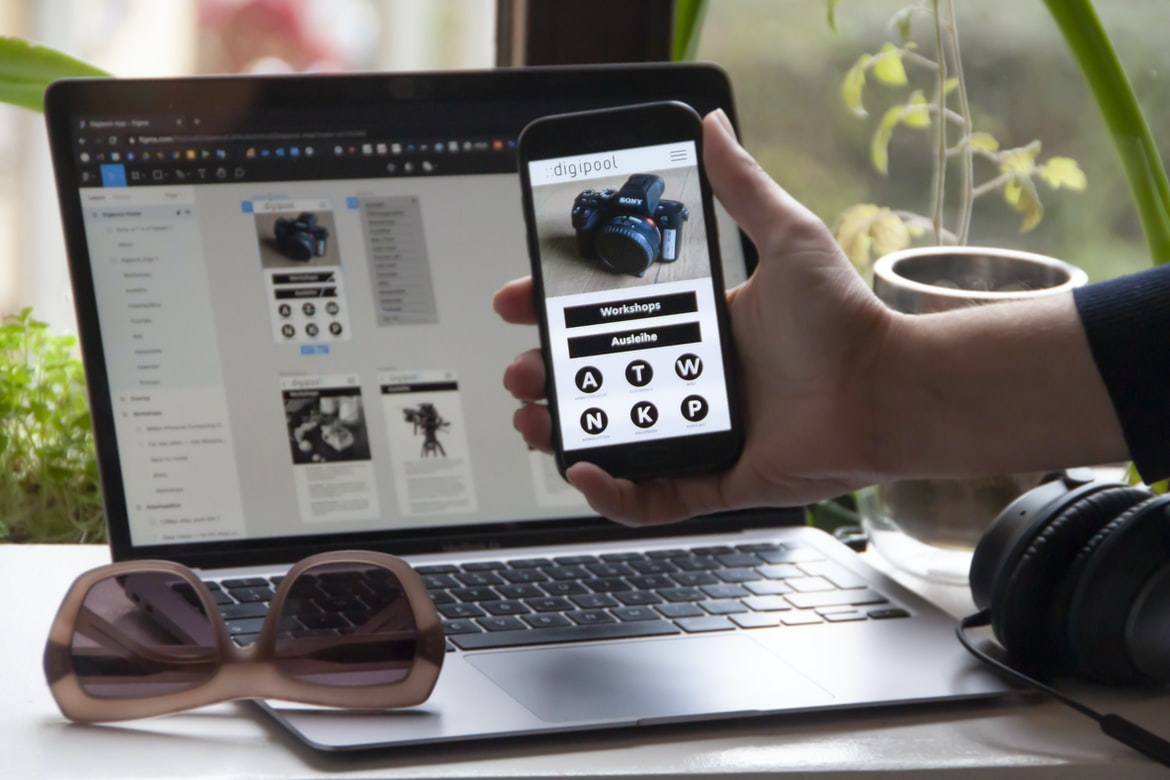
Figma is a user interface design software that allows users to create mockups and prototypes. The software was created by a team of designers and developers who wanted to make the process of design easier for other professionals. Figma is available on both Mac and Windows platforms, and it has an easy-to-use drag-and-drop interface. Users can create interfaces for websites, mobile apps, and more.
Adobe XD
Adobe XD is the newest graphic design software from Adobe, and it has a lot of potentials. It’s very user-friendly, and its interface is beautiful. There are many features that are unique to Adobe XD, such as layer groups, which allow you to group elements together and control how they interact with each other. The layers also have opacity, so you can create more complex effects than you could with other programs. Another great feature of Adobe XD is its vector editing capabilities. You can create logos, icons, and illustrations using vectors, which makes them much more realistic and 300% faster to create than with other programs. Overall, Adobe XD is a great program that offers a lot of flexibility and power for graphic designers.
Design Mobile App
Creating a mobile app requires a carefully designed user interface and experience. User experience is key, as users must be able to easily navigate the app and find what they are looking for. The interface should be simple yet efficient, allowing users to get the job done quickly. Graphic design is also important in creating an appealing mobile app. Users should feel confident using the app and want to come back to it.
What is Visual communication in graphic design?
Visual communication is the use of graphics and images to communicate ideas. It can be done through a variety of mediums, such as print media, web design, or even motion graphics. Visual communication can help with legibility, comprehension, and brand recognition. It can also add an extra layer of artistry to a project.
There are many different types of visual communication that a designer may need to take into account when creating a project. Some common examples are layout, typography, colour palettes, and image usage. Each has its own set of rules and guidelines that must be followed in order to achieve the desired outcome. A skilled designer will have a general understanding of these principles but will also be able to adapt them to specific situations.
The goal of any visual communication is to transmit information effectively and engagingly.
Graphic design is the process of creating a visual message that can be interpreted by people. The goal of any visual communication is to transmit information effectively and engagingly. To achieve this, graphic designers must understand how users interact with their devices and the interface they are using. In order to create an effective user experience, graphic designers must also pay attention to the typography, layout, colour, and imagery used in a design.
Application of Graphic Design: Adobe Photoshop, Adobe Illustrator, Adobe InDesign
Graphic design has become an important part of many people’s lives. From creating logos and marketing materials to creating digital art, graphic designers have a lot to offer. However, if you’re not familiar with some of the most popular graphic design software options, you may struggle when trying to create your own designs. In this article, we’ll explore the different applications that are used by professional graphic designers and describe their unique features.
First off, we’ll take a look at Adobe Photoshop. Photoshop is well-known for its ability to edit images and create graphics from scratch. Its features include tools for cropping, resizing, adding effects and colours, and more. Adobe Illustrator is similar to Photoshop in that it can be used to edit images and create graphics. However, Illustrator also includes tools for designing vector illustrations and logos.
What is the difference between a graphic designer and a graphic artist?
A graphic designer is responsible for the overall look and feel of a piece of design, while a graphic artist focuses on creating specific visuals. A graphic designer typically has a degree in graphic design, while a graphic artist may have art or design experience. Graphic designers often work with clients to create designs that meet specific needs, while graphic artists are more likely to create their own pieces. A good example of a job where someone would use both skills is Illustrator.
What is the difference between a freelance or in-house design project?
A freelance project is a project where the graphic designer works on their own without any direct supervision. This means that the graphic designer is responsible for everything from the design down to the final product. In-house projects, on the other hand, are projects where a company hires a graphic designer to work on their behalf. This means that the graphic designer will have direct supervision from someone within the company, and they will be responsible for all aspects of the design—from conception to execution.
What is the difference between a graphic designer and a visual artist?
There is a big difference between graphic designers and visual artists. Graphic designers are focused on the layout and design of printed materials such as brochures, magazines, and newspapers, while visual artists are more focused on creating paintings, sculptures, and other graphical artworks.
A graphic designer will typically have a degree in graphic design or an equivalent field, whereas a visual artist may have no formal training in design at all. A visual artist may also use Photoshop or another photo editing software to create their artwork.
Some key differences between graphic designers and visual artists include the following:
-A graphic designer is primarily concerned with the layout and design of printed material, while a visual artist is more focused on creating paintings, sculptures, or other graphical artworks.
What are some graphic design projects?
Graphics design projects can be anything from designing a logo to creating a website. Whatever the project, it’s important to have a clear vision and understanding of what you want your final product to look like. Here are some tips for creating user experience and user interface designs:
1) Start by doing your research. Know your target audience and what they need or want from your product. This will help you create a design that suits their needs.
2) Take into account the dimensions of your screen and the devices you’ll be using it on. Make sure everything is legible and easy to use on all platforms.
3) Be creative! Don’t be afraid to experiment with different styles and techniques. This will help you stand out and deliver an amazing product.
4) Stay organized!
Graphic design can involve a wide range of projects, from simple logo designs to complex web interfaces.
Graphic design can involve a wide range of projects, from simple logo designs to complex web interfaces. In order to be successful with graphic design, it is important to have a strong understanding of user experience and user interface design. While both of these areas are complex, with the right tools and techniques, designers can create beautiful and effective products.
User experience is about making sure that the users of a product feel comfortable using it. Poor user experience can lead to frustration and even abandonment of a product. User interface design concerns the look and feel of an application or website. It includes aspects such as colour, typography, layout, and motion graphics. If done correctly, these details can make a product more appealing and easy to use.
Both user experience and user interface design are important skills for any designer.
Creating a good user experience is essential for any designer. It’s necessary to consider how users will interact with your design and make sure that the process is easy and intuitive. User interface design is also important, as it can influence how users feel about using your product or service. Understanding both of these aspects of design is essential for any designer.
Graphic design is all about creating a beautiful, effective piece of communication. But to be truly successful, you need to understand both the user experience and the user interface. To create an amazing graphic design, you need to know how people will use it and what they’ll feel when they see it. This is where user experience comes in. The user interface is all about how the design looks and feels on a screen. It includes things like fonts, colours, and layout. Both of these aspects are essential for any designer looking to create a successful project. Understanding them both will help you create designs that people will love and use every day.
What are the benefits of graphic design?
Graphic design is one of the most versatile and in-demand professions today. With its wide range of benefits, graphic designers can find employment in a variety of industries. Here are reasons why graphic design is such a great profession:
1. Graphic designers have an innate ability to create beautiful and user-friendly designs. Their skillset encompasses both static and interactive design, meaning they can create anything from brochures to website layouts to app interface designs. This versatility makes them a sought-after commodity in the advertising and marketing industries, as well as for companies that need to improve their branding or customer service.
2. Graphic designers are often able to work with a variety of different types of media, which gives them flexibility when it comes to creating visuals.
Graphic design can offer numerous benefits to users, including a more intuitive interface, improved user experience, and a more distinctive brand. These advantages can be especially helpful for smaller businesses that may not have the budget or resources to hire a professional designer. Additionally, graphic design can help create a unified look across all marketing materials and websites. By incorporating effective graphic design into your online presence, you can ensure that your customers stay informed and interested in your products and services.
What are some career options for a graphic designer?
Graphic design is a very versatile career that can be used in many different industries. There are a few different options for graphic designers, including user experience, user interface, and branding.
User experience designers create designs that make people’s lives easier. They help people find what they’re looking for on the web or in an app and make sure the information is easy to read and understand. User interface designers create the look and feel of products, websites, and apps. They work with software developers to come up with ideas for how the interfaces should look and work. Branding designers create logos, fonts, and other elements that help companies stand out from their competitors.
There are many different careers you could pursue as a graphic designer.
A graphic designer is responsible for the design of any type of visual communication, including advertising, packaging, web pages, and software interfaces. There are many different career paths a graphic designer can take, from starting out as a freelance artist in a small business to working for a large corporation. Some common career options include:
-Freelance artist: This is the most common path for beginning graphic designers. Freelancers work independently and typically receive less pay than those working for larger companies. However, freelancing can be very rewarding because it allows designers to work on projects they’re passionate about.
-Designer at a corporate agency: Large corporations often have their own design departments, which means that graphic designers who want to pursue a career in design may have more opportunities than those who start out freelancing.









