

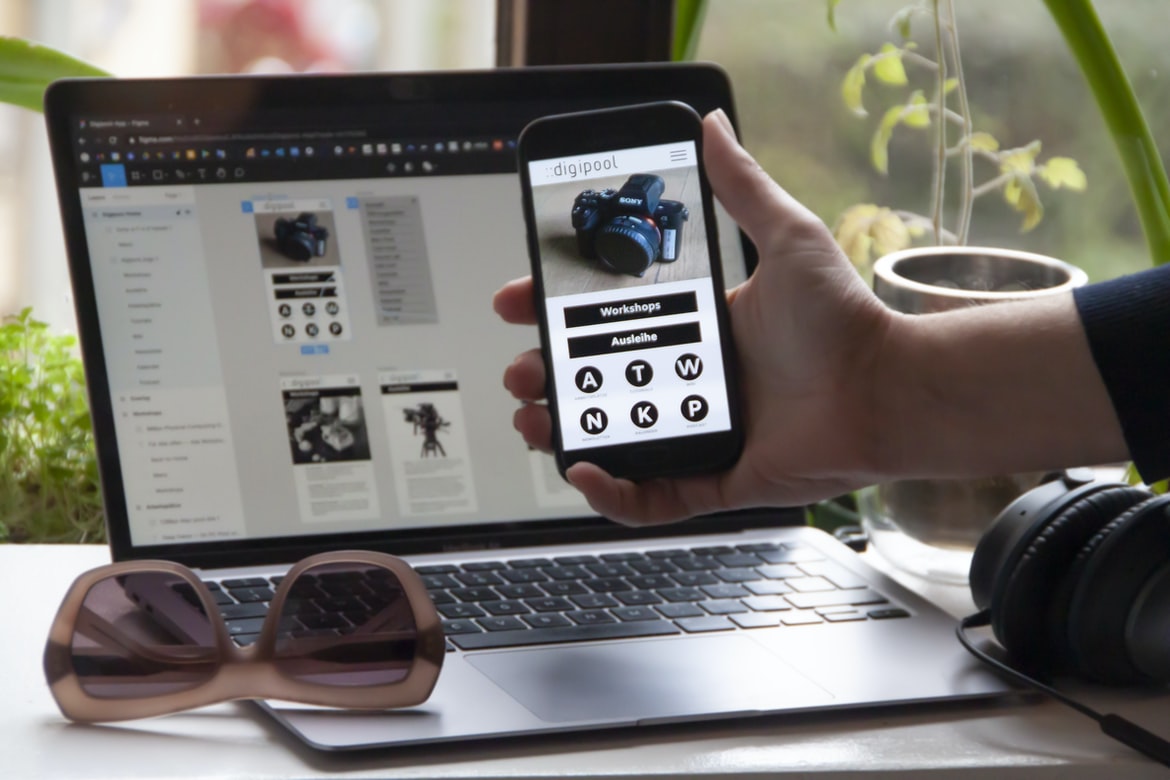
Application design UI UX is one of the most important aspects of an application. A well-designed UI will make the application more user-friendly and help users navigate through it more easily. It should be easy to find what you are looking for, and the interface should be intuitive. Furthermore, users should be able to access all of the features of the application without having to go through a lot of menus or buttons.
One way to improve the usability of an application is by ensuring that all of its features are easy to find. One way to do this is by placing all of the relevant options close by on screens that are logically related to each other. Another way to make sure that all features are easily accessible is by using icons instead of text labels for items in menus or windows. In addition, it is also important to provide helpful tips and instructions whenever users need them.
What is an application design UI UX?
Applications are designed with the end user in mind. This means that the design of the user interface (UI) is an important part of the overall application design. The UI should be intuitive and easy to use while still providing all the necessary information. It should also be visually appealing and fit with the rest of the application design.
What are the key considerations for designing a user interface?
Designing a user interface is an important task that must be performed carefully in order to ensure that the users of the application are able to interact with it easily and effectively. Key considerations when designing a user interface include making sure that the layout is easy to follow and understand, ensuring that all of the buttons and controls are located where they should be, and creating a design philosophy that focuses on enhancing usability. It is also important to consider the user’s environment when designing the user interface, as different applications may work better in different environments. Overall, designing a user interface is an essential part of creating an effective application.
What are some of the pitfalls to avoid when designing a user interface?
When designing a user interface, it’s important to avoid the following pitfalls:
-Overcomplicating the design -Making the interface difficult to use -Using too many buttons or menus -Confusing users -Striking the wrong balance between what’s possible and what’s easy to use
-Confusing users A user interface is a place where you are trying to make things easier for the user. The user interface of your app is where you want to make things simple, easy and intuitive. But to do that, you have to understand your users and keep them in mind while designing your app. This means not only thinking about how they think but also how they will learn and remember.
WordPress for Designers
WordPress is a popular content management system (CMS) that can be used by designers to create a website or application. WordPress has a wide variety of features that make it an excellent platform for design work, including:
-A plugin ecosystem that includes hundreds of plugins that can be used to add features to your site or application.
-A simple and intuitive user interface (UI), making it easy to customize and manage your site.
-The ability to use custom themes and plugins designed specifically for design work, making it possible to create a unique and personalized experience for your users.
-The potential for WordPress to grow into an even more powerful platform as the community creates new features and plugins.
WordPress is a popular content management system that can be used by designers to create a site. WordPress allows users to easily customize the look and feel of their site, making it a popular choice among designers. WordPress also provides an extensive library of plugins that allow users to add extra functionality to their site.
What Is Elementor Website WordPress Plugin?
If you’re looking for a website design plugin that can help you create beautiful and functional websites, Elementor Website WordPress Plugin should be at the top of your list. It’s one of the most popular plugins on WordPress.com and has been used to create sites for big brands like Nike, Audi, and Samsung.
Elementor Website WordPress Plugin is incredibly user-friendly. You can use it to create beautiful and functional websites from scratch, or you can use it to customize existing websites. The plugin includes hundreds of built-in templates and themes, so you can quickly and easily create a website that looks great.
If you’re looking for a website design plugin that can help you create beautiful and functional websites, Elementor Website WordPress Plugin should be at the top of your list.
Figma
With the ever-growing popularity of mobile apps, it’s no wonder that design has become so important. And for those who specialize in app design, there’s a tool that can help you create better user interfaces (UIs) and user experiences (UX): Figma.
Figma is a free online application development platform that allows users to create professional-grade designs with ease. The platform offers tools for wireframing, prototyping, and testing, making it an ideal choice for app designers who want to produce high-quality visuals quickly and efficiently.
While there are other app design platforms available, such as Sketch and Axure, Figma is unique in its ability to handle both vector illustrations and live prototypes. This makes it a great choice for those who want to create detailed visualizations before beginning development on their app.
Adobe XD
Adobe XD is a powerful vector design application that helps users create high-quality user interfaces and graphics for their applications. It has a wide range of features, including support for layers, workspaces, drawing tools, and import/export options. Adobe XD also integrates with other Adobe products, such as Photoshop and Illustrator, making it easy to share designs between applications.
Design Mobile App
Designing a mobile app can be challenging, but with the right design principles in place, it can be a rewarding experience. Here are some tips to help you create a successful mobile app:
1. Keep It Simple
One of the most important design principles is to keep things simple. If your app is too complex to use or understand, it will not be successful. Make sure all elements are easy to find and navigate and use intuitive user interface (UI) designs that are visually appealing.
2. Use Clear Graphics and Messages
Your app’s graphics and messaging should be clear and concise. Use simple fonts and images that are easy to see on a phone screen. Additionally, make sure all text messages are translated into different languages for international users.
3. Minimize the Number of Apps You integrate with other apps. A single app should do everything that a user needs to accomplish—for example, making a meal reservation at a restaurant or booking an appointment at the doctor’s office. 4.
Graphic Design
Graphic design is the process of creating a graphic representation of an idea. Graphic designers work with clients to create designs that can be used in print, online, or even as murals. Graphic design can involve anything from creating logos and advertisements to creating unique user interfaces for websites.
Despite its name, graphic design is not limited to only graphics. Any type of design – from website layouts to packaging – can be considered graphic design if it is created using creative methods and effective visual communication. It’s no wonder that graphic designers are in high demand; their skills are in high demand by businesses of all shapes and sizes.
To become a good graphic designer, you need to have strong skills in both Adobe Photoshop and Illustrator, as well as basic knowledge of Inkscape and Dreamweaver.
What is UI design?
UI design encompasses the creation of the user interface for a software application or website. A good user interface design should be easy to use and look attractive while still providing all the necessary functionality. It’s a critical piece of any software or website and one that can make or break an experience. There are many different aspects to UI design, including user interaction, visual layout, typography, and colour. It can be difficult to know where to start when creating a user interface, but with careful planning and execution, the end result can be beautiful and effective.
What is UX design?
What is User Experience Design?
User experience design is a field of design concerned with creating an effective and pleasant experience for humans using digital products or services. User experience designers work to create a positive customer experience by understanding the needs of the users, designing the user interface and interactions, and integrating user feedback into the product.
User experience design encompasses all aspects of designing digital products and services, from concept to delivery. It involves understanding users’ needs, motivations, and behaviour; designing intuitive interfaces that are easy to use; considering how users will interact with your product in different situations; incorporating feedback from early adopters into your product development process; and constantly evaluating your design against customer feedback.
User experience design has emerged as an essential discipline in recent years as more businesses adopt online platforms as their primary communication channels.
Visual Communication
Visual communication is one of the most important aspects of user experience design. By creating beautiful and effective user interfaces, we can encourage users to interact with our software in a positive way. The following tips will help you create a user interface that looks great and encourages users to use your software.
1. Use contrasting colours and textures to create visual interest. Bold, bright colours will draw attention, while soft pastels and subtle textures will help keep users comfortable.
2. Use simple shapes and patterns to create a modern look. Geometric shapes, stars, circles, and squares are all popular options for user interface designs.
3. Avoid cluttered backgrounds or excessive text decoration. A clean interface with limited distractions will make it easier for users to concentrate on the task at hand.
4. Use white space wisely!
Visual Communication Vs Graphic Design
There is a lot of debate surrounding the line between visual communication and graphic design. Visual communication is often thought of as the application design UI UX layer, while graphic design is seen as the creation of high-quality graphics. However, there are many ways in which these two disciplines overlap, and it’s important for designers to be aware of this when creating their projects.
One way in which visual communication and graphic design overlap are in the use of typography. Whether it’s using headlines to attract attention or using textured fonts to create a more sophisticated look, typography can play an important role in visual communication. Graphic designers also have a lot to offer when it comes to creating appealing visuals. They can help create appealing designs that are both functional and visually pleasing.
Another way in which these two disciplines overlap is in the use of colour.
Application of Graphic Design: Adobe Photoshop, Adobe Illustrator, Adobe InDesign
Adobe Photoshop and Adobe Illustrator are widely used graphic design programs. They both offer a lot of features for creating designs, including the ability to create logos, icons, and other graphical elements. However, when it comes to creating user interfaces (UI) or user experiences (UX), Adobe InDesign may be a better option. InDesign is commonly used to create magazines and newspapers, which often require detailed layouts and careful attention to typography. As a result, InDesign is well-suited for designing complex UI/UX elements.
What is the difference between UI and UX building applications?
There is a big difference between UI and UX building applications. UI refers to the look and feel of an application, whereas UX design focuses on how the user experiences the application. While both aspects are important, there is a big difference in terms of how much work goes into each. UI design is usually done first, with a focus on creating a visually appealing interface that is easy to use. Then, after the interface is designed, UX designers will work on designing an effective user experience that makes the application easy to use and enjoyable to use. In contrast, most UX design work happens after the interface has been created and may involve redesigning menus or developing new features that make the application more efficient or user-friendly. Ultimately, both aspects of application design are important in order to create an effective product.
What are the benefits of using UI/UX building applications?
As the user interface (UI) for a software application, the user experience (UX) of a UI is critical. Poorly designed UIs can frustrate users and lead to decreased user engagement and conversion rates. Fortunately, there are many benefits to using UI UX building applications.
Some benefits of using UI UX building applications include increased efficiency and accuracy in design, improved accessibility and usability, reduced development time, and improved branding and marketing. By taking advantage of these benefits, organizations can improve their overall application experience for users.
What are the most popular UI/UX building applications?
There is no one answer to this question, as the most popular applications will vary depending on who you ask and what criteria they use. However, some popular applications that are known for their user interfaces are Gmail, Facebook, and Instagram. While all three applications have unique features that set them apart from others, it’s their user interfaces that have made them so popular.
Gmail is known for its clean and simple interface, which makes it easy to find what you’re looking for. The same can be said for Facebook, which has a well-organized layout with easy-to-follow icons. Instagram also has a sleek and modern design which appeals to users who want an easy way to share photos with friends and family.
How can the user experience be improved with UI/UX building applications?
User experience (UX) is a critical component of the application design process. Poor UX can lead to frustrating user experiences and decreased engagement with an application. Good UX can result in increased customer loyalty, better conversion rates, and increased user satisfaction. There are a number of ways that UX can be improved with UI design:
1. Use feedback loops to constantly monitor and improve the user experience. This could involve using analytics to track user behaviour and feedback to adjust features or designs as needed.
2. Pay attention to the overall look and feel of the app interface. This includes everything from the typography used on menus to the colour palettes used throughout the app.
Satisfied users are more likely to return and recommend your app, which can lead to increased revenue and growth for your business.
3. The more time users spend in your app, the more likely they will become active users. Use micro-interactions within your app to push users to perform certain actions and guide them through the process of using it.
What kind of features should I look out for when selecting a UI/UX building application?
When it comes to selecting a UI UX building application, it is important to consider the features that will be necessary for your specific needs. Some of the features you should look for include: user interface layout options, drag-and-drop functionality, prototyping capabilities, communication tools, and collaboration features. By considering these factors, you will be able to find the perfect application for your needs.
How do different UI/UX building applications compare in terms of cost and features?
Application Design UI UX is an important factor to consider when selecting a UI UX building application. Many different applications can be compared in terms of cost and features. In this article, we will look at two popular applications – Sketch and Axure.
The sketch is a more expensive application, but it offers more features than Axure. For example, Sketch has a wider range of prototyping tools, while Axure only has basic tools for creating wireframes and prototypes. However, some users argue that the advanced features of Sketch are too complex for beginner designers.
Axure also offers more features than Sketch, but it is less expensive. This makes it a good choice for people who want to try out different UI UX building applications without spending too much money.
Are UI/UX building applications compatible with multiple platforms?
Many people believe that application design UI UX should be designed for a single platform, such as Windows or Mac. However, this is not always the case. In fact, many applications are designed to be compatible with multiple platforms. It is important to consider the target platform when designing your application UI UX. If your application is going to be used on a number of different platforms, it is important to make sure that the design looks and feels consistent across all of them. This will help users feel more confident about using your application and will encourage them to take advantage of its features.
Do I need special expertise to use a UI/UX building application?
No matter what type of application you are designing- whether it is a simple-to-use web form or an elaborate desktop software program- there are certain fundamentals that need to be followed in order to create an effective user interface. In this article, we will look at some of the key aspects that need to be taken into account when designing a user interface for any type of application.
First and foremost, it is important to consider the target audience of the application. Do they want a simple, easy-to-use interface, or do they want more features and control? Once you have determined your target audience, you will need to design accordingly. For example, if your target audience is novice users, then you may want to keep the interface simple and straightforward. If your target audience is more experienced, then you may want to provide them with more options and control over their experience.
What are the key considerations when building an application?
When designing an application, there are a few key considerations that must be taken into account. The first is the overall design of the UI and how it will be used by the end user. Next is the UX – how easy is it to use and navigate? Finally, make sure your application can scale well and meet the needs of your users. Here are some tips to help you with each of these:
When designing an application, think about how users will be using it. Is it a simple app, or do you have more complex functionality? Once you know this, focus on making the UI as easy to use as possible. This will make everyone happier, including yourself!UX should also be taken into account when designing an app. Make sure all features are easily accessible from the main menu or toolbar and that everything is organized logically.
What can different types of applications be built?
Designing a user interface (UI) and User Experience (UX) for an application can be challenging, but there are a variety of different types of applications that can be built. This article will discuss some of the most common types of applications and how to design them.
Web Applications
A web application is a type of application that is hosted on a web server. Web applications are accessed using a web browser. The main advantage of web applications is that they can be accessed from any computer with internet access. Web applications can also be built using many different programming languages.
Windows Applications
A Windows application is an application that is designed to work with the Microsoft Windows operating system. Windows applications can be created in many different programming languages, and they typically have a user interface that looks similar to the standard windows explorer window.
What technologies are needed to build an application?
Technology is an essential part of any application development project. The right mix of software and hardware can help speed up the development process and make sure that your application is reliable and secure. Here are some of the most common technology tools you’ll need to build an app:
-Software Development Tools (SDT): These include code editors, compilers, trace tools, source control systems, and testing tools.
-Web Development Tools: These include browser extensions, web hosting services, and popular coding frameworks like AngularJS or ReactJS.
-Database Management Systems (DBMSs): You’ll need a database to store your application’s data. Popular DBMSs include MySQL, MongoDB, and Oracle.
-Web Servers: Your app will need a web server to host its files and serve up its content. Apache or nginx are popular choices.
Is it necessary to have a development team to build an application?
There are many software development teams out there that create applications without the need for a development team
. These teams are composed of skilled individuals who collaborate to produce an application. Some argue that this type of team is not necessary in order to produce an application, as skilled individuals can usually manage the tasks themselves. However, most developers insist on having a dedicated team for various reasons, such as synergies and potential bottlenecks.
There are pros and cons to both approaches, and ultimately it depends on the specific situation and requirements of the project. In some cases, a development team can be beneficial in terms of efficiency, communication, and overall productivity.
How long does it take to develop a successful application?
There is no definitive answer to this question, as the time required to develop a successful application will vary depending on a number of factors, including the size and complexity of the project, the skills and experience of the development team, and the specific software platform or frameworks used. However, generally speaking, it can take anywhere from weeks to months or even years to create an effective application. In some cases, however, it may be possible to achieve a high level of success much more quickly than that – but this is typically only the case when starting from scratch with no existing source code or databases to help guide development.
In today’s world, it seems as if there is never a moment to rest. We are constantly on the go and need to be able to work on our projects anywhere we find ourselves. This has led to the development of tools that allow us to work on our projects without having to leave our comfortable seats. One such tool is mobile application development applications. However, not all mobile application development applications are created equal. In this article, we will be discussing the different types of mobile application development applications and how they can benefit your business.
There are three main types of mobile application development: native apps, hybrid apps, and web applications. Native apps are app versions that run on a specific platform (iOS or Android).
What kind of testing should be done before launching an app?
Before you launch your new mobile app, make sure to do some testing to ensure that it is user-friendly and meets the expectations of your target audience. Here are a few things you should consider:
1. User feedback– Take advantage of user feedback to find out what works well and what needs improvement on your app. This information can help you make changes before launching, as well as improve the user experience over time.
2. Interface design– Make sure your interface is easy to use and looks stylish. People won’t want to use an app if it’s difficult to navigate or looks dated. Keep in mind the trendsetters in your industry, as well as current popular apps, when designing your app’s interface.
3. Built-in social features– It s important to provide your users with the ability to communicate with one another, as this encourages participation within your app and gives it a social feel. For example, if you have a chat feature, include an option for users to create groups and add members.









