

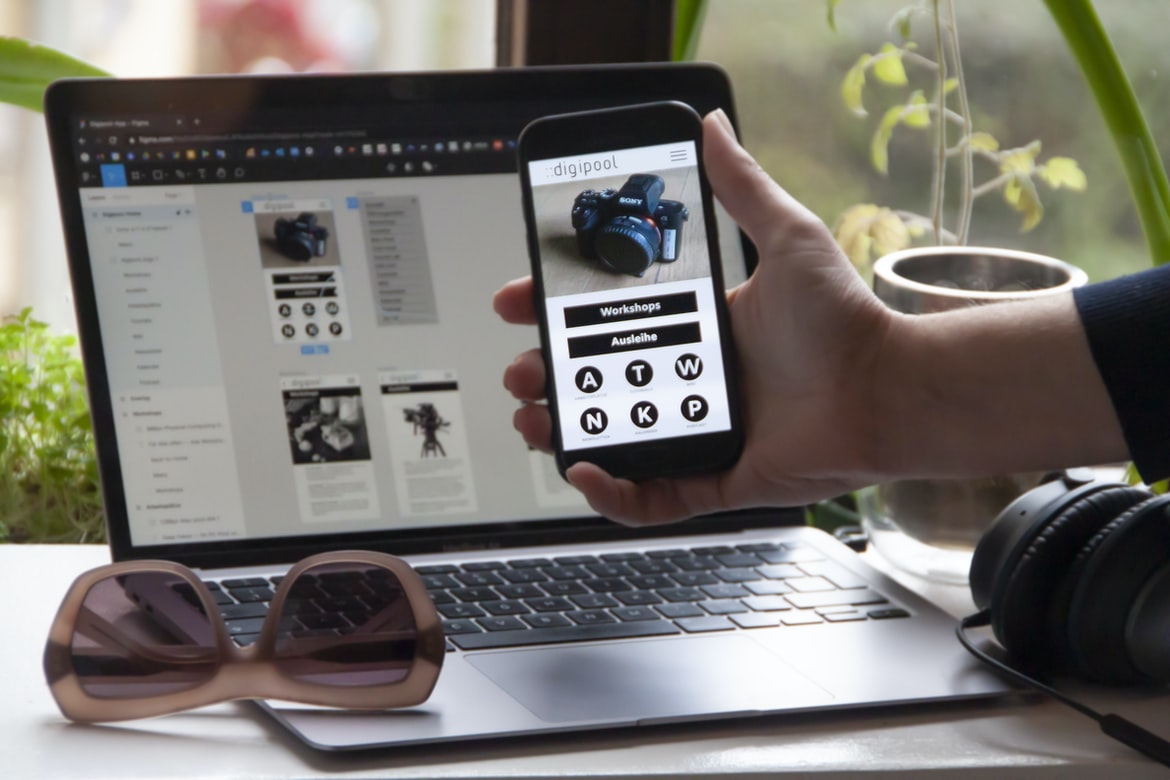
A brief overview of what “UI UX” is and why it’s important.
UI UX is the design of user interfaces that take into account how the user will interact with the design. It includes things like how well the buttons are labelled, what navigational elements are available, and how easy it is to find what you’re looking for. Good UI UX makes users feel comfortable and confident using your design, which can lead to them staying longer and spending more money on your site.
UI UX is important because it affects how users feel about your site. If they have a negative experience, they’re likely to leave immediately. On the other hand, if users feel like they’ve been able to complete tasks quickly and easily, they’re more likely to recommend your site to their friends.
There are a number of ways you can improve your UI UX without having to spend a lot of time or money.
The different types of UI UX: Graphic elements, layout, organization, and navigation.
Web design UIUX can be broken down into three different types: Graphic elements, layout, and organization. Each type has its own set of unique characteristics that should be taken into consideration when designing a user interface.
Graphic elements are the most obvious and visible part of a user interface, and they often contain the most important information. They should be designed with clarity in mind, so users can understand what’s being displayed without having to read through long paragraphs of text.
The layout is the way items are arranged on a page, and it affects how users perceive the overall layout. Make sure to take into account how people will use your site – for example, will they want to browse through pages chronologically or by category? And how will users move around the site? Will they need to scroll down or up in order to view everything?
How to design a user interface that’s effective and aesthetically pleasing.
There are many different ways to design a user interface that’s effective and aesthetically pleasing. Some of the most common tips include making sure all elements of the UI are easy to understand, using high-contrast colours, and creating a cohesive layout. Here are some other tips to help you create an awesome user interface:
1. Make sure all elements of the UI are easy to understand. If users have trouble understanding what they need to do or how to use your interface, it will be difficult for them to use it effectively. Keep the layout simple, and make sure icons are clearly labelled.
2. Use high-contrast colours. Colours should be brightly coloured and easily visible onscreen, which will make them easier for users to see and interact with. Also, use contrasting colours throughout the UI so that everything is more visually appealing.
3. Use contrast for fonts and backgrounds. If a font is difficult to read, make it larger or use a different font. Also, background images should be used sparingly and not covered up by text. 4. Use space wisely.
Tips for creating a good user experience with web design.
In order to create a good user experience with web design, it is important to take into account the different types of users that will be interacting with your website.
1. You first need to identify the different types of users who will be using your website. This can include people who are just browsing, people who are looking for specific information, and people who are buying products or services.
2. Next, you need to make sure that all of the elements on your website are easy to use for each type of user. This includes making sure the navigation is easy to use and the buttons and menus are clearly labelled.
3. Finally, you need to make sure that all of the content on your website is easy to understand. This means making sure all of the text is legible and that images are correctly captioned.
What is web design UI UX and what are its benefits?
Web design UI UX is the process of designing a user interface for a web application. It involves designing the look and feel of the user interface, as well as the functionality. The benefits of having a good UI UX include making it easier for users to find what they are looking for, improving usability, and reducing frustration.
History of web design UI UX: From static designs to the present day.
The first web design was developed in the early 1990s and used static designs with limited interactivity. The early web design consisted of text, images, and simple forms. In the 1990s, most websites were designed using a text-based interface with pre-defined pages.
In 1998, the first website builder software was released, which allowed users to create their own websites. This led to a new wave of website design where users could create their own layouts and designs. In 2003, Adobe Photoshop was released, which made it easy to create high-quality graphics for websites.
Since the early 2000s, there has been a shift towards user experience ( UX) over graphic design when designing websites. User experience is concerned with how people interact with a product or service. This has led to more user-friendly designs with adaptive content and fluid interactions.
The different types of web design UIUX: Functional, navigational, and interactive.
The three types of web design UIUX are Functional, navigational, and interactive. Each type has its own strengths and weaknesses, which should be considered when designing a website.
Functional UIUX is designed to help users find the information they need quickly and easily. Navigation is simple and straightforward, so users can easily move around the site. Interactivity is limited to the content on the page; there is no animation or interactivity between pages.
Navigational UIUX is designed to make navigating a website easy for users. The menus are well organized, and the layout is easy to understand. Interactivity is increased by providing links between pages, as well as highlighting important sections with icons or text.
Interactive UIUX makes use of animation and interactivity to enhance the user experience.
Interactive UIUX is a style of web design that makes use of animation and interactivity to enhance the user experience. By using animation, users are able to more easily understand how to use the interface and feel more engaged in their interactions. Additionally, interactive elements can encourage users to take action, which further enhances the overall user experience.
The main principles behind good web design UIUX: Are simplicity, accessibility, and usability.
There are three core principles behind great web design UIUX: simplicity, accessibility, and usability. By following these principles, your users will be able to navigate your website with ease, regardless of their level of experience or technology ability.
Simplicity is key when designing a user interface. Make everything as easy to understand as possible without sacrificing functionality. Avoid cluttering up the screen with too many menus and buttons, and make sure all elements are clearly labelled. Keep things simple so that even novices can understand what’s happening on the screen.
Accessibility is also important when it comes to web design UIUX. Make sure every element on your website is easily accessible to people with disabilities. This includes text descriptions for images and videos, as well as alt attributes for images that provide alternative views for people with vision impairments.
The importance of user feedback in the design process: How to get user feedback and how to use it wisely.
User feedback is one of the most important aspects of the design process. Without it, it can be difficult to create a product that meets the needs of the users. Getting user feedback is always a challenge, but there are some tips that can help make it easier.
One way to get user feedback is to ask them directly. This can be done through surveys or interviews. However, it is important to remember that asking people for their opinions can be difficult. You need to find a way to make the survey or interview interesting and easy to complete.
Another way to get user feedback is through observation. Watching people use your product can give you an idea of what they think works and what doesn’t. However, this method is less reliable than asking people for their opinion.
Tips for improving web design UIUX: From user research to effective layout and typography.
Tips for improving web design UIUX:
From user research to effective layout and typography.
UIUX is an important part of any web design, and it’s essential to make sure that the interface is easy to use and provides a good user experience. Here are some tips for improving your web design UIUX:
1. Take user research seriously. As with all aspects of web design, good UIUX starts with understanding your users’ needs. Conduct user research in order to identify what features users want and how they use the website. This will help you create an intuitive and customer-friendly interface.
2. Use consistent typography and layout across all elements of your website. Make sure that all text, icons, buttons, etc., are presented in a consistent style throughout the site. This will make navigation easier for users and help keep the layout visually appealing.
Motion Graphic Design
Motion graphic design is the process of creating graphics that are used to create a visual narrative or presentation. Motion graphics can be used in a variety of contexts, such as advertising, animation, and video production.
Some of the most common tools used for motion graphic design are Adobe Photoshop and After Effects. In order to create effective motion graphics, it is important to have a good understanding of composition, colour theory, and motion path animation.
Animation Design
Animation design plays an important role in creating a user interface that is both visually appealing and easy to use. By using animation, designers can make interactions feel more natural and add excitement to the user experience. Additionally, animation can help users understand how to use an interface quickly.
There are a variety of different animation techniques that can be used in web design UI UX. One popular approach is motion graphics, which uses basic shapes and animations to create designs that look Venetian or Japanese in style. Another common technique is video looping, which allows designers to create animated buttons, tooltips, and other elements that cycle through a set number of frames.
Overall, animation design is an essential part of any user interface layout. By taking the time to create engaging visuals, designers can make their websites easier and more fun to use.
WordPress for Designers
WordPress is a popular content management system (CMS) that makes it easy for designers to create a website or blog. WordPress has a wide range of features and plugins that can be used to lay out and design the site, making it an ideal platform for designers. Here are some tips on how to use WordPress to create a designer-friendly website:
1. Use custom themes and plugins: One of the best things about using WordPress is that there are many different theme and plugin options available. This means that you can tailor the look and feel of your site to match your own unique style. There are also many premium themes and plugins specifically designed for web designers, so make sure to explore these options if you’re looking for extra features or customization.
2. Use custom post types: Another great way to customize your site is by using custom post types. WordPress is a popular content management system (CMS) that can be used by designers to create a website or blog.
What Is Elementor Website WordPress Plugin?
Elementor Website WordPress Plugin is a powerful website design and development plugin that makes creating, managing, and updating websites easier than ever. With Elementor, you can create beautiful, responsive websites in minutes with drag-and-drop tools and templates. Plus, Elementor offers essential features like site search, contact forms, and social media integration. Whether you’re a beginner or an experienced web designer, Elementor is the perfect plugin for your next project.
Figma
A web design platform called Figma has been growing in popularity in recent years. It is free and open-source software that allows users to create user interfaces for websites, apps, and other digital projects.
Figma’s user interface is designed specifically for web designers and is based on the popular mockup tool Sketch. It offers a drag-and-drop interface that makes it easy to create custom designs.
Figma also has features that allow users to export their designs into different formats, including HTML, CSS, and SVG. This makes it ideal for creating front-end interfaces for web applications or websites.
Overall, Figma is a versatile tool that can help novice and experienced web designers alike create user interfaces with ease.
Adobe XD
Adobe XD is a new web design UI UX tool that was created by Adobe. It is a vector graphics editor that allows users to create and edit vector illustrations, logos, and banners. Adobe XD has many features that are similar to other popular graphic design software, but it also offers some unique features that make it an interesting option for novice and experienced designers.
Some of the unique features of Adobe XD include its ability to create layers and use brushes to create textures, as well as its support for exporting files in various formats, including PDF, SVG, AI Illustrator (.ai), and Photoshop (.ps). Overall, Adobe XD is an intuitive and powerful tool that can help novice and experienced designers alike produce high-quality designs.
Design Mobile App
Designing a mobile app can be a difficult and time-consuming process, but with the right approach, it can be an enjoyable and rewarding experience. Here are some tips to help you get started:
1. Start by thinking about your app’s purpose and target audience. What do you want it to do, and who is it for? This will help you design the appropriate user interface.
2. consider how users will interact with your app. How will they navigate around it? How will they use the various features? Pay close attention to how users use similar apps on their devices and make sure your app feels familiar and comfortable to use.
3. think about the look and feel of your app’s user interface. Are all elements designed in a consistent style? Is there a clear layout that makes navigation easy?
What is Visual communication in graphic design?
Visual communication is the use of visuals to transmit information. It can be summarized by four core principles: the use of images, typography, motion, and colour. Each has its own set of rules that must be followed in order to create effective visual communication. In web design, visual communication takes on greater importance than ever before. With users spending increasing amounts of time on their devices and on the web, designers need to ensure their sites look good and are easy to use.
One way to achieve this is through judicious use of typography and layout. Good typography can help users understand the structure of the site quickly, while well-designed layouts can make navigation easy and prevent overcrowding on small screens.
Application of Graphic Design: Adobe Photoshop, Adobe Illustrator, Adobe InDesign
The graphic design industry is constantly evolving, and new software programs are being created to meet the demands of today’s designers. Photoshop, Illustrator, and InDesign are all popular programs used in the graphic design industry. Each program has its own unique features that make it an effective tool for creating beautiful graphics. Let’s take a look at how each program can be used to create user interfaces and UX designs.
Adobe Photoshop is well known for its ability to create high-quality images, but it can also be used for user interface and UX design. One common use for Photoshop is the creation of mockups or wireframes. These mockups help designers see how a website or application will look before any actual coding is done. They can also be used to test different layout ideas before committing to a final design.
Designing a website or web application is an important task, but it can also be daunting. What layout should the pages have? What colours should they use? How will users navigate the site? Before committing to a final design, it’s a good idea to test different layout ideas.
Here are eight layouts that you can try:
1. A grid-based layout with large blocks of text on each page. This style is popular on newspaper websites and creates a clean look.
2. A paginated layout in which pages load as users scroll down. This type of design is often used on news sites and blogs.
3. A list-based layout in which items are listed horizontally across the screen. This style is common on e-commerce sites and makes browsing easier.
What is the difference between a graphic designer and a graphic artist?
A graphic designer creates the look and feel of a website or app, while a graphic artist creates the images and graphics that make up the design. A graphic designer may have experience with web design, user interface design, or marketing materials, while a graphic artist may be more skilled in creating pixel-perfect illustrations.
What is the difference between a freelance or in-house design project?
Freelance design projects typically involve a smaller team working on a project basis. In-house design projects, on the other hand, are typically larger and more complex. They often require specialized skills and experience that can’t be sourced through freelancing. There are also inherent risks with in-house projects – organizations may not be able to manage the project properly, leading to delays or even failure.
What is the difference between a graphic designer and a visual artist?
There is a big difference between a graphic designer and a visual artist. A graphic designer designs the layout, structure, and style of printed or electronic media, while a visual artist creates art that conveys emotion or information. The following are some key differences between the two professions:
1. Graphic designers typically work with layouts and fonts, while visual artists create paintings, sketches, or other mediums to communicate ideas or stories.
2. Graphic designers commonly use Illustrator or Photoshop to design graphics, while visual artists often use paint or other mediums to create their artwork.
3. Graphic designers usually have strong communication skills and may be responsible for creating all the graphics for an entire website or application, while visual artists often specialize in one specific area, such as painting or sculpture.
4. Graphic designers usually use programs like Adobe InDesign or Adobe Photoshop, while visual artists may use artistic mediums such as oil paint or clay. 5.
What are some graphic design projects?
We all know that a great web design project starts with a killer user interface, but what about the visual elements of the user experience itself? From buttons and icons to layout and colour, here are some of the most important graphic design projects you can tackle for your next website or app.
1. Create a custom font library.
If you’re designing a website or app with any kind of typographic flare, it’s important to have a comprehensive font library at your disposal. Not only will this save you time in choosing fonts for specific instances, but it can also help to create an individualized look and feel for your site or app.
2. Use colour palette harmonization techniques.
When selecting colours for your project, it’s important to take into account both the content and the surrounding environment. Graphic design projects can range from simple website designs to more complex user interface designs.
What are the benefits of graphic design?
There are many benefits to having a well-done graphic design on your website. Some of the benefits include:
– Increased Visibility: A well-designed website will stand out more than one that is poorly designed. This will lead to increased traffic and conversions.
– Better Branding: A well-designed website will help your business brand itself better. This can help you attract new customers and increase sales.
– Improved Navigation: Poorly designed websites can be difficult to navigate, which can lead to lost visitors and lower conversion rates. A well-designed website will keep users on your site longer, which means more revenue for you!
– Increased Engagement: Design that is appealing not only looks good but also makes users want to interact with it.
What are some career options for a graphic designer?
There are many career options for a graphic designer. They can work as freelance designers, in-house designers, or even as marketing or advertising professionals. Here are some of the most common career options:
Freelance Graphic Designers
Freelance graphic designers can work for a variety of companies and clients. They typically have their own studio, and they typically charge per project rather than by the hour.
In-House Graphic Designers
In-house graphic designers usually work for large companies. They design the graphics for company websites, product packaging, print ads, and more. In-house graphic designers usually have a degree in graphic design or another related field.
Marketing/Advertising Professionals
Many graphic designers choose to become marketing or advertising professionals. They may work for small businesses as consultants or join larger companies as staff members.









