

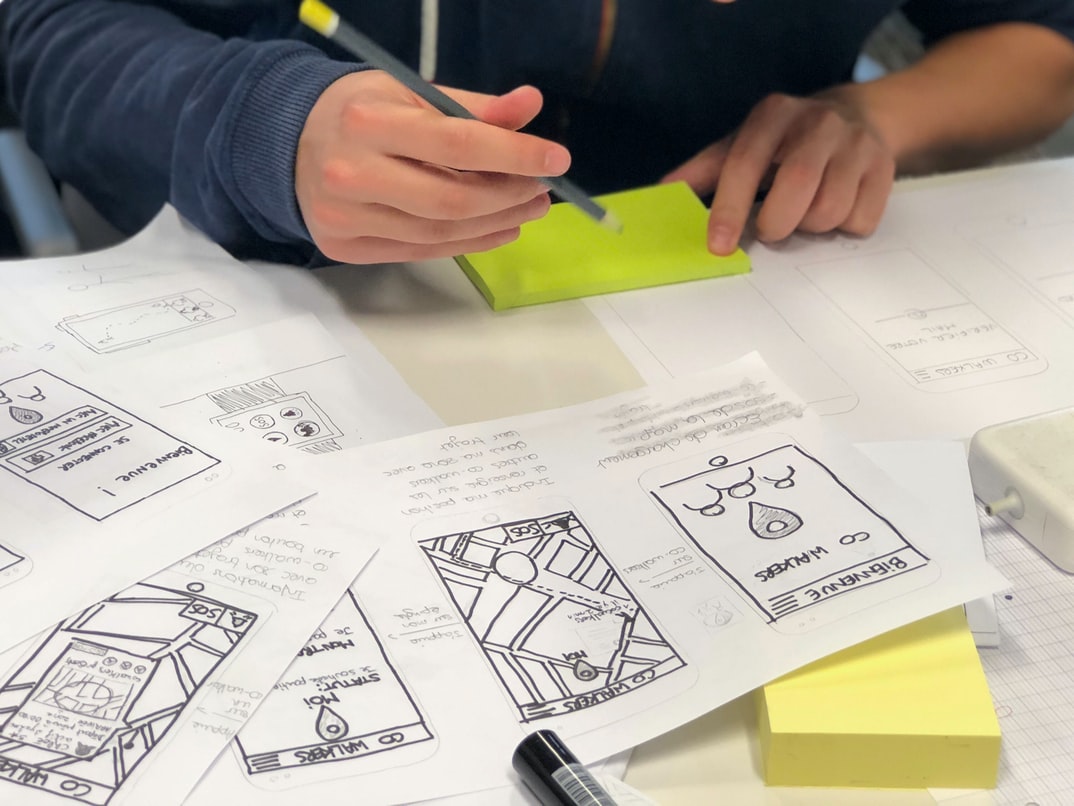
Today, websites are more user-friendly than ever before. A well-designed UI can greatly improve the usability and appeal of a website. A well-organised interface will be easy to navigate, making it easier for users to find what they need.
A great web design UI will make sure that all the elements of the site are easy to find and access. Navigation should be simple and effective, allowing users to quickly and easily move around the site. The layout should be visually appealing so that users want to keep visiting the site.
A good web design UI will make sure that all of the content is easily accessible. Sites should have an easy-to-use search engine so that users can find what they’re looking for quickly. Users should also be able to access all of the information on a site in one place without having to search through different pages.
Graphic Design
Graphic design is the process of creating a visually appealing design for any type of communication, including websites, advertisements, brochures, and labels. Graphic designers use various mediums to create their designs, such as Adobe Photoshop and Illustrator. They also often work with other designers to create a cohesive look for a project.
Graphic designers need strong skills in graphic design, typography, photo editing, and web development. They also need to be able to think creatively and solve problems. Many graphic designers start their careers as apprentices before becoming full-time professionals.
Visual Communication
Web design UI UX is a growing trend in web design and one that needs to be taken seriously. A well-designed user interface will keep users happy and engaged while also making the website easier to navigate. Keep these tips in mind when designing your next website:
Start with the End of Mind
When designing a web page, always focus on the end user. What do they need to do in order to access your content? How easy is it for them to find what they are looking for? Once you know this, you can start designing around it.
Keep It Clean and Simple
If users are going to spend time on your website, they want it to be easy and hassle-free. Don’t overload them with too much information or clutter.
Visual Communication Vs Graphic Design
Visual communication has come to be associated with layouts and designs that are often less than aesthetically pleasing. Graphic design, on the other hand, strives to create a cohesive and visually appealing design system.
A good visual communication system should be able to effectively convey a message to the user. Graphic designers must take into account different types of users, from those who are new to the site or app to long-time fans who may have specific preferences.
Graphic designs can also be more expensive than visual communication systems; however, this doesn’t always mean they’re better. Oftentimes, a well-done graphic design will look better even if it costs more in the long run because it will age better and stand the test of time.
Application of Graphic Design: Adobe Photoshop, Adobe Illustrator, Adobe InDesign
Graphic design is an essential component of any website. It can be used to create a user interface that is visually appealing and easy to use. There are three main graphic design software programs: Adobe Photoshop, Adobe Illustrator, and Adobe InDesign. Each has its own features and benefits that make it the best tool for certain tasks. In this article, we will discuss the different uses for each program and which one is best for a specific type of website.
What is UI UX?
UI UX is the design of a user interface that takes into account how the user will interact with it. This includes things like ensuring that buttons are big enough to be easily clicked, that all text is legible, and that the layout makes sense and is easy to use. UI UX also includes making sure that all elements look consistent with one another so that users don’t have to focus on figuring out which button goes where.
The importance of UI UX in web design.
Web design UI UX is important for a few reasons: first, it can help create a more user-friendly experience for users when navigating your website. Second, good UI UX can also help encourage users to stay on your site longer, which can lead to more website traffic and sales. Third, good UI UX can make it easier for users to find the information they’re looking for. Finally, well-designed UI UX can help your business look professional.
How to create a good UI UX.
A good user interface (UI) is essential for any website or application. It needs to be easy to use, look good, and be efficient. There are a number of things you can do to make your UI UX top-notch.
1. Keep the layout simple. Don’t clutter your user interface with too many buttons or menus. Keep it clean and organised so that users can find what they’re looking for quickly.
2. Use clear, concise icons and labels. Users should be able to understand what each button does without having to read the text underneath it. Use simple, legible fonts that are easy on the eyes.
3. Make sure all elements of your UI are responsive. Your users will likely have different screen sizes and resolutions, so make sure everything looks good on every platform and device!
4. Use the right colour for each element. You want your UI to be a pleasure to use, and that starts with keeping it consistent and easy on the eyes. 5. Make sure the UI is visually appealing and pleasant to look at.
Benefits of good UI UX.
Web design UI UX can have a number of benefits. Firstly, good UI UX can make web pages easier to use and navigate. This is because it can be designed in a way that is easy to identify and understand. Secondly, good UI UX can help users find what they are looking for more quickly. This is because the layout of the page is organised in a way that makes it easy to browse. Thirdly, good UI UX can make users feel more confident using the web. This is because the layout and design of the page are consistent and user-friendly. Finally, good UI UX can help users save time when using the web. This is because it can be designed in a way that makes navigation quick and easy.
UI stands for User Interface, and it is the design of the physical interface that a user sees and interacts with on a website or application. It includes everything from the look and feel of the menus, buttons, and text to how users navigate through the site. Good UI UX can make a website or application more user-friendly, easier to use, and more appealing to look at.
The Importance of UI UX in Web Design
Most people don’t think about the user interface (UI) when they think about web design, but it’s one of the most important parts of the process. A good UI can make a site more user-friendly and attractive, while a bad UI can ruin an otherwise great website. There are a number of different factors that go into creating a good UI, and it’s important to pay attention to all of them if you want to create a successful website. Here are some tips on how to improve your web design UI:
1. Make sure your site is easy to use. People will spend more time on sites that are easy to use, and they’ll be more likely to return later on. Make sure all your site’s components are located where they should be and that everything is organised neatly.
2. Be consistent with the look and feel of your site. When designing a website, you want to make sure that the same style is used throughout. This will help to make your site look more unique and professional. 3. Pay attention to what’s happening on your site.
A well-designed user interface can help users find what they’re looking for quickly and efficiently.
A well-designed user interface can help users find what they’re looking for quickly and efficiently. This is especially important on websites, where users are often looking for specific information. By using effective design techniques, web developers can make the search process easier and more efficient for their users.
Some of the most common design techniques used in user interfaces are typography, layout, and colour. Typography is the use of typefaces to create a visual impact on a page. Layout refers to how elements are arranged on a page. It can affect how easy it is for users to find what they’re looking for and can also affect how organised the page appears. Colour is also an important component of user interface design. By using different colours, web developers can indicate different elements on a page. This makes it easier for users to understand the content on a page and navigate around it.
Figma, Adobe XD, WordPress, Elementor.
Designers are constantly looking for new and better ways to create user interfaces (UI) for their websites. A popular new tool is Figma, which can be used in combination with Adobe XD and WordPress. Elementor is another popular UI design tool that can be used to create mockups and prototypes.
What is the difference between UI and UX apps?
UI and UX are two different design disciplines that focus on the user interface and user experience, respectively. UI designers create the look and feel of a website or application, while UX designers focus on how users interact with the interface. There are many differences between these two disciplines, but here are a few key points to keep in mind:
-UI designers typically focus on the visual elements of a site or application, while UX designers pay attention to how users interact with the interface.
-UI designers tend to design for ease of use, while UX designers focus on providing an optimal user experience.
-UI designs can be simple or complex, while UX designs usually aim for simplicity and clarity.
How do UI and UX apps benefit companies?
There is no doubt that user interface and user experience (UI/UX) apps have become essential components of any company’s online presence. From streamlining and improving customer service to boosting productivity and sales, these apps can do wonders for a business. Here are five reasons why UI/UX apps are so beneficial.
What are the best practices for creating effective UI and UX apps?
There are a few things you can do to make sure your user interface and user experience (UI/UX) applications are effective. First, use feedback loops to constantly monitor users’ reactions and modifications to the app. Second, focus on making the overall experience as smooth as possible for users, from start to finish. And finally, keep in mind that not all users will have the same needs or preferences, so be sure to cater to everyone involved.
To create an effective UI/UX application, follow these eight tips:
1. Use feedback loops to constantly monitor user reactions and modify your app accordingly.
2. Make sure the overall experience is smooth and easy for users from start to finish.
3. Be aware of user needs and preferences, and cater to them accordingly.
4. Make sure to use the right tools and materials for your app, especially when using touch-based devices. 5. Create a good user onboarding flow that explains how to get started with the app. 6. Create a clear and easy-to-understand privacy policy explaining how the app uses, collects, and stores data. 7. Include a way for users to report bugs or request new features without requiring them to log in or create an account. 8. Make sure your app is responsive, especially on small screens.
What qualities should a successful UI and UX app have?
The success of any web design or UI/UX app relies on the right balance of qualities. Here are the key ingredients that make a successful app:
1. User-friendly design: Users should be able to easily navigate and find what they’re looking for. Navigation should be intuitive and simple to use, no matter how experienced users are.
2. Functionality galore: Users need a comprehensive and easy-to-use interface that offers all the features they need without having to scroll through a long list of options. Everything should be conveniently located in one place, so users don’t have to waste time searching for it.
3. Eye-catching visuals: The design should be visually appealing, making the app look as good as it works. It should be sleek and modern without being too overbearing or overwhelming.
4. Ease of use: The user interface needs to be easy for the average user to navigate and use without being too complicated or confusing. 5. Scalability: The app should scale well across all devices, even those with limited screen space and memory.
How do user feedback and analytics impact the design of UI and UX apps?
User feedback and analytics play an important role in the design of user interfaces (UI) and user experience (UX) apps. By understanding how users interact with the app, designers can make improvements that improve the overall usability and accessibility of the app.
Benefits of User Feedback and Analytics
By gathering user feedback and analytics, developers can improve the following aspects of their apps:
Layout – By understanding how users use specific areas of the app, developers can optimise the layout to make it easier to navigate. This also allows for better readability overall.
Design – By analysing how users interact with the design elements within an app, developers can identify usability problems and make necessary changes. This helps to create a more immersive and intuitive experience for users.
What technologies are used to develop high-quality UI and UX apps?
There are a number of technologies that are used to develop high-quality UI and UX apps. Some of these technologies include HTML, CSS, JavaScript, and Visual Studio. HTML is the markup language for web pages. CSS is the style sheet language for web pages. JavaScript is the language for scripting web pages. Visual Studio is a software development environment that allows developers to create and debug applications. Finally, there are various tools that can be used to measure the quality of user interfaces and user experiences.
Today, there are many different technologies used to develop high-quality UI and UX apps. Some of the most common technologies include HTML, CSS, JavaScript, and AJAX. In this article, we will explore some of the most popular technologies used to create professional-looking and user-friendly websites.
How do teams work together to create a successful UI and UX app?
To create a successful web and mobile app, teams must work together effectively. The right mix of design, coding, and UX/UI expertise is essential to crafting an appealing interface that meets the needs of users. Here are tips for team success:
1. Establish clear goals and expectations from the outset. Team members need to understand what they’re working towards and be clear about what they need to deliver in order for the project to meet those goals. This way, everyone can stay focused and avoid conflicts down the line.
2. Keep communication open. It’s important that team members are able to share ideas and feedback openly without fear of reprisal or judgement. This allows everyone involved to learn and grow as the project proceeds.
3. Utilise concurrent development methods where possible.
When designing a web user interface, it is important to consider the different types of devices and browsers that people use. For example, if you are designing for desktop computers, it may be best to design for single screen size and resolution. However, if you are designing for mobile devices or tablets, you may want to make your website more responsive so that users can view it in any orientation or size. Additionally, if you are developing your website using a web development framework such as Ruby on Rails or Django, it is often advantageous to use concurrent development methods such as testing with multiple browsers and devices simultaneously. This allows you to quickly identify any issues that may occur on different platforms and make necessary changes before your website is released to the public.
Are there any challenges associated with developing a good UI and UX app?
There are many challenges associated with developing a good UI and UX app. One challenge is that good UI, and UX apps are often complex and require a lot of skill to create. Another challenge is that good UI and UX apps can be expensive to develop, so developers may have to find ways to reduce costs or monetise their apps in other ways. Still, other challenges include ensuring that the user interface is easy to use, looking for ways to improve the user experience, and making sure the overall design looks professional.
Creating a good user interface (UI) and user experience (UX) for an app can be challenging.
Creating a good user interface (UI) and user experience (UX) for an app can be challenging. There are many different factors to consider, including the user’s needs, the app’s features, and the platform on which it is being used.
One important factor to consider is how users will interact with the app. UI and UX designers must consider how users will navigate around the app, what buttons and menus they will use, and how they will interact with data displayed on the screen.
Another key factor to consider is how users will feel when using the app. UI and UX designers should aim to create a comfortable experience that encourages users to stay engaged with the app. This includes creating an appealing design and ensuring that all elements of the UI work smoothly together.
Finally, designers must think about how users will perceive the app when viewing it on different devices or platforms.
What are the advantages of using a UI/UX app?
What are the advantages of using a UI UX app? There are many reasons why using a UI UX app can be advantageous. First, these apps allow for more creativity and flexibility when creating a website or application. Users can customise the look and feel of the app to match their own preferences, which is not always possible with traditional web design software. Additionally, UI UX apps are often faster and easier to use than traditional web design software. This means that users can create more complex websites or applications quickly and without having to learn complicated programming languages. Finally, UI UX apps often have better search engine optimisation (SEO) than traditional web design tools. This is because users can focus on creating appealing and user-friendly designs instead of worrying about SEO issues. All in all, there are many reasons why using a UI UX app is advantageous for web designers and developers.
Web design UIUX apps are advantageous for web designers and developers because they allow for the quick and easy creation of user interfaces. They also allow for more customisation and control over the look and feel of a website, making it easier to achieve a desired aesthetic. Additionally, UIUX apps make it easy to test different design ideas before implementing them on a live website.
How do UI/UX apps help increase customer engagement?
User interface (UI) design is an essential part of web design, as it affects not only how a user interacts with the site but also how users perceive the site. The goal of good UI design is to create a pleasant experience for the user, ensuring that they stay engaged and return to the site. There are a number of ways in which good UI UX can help achieve this goal.
One way is by making sure all elements of the interface are easy to use and understand. GoodUIUXapps take this principle one step further by creating intuitive menus, buttons, and forms that are consistent with the overall style and feel of the app. This helps users get right to what they want without having to spend time learning how things work.
Another way in which good UI UX can help increase customer engagement is by providing helpful feedback.
What features do UI/UX apps provide to users?
User experience is one of the most important aspects of any app, and it’s no surprise that many designers focus on creating a great user interface (UI) when designing their apps. A good UI can make a tedious task, like finding a piece of specific information, seem easy.
There are a number of features that UI UX apps provide to users in order to make the experience as smooth as possible. Some common features include an intuitive layout, easy-to-use controls and menus, and helpful prompts that teach users how to use the app.
UI UX apps also take into account different user needs. For example, some apps may have a simplified interface for beginners or an elaborate interface for experts. Whatever the case may be, making sure each user has an enjoyable experience is key.
What impact can a well-designed UI/UX have on customer satisfaction?
A well-designed user interface (UI) can impact customer satisfaction in a number of ways. It can increase the perceived value of the product, which can lead to increased sales. It also allows customers to more easily find what they’re looking for and reduces the need for them to take multiple steps to complete a task. In addition, a well-designed UI can make it easy for customers to communicate with the company, whether through online forms or by phone. Finally, a good UI design can help customers feel like they’re part of the company and that their concerns are being taken seriously.
UX design has been shown to have a significant impact on customer satisfaction. A well-designed user interface can help users find what they’re looking for, feel confident in their interactions, and reduce the number of errors made. By making it easy for people to use your product, you can create a winning customer base that is more likely to return and recommend your product to others.
How can businesses improve their user experience with UI/UX apps?
Looking to improve the user experience of your UI UX apps? Here are a few tips to keep in mind.
1. Make sure all elements of the app are well-designed and cohesive. This includes the layout of the screens, buttons, and menus, as well as the graphics and animations used throughout.
2. Use intuitive design principles when creating your menus and buttons. For example, make sure all menu items are labelled clearly and use icons that are easily recognisable. Similarly, make sure all user interface elements – such as buttons, text fields, and icons – are sized appropriately and responsive to different screen sizes.
3. Always test your app on a range of devices before release – this will help you identify any issues that may crop up on different devices or configurations.
4. After you have completed your app, remember to test it on as many different devices and operating systems as possible. This will ensure that your app is fully functional across all platforms. 5. Testing on Windows PCs There are many different ways to test your app on a Windows PC, but the most important step is to use a virtual machine (VM) to simulate the broadest range of operating systems and hardware that you can find.
What factors should be considered when choosing a UI/UX app?
When it comes to choosing a web design UI UX app, there are many factors to consider. Below are some key considerations:
-The app’s purpose. Does the app help you design or manage your website?
-The app’s features. Does the app have features that will help you streamline your workflow?
-The app’s interface. Is the interface easy to use and navigate?
-The app’s support. Does the developer have responsive customer service?
What is the difference between UI (User Interface) and UX (User Experience) design?
Designers of user interfaces and user experiences are constantly striving to create a well-rounded, effective experience for the people using their work. Understanding the difference between UI and UX design is essential to creating a successful product. Here’s what you need to know.
UI design is focused on creating an appealing and easy-to-use user interface. This typically includes laying out screens, designing buttons and menus, as well as coming up with creative ways to display information. UX design, on the other hand, takes into account how users will interact with the product. It considers things like how users might feel when using a particular feature, how long it will take them to learn how to use it, and whether they find the interface intuitive or cluttered.
Both UI and UX design play an important role in web design—the two disciplines are simply different aspects of the overall design.
What are the key elements of a successful UI/UX design?
There are a number of key elements that must be included in any successful web UI UX design. These include the following:
1) A well-crafted layout that is easy to navigate and understand.
2) Appropriate use of colour and graphics that help to create a visually appealing and user-friendly interface.
3) Effective use of typography to ensure legibility and comprehension.
4) Appropriate use of screen resolution and device size when designing for different platforms, including desktop, laptop, tablet, and mobile devices.
5) An effective search engine optimisation strategy that promotes the site’s content and helps users find what they’re looking for.
6) Feedback mechanisms that allow users to provide feedback about their experience with the site or app.
How do UI/UX design trends change over time?
UI UX design trends change over time, and this can be seen in the way that certain design elements are used or avoided altogether. Here are four major UI UX design trends that have changed over the years:
1. Flat Design: Flat designs were popularised in the 2010s, and they emphasise simplicity and a lack of ornamentation. They’re often used for mobile apps and websites, as they’re easy to understand and navigate.
2. Material Design: Launched by Google in 2014, Material Design is a set of guidelines for creating user interfaces that look good on both Android and iOS devices. It uses a variety of lightweight materials and textures to give apps a luxurious feel.
3. Responsive Web Design: Responsive web design is all about making your website adapt to different device sizes, from phones to tablets to desktop computers.
What are the benefits of having a good UI/UX design for an app?
There are many benefits to having a good UI UX design for an app. A well-designed interface can make using the app more user-friendly and efficient, leading to increased customer satisfaction and loyalty. It can also improve user productivity by making it easier to find information and tasks and by reducing the amount of time spent interacting with the app. In addition, a good UI UX design can make the app more visually appealing, increasing its marketability. Overall, having a well-designed UI UX design benefits both the app developer and the end users alike.
There are many benefits to both the app developer and the end users alike when using a web design UI UX. The app developer can easily create a user interface with which they are familiar, and the end users will be able to more easily navigate through the various features of the app. Additionally, a web design UI UX makes it easier for the app to be found by potential customers, as it will look more professional and modern.
What technologies and tools are used in UI/UX design?
UI UX design is the process of designing interfaces for digital products. Many different technologies and tools are used in this field, including computer programs, web browsers, user interface design software, and graphics software. Some common technologies used in UI UX design include Adobe Photoshop, Adobe Illustrator, Sketch, Inkscape, and Axure.
How can I improve my UI/UX skills?
If you’re looking to improve your web design UI UX skills, there are a few things you can do. First, take some time to study user interface design principles. This will give you a better understanding of how users interact with web interfaces and help you create layouts that are easier to use. Additionally, practice making mockups and designing prototypes. This will help you improve your visual design skills and learn how to test designs before implementing them live. Finally, keep track of industry trends and adopt best practices when creating your interfaces. By doing all of these things, you’ll be on the road to becoming a proficient UI UX designer.
A proficient UI UX designer is able to create a user interface that is both visually appealing and easy to use. They understand how users interact with devices, screen sizes, and browsers, which allows them to create interfaces that are adaptive and responsive. A proficient UI UX designer also understands the importance of hierarchy in design, which helps to ensure clarity for users.
Users today have a plethora of options when it comes to web browsing, and as a result, they are increasingly asking for websites to be designed with clarity in mind. This is particularly true for users who are unfamiliar with a website’s features or who are looking to find information quickly and easily. In order to meet the needs of these users, website designers need to ensure that their user interfaces (UIs) are clear and easy to navigate.
There are a few things that designers can do in order to improve the clarity of their UIs. For example, they can use icons and labels consistently throughout the UI, make sure all elements of the UI are sized correctly, and avoid using cluttered background designs. Additionally, designers should take into account how users will be using the UI during different stages of their online journey: first-time visitors, regular readers, and power users.
Are there any tips or best practices for designing effective user interfaces and experiences?
There are a few things that can be done to make sure that user interfaces and experiences are effective. First, it is important to consider the users’ needs and wants. Second, it is important to create a consistent and easy-to-use interface. Third, it is important to make sure that the user’s experience is seamless and fun. Fourth, it is important to provide helpful feedback throughout the process. Fifth, it is important to design for mobile platforms as well as desktop platforms. Sixth, it is important to use colour effectively in user interfaces and experiences. Seventh, it is also important to keep an eye on ergonomics when designing user interfaces and experiences. Eighth, always consider the environment in which the product will be used.
The user interface of a web design will be used in a variety of environments, including on a personal computer, tablet or phone. The interface should be responsive so that it looks good in any size or resolution. It should also be easy to use, with clear instructions and no distractions.









