

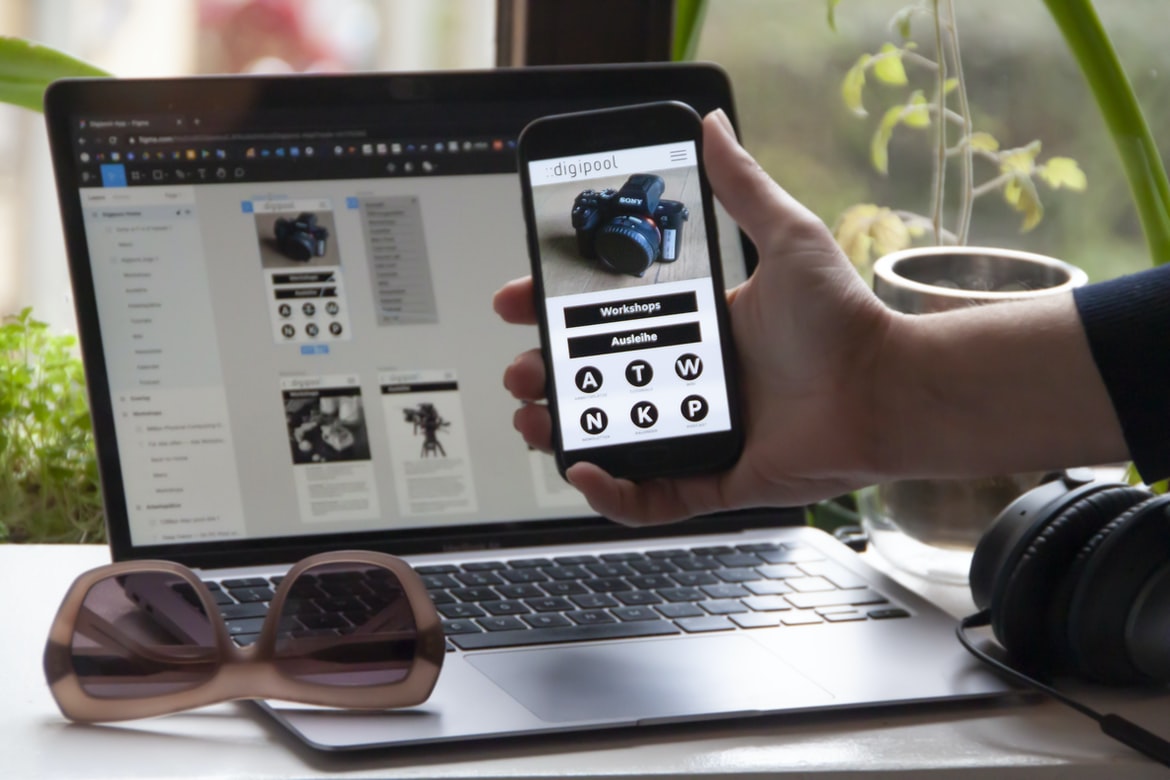
What is web design UI?
Designing user interfaces (UI) is a central part of web design. User interfaces can be used to create an interface for a website or to represent the user’s experience on the web. Each type of UI has its own set of features and limitations.
Web design UI UX is the process of designing a user interface that is designed to be easy and efficient to use. By following these tips, you can make your UI as simple and intuitive as possible while still providing all the features your users need.
In web design, UI is the user interface that presents a user with information and options. The most important part of web design UI, as it relates to usability, is the layout. This article will focus on the different aspects of web design UI – from the basic structures such as buttons, text fields, and dropdowns to more complex layouts such as grids and contact forms.
A few weeks ago, we introduced a new design philosophy for our web design team: dropdowns to more complex layouts. This way, we can create more intuitive and user-friendly designs that are tailored to the needs of our customers.
The results have been impressive. Our clients love the new designs and find them easier to navigate and use than ever before. In this article, we’ll show you how to make your own dropdowns with CSS3 and JavaScript.
First, let’s take a look at an example of how a simple Dropdown could look on a modern website:
A popular web design trend these days is Dropdowns. Dropdowns allow users to select one option from a list, and a dialogue box opens to show the other options. The most common type of dropdown is the one that appears when you hover your mouse over an item in a web browser. In this article, we’re going to take a look at an example of how Dropdowns could look on a website.
What are the benefits of using web design UI?
Web design UI is one of the most popular ways to create a website. It allows you to structure your website in a variety of ways and provides you with a number of features that can make your site more user-friendly. Some of the benefits of using web design UI include:
1) You can create a more organized website with better navigation. With web design UI, you can place different sections on different screens, so users can find what they need quickly and easily. This makes it easier for them to find what they want on your site and keeps your visitors longer on your page.
2) You can use tabbed browsing for faster access to content. Web design UI lets you place different sections on different tabs so users can quickly access whatever they’re looking for.
There are many benefits to using web design UI when creating websites. Some of the benefits include:
-Incorporating a web design UI into your website can make it look more professional.
-The UI can help you create a cohesive and organized website.
-The UI can improve user experience by providing more intuitive controls and features.
-Web design UI UX can help you reduce development time and save money.
Web design UI UX can help you reduce development time and save money, but it’s important to understand the different types of UX so that you can create an effective one.
There are three main types of UX in web design: user interface, front-end, and back-end. User interface ux is responsible for creating the physical look and feel of a website or app. Front-end UX creates the graphical user interface (GUI) that users see when they interact with a website or app. Back-end UX manages all the data elements on a website or app, including everything from content to user preferences.
User Interface Uxes
User interfaces (UI) come in two basic types: desktop and mobile. Desktop programs simply run on a monitor, keyboard and mouse. Mobile programs run on a small device such as a PDA or cell phone that contains some sort of display (typically a touch screen).
The desktop is the most common type of user interface.
Desktop computers are the most common type of user interface in the world, with over 90% of all users using them. This is because desktop computers are used for a lot of different tasks, such as working on documents, browsing the web, and playing games.
How to create a user interface for a website?
Creating a user interface for a website is not an easy task, but with the right approach, it can be a very successful one. In this article, we will take a look at some of the most common UI design tips that can help you create a user interface that is both easy to use and looks great.
User interfaces are the foundation of any website. They provide a way for users to interact with the website and make it easier for them to find information and do business.
What are the different types of user interfaces available in web design?
User interfaces, or the ways in which a user can interact with a system, can be divided into three categories: desktop, mobile and web. Desktop user interfaces typically consist of panels that users can drag and drop onto the desktop to create different layouts. Mobile user interfaces are more akin to Android or iOS apps and are designed for mobile devices such as phones and tablets. Web user interfaces are designed for websites and are typically used on computers or laptops.
How to create a better user experience with a website?
User experience is one of the most important aspects of a website. When it comes to creating a website, it is important to make sure that the user experience is good. There are many ways to improve the user experience, and there are some things that you can do to make your website more user-friendly. Here are some tips:
1. Make sure your website is easy to navigate. Your website should be easy to find, and you should make sure that every page has an easily accessible navigation system.
2. Use clear and concise text breaks on every page. When users visit a page, they should be able to understand what is happening immediately without having to scroll down or read multiple pages.
3. Use effective images and videos. Images and videos can help break up the text on a page, and they can also help illustrate complex concepts.
A website’s user experience can be improved by following a few simple tips. By following these tips, you can create a more successful online presence for your business.
Application of Graphic Design: Adobe Photoshop, Adobe Illustrator, Adobe InDesign
Graphics design is an essential part of web design. With the increasing popularity of the internet, graphic design has become an important aspect of web design. Adobe Photoshop, Adobe Illustrator, and Adobe InDesign are three of the most popular graphic design software. They can be used to create simple or complex designs.
Adobe Photoshop is most commonly used for creating illustrations and logos. It has a wide range of features for artists, making it easy to create beautiful designs. The software is available free on the internet.
Adobe Illustrator is similar to Photoshop but designed for vector illustrations and logos. It has a wide range of features for artists, making it easy to create beautiful designs. Illustrator is available free on the internet.
Adobe InDesign is designed specifically for web designing purposes.
Figma, Adobe XD, WordPress, Elementor.
Figma, Adobe XD, and WordPress are the three most popular web design UI UX tools. They each have their own pros and cons, but in the end, they all play a role in web design. Figma is a free online UX tool that can be used to create user interfaces for website designs. Adobe XD is an advertising program that is used by websites to create user interfaces. WordPress is a content management system (CMS) that helps you build websites. Elementor is a free online software that helps you create animations and videos for website designs.
Figma and Adobe XD are two of the most popular web design UI tools on the market. Both tools have their pros and cons, but which one is best for you? Let’s take a closer look at Figma and Adobe XD to see which one is right for you.
What are the key principles of UX and UI design?
User experience (UX) and UI design are two of the most important aspects of web design. They play a critical role in the overall user experience and can be said to be the foundation of a website or application.
The key principles of UX and UI design are:
1. First, users should be able to understand what they’re looking at. This means that all elements on a website or application should make sense from a first-person perspective, regardless of how the user appears to be interacting with it.
2. Second, users should feel comfortable and able to use the site or application as intended. This means making sure every element is easy to discover, navigate, and interact with.
3. Third, users should be able to find what they are looking for. This means that the user interface should make it easy to find the information he or she is looking for. 4. Finally, users should be able to perform tasks quickly and efficiently.
What are the differences between UX and UI design?
User Experience is the overall impression that a user receives from using a product. UI design is the design of the interface and elements used to provide an overall experience to users. UX design focuses on creating an ergonomic and pleasing user experience for any product.
How can I use UX and UI techniques to create an effective user experience?
User experience is the design of the objects and experiences that users encounter on a web page or application. UX is the process of designing how users interact with an object or experience. By understanding how users interact with your design, you can create a more effective user experience.
What kind of tools do I need to create a successful user interface?
User interfaces (UI) are the interface between a user and a software system. They can be created for a web application, an online store, or a mobile app. There are many different types of UI tools available, so it’s important to understand which ones are most appropriate for your project.
How can I ensure that my design meets the user’s needs?
User experience is the foundation of any website or web application. Every step in the design process—from developing the user interface to creating content—should be designed to ensure that users have a positive experience. Here are tips to help you make sure your design meets user needs:
1. Research your audience before starting the design process. In order to create a UI that will be effective and pleasing to users, it’s important to understand what they want and need on their site. Take into account their specific needs when designing the user interface and content.
2. Think about how users might interact with your designs. When designing for different devices and browsers, it can be helpful to think about how users might interact with different parts of your design.
What steps should be taken to ensure optimal usability?
Today, it is more important than ever that web design and UI designers take into account user experience when creating their designs. There are a number of factors that can impact the usability of a website or application, and it is important to take these into account when designing your content, menus, and other elements.
One way to ensure an optimal user experience is to take into account the following: users’ natural behaviours; how they interact with your website or application; your target audience; and how you want users to move through your content. It’s also important to make sure that all layout attributes—including heights, fonts, widths, margins, and line height—are configured correctly when appropriate.
To help you create better designs for users around the world, we’ve collected some best practices for web design UI UX.
What are the best practices for designing an engaging user interface?
User interfaces are one of the most important aspects of a website. They must be easy to use and understand and look good. Here are some tips for designing an engaging user interface:
1. Use clear, concise text instead of flowery language. Users are less likely to read long paragraphs if they can understand what is being talked about quickly.
2. Use standard design principles such as grouping users by task, using icons and buttons for inputs, and making sure everything is easily accessible.
3. Make sure all content is well-organized and relevant to the user’s needs. Avoiding dense or incomprehensible navigation schemes will make your user interface more appealing and easier to use.
When designing a user interface, it is important to keep in mind the three key principles of user experience: engagement, clarity, and organization. By following these practices, you can create an experience that is both engaging and easy to understand.
User interfaces are a critical part of any website or application. When designing an engaging user interface, it is important to follow best practices. These include creating a clear and concise structure, avoiding distractions, using efficient icons and buttons, and using effective typography.
How can I measure user engagement with my design?
Designing user interfaces is important for any organization. The goal of a good user interface is to provide a smooth environment for the user to interact with your website or app. However, measuring user engagement can be difficult. There are many ways to measure user engagement, but some common methods include surveys, focus groups, and interviews. Whether you use these methods or not will depend on your specific goals and needs.
There are a number of ways to measure user engagement with your design, but one of the most important is by measuring how often users visit your website. This can help you determine whether your design is working as planned and whether you need to make any changes.
What are some of the most common mistakes to avoid when designing a user interface?
When designing a user interface, it’s important to avoid some common mistakes. Here are tips to help you make your designs more effective:
1. Choose the right design language
User interfaces should be designed in a clear and concise style. Use Unicode characters, clean and simple fonts, and avoid symbols and acronyms.
2. Use focused elements
Elements that are easily identifiable and used frequently are the main buttons, fields, text blocks, and columns. Other elements that should be used sparingly or not at all are sidebar items and images.
2. Choose the right design language. User interfaces should be designed in a clear and concise style.
How can I make sure my UX designs are intuitive and user-friendly?
User experience is one of the most important aspects of web design. When it comes to designing your user interface, you need to make sure that it is intuitive and easy to use. There are a few things that you can do to make sure this happens:
1. Make sure your design is based on user feedback. If you want your users to feel comfortable and happy with your designs, you must take into account what they have said in the past. User feedback will help you improve your designs and make them more intuitive for the average user.
2. Use clear and concise elements when designing your user interfaces. When users first encounter a new piece of content or interface, they may not be able to understand everything immediately.
What techniques can I use to ensure a good user experience?
Web design is all about making the user experience as delightful and stress-free as possible. Here are some tips to help make sure your users have a positive experience:
1. Use user-friendly design approaches to improve the Navigation arrangement and Menu Structure
2. Keep the Interface clean and organized
3. Use clear, concise text and images to communicate information
4. Avoid too much white space on your pages
5. Improve typography for readability and aesthetics
6. Use effective colour schemes to match the site’s style
There are a number of ways to create effective colour schemes for a website. One way is to match the site s style. Another way is to use complementary colours or similar colours together.
How can I use UI elements to create a visually appealing design?
UI elements can be used in a variety of ways to create visually appealing designs. By using different elements, you can create a design that is unique and eye-catching. There are many free and paid tools available that can help you create beautiful designs. By following some simple rules, you can start creating designs that are visually appealing from the very beginning.
UI elements can be used to create a visually appealing design. By using them in the right places, you can make your website look more together and polished.
What tools can I use to optimize my user interface design process?
In order to optimize your design process, you should use tools such as user studies, surveys, and focus groups to gain a better understanding of what users want and need. Additionally, you can use principles of ergonomy to improve the look and feel of your designs.
User interfaces are a design process that starts with the idea and then unfolds over time as you develop the design. It can be helpful to have tools that help you along the way, as well as tips for improving your overall process. In this article, we’ll discuss a few of these tools.
What factors should I consider when creating an effective UX/UI design?
UI design is an important part of any web design project. The right design can make a difference in user experience and engagement. Here are some factors to consider when creating effective UX designs:
1. The users’ needs
2. The target audience
3. The environment
4. The budget
5. The team, culture, and work environment 6. The specific project 7. The organization’s resources and limitations 8. How the design will be used 9. The process of designing 10. The proper way to use a feature 11. How the interaction with users will take place.









