

Practical Tips for Creating Successful Apps with the Tool
UI UX (User Interface Design) is the process of designing the user interface or layout of a software application, website or other digital product. Proper UI UX design can make it easier and more efficient for users to use your product. It can also improve the overall aesthetic appeal of your work.
There are many different factors that go into UI UX design, including but not limited to: interface elements such as buttons, text fields, labels, and logos; layout arrangements; navigation menus; and user feedback mechanisms such as error messages and prompts.
It’s important to take into account the specific needs and preferences of your target audience when developing UI UX. For example, a software application designed for children might feature simpler interface graphics and fewer options than an adult-oriented version. Likewise, a website that’s intended for use by business professionals might include more complex navigational elements and detailed error messages. UI UX (User Interface Design) is the process of creating a good user interface for software applications. A good UI should be easy to use, attractive, and informative. It should also be responsive to the user’s needs and preferences.
How to build a great user interface?
There is no single right or wrong answer when it comes to designing a user interface, as the goal is always to provide an intuitive and efficient experience for the end user. However, there are some key principles that should always be considered when building a UI, including the effective use of colours and layout. Additionally, it is important to consider how users will interact with your application, as this can often result in a more engaging experience. Overall, a great user interface should be well-thought-out and reflect the unique needs of the application’s target audience. There is no one right way to build a user interface or create a user experience. However, there are some general principles that can help make an application more user-friendly and intuitive.
One of the most important things to keep in mind when designing a user interface is to make sure that the layout is easy to understand and use. Try to group related elements together, and make sure all buttons, controls, and menus are easy to find and use.
Another key principle is usability testing. Make sure that you test your application with as many different types of users as possible before release. This will help ensure that everyone who uses your application can understand it easily and comfortably.
Tips for creating a good UX design
There are a few things that every UX designer should keep in mind when designing an application. First, it is important to consider the user’s needs and wants. Second, it is important to create an intuitive and easy-to-use interface. Finally, it is important to consider the overall aesthetics of the application.
When designing for mobile devices, be sure to take into account different screen sizes and orientations. Additionally, consider how users will interact with the app on a daily basis – will they be using it casually or intensively? The goal of any good UX design is to make your users’ lives easier and more enjoyable, so take some time to think about these things when creating your application. There are many different tips for creating a good UX design, but some of the most basic things include making sure your application is easy to use, designing something that is aesthetically pleasing, and making sure your user interface is responsive. Additionally, it’s important to consider how users will interact with your app during the development and testing phases. For instance, if you plan on including features that require users to input information in a certain way, make sure those inputs are clearly marked on the screen, so they don’t get frustrated. Overall, taking the time to create a good UX design can make an application more successful and easier for users to navigate.
Graphic Design
The field of graphic design has seen a resurgence in popularity in recent years, with many people becoming interested in the art and craft of creating appealing and effective visual communication. Graphic designers typically work within a variety of industries, including advertising, branding, marketing, publishing, and product design. They are responsible for designing the user interface (UI) and graphics for websites and applications, as well as developing creative concepts that can be executed through visual means. In addition to their creative skills, graphic designers must have an excellent understanding of both typography and layout principles. Graphic design has come a long way from the days of hand-drawn sketches. Today, there are a number of software programs that allow designers to create stunning and effective visuals. With so many options available, it can be difficult to know where to start.
One of the most important aspects of graphic design is user experience (UX). It is essential that the design works well on all devices and looks attractive no matter what device is being used. Additionally, good graphic design should be flexible enough to change with future updates or changes in the theme or brand.
While there are a variety of techniques that can be used in graphic design, some common approaches include typography, colour theory, image composition and motion graphics. Graphic designers must have excellent knowledge of both print and web-based media in order to create effective visuals.
What is UI design?
UI design is the process of creating a look and feels for an application or website. Its goal is to make the user’s experience as pleasant as possible, whether they are interacting with the application on a desktop computer, mobile phone, or another device. A well-designed interface will be easy to navigate, attractive to look at, and intuitive to use. It should also conform to user needs and expectations, taking into account different devices and platforms that users may access the application from.
There are many different aspects of UI design that must be taken into consideration when creating an app or website. The layout of elements onscreen, the typeface used, button size and placement, colour palettes and backgrounds – all play a role in making an interface feel friendly and intuitive. The goal is for users to be able to quickly find what they are looking for and navigate around the site without having to learn complicated navigation conventions or deal with confusing layouts.
UI design can be a complex task, but it is essential in creating an appealing interface that will draw users in. With so many competing applications available online, it is essential that any site or application we use feels like our own – individualized enough that we want to stay there forever but also familiar enough that we don’t have to think too much about how it works. Good UI design can make all of the difference in how successful an application is likely to be.
What is UX design?
User experience (UX) design is the process of designing the user interface, or experience, of a product. The goal of UX design is to create an intuitive and pleasant environment for users to interact with a product.
UX design focuses on understanding how users interact with products and understanding their needs. This information is used to create an effective and efficient user interface. User experience can be improved by redesigning areas such as navigation, layout, screen size and font size.
UX design is important because it affects the overall usability of a product. Poor UX can lead to frustrated users who may not return to a product or recommend it to others. Good UX should make users feel comfortable using a product and help them achieve their goals while using the product. User experience design (UX) is a discipline that focuses on the visual, interactive, and auditory aspects of applications. It encompasses everything from understanding how people interact with digital products to designing intuitive user interfaces.
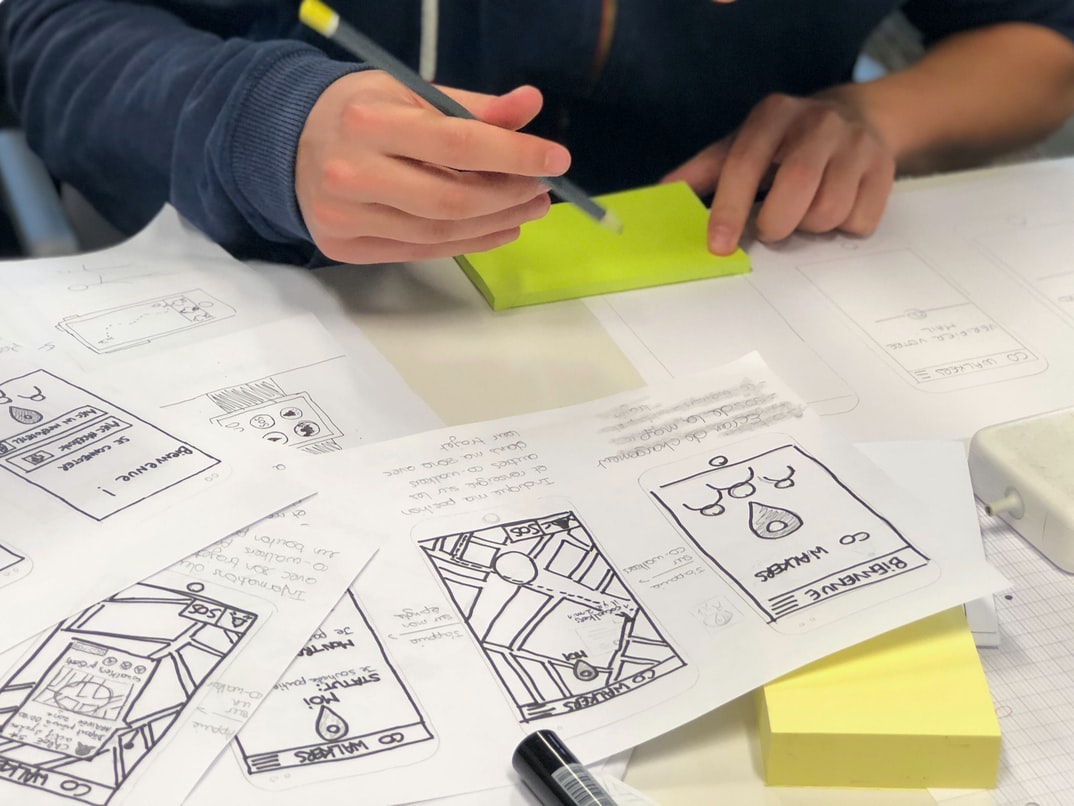
UX professionals consider every aspect of an application before creating or redesigning it. They may focus on the initial design stages, such as coming up with ideas for interfaces or developing wireframes and prototypes. Or they may work on later stages, such as fine-tuning designs or improving usability tests.
Overall, UX designers aim to create an enjoyable and efficient experience for users. This can be difficult, however, given the ever-changing preferences of consumers and the constantly evolving technology landscape.
Visual Communication
Visual communication is the process of conveying information through the use of images, symbols, or words. It has been around for centuries and is still used today in advertising, design, and propaganda. It can be used to create a positive or negative image of a product or organization.
Images are especially important in web and app design because they need to be seen quickly. The right images can make a user feel excited about using your product or encourage them to sign up for your email list. On the other hand, poor visual communication can lead to confusion and abandonment.
UX designers must take into account the visual communication of their applications when designing the user interface and layout. They should also consider how users will interact with the interface and what type of feedback they will receive. For example, an interface with big blocks of text may be difficult to read on a small screen. In this case, UX designers might choose to display text instead as small icons that users can tap or click on. Visual communication is the use of images, symbols, and words to communicate ideas. In application design, visual communication can include everything from the layout and design of a user interface to the way in which data is presented. In UX design, visual communication can involve creating a system that is visually appealing and easy to understand. Visual communication can also help users feel confident about using a system.
Visual Communication Vs Graphic Design
Graphics designers create and manipulate visual images to communicate a message. They design logos, packaging, website layouts, and other graphical elements to support the goals of a business or organization. Visual communication is critical in today’s world, where technology is constantly changing, and new products are being developed. Graphic designers must have strong creativity skills and be able to think outside the box in order to come up with unique designs that will be effective.
Visual communication is important in application building and design as well. A user interface (UI) designer creates the look and feel of an application for users. They determine what features are included, how they will be organized, and how users will interact with them. UI design can involve everything from creating mockups of screens to working with programmers to create custom code. It is essential that the UI designer has a strong understanding of user needs and wants in order to create an effective user experience.
There is a great deal of overlap between graphic design and UI/UX design, which makes it difficult to define one category as more important than the other. Both disciplines require creativity, understanding of user needs, good design sense, knowledge of different software programs, as well as excellent communication skills.
Application of Graphic Design: Adobe Photoshop, Adobe Illustrator, Adobe InDesign
Graphic design is an essential skill for anyone wanting to work in the creative industry. With software such as Adobe Photoshop, Adobe Illustrator and Adobe InDesign, graphic designers are able to create stunning visuals that can be used in a variety of different applications.
One of the most common uses for graphic design is in user interface (UI) design. UI design is responsible for creating the look and feel of a user interface, including all the visual elements and menus. Graphic designers can use their skills to create beautiful, sleek designs that are easy to navigate and work well on various devices.
Another common use for graphic design is in advertising and marketing. Graphic designers can use their skills to create eye-catching flyers, ads and other marketing materials. They can also create logos, icons and other graphical elements that help promote a product or company.
No matter what type of application or device a graphic designer is working on, their skills in Adobe Photoshop, Adobe Illustrator or Adobe InDesign will be invaluable.
Figma, Adobe XD, WordPress, Elementor.
There are a variety of application building & design tools out there, and which one you choose can be heavily influenced by your own preferences.
Some popular choices include Adobe Photoshop, Adobe Illustrator, and Adobe InDesign. However, there are other options, such as Figma and Adobe XD. These tools allow for more complex designs than those offered by the aforementioned applications, but they also come with a higher learning curve.
WordPress is another popular option for web application development. It’s easy to use and manages content well, making it a good choice for smaller projects or ones that don’t require a lot of customization. Finally, Elementor is an excellent tool for designing user interfaces. It allows for the quick creation of mockups and provides lots of customizability options.
What are the basic principles of UI UX design?
There are a few fundamental principles of UI/UX design that are universally acknowledged and accepted by those in the know. These principles include the importance of meaningful visuals, how to efficiently and effectively communicate information to users, and providing an overall user experience that is both intuitive and compelling. Additionally, designers must take into account the unique needs of each individual user when designing a system or application. By adhering to these basic tenets, a designer can create an interface that is easy for users to understand and navigate while still upholding a high level of design quality.
What are some books for beginners to read about UI UX design?
There are many books that can be used as a starting point when learning about the user interface (UI) and user experience (UX) design. Some of the more popular titles include: “The Non-Designer’s Design Book,” “The Designer’s Manual of Style,” and “Designing for the Web.” Additionally, some online resources, such as UX Magazine and Smashing Magazine, offer articles on UI and UX design.
What is a good starting point to get started with UI UX design?
There are a few things to keep in mind when starting out with UI/UX design. One important factor is the overall goal of the project – what is the user trying to accomplish? Is it a simple task that can be accomplished with minimal input? Or is there more complexity involved, and will the user need some assistance in completing the task? Once you know the goal, you can begin to think about how best to present information to the user.
Another important factor is feedback. How will users react when they try out your design? Are they confused or frustrated? This feedback will help you figure out where to improve your design. Finally, it’s important to have a good understanding of different types of devices and browsers, so your website looks great on all types of screens.
What skills are necessary for UI UX design?
UI UX design is a unique and complex field that requires a diverse set of skills. To be successful in this field, you will need to have both design and engineering skills. Additionally, you will need to have a deep understanding of user behaviour and how people interact with digital applications.
To be successful in UI UX design, you will also need to be able to think critically and problem-solve. You will need to be able to take feedback and improve your designs based on it. Finally, you will need strong communication and collaboration skills, as most UI UX designs are collaborative efforts.
What are the best resources for learning UI UX design?
There are many great resources for learning UI UX design. Some of the best include books, online courses, and video tutorials.
Books. One of the best ways to learn UI UX design is by reading books. There are many great books on UI UX design that can teach you everything from the basics to more advanced concepts. Some of the best books on UI UX design include “UX Design Basics” by Eric Ries, “Designing Interfaces” by Jesse James Garrett, and “User Experience Design: Perception, Process, and Practice” by Donald Norman.
Online Courses. Online courses provide another great way to learn UI UX design. Many online courses offer a variety of courses on different aspects of UI UX design. Some of the most popular online courses in this area include “Ux101: A Beginner’s Guide to User Experience Design” and “Interaction Design Fundamentals.”
Video Tutorials. Another great way to learn about UI UX design is through video tutorials. Many video tutorials are specifically designed to teach you how to create effective user interfaces using popular software programs like Photoshop or Illustrator.
Overall, there are many great resources for learning about UI UX design.
What are the most important skills to learn when starting off with UI UX?
UI UX is the process of designing a user interface for software or a website. This includes everything from developing the wireframe to creating the layout and graphics to ensuring that all elements interact correctly and look appealing.
To be successful with UI UX, you’ll need to have strong design skills as well as knowledge of browser compatibility and user behaviour. You’ll also need to be able to think critically and come up with solutions to problems quickly. Overall, UI UX is a challenging but rewarding field. If you’re interested in learning more about how it works, here are some essential skills that you should develop:
-Strong visual design skills – Whether you’re creating mockups or original artwork, your work must be visually appealing. You’ll need to understand both classic design principles (such as composition) and modern trends (such as flat design).
-Knowledge of browser compatibility – Your designs will need to work on a variety of devices, from desktop computers to smartphones and tablets. To ensure that they look good on all platforms, you’ll need to know which browsers are most popular among users and which features are supported by those browsers.
-Critical thinking ability – When solving problems or coming up with ideas for new designs, you’ll need to be able to think outside the box. You won’t always have clear instructions or feedback available, so it’s important that you can come up with innovative solutions on your own.
What are the most common mistakes that newbie UX designers make?
In this blog post, we are going to discuss the most common mistakes UX designers make when building and designing user interfaces. We will also provide some tips on how to avoid making these same mistakes.
There are a few things that often go wrong with user interfaces, regardless of experience or skill level. These include failing to account for users’ needs and preferences, making assumptions about what users will want, and creating interfaces that are too complicated or difficult to use.
Here are the most common UX design mistakes:
1) Failing to account for users’ needs and preferences: Too often, novice designers build interfaces without taking into account what the users want or need. They may think that they know better than the people who will be using the interface, or they may be influenced by their own ideas instead of what would best serve the end users. It is important to remember that everyone has their own way of working and thinking, so it is important to design for all types of users.
2) Making assumptions about what users will want: Another common mistake is making assumptions about what users will want or need in an interface. Sometimes designers create default options or shortcuts in an attempt to simplify the process for new users, but this can actually end up causing more confusion and difficulty down the line. Instead, it is often better to give users clear instructions on how to complete certain tasks or use features within an interface. 3) Not creating an accessible design: When designing websites and other digital products, it is important to make sure that accessibility is a priority. This includes making sure that the interface is fully accessible for all users, including those with disabilities. There are many ways to make sure that you are meeting accessibility standards. If you are interested in learning more about how to make your website accessible, check out our article on how to create an accessible website.









