

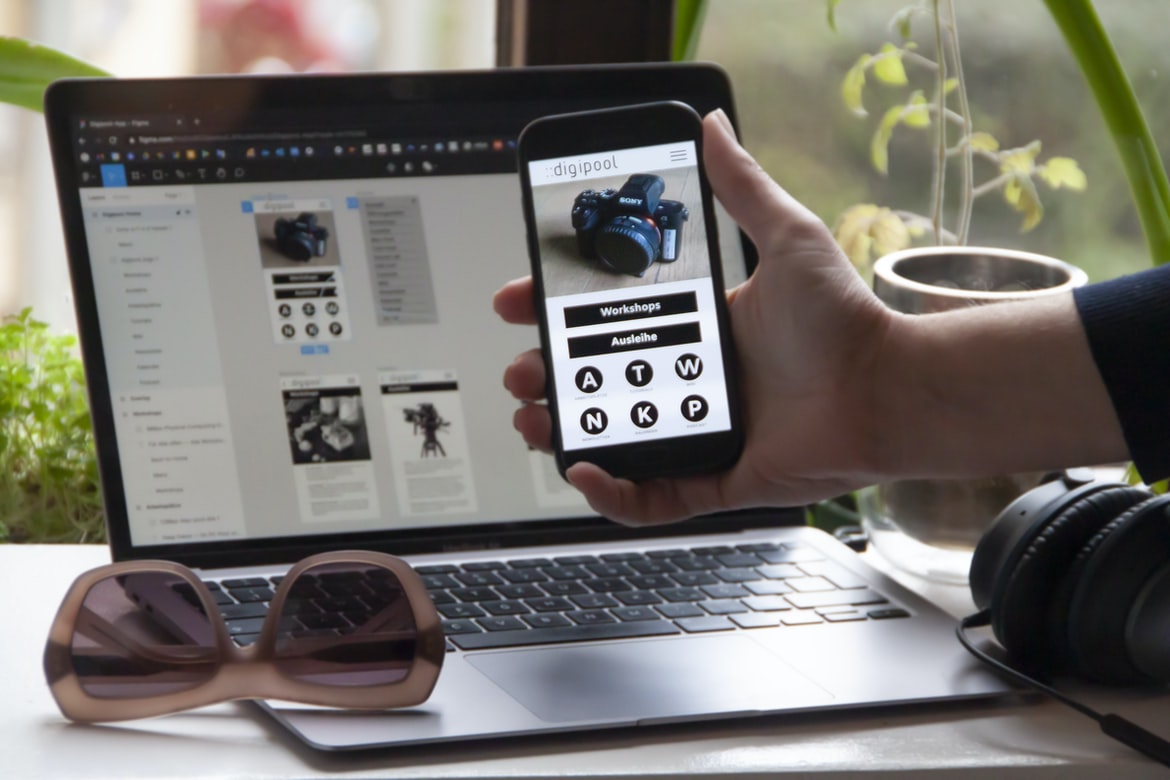
What is user experience, and what does it involve?
User experience is the totality of a person’s interaction with a product or service. It encompasses everything from how easy it is to find what you are looking for to how satisfying the experience feels. User experience takes into account not only the features and functionality of a product or service but also how those features are presented and interact with the user. User interface design is one key aspect of user experience and can play a significant role in determining whether or not users feel engaged with a product or service. By properly designing interfaces, companies can ensure that their users have an overall positive experience.
Graphic design: What are the different types of graphic design?
What is graphic design? Graphic design is the process of creating a visual representation of the information through the use of typography, images, and layout. There are many different types of graphic design, but all share some common traits. Graphic designers must be skilled in both traditional and digital mediums, have a strong understanding of branding and communication, and be able to think outside the box.
Here are eight different types of graphic design:
1. Print Design: Print designers create layouts for newspapers, magazines, books, and other printed materials. They must have an understanding of typography and composition, as well as an eye for detail.
2. UI/UX Design: User interface (UI) designers create user interfaces for computer screens or mobile devices. They need to understand how users interact with devices and make sure the designs are easy to use.
User experience vs user interface: What is the difference between the two?
User experience is all about creating an enjoyable and satisfying experience for the end user. The user interface, on the other hand, is about how a system looks and feels to the users. The two are often confused, but they are actually very different concepts. The user interface is all about how things look and feel to the users, while user experience focuses on the overall satisfaction of the user. In order to create a great user experience, it’s important to understand what goes into making a good user interface.
User interfaces can be divided into three main categories: visual design, interaction design, and information architecture. Visual design focuses on how things look, while interaction design deals with how things work. Information architecture deals with structuring and presenting information in a way that is easy to navigate for users.
The importance of user experience: How can poor user experience lead to dissatisfaction with a product or service?
User experience – or the “experience of using a product or service” – is increasingly important to customers and businesses. Poor user experience can lead to dissatisfaction with a product or service, which can, in turn, damage sales and reputation. Here are some tips for ensuring that user experience is a top priority:
– Make sure all aspects of the product or service are designed with users in mind. This includes the layout, functionality, and design of screens and menus.
– Test and evaluate new features before they’re released to users. This way, you can determine whether they’re easy to use and meet expectations.
2 – Use feedback from users to improve your product or service. This includes tracking feedback on websites, social media platforms, and customer surveys.
3 – Train staff on how to provide a good user experience.
The role of graphic design in creating user experience: How can graphic design help create a positive customer experience?
Designing user interfaces and user experiences can be tricky business. Ensuring that the end result is both effective and appealing to the user can be a difficult balancing act, but with the help of skilled graphic designers, it can be done.
There are a number of ways that graphic design can help improve the user experience. One important aspect is ensuring that all elements of the interface are easy to understand and use. This includes making sure all elements are appropriately sized and positioned on the screen, as well as using clear and concise labels for buttons and menus.
It’s also important to consider how users will interact with the interface. For instance, if a button requires a user to enter information in a certain format, it’s important to make this process as easy as possible.
What is the career outlook for a graphic designer?
There is no one-size-fits-all answer when it comes to the career outlook for graphic designers, but generally speaking, the field is growing. In fact, according to the Bureau of Labor Statistics (BLS), the employment of graphic designers is projected to grow by 20 per cent between 2016 and 2026, much faster than the average for all occupations.
The main reasons for this growth are twofold: First, there’s a growing demand for graphical design skills in industries such as advertising and marketing, which are becoming increasingly digital. Second, as technology becomes more sophisticated, people are demanding more sophisticated designs that meet their specific needs.
How does graphic design relate to other careers?
Graphic design and user experience are two distinctly different disciplines, but they both rely heavily on the same principles: understanding users and designing interfaces that make their lives easier. Graphic designers use a variety of techniques to create a positive user experience, while user interface designers focus on creating an intuitive and attractive interface. However, graphic designers must also understand the workings of web browsers and other devices in order to create effective visuals. Both disciplines have a lot to offer potential employers, so it’s important for students to explore all their options early in their careers.
What are the benefits of learning graphic design?
Graphic design is a process that encompasses the creation of visually appealing and effective designs. It has many benefits, such as the ability to communicate ideas quickly and effectively, increased productivity, and a higher salary. Some of the benefits of learning graphic design are outlined below.
Graphic design can be used to communicate ideas quickly and effectively. When designing logos, for example, a designer may need to create a simple logo in under an hour. With graphic design, complex logos can be created in just a few minutes. Furthermore, because graphic designs often have multiple elements (textures, colours, shapes), it is possible to create intricate designs with little time investment.
Another benefit of graphic design is increased productivity. Because graphic designers are able to communicate ideas quickly and make changes on the fly, they are more efficient than those who do not use graphics heavily in their workflows.
What are some examples of things you can do with graphic design skills?
1. Graphic design can be used to create a variety of things, such as logos, graphics for websites and apps, or even illustrations.
2. It can help you improve your user experience and interface designs by creating a cohesive look and feel for your product or service.
3. Graphic designers often have specialized knowledge in areas like typography, layout, colour theory, and illustration, which can give their work an extra edge.
4. There are many opportunities for graphic designers to freelance across various industries and disciplines.
5. With the right skills and training, anyone can learn how to work with graphic design software and produce professional results.
6. If you’re interested in pursuing a career in graphic design, consider taking some classes or workshops to get started; there’s no substitute for hands-on experience!
User Interface Guidelines
User interface guidelines are an important part of creating a user-friendly experience for users. By following these guidelines, designers can ensure that the user interface is easy to use and looks attractive. There are a number of different types of user interface guidelines that should be followed when designing a website or application. These include:
1) The HCI Principles of usability: The first guideline is based on the HCI principles of usability, which states that all information and controls should be easy to find and use. This includes making sure all buttons are visible and within easy reach, as well as labelling buttons appropriately so that users know what they do.
2) Use the right layout: Another guideline is to use the right layout for your application or website. If your users have to scroll down or use multiple windows to access information, you may want to reconsider your design choices. User interface guidelines are important for creating a positive user experience. Graphics design should be consistent with the overall user interface and help users understand how to use the system.
UX Vs Graphic Design
User experience (UX) is the process of designing an interface that makes it easy and enjoyable for users to achieve goals. Graphic design, on the other hand, is the creation of images and designs that can be used to communicate ideas and messages. Both disciplines have their own strengths and weaknesses, which are often overlooked when teams are trying to decide on a project’s final product. Here are the key differences between UX and graphic design:
1. UX focuses on the entire user journey, from research through design and testing. The graphic design normally focuses on just one aspect of the user experience – for example, logos or web graphics.
2. Graphic designers use typography, colour, layout, and imagery to create visuals that communicate ideas. UX designers use different types of research methods to understand how people interact with screens, websites, or products in general.
3. Graphic designers use a wide array of software to understand how the design will look in all possible scenarios. UX designers must understand how users interact with the website or product and test their ideas in many different ways. 4.
UI Vs Graphic Design
User experience (UX) is all about making sure that the end-user has an enjoyable experience with a product or service. This can be done through the design of the user interface, as well as the graphic design of the product itself. User interface (UI) refers to how an end user interacts with a product or service, while graphic design focuses on the visual appearance and composition of a product.
There are many benefits to designing products using both aspects of UX and UI. A well-crafted UI can make it easy for users to find what they’re looking for and navigate around the product. It can also help create a positive first impression, which can encourage users to continue using a product or service. By contrast, a poorly designed UI can make it difficult for users to find their way around, leading to frustrations and, eventually, abandonment of the product.
Usability And User Experience Design
There is a big difference between usability and user experience design. Usability is focused on making the user interface (UI) easy to use, while user experience design takes into account the entire experience of using a product or service. A product may be usable, but if it lacks an enjoyable or satisfying user experience, users will likely not stick around.
To create an effective UI and UX, it’s important to understand how people interact with products. User research is essential for understanding how people use products, how they think about them, and what problems they encounter. Once you know these things, you can start designing solutions that address those issues.
Motion Graphic Design
Motion graphic design is an ever-evolving field that requires the use of advanced graphics software and design techniques to create engaging and effective user interfaces. However, despite its growing popularity, there is a lack of understanding of motion graphic design principles among non-professional users. In this article, we will explore the difference between user experience and user interface graphic design and discuss why understanding these distinctions is critical for anyone looking to pursue a career in motion graphic design. Motion Graphic Design is a process that uses animation and graphics to create a visual representation of information. It can be used in a variety of mediums, such as advertising, video production, and web design. In order to create effective motion graphics, it is important to understand the user experience vs user interface distinction.
User Interface Animation Design
User interface animation design plays an increasingly important role in creating a positive user experience. By making the interactions between users and the software more fluid, animated user interface designs can make it easier for users to learn and use new software. This article will explore the various advantages of using animated user interface designs and provide tips on how to create them.
Animated user interface designs have several advantages over static ones. For one, they are more engaging and easy to understand. This is because they allow users to see the interaction as it happens rather than having to wait for it to finish loading before continuing. Additionally, animated user interfaces are often faster and more responsive due to their fluid animation. This makes it easier for users to find what they are looking for and makes interactions feel smoother overall.
It is also important to consider the psychological impact of user interface animations when designing them.
Motion Graphics UI UX
Motion Graphics UI UX has always been a challenge. But with new software and hardware tools, designers can create more engaging and interactive user interfaces using motion graphics.
There are pros and cons to using motion graphics in user interfaces. On the pro side, motion graphics can help make user interfaces more visually dynamic and engaging. They can also add an element of excitement and suspense to a viewer’s experience.
However, there are also some potential drawbacks to using motion graphics in user interfaces. For example, they can be time-consuming to create, and they may require advanced skills that not all designers may have access to. Additionally, motion graphics can be distracting for users if used improperly or if they take up too much screen space.
WordPress for Designers
WordPress is a popular content management system that is used by millions of people around the world. It’s also becoming increasingly popular as a platform for graphic design. WordPress makes it easy to create a website or blog from scratch or to improve an existing one.
There are many reasons why WordPress is great for graphic designers. First, it has an extensive library of themes and customizations that make creating a site look professional and easy. Second, WordPress is very customizable, which allows you to tailor the look and feel of your site to match your own unique style. Finally, WordPress is versatile enough to be used for both personal sites and larger businesses.
WordPress Elementor for Designers
WP Elementor is a powerful WordPress plugin for creating stunning user interfaces and user experiences. The plugin makes it easy to create attractive graphical designs while also providing detailed options for customizing the look and feel of your site. In this study, we compare the user experience of WP Elementor against the user interface (UI) of popular free and premium UI design tools. Results show that WP Elementor offers a more intuitive and visually appealing experience, making it a great choice for designers who want to create high-quality graphic designs quickly and easily.
Figma
Figma is a user interface design tool that allows users to create wireframes, mockups, and prototypes. The company was founded in 2014 by Bene Ben-Ami and Nat Friedman. According to a study by User Experience firm Interaction Associates, Figma was the most popular user interface design tool among professional designers.
Adobe XD
Adobe XD is one of the newest graphic design programs on the market. It has a user interface that is different from other graphic design programs. Adobe XD has a feature called “Direct” which allows users to create graphics without going through the layers of an image. This makes it faster for users to create graphics.
Another feature of Adobe XD is its ability to work with three objects. This means that users can create 3-D graphics without needing to use any software that supports 3-D graphics. Adobe XD also offers a wide range of tools for creating logos and icons.
Visual Communication
Visual communication can be broken down into two categories, user experience design and user interface graphic design. User experience design focuses on the entire customer experience, from the moment a person interacts with your website or app to the moment they decide to buy something. User interface graphic design is responsible for creating the look and feel of a website or app, from the navigational elements to the visual representations of data.
User interface graphic designers must consider a variety of factors when designing a product, including usability and aesthetics. Usability refers to making sure that all elements of the product are easy to access and use, while aesthetics focuses on making products look attractive and appealing to users.
Both user experience design and user interface graphic design have their own strengths and weaknesses.
What is Visual communication in graphic design?
Visual communication is the process of conveying information through images. In graphic design, visual communication can be used to create a message or idea that is not easily conveyed through textual means. Visual communication can be used in a variety of ways, such as to convey information about a product, to improve user experience, or to create an effective logo.
Application of Graphic Design: Adobe Photoshop, Adobe Illustrator, Adobe InDesign
The application of graphic design has evolved over time and continues to do so. With the ever-growing popularity of Adobe Photoshop, Adobe Illustrator, and Adobe InDesign, students are finding it more difficult to differentiate between user experience and user interface. Today’s designers need to be able to create beautiful graphics that convey a message or tell a story while also being aesthetically pleasing. This article will discuss some of the different techniques that are used in graphic design and how they can be applied to Photoshop, Illustrator, and InDesign.
Web Design
All too often, web design is seen as an exercise in creating a pretty layout. While this is important, it’s not the only thing that needs to be considered when designing a website. Poor user experience can actually kill a site before it even gets off the ground. Here are tips for ensuring your website delivers an amazing user experience.
1. Make sure all content is easily accessible. Users should be able to find what they’re looking for without having to search through multiple pages or navigate through confusing menus. Make sure all text and images are placed where they should be, and make use of effective navigation buttons and links to help users move around your site quickly and easily.
2. Keep pages simple and easy to understand. A study was conducted to determine whether user experience (UX) or user interface (UI) graphic design is more important. The study found that UX is more important than UI graphic design.
Mobile Graphic Design
The difference between user experience and user interface design has always been a bit fuzzy. But, as the world becomes more mobile-friendly, it’s becoming more important to make sure that the two disciplines are on the same page. In fact, studies have shown that when it comes to mobile users, a good user interface can even trump a great user experience. Here’s why:
1. Mobile devices are often used in spur-of-the-moment situations. This means that they need an intuitive and fast user interface in order to get the job done quickly.
2. Users usually have less time for long interactions with a mobile app or website. Instead, they’re usually looking for solutions that are quick and easy to use.
3. The mobile web is already a place where many people go to find answers. For example, the Google search engine has more than 70% of the global market share. 4. People often expect apps to be user-friendly and fun.
Responsive Graphic Design
Responsive graphic design is a trend that has taken off in recent years. It involves creating graphics that adjust to different screen sizes, making them more user-friendly. Responsive design can be used for websites, apps, and any other type of graphical design.
There are two main types of responsive design: fluid and adaptive. Fluid responsive designs change their appearance automatically as the device’s width or height changes, while adaptive, responsive designs respond to specific user interactions, such as clicking on a link.
The main benefit of using the responsive graphic design is that it makes your website or app easier to use on various devices. Users with smaller screens will not have to squint at tiny text or pictures, and those using larger screens won’t have to scroll down endlessly to see everything. Responsive graphic design is a growing trend in the world of design. It means creating graphics that automatically adjust to different devices, such as smartphones, tablets, and desktop computers.
Some people believe that responsive graphic design is better because it takes into account the user’s context. For example, if you’re using a smartphone, you might want the graphic to be smaller and less detailed so that it doesn’t take up too much space on the screen. If you’re using a computer, you might want more detail and space to work with.
There are many different responsive design tools available online. You can also try out responsive designs yourself by using different devices and seeing how they change the look of your graphics.
Design websites
Design websites have come a long way since the days of boring, static pages with minimal graphics. Gone are the days of using tables and boring fonts to display information. Today’s web pages are full of vibrant colours and eye-catching graphics that help users easily find what they need. While user experience (UX) and user interface (UI) design are both important when creating a website, it’s often forgotten that graphics also play an important role in making a website look good. Here are tips for improving your website’s graphics:
1. Use strong colours that stand out against the background colour. This will make your pages easier to read and remember.
2. Use contrasting colours to create visual interest. This will help draw attention to key areas on your page, which can improve usability.
3. Use a large image, preferably one that is high resolution. This will make your site look more professional and give it a better overall appearance. 4. Use simple fonts that are clear and easy to read. 5. Use white space to separate the text from the background.









