

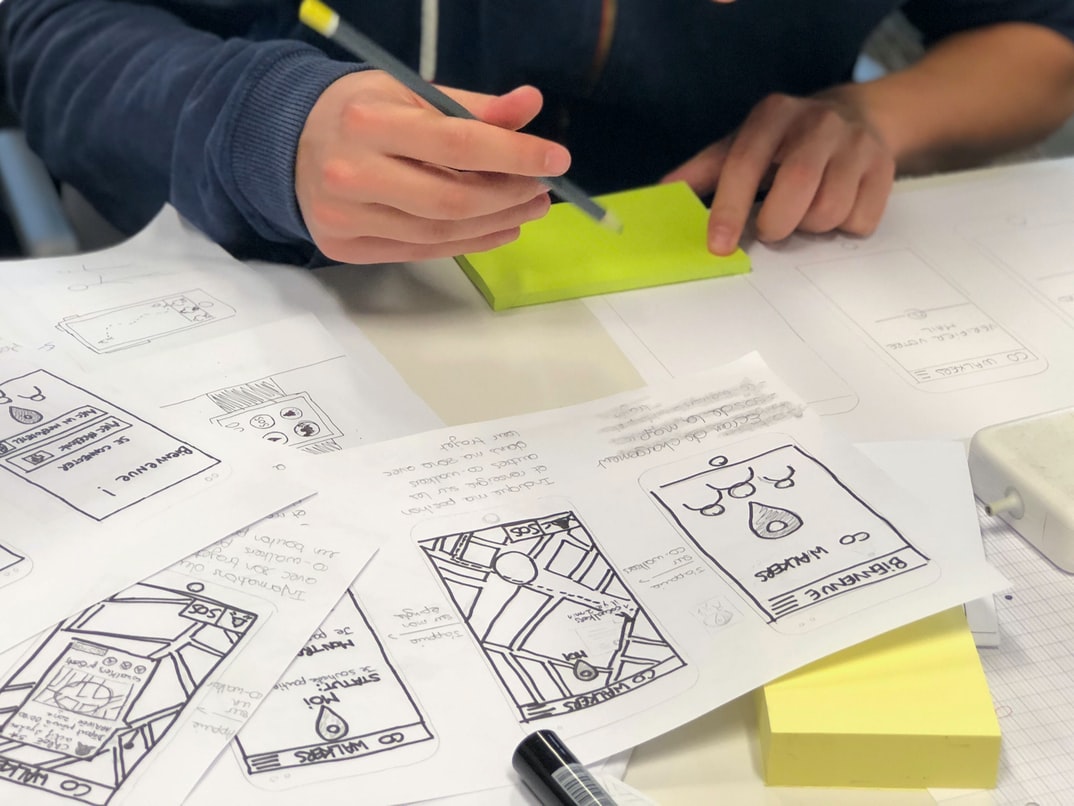
What is user experience, and what does it have to do with graphic design?
User experience is the totality of a user’s subjective experience with a product, system or interface. It has to do with designing and creating an environment that meets the needs of the end user. Good user experience can make a product or system more engaging for users, leading to increased use and satisfaction. User interface design, on the other hand, is the creation of an effective graphical representation of system functions for users to interact with. By taking into account both user experience and user interface design, graphic designers can create products that are easy to understand and use.
What is the user interface, and what does it have to do with user experience?
The user interface is the term used to describe how a system or application looks and feels to a user. It encompasses everything from the physical layout of the screen to the menus and options available. Good user interface design can make a difficult task seem easy, while poor design can be frustrating and even dangerous.
Good user interface design takes into account users’ needs both now and in the future. Today’s users are accustomed to using smartphones with virtual buttons and keyboards, so systems that don’t accommodate this need can feel clunky and outdated. New technologies, like voice control and augmented reality, will require even more specific attention to user interface design in the future.
User experience, on the other hand, is concerned with ensuring that users have an enjoyable experience using a system or application.
The difference between user experience and user interface
User experience is the overall feeling or impression that a user gets when interacting with a product or service. It encompasses all aspects of the user’s interaction with the product or service, from first encounter to ongoing use. User interface (UI) design is the process of creating a graphical representation of how users will interact with a product or service. UI designers must consider not only what users see onscreen but also how they feel when using the product or service.
The importance of graphic design in creating a good user experience
A well-designed user interface will make your users feel comfortable and in control. User experience is more important than user interface graphic design when it comes to creating a good user experience. Good graphic design can improve the usability of a website or application, while poor graphic design can have the opposite effect. Poor graphic design can create confusion, frustration and even nausea in users. Graphic designers must understand how to use typography, colour, layout and images to create an effective user interface that is both visually appealing and functional.
User Interface Guidelines
User interface guidelines should be followed in order to create an effective and user-friendly web interface. Guidelines that should be followed include creating a simplified and organized layout, using typography for emphasis, and avoiding clutter. Additionally, it is important to use clear and concise language in order to avoid confusion among the users. By following these guidelines, users will be able to easily navigate through the website and find what they are looking for.
UX Vs Graphic Design
User experience (UX) is the process of designing products that make people’s lives easier. User interface (UI) design is the process of creating the look and feel of a product, including how the buttons, menus, and other user interface elements are arranged. Graphic design is the creation of images for use on products or in marketing materials such as brochures or website designs.
While these three disciplines have overlapping areas of expertise, there are some key differences between UX and UI design, which can impact the overall user experience. For example, UI designers may focus on how a product looks from a purely visual perspective, while UX designers may focus on how users interact with a product. Additionally, graphic designers may create images that complement UI designs or act as standalone components altogether.
UI Vs Graphic Design
When it comes to designing a website or app, it can be difficult to decide which design approach is better: user interface (UI) or graphic design (GD). UI vs GD is a debate that has been around for years, with no clear-cut answer. In fact, there are many pros and cons to each approach. Here’s a look at the key differences between UI and GD:
1. UI is focused on the user experience, while GD is focused on the look and feel of the web/app.
2. UI designs are typically simpler than GD designs, which can be more effective when using a limited amount of resources.
3. However, GD designs can be more visually appealing and sophisticated, making them better suited for larger projects with a high visual impact.
4. UI designers are typically more familiar with the design process. However, GD designers tend to have more experience with specific technologies such as HTML, CSS and JavaScript.
Usability And User Experience Design
Usability and user experience design are the two main disciplines of graphic design. Both have their own set of goals, methods, and principles. But how do they interact? And which one is better for certain projects?
There’s no easy answer to these questions. User experience design is about creating a positive user experience. This can involve everything from designing the layout of a website to ensuring that the buttons are easy to press and the messages are clear. User interface design, on the other hand, is mainly concerned with how users interact with a piece of software or a website. This could involve things like developing an intuitive layout or ensuring that all the buttons work as expected.
Both disciplines have their benefits and drawbacks. User interface design can be more visually appealing, while user experience design can often result in a more functional product.
Motion Graphic Design
Motion graphic design is a type of graphic design where motion is used to create an effect on a user interface. Motion can be used to convey information, add interactivity or simply make the user interface look more dynamic.
There are many different ways that motion can be used in graphic design. One common way is to use animating 3D objects to represent data or content. This type of animation can help users understand and interact with the information on a screen.
Other types of motion graphics include typography that uses animated letters or symbols and video that is manipulated to create effects like changing speed, orientation or colour. By using these various types of motion graphics, designers can create unique and engaging user interfaces. Motion graphic design is an important part of user interface design. A motion graphic designer can create graphics that are engaging and help users understand the information they are viewing. They can also create graphics that are visually appealing and help to promote a company or product.
User Interface Animation Design
User interface animation design has been around for years and is still a popular choice for creating a more user-friendly interface. Animations can help users understand how to use the interface and can help improve the overall user experience. There are different types of animations that can be used in user interface design, such as motion graphics, which are used to create smooth animation sequences or simple transitions between screens. In order to create an effective user interface animation, it is important to consider the goals of the animation and the design of the user interface.
Motion Graphics UI UX
User experience (UX) is the total package of a user’s interaction with a product or service. It includes not only the physical design and layout of the interface but also how well the product informs and engages users, how intuitive it is to use, and what feedback users receive during their interaction. User interface (UI) graphics design encompasses all aspects of creating an attractive, usable graphical interface for a computer program or website. It can be as simple as arranging icons on a screen or as complex as designing an entire user interface from scratch. Graphic designers are always striving to create beautiful and intuitive designs that make users happy. However, despite the best efforts of graphic designers and programmers, there are still hiccups in user experience that can be prevented or corrected with good UI graphic design.
WordPress for Designers
WordPress is a popular content management system (CMS) used by designers and developers to create websites, blogs, and other web-based applications. WordPress’s wide range of features makes it a great platform for creating user experiences and user interface graphics.
WordPress is easy to use and has an extensive plugin library that makes it possible to customize almost any aspect of your website. Additionally, WordPress is highly customizable through its themes framework (a collection of pre-made templates for different types of websites). This makes it possible to create unique, user-friendly websites quickly and easily.
WordPress also has several built-in features that are perfect for designing user interfaces. For example, the Theme Customizer allows you to change the look and feel of all your theme files in one place.
WordPress Elementor for Designers
WordPress Elementor is a popular tool for creating user interfaces and user experiences. It is often used by designers. However, there is little research on its usability. This study aims to evaluate the difference between user experience and user interface design using WordPress Elementor. The study found that user interface design was more important than user experience when creating a website with WordPress Elementor.
Figma
Designers and developers of software applications often face the challenge of designing user interfaces that are both visually appealing and functionally efficient. One popular solution to this problem is the use of graphic design concepts such as layout, typography, and colour. However, some software users find this design features difficult to understand and use.
One alternative approach to designing user interfaces is to focus on user experience (UX) rather than on user interface graphics. UX refers to the overall experience a person has while using a product or service. This includes everything from how easy it is to find what you’re looking for to how comfortable the interaction feels.
Figma is a free software application that allows users to create complex graphical designs with ease. Because Figma strictly focuses on UX, it has been successful in winning over some of the most demanding software users.
Adobe XD
Adobe XD is a powerful user interface design tool that can help you create stunning graphics and interactions for your web and app projects. But how does it stack up against other user experience tools? In this study, we looked at two main factors: user experience and user interface graphic design.
We used a variety of different tools to measure these two factors, including questionnaires, interviews, and focus groups. In the end, we found that Adobe XD was the clear winner in both areas. Its intuitive interface makes it easy to create beautiful graphics without having to learn an entirely new set of tools. Meanwhile, its powerful features allow you to create high-quality interactions that are both attractive and functional.
So if you’re looking for a powerful user interface design tool that’s easy to use, Adobe XD is definitely worth considering.
Visual Communication
Visual communication has become increasingly important as the world becomes more and more digital. Gone are the days when people communicated primarily through written words. Today, people rely on visual cues to convey their messages. This is why it’s so important for designers to have a strong understanding of visual communication.
One of the most important aspects of visual communication is the layout. A good layout allows users to easily navigate a design and find what they’re looking for. A good layout also makes sure that all the elements on a page are easily visible and accessible.
Another key element of visual communication is colour. Colour can be used to create a sense of warmth or coldness, evoke feelings of joy or sadness, or emphasize various points in a message. Visual communication is an important part of creating user interfaces and user experiences. User interface graphics, or “UI graphics”, can be used to create a positive or negative first impression of a product. Graphics that are well executed can help users understand how to use the product more quickly and easily. Poorly executed graphics can confuse users and make them feel lost or frustrated.
What is Visual communication in graphic design?
Visual communication is a process of establishing and maintaining contact with the audience through the use of images. Visual designers use different techniques to create visuals that can influence people’s emotions, thoughts, and actions.
Some common techniques used in graphic design include graphical elements such as typography, line work, colour, and composition; motion graphics; 3D designs; and photo manipulation. Each technique has its own set of rules and principles that must be followed in order to achieve the desired effect.
Visual communication can be used in many different fields, including advertising, marketing, web design, product design, and graphic design. It is important for visual designers to have a strong understanding of user experience and user interface so they can create visuals that are both effective and pleasing to the eye.
Application of Graphic Design: Adobe Photoshop, Adobe Illustrator, Adobe InDesign
Designers are tasked with creating layouts, graphics, and applications that appeal to users. Graphic design often relies on the use of Adobe software, such as Adobe Photoshop, Adobe Illustrator, and Adobe InDesign. Each program has its own set of features and advantages that can be put to use in order to create a user interface that is both effective and pleasing to look at.
Adobe Photoshop is widely used for creating images and graphics. It offers a wide range of tools for manipulating images, including digital painting and vector drawing capabilities. Adobe Illustrator is used for creating logos, brochures, or other types of designs that need detailed vector illustrations. It also offers features for easily creating charts and graphs. Adobe InDesign is used for creating publications such as magazines or newspapers. It provides advanced typography capabilities as well as the ability to create cross-platform ePubs. Adobe Photoshop, Adobe Illustrator, and Adobe InDesign are all popular graphic design software programs. Each has its own strengths and weaknesses, but they can be used to create beautiful graphics. This article will explore the different ways these programs can be applied to create user interfaces.
Adobe Photoshop
Adobe Photoshop is a widely used image editing software. Many users have different opinions about the user experience vs the user interface of Adobe Photoshop. In this study, two groups of users were compared to find out which group had a better user experience. The first group was composed of professional graphic designers who were familiar with Adobe Photoshop’s features and used it often. The second group was composed of amateur graphic designers who were not familiar with Adobe Photoshop’s features and used it for the first time. Results showed that professional graphic designers had a better user experience than amateur graphic designers. Although amateur graphic designers found some features easier to use, they did not feel as confident in using them as professional graphic designers did. This study shows that when designing an application, it is important to consider both the user interface and user experience so that everyone can be comfortable using the application.
Adobe Illustrator
Adobe Illustrator is a powerful graphic design software used by many professionals. It comes with different tools to help you create graphics, but it can be hard to know which tool to use for what task. In this article, we will compare the user experience and user interface of Adobe Illustrator vs Photoshop. We will also discuss some tips to help you improve your workflow.
Adobe InDesign
Adobe InDesign is a popular graphic design software used by professionals and enthusiasts around the world. The software has a number of features that make it an appealing choice for designing layouts, logos, and graphics. However, while Adobe InDesign is a powerful tool, its user interface can be challenging to navigate for beginners. This study sought to compare the two most common user experiences with Adobe InDesign: novice users who have never used the program before and experienced users who are familiar with the interface but want to see how their skills stack up against those of new users. The results found that both groups had similar difficulty in completing common tasks, but experienced users had more success when working through tutorials or using reference materials. Overall, these results suggest that experienced users benefit from learning how the interface works before starting to design, as this allows them to better anticipate potential problems and find solutions more quickly.
Web Design
Web design has come a long way since the days of simple, static websites. Designers now have the ability to create beautiful and interactive websites that engage with their users. However, one question still remains: which design is better – user experience or user interface?
Mobile Graphic Design
Some people think that graphic design is about creating beautiful, intricate artwork. Others believe that a good graphic designer should be able to create usable and effective user interfaces. In this article, we will explore the differences between these two types of graphic design and see which one is better for certain projects.
User experience is all about creating an enjoyable experience for the user. This includes making sure the design looks great, but it also needs to be easy to use and navigate. User interface (UI) graphics are often used to create a look and feel for a website or app. They can be simple or complex, but they are usually designed to be visually appealing and easy to use.
User experience is often more important than user interface when it comes to web design projects. Websites are visited on a daily basis, so it is important that they look good and be easy to use.
Responsive Graphic Design
Responsive graphic design is a trend in graphic design where the layout of a website or application adapts to the device it is being viewed on, such as a desktop, tablet or phone. This allows users to have an optimal viewing experience regardless of their device size or resolution. Responsive design has become increasingly popular in recent years because it creates a cleaner and more user-friendly interface for users. It also makes websites more mobile-friendly, which can result in increased traffic and revenue. Responsive graphic design requires a high level of skill and knowledge in various aspects of graphic design, such as typography, animation and web development.
Design websites
Designing a website is a process that starts with understanding user needs and goals. User experience (UX) is the focus of many design efforts, while user interface (UI) design concentrates on how users interact with the content and features of the site. Graphic designers often take on both roles, creating graphical elements that support UX and UI design. This article explores how graphic designers can create effective designs that meet user needs.
Graphic design is an art form that has been around for centuries. It can be used to create effective designs that meet user needs. Graphic designers can use different techniques to create designs that are appealing and functional. One of the most important aspects of graphic design is making sure the user interface is effective. This means creating a design that is easy to use and looks attractive. Graphic designers should also consider how their designs will impact users’ productivity. By doing this, they can create designs that are both effective and pleasing to the eye.
Graphic designers must take into account user needs when designing websites. User experience is the focus of many design efforts, while user interface (UI) design concentrates on how users interact with the content and features of the site. Graphic designers often take on both roles, creating graphical elements that support UX and UI design.
Typography
1. Typography can play a significant role in the design of user interfaces, as it can help to convey information quickly and easily.
2. Good typography can also improve the overall user experience by helping users understand the content on a page more easily.
3. There are a number of different typographic principles that can be used in user interface design, and each has its own benefits.
4. It is important to consider both the visual and functional requirements of a UI when designing typography, as each will play a different role in making the user experience positive.
5. The use of typefaces can also add an element of personality to a UI, helping to distinguish it from others on the web or in other applications.
6. There are a number of tools that can be used in the creation of great user interfaces, including CSS, JavaScript and HTML. 7. Typography is a vital part of user experience design, as it affects both the appearance and functionality of the UI.
Theory
Designing user interfaces had come a long way since the days when users had to input data manually into forms. Today, many user interface designs use graphics to help users understand what they’re doing and how to do it. But is using a graphical design really better? A study recently published in the journal “Human-Computer Interaction” analyzed the two approaches and found that user experience was better when the graphical design was used.
The study compared 112 user interfaces from different applications and found that graphics made it harder for users to understand the task at hand. In contrast, user experience was much easier when graphical designs were not used. The study’s lead author, Brian Zdzienicki, said, “Graphics can actually make things more difficult for people because they can slow them down and distract them.









