

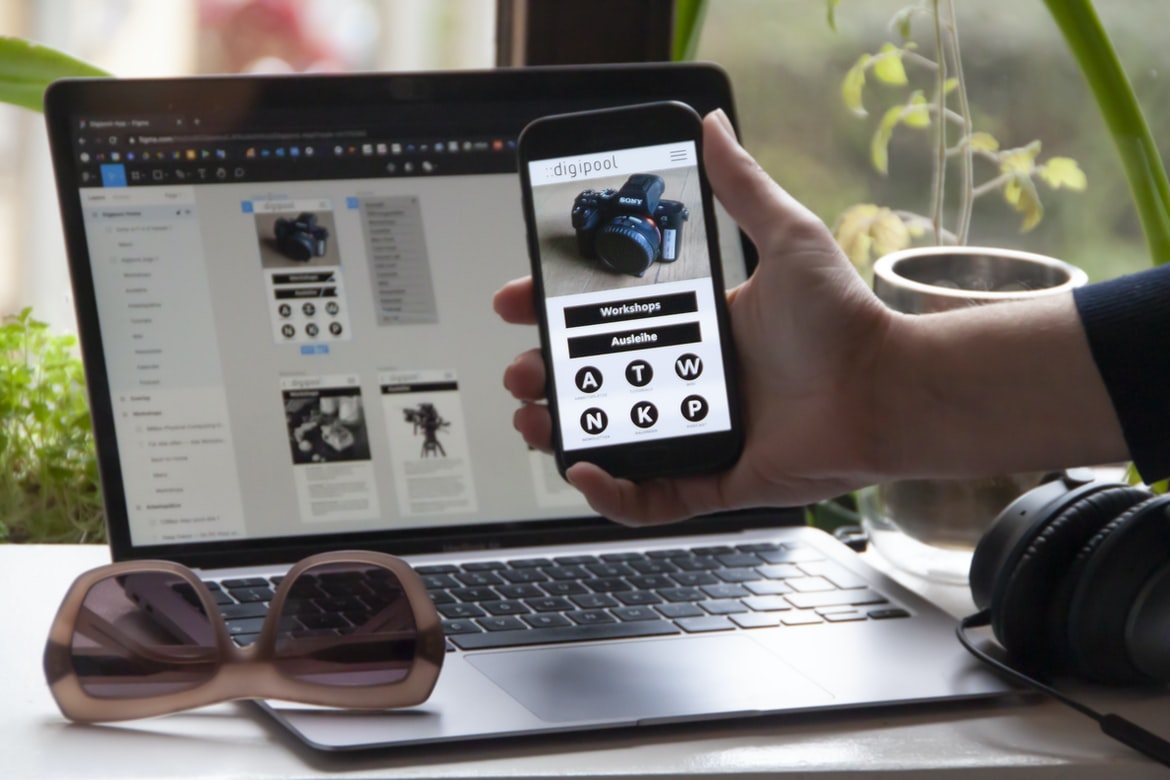
What is user experience?
User experience (UX) is the process of creating a good user interface or experience. A user interface is the physical and virtual presentation of information to users, while an experience encompasses all aspects of how a user interacts with that interface. User interfaces can be simple or complex, but they all should be easy to use and understand. The goal of UX is to create an effective and efficient user experience that meets the needs of the users. User interface design is concerned with the visual layout and appearance of a system, while UX design focuses on how well the system meets the needs of users. There are several factors that go into designing a good user experience, including usability testing, understanding the users’ needs, and ensuring that each element of the design reflects those needs.
What is user interface design?
User interface design is the process of creating a graphical interface that users will find easy and comfortable to use. Good user interface design is essential for any software or website, as it can significantly improve the user experience.
There are a number of factors that go into designing a good user interface, including usability testing and research into the needs of the target audience. It is important to take into account both visual and functional elements, as well as how users will interact with the system.
User interface design is a complex task that requires a blend of creativity and technical know-how. If done correctly, it can help make a user’s experience with a software or website truly enjoyable.
User interface design is the process of creating a graphical representation of how a user will interact with a product or service. The goal is to make the interface as easy and comfortable as possible for the user while still providing the required functionality. User interface design can be divided into two main categories: visual design and interaction design. Visual design concerns itself with the look and feel of the interface, while interaction design focuses on how users will interact with it.
The difference between user experience and user interface design
User experience and user interface design are two different yet equally important aspects of web design. User experience is about creating a positive experience for the user, while user interface design is about creating an appealing and easy-to-use interface. The two concepts can be difficult to differentiate because they both involve designing features that will make users happy. However, there are some key differences between the two that should be considered when designing a website.
User experience takes into account everything from the layout of the page to how users interact with it. It’s all about ensuring that users have an enjoyable experience while on your website, whether they’re browsing for information or just looking around. User interface design, on the other hand, focuses on making the elements of a website easily accessible and user-friendly.
Why focus on user experience in graphic design?
User experience is an important part of graphic design because it can affect how people feel about a product or website. It can also help people understand what to do and how to use a product. User interface (UI) is another important part of graphic design, but the user experience is more important because it affects the overall feeling of a product. UI can be designed poorly and still be successful, but if the UI feels unintuitive or difficult to use, then the product will not be as successful.
User experience is becoming more and more important in graphic design. In this article, we will discuss why user experience is so important and provide some examples of how it can be incorporated into graphic design.
The importance of customer feedback: How to get feedback from users and how to use it
If you’re like most business owners, you know that customer feedback is essential to creating a successful product. But how do you get feedback from your users? And how can you use it to improve your products?
There are many ways to collect customer feedback, and each has its own benefits. Surveys allow you to collect quantitative data from a large number of users. This information can help you understand user behaviour and preferences. User interviews allow you to hear directly from users about their experiences with your product. This information can help you improve your product design and user experience. Blogging allows you to share your users’ experiences with other customers, potential investors, and partners. This information can help promote your product and attract new users. Finally, customer reviews are an important source of customer feedback.
Methods for measuring user experience: Surveys, interviews, focus groups, etc.
There are a number of ways to measure user experience, and each has its own pros and cons. Surveys, interviews, focus groups, and other user research methods can provide detailed data about how users feel about specific aspects of a product or service. However, these methods can be time-consuming and expensive to conduct. Graphic design techniques can also be used to measure user experience. For example, studies have shown that people prefer interfaces that are easy to navigate and look attractive. By understanding how users interact with a product or service, designers can optimize the design for better usability.
Guidelines for designing better user experiences: Don’t forget the basics!
Designing better user experiences starts with paying attention to the basics. In this article, we’ll share some tips for designing interfaces that are easy to use and intuitive for users. Always keep in mind the needs of your users and make sure you cater to their individual needs. Here are essential guidelines to follow:
1) Make sure your interface is easy to navigate and understand. Users should be able to find what they need without having to search through menus or screens.
2) Keep buttons, icons, and other controls within reach of users. If control is buried too deep in a page or screen, users will have difficulty finding it and may end up frustrated.
3) Use simple fonts and design elements that are easy to read. Large blocks of text can be difficult for users to decipher, especially on mobile devices.
User Interface Guidelines
Designing user interfaces can be a daunting task, but with the right guidelines in place, it can be easier than you think. These guidelines are based on research and experience, and they will help you create an interface that is both easy to use and engaging. Here are some tips to keep in mind when designing your user interface:
1. Keep your design simple. The fewer buttons, controls, and menus there are, the easier it will be for users to navigate.
2. Use icons where possible. Icons make it easier for users to understand what they need to do next without having to read through lengthy text or click on numerous links.
3. Use colour sparingly. Too much colour can overwhelm users and distract them from what they are supposed to be doing. Stick with basic colours such as blue or green for the majority of your interface elements.
UX Vs Graphic Design
User experience design (UX) is the process of optimizing the user interface or experience of a product or system to make it more effective and satisfying for the end user. Graphic design, on the other hand, is the creation of beautiful visuals for products and systems. While both disciplines have their place in product design, it’s important to understand their differences in order to create a successful product.
Here are the key differences between UX and graphic design:
1. UX focuses on how users interact with a product or system, while graphic design focuses on how a product looks.
2. UX often takes into account how users will use a product or system, while graphic design typically doesn’t until later in the development process.
3. UX focuses on the user experience, while graphic design focuses on appearance. 4. UX is a discipline within product design; graphic design is not.
2 The difference between the graphic and UX design is somewhat of a misnomer because it implies that graphics are only used in creating products.
According to the graphic designer, user experience (UX) design should not be mistaken for user interface (UI) graphics. Graphic design is about creating a product that is visually appealing and easy to use, while UX design focuses on the emotional connection users have with the product.
This distinction can be seen in many aspects of design. For example, consider how a website’s typography affects its overall user experience. Great typography can make a site look polished and professional, even if the content is basic. Similarly, good UI design can improve a website’s usability even if no graphics are used at all. In fact, many apps use minimalistic designs that rely on clever iconography and simple colours to convey their message.
Ultimately, graphic and UX designers aim to create products that are both effective and pleasing to look at.
UI Vs Graphic Design
User interface design is focused on creating a smooth and easy-to-use interface for the users. Graphic design is focused on creating appealing and visually pleasing designs.
User interface design is more about how the user interacts with the software, while graphic design focuses on the look and feel of the software. User interface designers need to understand how people use their applications and make sure that everything is easy to find and use. Graphic designers are often able to create beautiful layouts, graphics, icons, and other visuals that can improve an application’s overall look and feel. However, it’s important to note that user interface design isn’t limited to just graphics; sound, colour, typography, layout, etc., all play an important role in creating a user-friendly experience.
Usability And User Experience Design
User experience design is the process of creating a usable and enjoyable experience for users. User interface design, on the other hand, is the process of creating a visually appealing and easy-to-use interface. These two fields are often intertwined, as good user experience often requires good design. There are many different factors that go into designing a user interface, including research (into how users actually use their devices), testing (to see how people interact with the design), and feedback (from users). It’s important to focus on both the user’s needs and wants, as well as what’s possible on a given device or platform. Good user experience also takes into account things like ergonomics and accessibility.
Motion Graphic Design
If you’re looking to create user interfaces and user experiences that are as beautiful as they are effective, you need to learn about motion graphic design. Motion graphic design is a specialized form of graphic design that uses animation and motion graphics to create a visually appealing product or experience. Motion graphic designers can use their skills to create everything from website navigation bars to product demonstrations. By understanding the basics of motion graphic design, you can create high-quality products that will impress your clients and customers.
To be a successful motion graphic designer, you need to have strong skills in both art and engineering. You’ll need to be able to create beautiful visual designs that look amazing on screen but also meet the technical requirements of web browsers and mobile devices. In addition, you’ll need to be familiar with adobe After Effects and other software used for creating animations.
User Interface Animation Design
User interface animation design has been around for many years and is still one of the most important aspects of creating an effective user interface. Animations can help create a more engaging experience for users by making the interactions more fluid and easy to understand. Additionally, animations can also help simulate real-world actions and movements.
There are a few different types of user interface animations that designers can use. The first type is called motion graphics or motion graphics design. This type of animation is used to create smooth, flowing transitions between different screens or elements within a screen. Another type of user interface animation is called keyframe animation. Keyframe animation uses precise timing to create a movement that looks realistic and reacts to user input.
User interface animations can be very cost-effective when used correctly. They can also help improve the overall visual appearance of a product or website.
Motion Graphics UI UX
Motion graphics are often used in user interface design to create a more polished and visually appealing look. However, many people don’t understand how motion graphics work or how to create them. This can lead to a poor user experience when users interact with the design. In this article, we will explore the different types of user interfaces and how motion graphics can enhance them. We will also discuss the different considerations that must be taken into account when designing motion graphics for a user interface.
WordPress for Designers
WordPress is a popular content management system (CMS) used by millions of website owners and designers around the world. WordPress has a number of features that make it an ideal platform for graphic designers, such as its drag-and-drop interface and its ability to create custom themes. In this article, we will take a look at some of the best ways to use WordPress for graphic design purposes.
WordPress Elementor for Designers
WordPress is a popular Content Management System (CMS) used by millions of website owners around the world. Created in 2007, WordPress has since evolved into a powerful platform with a vast array of features and functions. As a designer, it can be tempting to use WordPress as your sole content management system (CMS). However, there are many advantages to using an interface or design framework like Elementor instead. In this article, we will explore the pros and cons of using Elementor as your primary content design tool and why you might want to consider switching.
User experience vs user interface (UI) graphic design:
When designing for WordPress, it’s important to take into account both the user experience and the UI/UX design. The two are complimentary but can also conflict.
Figma
“Figma is a user interface design software that has quickly gained ground in the industry, and it is no wonder why. Figma offers a unique combination of features that make it an incredibly versatile and powerful tool.”
“One of the many features that sets Figma apart is its artboard layout system. This allows users to easily create and edit layouts, which makes designing user interfaces a breeze.”
“Another great feature of Figma is its ability to export designs as PSD files. This makes it perfect for use in web projects or any other type of design project.”
“Overall, Figma is an incredibly powerful user interface design software with plenty of features designed to make creating beautiful graphics easily.
Adobe XD
Adobe XD is a design software that has been gaining a lot of popularity in the last few years. The software is known for its user interface and user experience. In this article, we will compare the two and see which one is better.
Visual Communication
The world of business is constantly changing, and with it, the way companies communicate with their customers. Gone are the days when businesses mailed brochures and relied on commercials to sell their products. Today, businesses must rely on visual communication to stay in front of their customers and win their trust.
Visual communication can take many different forms, from simple images used on company websites to more elaborate graphics used in advertising campaigns. The goal of all visual communication is to create a relationship between the company and its customers.
The two main types of visual communication are user experience design (UXD) and user interface (UI) graphic design. UXD focuses on creating a user interface that is easy to use and looks good, while UI graphic design focuses on creating attractive visuals that help users understand and use a product or service.
What is Visual communication in graphic design?
Visual communication is the process of conveying information through images. Images can be used in a variety of ways to inform, entertain, and persuade. In graphic design, visual communication can take many different forms, from creating appealing and cohesive designs to crafting effective user interfaces.
Visual communication has always been an important part of graphic design, but its importance has increased in recent years due to changes in technology and the way people interact with information. Today’s users are more visually literate than ever before, which means that designers need to be able to craft engaging and effective visuals without relying on text alone.
Some of the most common forms of visual communication in graphic design include logo design, web graphics, interface designs, typography, and image editing. Each type of image has its own unique strengths and weaknesses that should be carefully considered when creating a piece of graphic design.
Application of Graphic Design: Adobe Photoshop, Adobe Illustrator, Adobe InDesign
Graphic design is one of the most popular arts in the world. It can be found in every industry, from advertising to publishing to product design. With so many different programs available, how do you know which one is right for you? In this article, we will compare the three most popular graphic design programs: Adobe Photoshop, Adobe Illustrator, and Adobe InDesign.
Adobe Photoshop is probably the most well-known program out there. It has been around for a long time and continues to be a favourite among professionals and amateurs alike. Its intuitive user interface and powerful features make it an ideal tool for creating logos, illustrations, and other graphics.
Adobe Illustrator is a newer program that has quickly gained popularity among designers of all levels.
Adobe Photoshop
Adobe Photoshop is one of the most popular graphic design software programs around, and for a good reason. It’s powerful yet easy to use, making it perfect for both novice and experienced designers. But just because it’s popular doesn’t mean that Photoshop is without its flaws. There are a few things you need to keep in mind if you want to create the best user experience possible with this software.
First of all, Adobe Photoshop is packed full of features and options that can be quite overwhelming at first. If you’re not used to working with graphic design programs like Photoshop, it might be helpful to take some time to familiarize yourself with some of the basics before getting started. This includes understanding how layers work and how to alter your images using basic tools like filters and adjustment panels.
Adobe Illustrator
Adobe Illustrator is one of the most popular graphic design software programs on the market. It has a wide range of features that can be used for creating logos, illustrations, and graphics. While it has a user interface that can be difficult to understand at first, with some practice, it can be mastered.
One of the biggest drawbacks of Adobe Illustrator is its user interface. While it is easy to move around the program, finding specific tools can be difficult. Additionally, many features are hidden behind menus or toolbar buttons that are hard to spot. This can make using Adobe Illustrator difficult for new users.
However, despite its difficulties, Adobe Illustrator is a powerful tool that can be used for creating high-quality graphics.
Adobe InDesign
Adobe InDesign is a graphic design software used by professionals. It offers a wide range of features and tools to help users create professional-quality documents. However, some users complain about the user interface (UI) and experience. This study compares user experience vs UI in InDesign to identify which factors are most important to users.
No matter what type of product or service a company offers, user experience is always key. But what factors are most important to users when it comes to experiencing a product or service? According to a study conducted by InVision, user interface design and user experience are both equally important.
The study found that the most important factor when it comes to user experience is engagement. In order for users to be engaged with a product or service, they need to be able to understand and navigate the interface. Furthermore, users need to feel like their input is being used in the development of the product or service.
User interface design is also critically important in terms of user experience. Poor UI design can lead to frustration among users, as they may not be able to understand or use the product or service properly.









