

Getting Started With App Development Through Free Tutorials – What is UI UX? How is it different from application building or design?
UI UX is the unique combination of user interface design and user experience design. It is focused on creating an intuitive and appealing user interface that works well for the end user. UI UX is different from application building or design in that it is more focused on the user experience rather than just the look and function of the application. This means that UI UX designers must pay close attention to things like how users interact with the application, how they feel when using it, and how easy it is to learn how to use it. UI UX is the design of the user interface or the look and feel of a particular application. It can be different from application building, which is the development of an app’s functionality. UI UX design may include things like creating wireframes, coming up with colours and styles, designing user flows, and optimizing user interface elements for speed and accessibility.
The Role of UI UX in Application Development: What tasks does it help with?
UI UX is a critical part of any application. It helps users interact with the app and understand how to use it. UI UX can help with tasks such as:
Designing the user interface (UI) of an application.
Figuring out how users will interact with the UI.
Making sure that the UI is easy to use and understand.
Creating feedback loops so that users know how they are doing and what changes they need to make. UI UX is an important part of application development. It helps designers create a user interface that is both effective and appealing to users. This can help reduce user frustration and improve the overall usability of the software. UI UX can also help developers identify any potential issues with the software before they become widespread.
A Case Study: An Example of How UI UX Can Improve an Application
An organization is looking to revamp its application. The old application was built at a different time, and the user experience was not up to par with today’s standards. In order to improve user experience, the organization hired a UI/UX designer to help redesign the user interface.
The goal of the UI/UX designer was to create an interface that was intuitive, easy to use, and attractive. They also wanted to make sure that all of the functionality of the old application was still available without having to learn a new interface.
The results of their work were impressive. Not only did they redesign the user interface, but they also made it easier for users to find what they were looking for and performed various usability tests to make sure that everything worked as expected.
What is application building & design UI UX?
Application building and design can be a complex process, often requiring the expertise of both developers and designers. UI UX, or user interface design, is an important part of application building and design, and it is crucial to ensure that all users have an enjoyable experience when using an application.
UI UX involves creating a visual interface that is easy to use and navigate. It should also be visually appealing so that users will want to use the application frequently. Users should be able to complete tasks quickly and easily without having to struggle with complicated controls or layouts.
It is important to consider all aspects of UI UX when designing an application. For example, it is essential to consider the layout of menus and screens, as well as the colours and fonts used in the interface. Additionally, it is important to consider how users will interact with the application – for example, by using input devices such as keyboards or touch screens.
Overall, UI UX is critical for ensuring that users have a positive experience using applications. By taking into account all aspects of UI UX, developers and designers can create applications that are easy to use and attractive enough for users to stick around long term. UI UX is the user experience design of an application’s graphical interface. It encompasses the physical layout, appearance, and function of the interfaces that users see and interacts with. The goal of UI UX is to make the user’s experience as positive as possible so they feel comfortable and confident using the application.
Some important factors to consider when designing UI UX include: how easy is it to find what you’re looking for? Can you identify any potential problems or issues before they happen? Is every element clearly labelled and organized? Are all buttons size-appropriate and easily accessible? Is there a consistent look & feel throughout the application?
Overall, good UI UX makes your applications easier to use and more fun to use.
There are many aspects of an application’s UX that can make it more user-friendly and fun to use. The following are a few examples:
Designing applications with intuitive icons and buttons help users find what they’re looking for quickly. Making sure all menus and drop-downs are easily visible and accessible also makes the application easier to navigate.
UI elements that are animated or have a fluid animation can add life and excitement to an application. When an application’s UI is easy to interact with, users will feel more in control of their environment and will be more likely to stay engaged with the application.
Types of User Interfaces: Desktop, Mobile, Tablet
There are three main types of user interfaces when it comes to applications: desktop, mobile, and tablet. Desktop interfaces are typically used by users who have a stationary computer in front of them. Mobile interfaces are typically used by users who are on the go and need to access information quickly. Tablet interfaces are typically used by users who want to be able to access information in a comfortable position.
When designing an interface, it is important to take into account the type of user that will be using the application. For example, if an application is designed for a desktop interface, it might need more buttons and less interaction than if the app was designed for a mobile or tablet interface. Additionally, different types of users can have different preferences when it comes to how they interact with an interface. For example, some people like to use buttons and icons, while others prefer more touch-based interactions.
Overall, there are many different types of user interfaces available, so it is important for developers to make sure their applications are designed for the specific type of interface that users will be using.
Interface Design Principles: Functionality, Simplicity, Consistency
Functionality: Your interface should be easy to use and understand. The more functionality your interface has, the easier it will be for users to get what they need from it. As a designer, it’s important to keep in mind the different types of users who will be using your application and make sure all elements of the interface are accessible and user-friendly.
Simplicity: A simple interface is easy to navigate and understand. Users shouldn’t have to spend time figuring out how to use your application or navigate through its features. Keep everything as streamlined as possible so users can get what they need from your interface quickly.
Consistency: Your interface should look consistent across all devices (desktop, laptop, tablet, phone) that your application is being used on. This will help users feel confident using your application no matter where they are or what device they’re using. Make sure all elements of the interface – from fonts and colour schemes to layout – are consistent throughout your application so that users don’t feel overwhelmed or confused when navigating it. When designing an interface, it is important to consider the functionality of the application and how users will interact with it. In addition, it is important to design a user interface that is simple and consistent so that users can easily use the application. Finally, it is essential to make sure that the interface reflects the brand and vision of the company or organization developing it.
Guidelines for Building User-Friendly Applications: Use feedback from users to improve the user experience
When building or designing an application, it is important to take into account the user experience. This means incorporating feedback from users into the design process in order to ensure that the end product is as user-friendly and intuitive as possible.
One way to facilitate this process is to use feedback forms. By asking users questions about their experience with the application, you can get a sense of what features are most important and how users would like them to be improved. This information can then be used to shape the design of the application accordingly.
Moreover, it is also beneficial to regularly review user feedback in order to make sure that the interface remains intuitive and easy to use. This can be done through surveys or focus groups, both of which are relatively easy and inexpensive ways to gather feedback from a large number of people. By taking these steps, you can ensure that your application is as user-friendly as possible and meets the needs of your target audience.
Tips for Building Better User Interfaces: Take advantage of natural user interface behaviours
There are a few tips that can be used to help make user interfaces more effective and user-friendly. One of the most common usability issues with interfaces is that users do not have easy access to the information they need. Poor organization of screens and menus can create frustration and confusion for users, making it difficult to find what they are looking for.
One way to help organize screens is to take advantage of natural user interface behaviours. For example, if a menu is displayed at the top of a screen, try grouping related items together under one heading rather than scattering them across the screen. This will make it easier for users to find what they are looking for and will reduce the amount of time they spend navigating through menus.
Another tip is to use colour sparingly. Users generally have better vision in bright light, so use bright colours only when necessary. In darker environments, use darker colours instead – this will make screens easier to see and less likely to cause eye fatigue.
Finally, keep in mind the user’s level of experience when designing an interface. A novice user might not understand complex instructions or require extensive training before using an application; a more experienced user might be able to complete tasks without any instruction at all. It is important to cater for both types of users with appropriate design features and instructions. The first step in designing a user interface is understanding how users interact with the application. One way to accomplish this is to use natural user interface behaviours. When users interact with an application, they typically follow certain patterns or habits. By understanding these patterns, you can build better user interfaces that take advantage of the user’s behaviour.
Figma
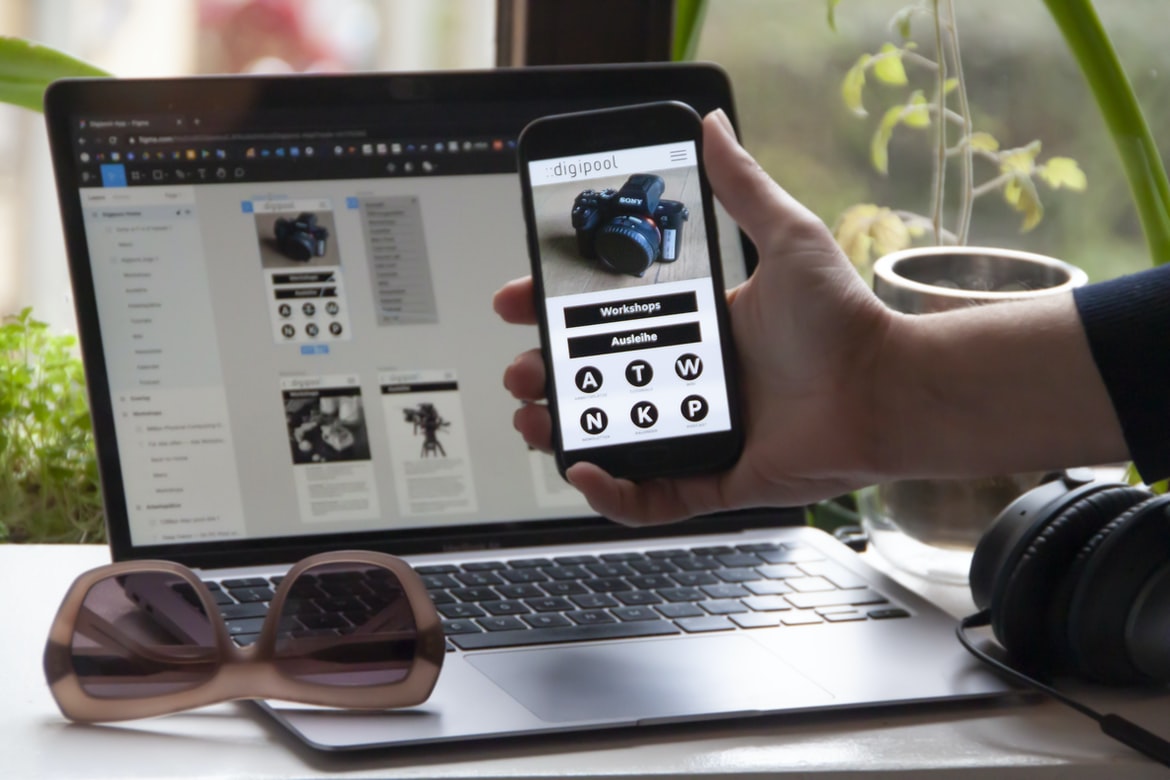
Figma is a user interface design tool which allows users to create mockups or prototypes for web and mobile applications. It boasts an intuitive drag-and-drop interface and offers a variety of features such as vector illustrations, 360° views, and real-time collaboration. Figma has been used by some of the world’s leading brands, including Airbnb, Walmart, Twitch, and Atlassian.
Adobe XD
Adobe XD is an application development platform that helps designers and developers create powerful, interactive applications. Adobe XD gives users the power to quickly create prototypes and test designs before developing a full app. This platform also has robust UX capabilities, making it ideal for creating user-friendly applications.
Design Mobile App
There are many factors to consider when designing a mobile app, from the user interface (UI) to the user experience (UX). UI design is particularly important for mobile apps, as users must interact with them in a different way than traditional websites. UX design focuses on making sure the app is easy to use and provides an optimal experience.
One of the most important aspects of any mobile app is its graphics. Graphics need to be simple yet effective in order to keep users engaged. Additionally, animations should be used sparingly so that users feel like they are interacting with the app fluidly.
Overall, it’s crucial to pay close attention to both UI and UX when designing a mobile app. Doing so will ensure that users have a positive experience using your product and continue using it long-term.
Graphic Design
Design is the process of creating a brand, product or service that is appealing to the human eye. Graphic design encompasses the creation of graphics for print, web and other media. A graphic designer must have excellent skills in typography, colour theory and composition, as well as an understanding of how people use visual communication to make decisions. Graphic designers work with clients to create a vision that meets their needs while staying within budget. Graphics design is the process of designing the visual appearance of a product, service, or website. It includes the selection and arrangement of typefaces, images, and other graphic elements; the development of layout plans and thumbnails; and the creation of finished graphics files. A graphic designer typically develops original designs, but may also work with existing designs to improve them. Some of the most common applications people use on a daily basis are email, calendar, and browser. Each application requires a unique design that is both functional and visually attractive to users. A designer’s job is to take an idea or concept and turn it into an application that people will want to use.
Graphic designers must have strong skills in both design and coding. They need to be able to create concepts and mockups of the interface before any programming is done. Once the program is created, they need to make sure the designs look good on various devices, including mobile devices.
If you’re interested in becoming a graphic designer, be sure to have a strong background in art or design. You’ll also need proficiency in Photoshop and Illustrator, as well as some knowledge of HTML/CSS.
What is UI design?
UI design refers to the process of designing the User Interface (UI) for an application. It includes everything from developing a look and feels for the interface down to the individual elements within it. This can include anything from icons and buttons to layout and colour schemes.
UI design is often a critical part of any app development project, as it can impact how users interact with the app and, ultimately, how successful it is. It’s also important to consider user feedback when designing an interface – if something feels awkward or difficult to use, chances are users will quickly lose interest in using the app.
As with all aspects of app development, good UI design takes time and effort – but it can be well worth it in terms of user satisfaction and eventual success. UI design is the process of designing the User Interface (UI) for a software application or website. The UI design can involve the coordination of graphic elements, typography, layout, colour, and motion on a computer screen. It is also the process of deciding how an interface should look and feel to maximize usability and pleasure for users.
What is UX design?
UX design is the process of designing a system or product with the end user or customer in mind. It involves understanding the user’s needs and wants, creating a usable interface, and testing it with potential users. The goal is to create an experience that meets or exceeds the customer’s expectations.
When designing a system, you must take into account many different factors, including the user’s goals, current environment, and past experiences. You also need to design for various types of users, including those who are new to your product or service, experts in your field, and people who use multiple devices.
UX design can be difficult but rewarding work. It can help organizations improve their products and services while reducing frustration among their customers.
Visual Communication
Visual communication has come to be a fundamental part of our lives. It has become increasingly important in the design and development process of applications. The user interface (UI) designer must take into account how visual elements interact with one another in order to create an effective and user-friendly experience. Similarly, the UX designer must understand how users perceive and interact with the various components of an application’s interface. In this article, we will focus on the UI design aspect of visual communication and explore some key principles that help create effective interfaces.
When designing a UI, it is important to consider the overall layout and structure of the interface. This includes determining where different pieces of information will be displayed, as well as deciding on which elements will be prominent and focal points. Certain design principles can be applied when arranging these elements, such as using hierarchy to make navigation easy for users. Additionally, effective use of typography can help convey information quickly and easily to users.
In terms of visual communication, it is important for designers to know how users perceive different types of information. For example, text may be understood more quickly than images or icons. Therefore, it is often best to place text near other components that users may need in order to understand the content (such as navigation menus). Additionally, designers should consider how users will interact with their interfaces – for example, by clicking on objects or scrolling through long lists. Visual communication is the process of creating a message that is understood through sight. Visual communication can take many different forms, from billboards to newspaper articles to advertisements. In application building and design, visual communication often refers to the interface and user experience (UX) of an application.
A good visual interface allows users to interact with the application in a simple and efficient way. Users should be able to find what they are looking for quickly and be able to navigate the interface easily. The look and feel of an interface should be consistent across all platforms and devices that the application will be used on.
User experience can also play a big role in visual communication. Poor user experience can lead to frustrated users who may then discontinue the use of the application altogether. It is, therefore, important that any changes made to an interface or UX are properly tested before they are released into the public domain.
Visual Communication Vs Graphic Design
Visual communication is generally about how an idea or message is delivered through visuals. Graphic design, on the other hand, is more about the overall appearance of a piece of work.
Visual communication is often used in applications and websites to create a feeling or atmosphere. This can be done by using colour, layout, typography, and imagery. Graphic designers are often tasked with creating looks for products like logos, packaging, and advertising. They may also work on website designs or user interfaces. There is a lot of debate surrounding the difference between visual communication and graphic design. However, at their core, both are about creating an effective visual representation of information. Visual communication focuses on conveying meaning through images, while graphic design is all about creating a visually appealing and effective presentation.
When it comes to user interface (UI) design, it’s important to keep in mind that users aren’t always going to be looking at your app from the perspective of a designer. In fact, many people use apps without ever noticing the interface design. So, it’s important to think about how users will interact with your app. will they be tapping buttons or scrolling through screens? Will they need to enter data into fields? Will they need help to find what they’re looking for?
UX (user experience) is also an important part of app development. It’s crucial that you take into account how your app will look and feel when used by different types of users. For instance, will elderly users be able to see the screen easily? Or does your app require high-level technical knowledge in order to operate properly?
Application of Graphic Design: Adobe Photoshop, Adobe Illustrator, Adobe InDesign
Graphic design is the process of designing visual elements for use in printed or electronic communication. The term can encompass any type of graphic design, from logo design to simple web graphics. In a digital world, graphic designers are also responsible for the overall user experience of a website or application, from the look and feel down to the smallest detail.
Adobe Photoshop is a popular program for editing graphics files. Adobe Illustrator is used for vector drawings and illustrations, and Adobe InDesign is used for creating layouts and typography in print-ready formats.
Figma, Adobe XD, WordPress, Elementor.
Figma, Adobe XD and WordPress are three of the most popular application building and design platforms on the market. Elementor is another popular platform that can be used for UI design. All of these platforms have their pros and cons, but they all offer a wide range of features that can be used to create great applications.
One of the biggest advantages of using Figma is its interface. It is very easy to use and navigate, making it perfect for those who are new to application development or design. Adobe XD also has an easy-to-use interface, but it does not have as many features as Figma. However, it is more affordable than Figma and offers more features in terms of workflow and design tools. WordPress is less expensive than Adobe XD but does not offer as many features as Figma or Elementor. However, its popularity makes it one of the most popular platforms for building applications. Lastly, Elementor has a user-friendly interface but does not offer as many features as either Adobe XD or WordPress. It is also more expensive than both Adobe XD and WordPress.
All three platforms offer a wide range of tools for creating user interfaces and user flows. They all have drag-and-drop tools, which make it easy to create custom interfaces quickly and easily. Additionally, they all offer templates that can be used to get started quickly with your project.









