

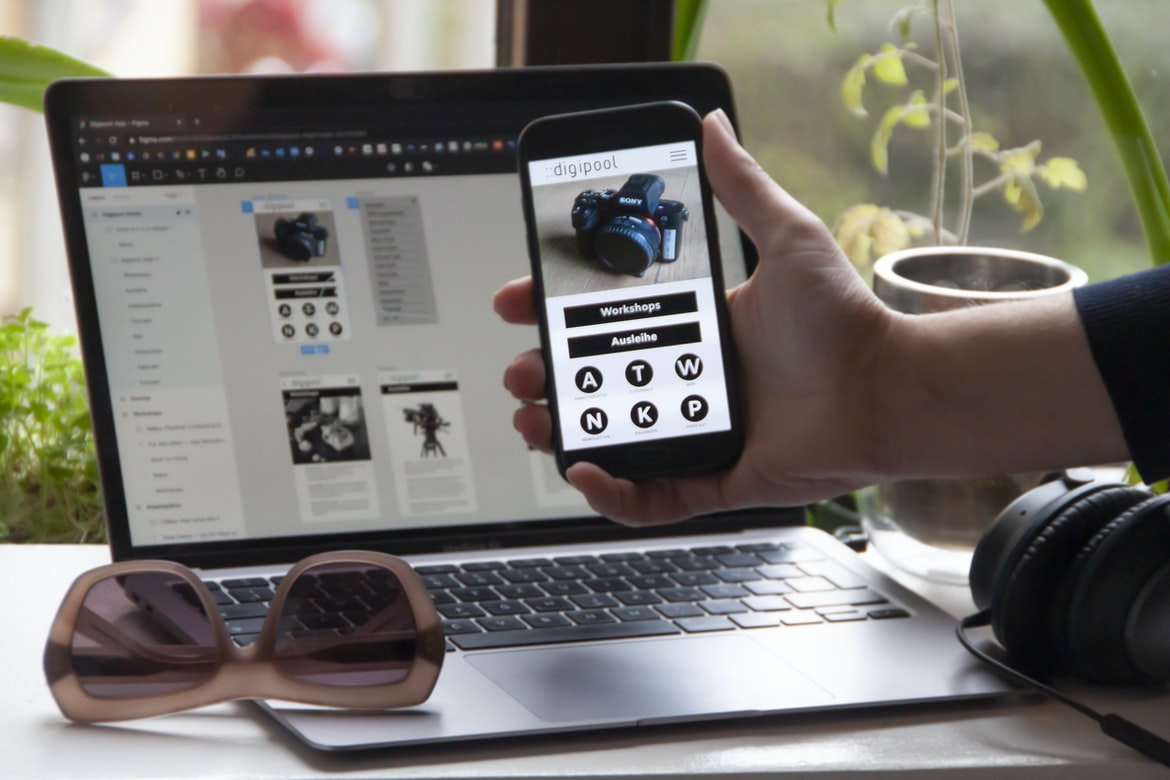
Design Elements Of An App – Free Learning – What is UI UX? How can it help improve the user experience of an application?
UI UX is the design and implementation of an application’s user interface. It can help improve the user experience by making it more intuitive, efficient, and attractive. By designing a user interface that is easy to use and appealing to look at, users will be more likely to stay engaged with the application and make use of its features. UI UX also helps reduce cognitive load on users, which can result in faster and easier navigation through an application. User interface (UI) design is the process of creating a visual presentation that enables users to interact with an application. It can help improve the user experience by ensuring that the components of an application are easy to use and understand, making it easier for users to complete tasks. UI UX design can also focus on creating a consistent look and feel for all elements of an app, from the main menu to individual dialogue boxes. By emphasizing these elements and making them visually appealing, developers can create a more welcoming and efficient experience for their users.
Prerequisites for good UI UX: Understanding users and their tasks, designing effective UIs that fit their needs.
UIs are not just about looks and design – they need to be effective and fit the needs of the users. A good UI UX starts with understanding users and their tasks. Next, the UI must be designed in a way that fits the specific needs of each user. Finally, effective UIs are easy to use and don’t require excessive training or effort from the user. UI UX is essential for making an effective user experience. A good UI should fit the needs of users and be easy to use. When designing a UI, it is important to understand who the user is and what their task is. In order to create an effective UI, it is also important to design for specific types of users.
Building a strong UIUX foundation: Putting your users first by understanding their needs and goals, then designing a well-thought-out interface.
There’s no denying the importance of a well-crafted user interface in an application. After all, if users can’t find what they’re looking for and navigate through the interface easily, they’ll likely abandon your app altogether. But building a strong UIUX foundation isn’t as easy as simply slapping together a pretty presentation; you need to understand your users’ needs and goals first. In this article, we’ll outline some tips for designing a well-thought-out interface based on our experience working with clients and customers across industries.
1) Make sure your interface is easy to use from the get-go. Start by identifying your app’s key features and ensuring that all required information is prominently displayed within reach. Eliminate any navigation barriers that may crop up later on, such as hidden tabs or buried menus.
2) Keep things simple where necessary.
Guidelines for creating a successful UIUX design: Keep things simple and easy to use, focus on the overall task at hand, and make sure your designs are consistent with your brand.
Consistent with your brand, your app’s user interface should be sleek and easy to navigate. The colours, fonts, and layout should be consistent throughout the app. All buttons, labels, and icons should be clear and legible. Use textured backgrounds to add depth and realism to your user interface.
User interfaces can be designed in a variety of ways, but they all have some common elements. User interfaces should be sleek and easy to navigate. They should use colours, fonts, and layouts that are consistent throughout the app. All buttons, labels, and icons should be clear and legible. Textured backgrounds can add depth and realism to the user interface.
Tips for improving user engagement with your application: By following these simple tips, you can keep users coming back for more.
Building an engaging user interface (UI) is one of the most important aspects of creating a successful application. By following these tips, you can help keep your users coming back for more.
1. Keep your design simple and easy to understand. Users will be less likely to interact with your UI if it’s difficult to understand or navigate. Make sure all elements are labelled and organized logically and avoid using too many icons or buttons.
2. Use colour and contrast wisely. Bright colours are often easier to see, while darker colours make items less conspicuous and can help users focus on what they’re working on. Use contrasting colours sparingly, though – overuse can quickly become overwhelming and confusing for users.
3. Use clear layout structures and templates.
1. The application-building process is fraught with challenges, and one of the most difficult tasks is designing user interfaces that are easy to use and look good.
2. Poor user interface design can lead to frustrated users and decreased productivity.
3. There are a number of techniques that can be used to improve the usability of an application’s UI, such as using simple fonts, creating consistent spacing between elements, and avoiding cluttered layouts.
Application building UIs can be difficult, time-consuming, and frustrating. A poorly designed UI can make it difficult for users to navigate the application and find what they are looking for. However, there are several steps that can be taken to improve the usability of an application’s UI.
First and foremost, it is important to take into account the user’s preferences when designing the UI. This means understanding what features they want to use and how they want to use them. Additionally, it is important to keep in mind the user’s current environment and how that affects their usage of the app. For example, if an app is being used in a dark room, certain elements may need to be adjusted to make sure that the user has an easy time seeing what is onscreen.
Application Building
Application building is an important part of software development, but it can be difficult to create a user-friendly interface. UI UX is one of the key aspects of application design that affects how users interact with the application. In this article, we will discuss some tips for designing user interfaces that are easy to use.
Adobe XD: Building Apps Without Coding Knowledge
Adobe XD is a platform for building apps without coding knowledge. It helps users to create interactive and immersive user interfaces with a drag-and-drop interface. Adobe XD has been designed for developers who want to quickly build high-quality applications without having to learn to code. Adobe XD comes with a wide range of features, such as vector graphics, animation, and AI capabilities. It also includes tools for collaboration and tracking changes among team members. Adobe XD is a user interface design tool that lets non-coders build apps. The app builder has a drag-and-drop interface and lets users create UIs without coding. Adobe XD also has built-in components for typography, animation, and charts.
E-Commerce Platform
E-commerce platforms make it easy for businesses to sell their products online. There are a number of different e-commerce platforms available, and each has its own advantages and disadvantages. Here are the three most popular e-commerce platforms:
1. Amazon Web Services (AWS) is the largest e-commerce platform in the world. It offers a variety of features, such as elasticity and scalability, that make it ideal for larger businesses.
2. Shopify is a popular platform for small businesses and entrepreneurs. It has a user-friendly interface and is very affordable compared to other e-commerce platforms.
3. eBay is another popular e-commerce platform that allows sellers to sell directly to consumers. Application-building platforms allow businesses to quickly and easily create custom interfaces for their applications, saving time and money. Platforms like WordPress make it easy to add custom design and functionality to existing websites, while Shopify makes creating an e-commerce platform a breeze.
Figma
Figma is a user interface design tool that lets you create mockups of your applications’ user interfaces in minutes. You can use Figma to prototype different interactions and designs and then test them with users. Figma also has built-in collaboration features so you can work with other people on your projects. Figma is a powerful application-building platform that allows users to easily create and customize user interfaces. The platform provides a drag-and-drop interface that makes it simple for users to create interfaces that look professional. Additionally, the platform offers a variety of features that make it easy to create complex interfaces.
Adobe XD
Adobe XD is a new application development platform that was announced at Adobe’s MAX conference earlier this year. It aims to make it easier for developers to create user interfaces by providing a more intuitive and collaborative environment.
One of the main features of Adobe XD is its Quick Start feature. This allows users to quickly create prototypes without having to learn any code. Additionally, Adobe XD is designed to work with other Adobe products, including Photoshop and Illustrator, which makes it easy for developers to export their projects into other formats.
Overall, Adobe XD is an innovative application development platform that could help speed up the process of creating user interfaces.
Design Mobile App
There is no doubt that the app market is growing exponentially, with new entrants and updates being released on a daily basis. In order to stand out and appeal to customers, it is essential for businesses to have a well-designed mobile app. Although there are many design options available, the following tips will help you create an app that looks great and is easy to use.
1. Use Clear Graphics and Color Scheme
When creating your graphics, make sure that they are clear and use colours that are easily identifiable. This will help users navigate your app more quickly and easily. Additionally, avoid using too many buttons or icons, as this can be confusing for users.
2. Create a Consistent Layout Across Devices
Make sure that the layout of your app is consistent across different devices – this includes both iOS and Android devices.
Graphic Design
Graphic design has come a long way since the days of typography and layout. With so many different tools and technologies at our disposal, graphic designers can create stunning user interfaces (UI) and web layouts that are both user-friendly and attractive. In this article, we’ll explore some of the most common graphic design tools and techniques, as well as some tips for creating effective UI UX. Graphic design is the process of creating a visual representation of Communication. Graphic designers create layouts, graphics, and icons for websites, print materials, advertisements, and other forms of media. They use a variety of computer programs to create attractive designs that can be easily understood by viewers.
A graphic designer must have an understanding of typography, composition, colour theory, layout techniques, and design principles. They also need to be familiar with digital tools and software such as Adobe Photoshop and Inkscape. A good graphic designer must be able to work independently as well as in collaboration with others on projects. The job of a graphic designer is to create beautiful, eye-catching designs that communicate the intended message to the audience. They use a variety of design tools and techniques to achieve this goal. In order to be successful, graphic designers need to have strong knowledge of typography, colour theory, layout, and imagery. Additionally, they must be familiar with current trends in both print and web design.
What is UI design?
Today, UI design is an essential skill for any web or mobile developer. It can help create a polished and user-friendly interface for your applications, websites, or mobile apps. While there is no set definition of UI design, it generally refers to the process of creating the visual look and feel of a product.
UI designers typically work with different teams within an organization to create a unified look and feel for all their products. They may collaborate with developers, artists, QA testers, marketing professionals, and others to create a well-rounded product that meets the needs of the customer.
To be successful in this field, you need to have strong skills in both graphic design and user interface development. You also need to be creative and have an understanding of how users interact with digital products. UI design is the process of creating the visual appearance and function of a user interface, including the layout and graphics. It can involve both designing individual components, such as buttons and menus, as well as overall layouts. UI designers may also need to take into account user feedback when designing a new interface.
What is UX design?
UX design is the process of designing a product’s User Interface or User Experience. This includes everything from the visual design of screens and menus to the smooth flow of data between different pages or features. It’s about creating an interface that is easy to use and looks attractive while still meeting all the functional needs of users.
UX design can be applied to any type of product, from desktop software to mobile apps. But it’s especially important in digital products, where every second counts. That’s why it’s often called “the heart of a successful business.”
The key element in any good UX design is thorough research. You need to understand your target audience and their needs, which means learning as much as you can about them. You also need to test different designs using real users before finalizing anything. User experience (UX) design is the process of creating an interface that is both effective and engaging for users. UX design focuses on creating a positive user experience by taking into account the needs of the end users. This includes understanding the user’s goals, motivations, and current environment before designing any part of the interface.
Good UX design involves thinking about how different elements of an interface will work together. For example, if you’re redesigning a web page, you might consider how colours and layout will affect usability. Similarly, if you’re designing a mobile app, you need to take into account how touch screens work and how users interact with various menus and buttons.
UX design is important not just for websites and mobile apps—any type of interface can benefit from good UX design. For example, consider a product menu or shopping cart interface.
Visual Communication
Visual Communication is one of the most important aspects of user interface design. It can help users understand what’s going on and make it easier for them to interact with your application. There are several different ways to improve your visual Communication, and each has its own set of benefits.
In this article, we’ll discuss some of the most common methods for improving visual Communication in user interfaces, as well as some tips for using them effectively. We’ll also explore four different types of user interfaces and how they can be improved with visual communication techniques. Finally, we’ll provide a few examples of applications that use Visual Communication effectively to improve the user experience. Visual Communication is an essential part of user experience. It helps users understand the purpose of an interface and how it works. With the right visual design, users can interact with a system more easily and feel confident in their interactions. There are several different techniques that designers can use to create effective visual Communication.
One common approach is to use icons or other symbols to represent different functions or features of an interface. These icons should be easy to see and understand so that users know what they need to do to complete their tasks. Symbols can also help users orient themselves in space and time, which can improve their overall understanding of the system.
Another important aspect of user experience is layout design. Every element of a user’s interface should be placed where it will be most effective in directing the user’s attention.
Visual Communication Vs Graphic Design
There is an increasing trend of using visuals in lieu of text when it comes to user interface design. This trend has been dubbed “visual communication,” and it involves using images, icons, and other visuals to communicate with users.
Visual Communication can be effective for a number of reasons. First, it can help users learn new information more quickly. Second, it can help users focus on the task at hand instead of being distracted by irrelevant visuals. Third, visuals can help motivate users to take action.
While visual Communication is gaining popularity among UI designers, there are still some important considerations that must be taken into account. For example, graphics should never take precedence over the user’s experience or functionality. Additionally, visual Communication should be consistent across all aspects of a product – from the website’s design to the user interface used in applications.
Application of Graphic Design: Adobe Photoshop, Adobe Illustrator, Adobe InDesign
Adobe Photoshop, Adobe Illustrator, and Adobe InDesign are powerful tools that can be used to create user interfaces (UI) and user experience (UX) designs. In this article, we will discuss the application of graphic design to UI and UX design and illustrate how each program can be used to create effective designs.
Graphic designers use a variety of programs to create layouts, graphics, logos, icons, illustrations and videos for websites, applications and other digital projects. Each program has its own strengths and limitations; for example, Photoshop is great for creating simple graphics or logos, while InDesign is better suited for complex layouts with multiple layers. However, all three programs have several features that can be used in UI and UX design. Graphic design is not just about creating pretty pictures. It’s about designing interfaces that are easy to understand and use. Whether you’re a designer working with Adobe Photoshop, Adobe Illustrator, or Adobe InDesign, these applications have many features that can help you create sleek and user-friendly UIs.
Figma, Adobe XD, WordPress, Elementor.
The three most popular application-building platforms are Figma, Adobe XD, and WordPress. Each has its own strengths and weaknesses, but they all have one thing in common: they make creating user interfaces easy. In this article, we’ll take a look at each platform and see how it can help you build sleek, user-friendly interfaces faster than ever before.
Figma is a versatile platform that lets you create prototypes quickly and easily. Its drag-and-drop interface makes designing screens easy, and its built-in plugin system lets you add functionality easily. Adobe XD is more geared towards creating polished products, but its drag-and-drop interface makes prototyping easy as well. Plus, its plugins let you add customizations to your prototypes very quickly.
Prototypes can be customized quickly and easily to fit the specific needs of your project. By following a few simple steps, you can make your prototypes look and feel like the final product.
1. Start by creating a rough outline of what you want your prototype to look like. This will help you determine which features to include and how they should be arranged.
2. Begin by sketching out basic designs for your interface elements using simple shapes and colours. You can later add more detailed designs if necessary, but keeping things simple will speed up the process.
3. Once you have a basic design in place, start adding in dummy content to test out how everything looks and works. This includes text fields, buttons, and other elements that users might interact with on a daily basis.
What Is A Prototype?
Prototypes are a very important part of the user experience design process. They help to create a better understanding of how users will interact with an interface and can be used to test and improve the design before it is finalized.
A prototype is simply a mockup or rough version of an interface that allows users to try out different scenarios and see how they would behave. It can be interactive or static, but the main goal is to provide feedback on how users might interact with the proposed design.
There are a few things to keep in mind when creating a prototype:
-Make it as simple and easy to use as possible so that users feel comfortable testing out different scenarios.
-Create prototypes that reflect the final design as closely as possible, but don’t hesitate to make changes if necessary.
Designing user interfaces can be a daunting task. Not only do you need to consider the look and feel of each individual screen, but you also need to take into account how users will interact with the interface. One way to simplify this process is to create prototypes that reflect the final design as closely as possible, but don’t hesitate to make changes if necessary.
By using prototypes, you can quickly test different designs and see which ones work best. This way, you can save time and energy while still ensuring that your final product looks professional and meets user needs.









