

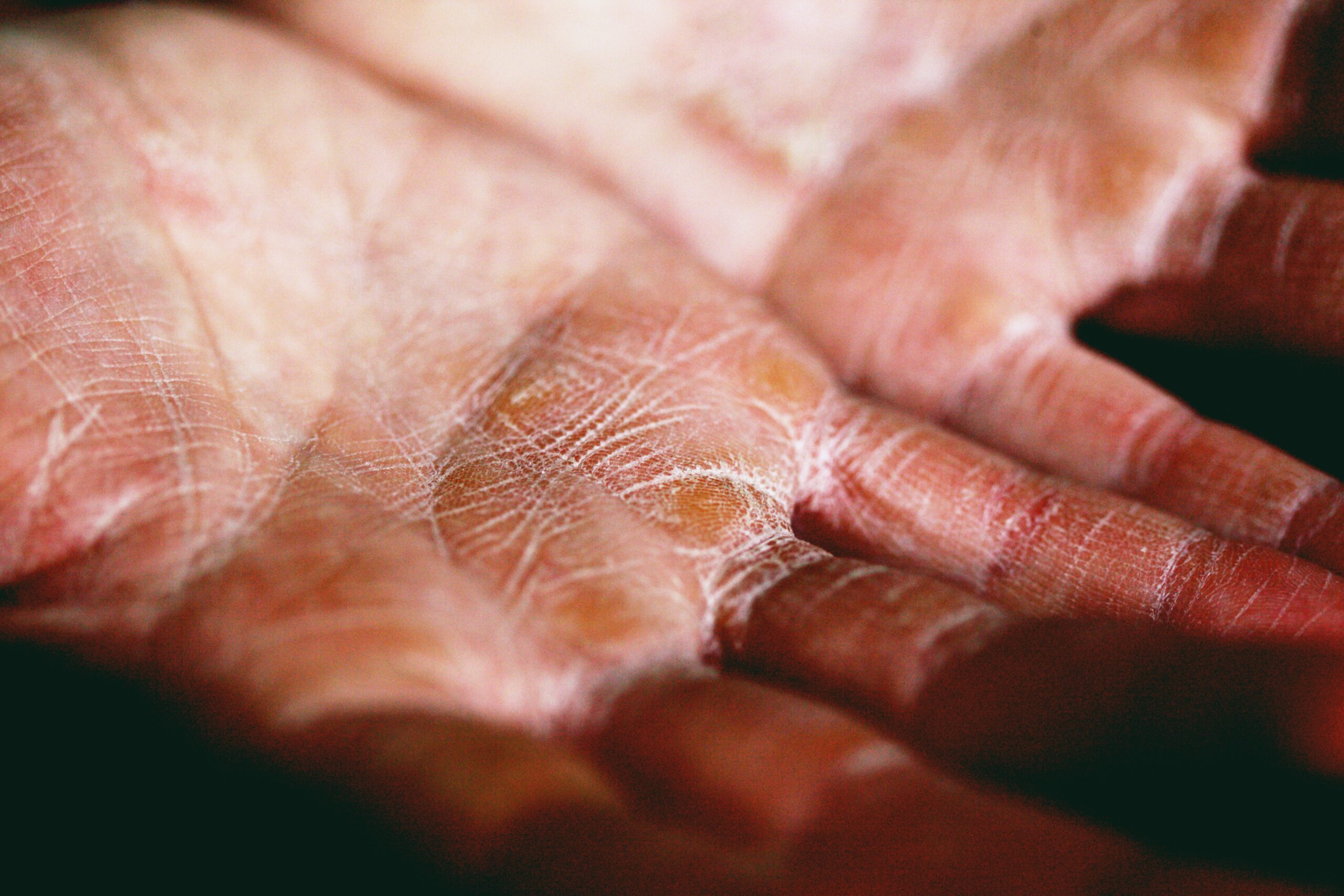
Cracked Skin Effect – Adobe Photoshop
Have you ever seen a close up photo of someone with dry, cracked skin and wondered how the photographer made the skin look so interesting? The technique is called the “cracked skin effect” and it’s easy to do in Adobe Photoshop. In this article, we’ll show you how to create the cracked skin effect in Photoshop.
Introduction: What is the cracked skin effect?
The cracked skin effect is a phenomenon that can occur when using Adobe Photoshop. It is caused by the software’s auto-align function, which can sometimes cause the edges of an image to become misaligned. This can create a jagged, uneven appearance that can make an image look like it has been damaged or torn. The effect can be used to create a variety of different looks, from distressed and aged photos to more abstract and surreal images.
How to create the cracked skin effect in Photoshop
There are many ways to create the cracked skin effect in Photoshop. One way is to use the brushes that are provided in the software. Another way is to use the layer mask option.
To create the cracked skin effect using the brushes, first create a new layer. Then select the brush tool and choose a brush with jagged edges. Next, set the foreground colour to black and the background colour to white. Finally, paint over the area where you want the cracks to appear.
To create the cracked skin effect using the layer mask option, first create a new layer and add a black and white image of cracked skin to it. Next, click on the layer mask icon at the bottom of the layers panel. Finally, paint over the area where you want the cracks to appear.
What are the benefits of using the cracked skin effect?
There are many benefits to using the cracked skin effect in Adobe Photoshop. This effect can add depth and dimension to your images, and it can also be used to create a distressed or aged look. Cracked skin is also great for creating textured backgrounds. Here are just a few of the benefits of using the cracked skin effect:
- Adds depth and dimension
- Creates a distressed or aged look
- Creates a textured background
- Works with both black and white and colour images
- Works with both female and male skin
How to use the cracked skin effect in your projects
Cracked skin is a popular effect in Photoshop, and it’s easy to see why. This effect can add realism to your projects, and it’s easy to achieve. Here’s how to use the cracked skin effect in your projects.
First, create a new layer in Photoshop. Then, use the Brush tool to paint over the area you want to be affected by the cracked skin effect. Next, go to Filter > Noise > Add Noise. In the Add Noise dialog box, set the Amount to 100%, Distribution to Uniform, and check the Monochromatic box. Click OK.
Now go to Filter > Blur > Gaussian Blur. In the Gaussian Blur dialog box, set the Radius to 5 pixels and click OK.
Adobe Photoshop: The newest features and what they mean for graphic designers
Adobe Photoshop is a widely used programme for graphic design and photo editing. The software is constantly evolving and the latest version, Adobe Photoshop CC 2019, includes some major new features that are sure to be of interest to designers. One of the most useful new features is the Cracked Skin Effect, which allows you to quickly and easily create realistic cracked skin textures. This can be used for a variety of purposes, such as creating aged or damaged skin effects, or simply adding an interesting texture to your work.
Another great new feature in Adobe Photoshop CC 2019 is the ability to automatically convert your photos to black and white. This can be a great time-saver if you often find yourself working with photos that would benefit from a monochrome treatment. The software also includes a number of other minor improvements and bug fixes.
Graphic design: A look at the different types and skills needed for opportunities in the future
Graphic design is an ever-evolving field with new opportunities opening up all the time. To be a successful graphic designer, you need to have a good understanding of the different types of graphic design and the skills required for each.
There are three main types of graphic design: print, web, and motion graphics. Print graphic designers create designs for printed materials such as newspapers, magazines, and books. Web graphic designers create designs for websites and digital media. Motion graphics designers create animation and video effects for TV, movies, and video games.
To be a successful graphic designer, you need to have strong visual communication skills and be able to use various software programmes such as Adobe Photoshop, Illustrator, and InDesign. You also need to have good problem-solving skills and be able to think creatively to come up with new ideas.
History of Adobe Photoshop: How this software has changed since its beginning
Adobe Photoshop has been around since the late 1980s and has undergone many changes since its inception. Originally created as a way to touch up photographs, Photoshop has evolved into a powerful tool for artists and graphic designers. With its ability to create realistic images and manipulate existing ones, Photoshop has become one of the most widely used pieces of software in the world.
While Photoshop started out as a fairly basic programme, it has become increasingly complex over the years. Newer versions of the software offer a wide range of features that allow users to create highly detailed and realistic images. Photoshop is also used extensively in the field of digital retouching, where it can be used to fix flaws in photographs or even create completely new images.
Despite its many uses, some people argue that Photoshop is actually doing more harm than good.
How to improve your Photoshop skills
If you’re looking to improve your Photoshop skills, one area you might want to focus on is creating realistic effects. One popular effect is the cracked skin effect, which can be used to create a aged or distressed look. Here are some tips on how to create this effect:
- Start with a base layer of skin tone. You can use a photo or create your own base layer in Photoshop.
- Next, add a cracks layer on top of the skin tone layer. To do this, use the pen tool to create a path around where you want the cracks to appear. Then, use the stroke command to turn the path into a brushstroke.
- Finally, add shading and highlights to the cracks layer to make them stand out more.
Graphic design trends for 2023
As we move into 2023, we can expect to see some fresh new trends in the world of graphic design. One of the hottest looks right now is the cracked skin effect, which can be achieved using Adobe Photoshop.
To create this effect, start by creating a new layer in Photoshop. Next, use the brush tool to paint over the area you want to crack. Once you’ve done that, go to Filter > Distort > Wave and apply a wave filter to your layer.
Now it’s time to add some texture. Go to Filter > Texture > Texturizer and choose a texture that you like. Apply it to your layer and then adjust the opacity until you’re happy with the look.
Finally, go to Layer > New Adjustment Layer > Curves and create a curves adjustment layer.
5 Creative ways to use Adobe Photoshop
- Adobe Photoshop can be used to create a cracked skin effect. This can be done by creating a new layer and then using the brush tool to paint over the skin. The brush size and hardness can be adjusted to create the desired effect.
- Another way to use Adobe Photoshop is to remove blemishes from photos. This can be done by selecting the spot healing brush tool and then clicking on the blemish. The software will automatically remove the blemish from the photo.
- Adobe Photoshop can also be used to change hair colour. This can be done by selecting the hair with the lasso tool and then changing the hue/saturation levels. For a more natural look, it is best to select only a few strands of hair at a time.
- Adobe Photoshop can be used to create custom shapes. This can be done by selecting the shape tool and then drawing your own custom shape.
- Adobe Photoshop can also be used to create custom text. This can be done by selecting the type tool and then clicking on the canvas of your photo.
3 Types of graphic design jobs you didn’t know existed
There are many different types of graphic design jobs available, but here are three you may not know about.
- Social media manager: A social media manager is responsible for creating and managing a company’s social media accounts. This includes posting content, responding to comments and messages, and monitoring analytics to see what is working and what isn’t.
- UX/UI designer: A UX/UI designer is responsible for the user experience and user interface of a website or app. They create designs that are not only visually appealing, but also easy to use and navigate.
- Motion graphics designer: A motion graphics designer creates animations and videos for websites, commercials, and other digital content. They use both graphic design skills and animation skills to create their work.
The necessary skills needed in graphic design
Graphic design is a field that requires both creativity and technical skills. As a graphic designer, you will need to be able to use various software programmes to create your designs. Photoshop is one of the most popular software programmes used in graphic design, and it is important to have a strong understanding of how to use it. In addition to knowing how to use Photoshop, you will also need to be able to think creatively in order to come up with original designs. Graphic design is a field that combines both art and technology, so it is important to have skills in both areas.
Adobe Photoshop: The future of graphic design
Adobe Photoshop is a software that allows users to create and edit graphic designs. It is one of the most popular programmes for graphic designers and is used by professionals in many industries.
While Adobe Photoshop has been around for over 30 years, it continues to evolve and be updated with new features. With each new release, designers have more tools at their disposal to create stunning designs.
As graphic design trends move towards more minimalistic and flat designs, Photoshop has kept up with the times by offering new features such as the Shape Builder tool and live corners. These tools make it easier than ever to create clean, professional designs.
Looking ahead, it seems likely that Adobe Photoshop will continue to be one of the most widely used graphic design programmes. With its robust set of features and constant updates, it provides everything that designers need to create beautiful, modern designs.
The different types of Adobe Photoshop tools and their functions
There are a variety of Photoshop tools that can be used to create different effects. The Clone Stamp tool is often used to fix imperfections in photos or to create interesting patterns. The Brush tool can be used to paint, airbrush, and retouch images. The Pencil tool can be used to draw lines and shapes. The Eraser tool can be used to erase pixels and restore parts of an image. The Pattern Stamp tool can be used to create interesting textures and patterns.
Defining Adobe Photoshop
Adobe Photoshop is a software application for image editing and creating graphics. It is one of the most widely used applications in the world for these purposes. Adobe Photoshop has many features and tools that allow users to manipulate images in a variety of ways.
Some of the most common uses for Adobe Photoshop include retouching photographs, creating digital artwork, and designing web graphics. Adobe Photoshop can be used to correct imperfections in photos, such as removing unwanted blemishes or red-eye. It can also be used to create completely new images from scratch. Artwork created in Adobe Photoshop can be either raster or vector-based.
Web graphics created in Adobe Photoshop often have a similar look and feel to traditional print graphics. However, because they are intended for use on the web, they must be saved in a file format that is compatible with web browsers.
The history of Adobe Photoshop and how it’s changed graphic design
Adobe Photoshop is a widely used raster graphics editor developed and published by Adobe Inc. It was originally created in 1988 by Thomas and John Knoll. Since then, it has become the de facto industry standard in raster graphics editing, to the point that it has also become an adjective in its own right (e.g. “Photoshop image”, “Photoshop contest”).
One of the earliest versions of Photoshop was releasing for Apple Macintosh computers in 1990. The software soon became popular for its ability to manipulate images digitally with a great degree of control. In 1992, Photoshop version 2.0 added support for layers, which allowed for more complex image editing effects.
Over the years, Photoshop has continued to evolve and add new features. Today, it is an essential tool for graphic designers, professional photographers, and anyone who wants to manipulate or enhance digital images.
The future of graphic design: Professional opportunities
As technology advances, so does the field of graphic design. Designers are constantly finding new ways to create amazing visuals that appeal to audiences. The future of graphic design is bright, with many opportunities for designers to explore.
There are endless possibilities for what designers can create in the future. With the help of technology, they will be able to push the boundaries of what is possible and create truly unique and impressive designs.
Designers will also have more opportunities to work with clients from all over the world. With the internet, it is easier than ever to connect with people from all corners of the globe. This means that designers will be able to work with a variety of clients and create designs that are truly global in scope.
The future of graphic design is full of possibilities. For designers, this is an exciting time to be working in the industry. There is no question that graphic design is here to stay. The industry is growing by leaps and bounds and there are plenty of professional opportunities available for those with the right skill-set. The future of graphic design looks bright, with plenty of room for growth and creativity. Here are just a few of the exciting things that we can expect to see in the coming years:
- Virtual Reality – With the advent of virtual reality technology, designers will have the opportunity to create immersive, three-dimensional experiences for their clients. This will open up a whole new world of possibilities for both businesses and consumers alike.
- Augmented Reality – Similar to virtual reality, augmented reality will allow designers to superimpose digital content onto the real world. This could be used for everything from product demonstrations to educational materials and beyond.
- Robots – Robots are getting smarter every day and this will ultimately lead to a more efficient way of working. They can be used for a wide variety of tasks.
5 Amazing Adobe Photoshop effects you didn’t know were possible
There are a lot of different things that you can do with Adobe Photoshop to make some amazing effects. Some of these effects are things that you might not even think were possible. Here are five amazing Adobe Photoshop effects that you probably didn’t know were possible:
- Cracked Skin Effect: This is a really cool effect that you can create by using the liquify filter in Adobe Photoshop. To create this effect, start by creating a new layer and then fill it with black. Next, apply the liquify filter to this layer and use the forward warp tool to create cracks in the black layer. You can then adjust the opacity of this layer to get the desired effect.
- Glass Text Effect: This is a really neat effect that makes text look like it’s made out of glass. To create this effect, you’ll need to start by creating a new layer. Next, fill the layer with black and then set the opacity of the layer to 50%. Next, apply a Gaussian blur of 15 pixels to the layer and then set the layer s mode to Overlay.
- Distort Text: This is another unique text effect that you can use to give your text a sort of warped look. To create this effect, start by creating a new layer and then filling it with black. Next, set the opacity of the layer to 50% and then apply a Gaussian blur of 20 pixels to the layer. Next, set the layer s mode to Overlay, but change it from Normal blending mode to Screen blending mode.
- Glamour Glow: This is another unique text effect that you can use to give your text a sort of glamour glow. To create this effect, start by creating a new layer and then fill it with black.
- Gradient Glow: This is a very easy to achieve text effect that you can use to give your text a sort of glow. To create this effect, start by creating a new layer and then fill it with black.
5 Ways to make your graphic design stand out with Adobe Photoshop
In today’s market, making your graphic design stand out is key to getting ahead. With so many people vying for attention, it’s important to use every tool at your disposal to make sure your work is seen. Adobe Photoshop is a powerful programme that can help you create unique and eye-catching designs. Here are five ways you can use Photoshop to make your work stand out from the rest:
- Use layers to create depth and interest.
- Experiment with different textures and patterns.
- Incorporate illustrations or photography.
- Use bold colours and shapes.
- Think outside the box.
By utilising these five tips, you can create Graphic Designs that are sure to catch someone’s eye. With a little creativity and effort, you can use Photoshop to take your work to the next level!
There are a few things you can do to make your graphic design stand out with Adobe Photoshop. First, try using layer masks to create interesting effects. You can also use adjustment layers to change the overall look of your image. Finally, don’t be afraid to experiment with different filters and textures. By following these tips, you’ll be sure to create unique and eye-catching designs.
Check out Blue Sky Graphics online design school to learn more about graphic design!









