

What is UI UX, and why is it important?
UI UX is the design of a user interface that takes into account the needs and wants of users. It is important because it helps create an intuitive and user-friendly experience for those who use a website or app. UI UX can be customized to make sure that every user is happy and fulfilled with their experience.
Elements of a Web Design UI UX: How to design intuitive interfaces that help users accomplish tasks easily.
In order to create an intuitive web design UI, it is important to consider the user’s experience. Here are key elements to consider:
1. Layouts: Keep your designs simple and straightforward. Make sure buttons are easy to find and understand and avoid crowded areas that can confuse users.
2. Navigation: Make it easy for users to navigate your site by including clear menus, labels, and arrows.
3. Graphics: Use high-quality images that are easily understood by users. Avoid using text images that can be hard to read or confusing if they’re not properly spelt out.
4. Typography: Use readable fonts that are easy on the eyes, especially in large text blocks or onscreen elements like logos and buttons.
5. Contrast: Use different colours and shades to make items more noticeable and easier to read.
Guidelines for creating intuitive UIs: Tips for making your interfaces easy to use, regardless of users’ level of experience.
Web design UI UX guidelines:
-Make your interfaces easy to understand and use, regardless of users’ level of experience.
-Design for ease of use even when users are unfamiliar with your interface.
-Take advantage of standard user interface conventions to make sure your interface is easily navigable.
-Use colours, typography, and imagery to create a visually appealing and user-friendly interface.
-Keep buttons small and simple so that they are easy to click.
-Create hierarchical menus so that users can easily find the items they need.
User research in web design: How to gather user feedback and understand how they interact with your interfaces.
User research is an essential part of designing web interfaces, as it allows you to understand how users interact with your designs and what could be done to improve them. There are a few ways to conduct user research, but the most common is through surveys or interviews. Surveys can be sent out to a specific group of users, while interviews allow you to get input from actual people using your interface. It’s important to ensure that all feedback is taken into account when making changes to your designs. By gathering user feedback throughout the design process, you can create a better experience for both yourself and your users.
The power of customizability: Keeping your interface intuitive and customizable allows users to personalize their experience.
Customizability is one of the most powerful features of web design. It allows users to personalize their experience by choosing the elements and settings that are most comfortable for them. This makes the interface more intuitive and easy to use, which in turn, enhances user satisfaction. Here are some tips for user customization to your advantage:
1. Keep your layout flexible and modular. This will allow you to easily change the content and layout without having to redesign the entire interface. You can also add or remove modules as needed without affecting other parts of the site.
2. Use clear labels and icons to make navigation easy. Make sure all menu items are labelled clearly with concise icons, so users know what they’re selecting. Use arrows or other visual cues where necessary to help users move between sections of the site.
3. Use intuitive design principles wherever possible.
Customizable interfaces allow users to personalize their experience. Keeping your interface intuitive and customizable allows users to quickly get to the information they need, reducing the time needed to browse through a site. This makes your website more user-friendly and helps increase customer loyalty. By keeping your interface customized, you can ensure that all users have a unique experience while browsing your site.
Application of Graphic Design: Adobe Photoshop, Adobe Illustrator, Adobe InDesign
Graphic design is the process of designing visual elements for communication. It can be applied to a variety of mediums, such as print media, web design, or motion graphics. These programs are widely used in the graphic design industry and can help to create high-quality visuals.
Adobe Photoshop is the most popular program used for graphic design. It is available for both personal and professional use and has a wide range of features that can be used to create graphics. Some of the main features include layers, vector tools, filters, and effects. Adobe Illustrator is similar to Photoshop but has more specialized features for creating logos, illustrations, and infographics. It also includes tools for realistic rendering and 3D printing.
Figma, Adobe XD, WordPress, Elementor.
Web design UI UX has come a long way in the past few years. Gone are the days of clunky, outdated user interfaces. Today’s designers have access to some of the most powerful and user-friendly tools available, like Figma, Adobe XD, and WordPress. Which tool is best for your project? Let’s take a look.
Figma is CAD software that can be used to create user interfaces for websites and apps. It has a sleek, modern interface that makes creating designs easy and fun. Adobe XD is an Adobe product that lets you create stunning 3D designs for websites and apps. It has an intuitive interface and lets you create complex structures quickly and easily. WordPress is one of the world’s most popular content management systems (CMS).
Putting user interface design basics into practice will help create intuitive and user-friendly interfaces for your web projects.
User interface design basics are essential for any web designer. By understanding how to create intuitive, user-friendly interfaces, you can ensure that your projects are easy to use and look great on all devices. Here are tips for designing user interfaces that will help:
1. Keep your screens simple. Don’t overload users with too many options or menus, and keep everything visible at a glance. This will make navigation easier and faster.
2. Use clear fonts and colours. Make sure all text is legible at a distance, and select easy-to-read typefaces like Arial or Verdana. Bright colours also help to stand out and make the interface more visually appealing.
3. Use layering wisely. Don’t bury users in details; instead, let them see the essential elements first and then provide additional information as needed.
How to Test Your UX/UI Design For Maximum User
How to Test Your UX UI Design for Maximum User Satisfaction
User experience (UX) is the overall feeling and experience a person has while using a product or service. It encompasses both the design and implementation of the user interface, as well as how the end user interacts with it. A good user experience should make tasks such as finding information, completing tasks and getting help easy and intuitive.
When designing your user interface (UI), it’s important to consider how users will interact with it. There are different ways to test your UI design: through focus groups, surveys, interviews, and prototypes.
The following are tips for creating an effective UX design:
-Start by understanding your users’ needs. This can be accomplished by conducting market research or surveys.
-Make sure the information contained in your UI is easily accessible.
How can UX/UI design improve user experience?
User experience (UX) is the overall feeling a user has while using a product or service. This can be affected by many different things, like how easy it is to find what you’re looking for, how smooth the user interface is, and how well the design follows best practices. Good web UI design can make a huge difference in improving user experience. Here are ways that good UX UI design can improve the user experience:
1. Make sure everything is easy to find. Users should be able to quickly and easily find the information they need without having to scroll through long lists or pages. Group related items together where possible and make sure all buttons are clearly labelled.
2. Keep the user interface smooth and fast. If users have to wait too long for something to happen, they’ll likely abandon your site or app in frustration.
What are some of the best practices for UX/UI design?
Recently, there has been an increase in the focus on user experience (UX) in web design. While it is important to have a good design, making sure that it is also user-friendly can result in a more successful website. There are some key practices that can make for a better UX UI design:
1. Keep your designs simple. When users encounter complex interfaces, they may become frustrated and give up on using the site. Make sure to keep things as simple as possible so that users can easily understand what you are asking them to do.
2. Use clear and concise labels. When labelling elements on your page, be sure to use wording that is easy for users to understand. This will help reduce the number of times they need to look back at instructions or documentation in order to figure out how to use your site.
3. Keep your design consistent. Consistency is key to a good UI design, and your customers may not be as patient or forgiving when they encounter inconsistent elements on your site. In this case, it’s best to keep things as consistent as possible.
How does UX/UI design help achieve business goals?
When it comes to achieving business goals, effective user interface design is key. User interface (UI) design takes into account the way users interact with a system or website and can help make it more efficient and user-friendly. Effective UI design can help increase website traffic, engagement and conversions.
One of the most important aspects of UI design is making sure the overall look and feel of the site is consistent throughout. This helps users easily find what they’re looking for and reduces the chances they’ll become confused or frustrated. Additionally, designing effective buttons, labels, and other navigation elements can help users find their way around the site quickly.
In order to create a good UI, it’s important to take into account both the user’s needs and requirements.
What are the key elements of a successful UX/UI design?
There is no one-size-fits-all answer to this question, as the key elements of a successful UX UI design will vary depending on the specific project in question. However, some key aspects that should always be considered include user interface design, layout design, typography, and colour schemes.
User interface design focuses on how the user interacts with the application or website. It should be simple and organized, with clear guidelines for how users are supposed to interact with it. Layout design includes everything from how content is arranged on a page to how buttons are placed. Typography is essential for any type of UI design and can help to create a sense of hierarchy and style within an application or website. Colour schemes should be carefully chosen to match the overall brand or look of the website or application in question while also being easy on the eyes.
When users first encounter a website or application, their first impression is important. Too often, poorly designed interfaces can quickly turn users off and hinder their ability to interact with the site or application. Many factors go into designing an effective interface, but one of the most important is how easy it is on the eyes. Poorly designed interfaces can be incredibly difficult to navigate, making them a major deterrent for potential users.
It’s not enough to simply have a design that looks good, though – user experience also needs to be considered. Good web design takes into account the different devices that people use and how people interact with websites and applications on those devices. For example, a website or application may look great on a desktop computer but may not work as well on a phone or tablet due to different screen sizes and orientations.
What tools and technologies are used in UX/UI design?
UX design is about creating a user interface that is both visually appealing and easy to use. There are a number of different tools and technologies used in UX UI design, and each has its own advantages and disadvantages. Here are some of the most popular tools and technologies:
1. User research: One of the key aspects of UX UI design is understanding your users’ needs and wants. This involves conducting user research (in-person or online) to understand how people interact with the current UI, what works well and what could be improved. User research can also help you identify any potential problems with the design before they become serious issues.
2. Prototyping: A prototype is a simplified version of a web or app interface that allows you to test out how people will interact with it before you make any final changes.
There are many tools and technologies used in web design UI UX, but some of the more common ones include Adobe Photoshop, Sketch, Inkscape, and Illustrator. Additionally, there are a variety of software programs that provide basic user interfaces design features, such as Adobe Dreamweaver and Microsoft Expression Blend. However, the most popular tool for web designers is undoubtedly Photoshop.
How important is usability testing in UX/UI design?
Usability testing is an important step in web design UI UX. It helps to ensure that the design is easy to use and understand. Testing can also help identify any problems with the layout or functionality of the site. Testing is essential for any website that aims to be user-friendly and efficient.
Usability testing is an important part of user experience design, and it can help to ensure that the end product is easy to use. In fact, usability testing is so important that it’s often worth its own title (UX UI design). Testing can help to identify problems with the user interface, as well as any confusing or difficult-to-understand elements. This information can then be fixed before the product goes live.
What challenges can arise during the development of a UX/UI design project?
When designing a web UI, there are many challenges that can arise. One of the most common is balancing the needs of the user with how the design will look. Other challenges include making sure all the components work well together and staying within a certain budget. There are also always new designs to be created, so keeping up with trends is essential.
A web design UI UX project can pose a number of challenges that need to be considered during the development process. These can include ensuring that the user interface looks sleek and professional while also being easy to use and navigate. It is also important to consider the layout of the website, as well as the overall aesthetics. Finally, it is essential to make sure that all aspects of the web design UI UX project are user-friendly from start to finish.
What are the best UX and UI tips to increase user engagement?
User experience (UX) and user interface (UI) are two of the most important aspects of web design. They can make or break a website, and it’s important to know how to improve them if you want your users to stick around. Here are some tips for improving UX and UI:
1. Keep your designs simple. Too much information on a page can be overwhelming and confusing for users, so keep things simple. Use basic colours, fonts, and layouts that anyone can understand.
2. Make sure your content is easy to read. Poorly written content can be frustrating for users, so make sure all your text is easy to read and formatted correctly. Use proper grammar and punctuation, and make sure all your images are properly sized and captioned.
3. Keep your navigation clear and concise.
Web design is all about creating a user interface that is both easy to use and coherent. Navigation should be clear and concise, so users know where they are and what they can do next. Here are four tips for keeping your web design navigation effective and easy to use.
1. Keep your main menu items front and centre. Make sure the most commonly used menu items are prominently displayed in an easily accessible location, such as at the top of the screen or on the left side of the page. This will make it easier for users to find what they’re looking for and get started right away.
2. Place submenus near the top of pages instead of buried deep within the content. This will keep main menu items at the forefront, making them easier to find while also giving users quick access to more specific information down below (provided it’s relevant).
What are the key elements of effective UX design?
Effective web design UI UX can be boiled down to a few key principles: simplifying tasks while providing rich feedback, creating a well-organized layout, and ensuring consistent visual style. Here are four more elements that are essential for creating an effective UX design: 1) Testing and iteration, 2) Simplicity over complexity, 3) Appropriate use of typography and imagery, and 4) Focusing on the user experience.
Testing and iteration are essential for ensuring that your user interface is effective. By constantly testing different iterations of your design, you can ensure that your users are getting the best possible experience. Furthermore, by using feedback from early adopters, you can identify any issues before they become widespread.
Simplicity over complexity is another key principle of effective web UI UX.
How can UI design be used to improve user experience?
One of the primary ways that user interface (UI) design can improve user experience is by taking into account how users interact with the design. By understanding how users will be using the design, developers can create a more intuitive and efficient experience for them. Additionally, UI design can make it easier for users to find what they’re looking for and navigate through the site. By considering these factors, designers can create an overall better experience for their visitors.
Designers can create an overall better experience for their visitors by following these tips:
-Keep the design simple and easy to use.
-Make sure all content is easily accessible.
-Use clear and concise text labels.
-Remove unnecessary clutter.
-Create a consistent look and feel for the entire site.
The purpose of a web design is to create a consistent look and feel for the entire site. A web designer must take into consideration the layout, colour scheme, fonts, and images used throughout the entire website. A well-designed website will be easy to navigate and look cohesive from one page to the next.
Layout: The layout of a website should be simple and easy to follow. Websites with complex layouts can be difficult to use and often confuse visitors. Use a single-column layout for most pages with large text blocks centred in the middle. For more conventional websites, use two or three-column layouts with smaller text blocks on either side of the main column.
Colour Scheme: Use a consistent colour scheme throughout your website. This will help visitors quickly identify sections of the site and make navigation easier.
What processes should be followed when designing a user interface?
Designing a user interface can be a daunting task. There are many different processes that should be followed when designing a UI, and it can be hard to know which ones to use. Here are important steps that should always be taken when designing a user interface:
1. Define the purpose of the UI. What is the user supposed to do with it? What goals do you want them to achieve?
2. Design the structure of the UI. How will users navigate it? Are all components accessible from anywhere on the screen?
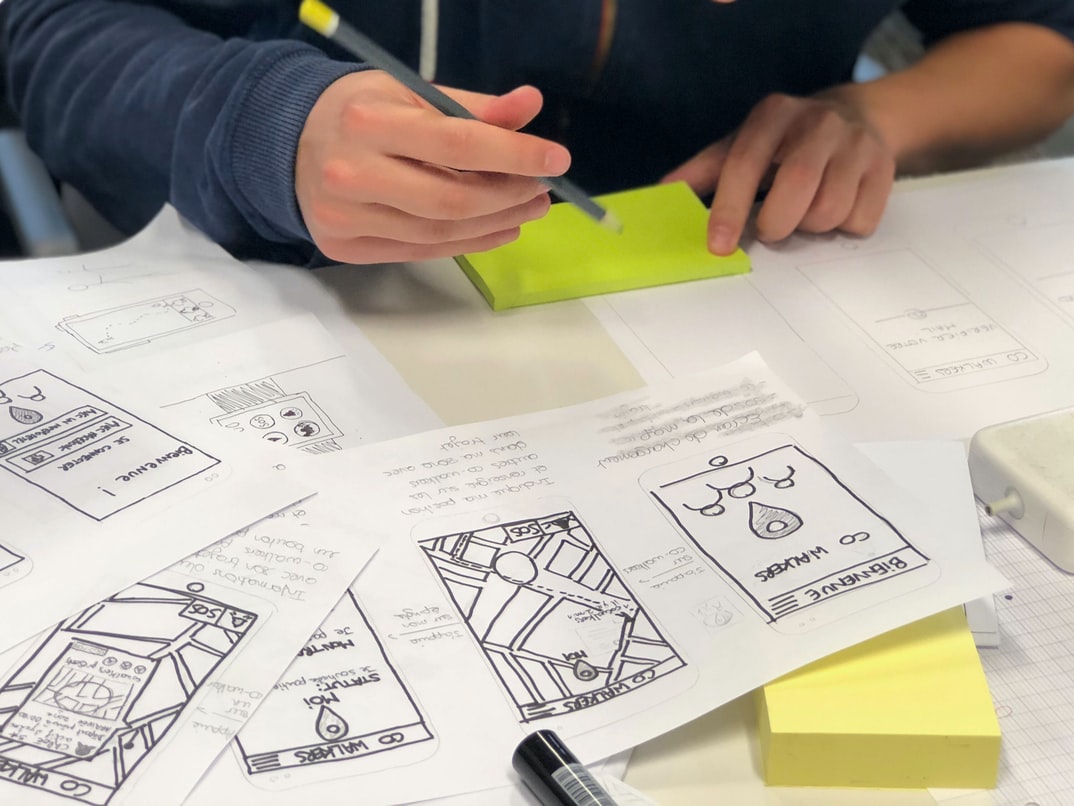
3. Create prototype user interfaces using mocked-up data or wireframes. This will help you test how users interact with your design and make adjustments before you start building live versions of the UI.
4. Choose an appropriate resolution and layout for your UI.
Choosing the best UI resolution and layout can be a daunting task. There are so many factors to consider, from the size of your screens to the amount of content on each page. Here are four tips to help you make an informed decision:
1. Start with your users in mind.
When deciding on a UI resolution or layout, it’s important to think about your users. What size screens do they use? How much content will they see on each page? What kind of device do they have? The more information you have about your users, the better decisions you’ll be able to make.
2. Consider how you will use the UI.
Once you know what size screens and amounts of content each resolution supports, it’s time to consider how you will use the UI.









