

App Building – Mobile Application Development – Software Development
A mobile app is a software application that can be downloaded and used on a smartphone or tablet. They are typically designed to make it easier for people to access information, communicate with friends, and make purchases. The app development process involves creating the app’s user interface, coding the app’s backend, and testing it before release.
A mobile app is a software application that is designed to run on smartphones and tablet computers. In order to create a mobile app, you need to develop an app for both Android and iOS devices.
The development process for creating a mobile app typically involves the following steps:
1. Planning: In order to create a successful mobile app, it is important to plan the project thoroughly from the start. During the planning phase, you will need to determine what type of app you want to create and how you plan on marketing it. Additionally, you will need to determine what features your app should include.
2. Development: Once you have planned out your project, it is time to begin development. During this stage, you will need to create the source code for your app and design the user interface. Additionally, you will need to include any required functionality, such as cloud storage or social networking integration.
3. Testing & Launch: After completing development and testing, it is time to launch your mobile app into the market place! During this stage, you will need to do all of the marketing work necessary in order for people to find and download your app. Once downloaded, it’s important that you provide excellent customer service in order to maintain users’ interest over time.
Mobile app development process: What are the steps involved in developing a mobile app?
The mobile app development process is a series of steps that must be followed in order to create a successful mobile app. There are many different elements that must come together for a successful mobile app, and each step in the process can be critical to the overall success of the project.
The first step in any mobile app development process is understanding the customer base. It is essential to know what type of apps your target audience wants and needs, as this will help you design an effective user interface and navigation system. After understanding your target market, it’s important to develop a detailed concept plan for your app. This document will outline all of the features you intend to include in your app, as well as the design specifications for each element. Once your concept plan is complete, it’s time to begin designing the user interface and graphics. The layout of your app should be designed with ease of use in mind, and all buttons, icons and other graphical elements should be readily identifiable. Once the user interface has been finalized, it’s time to start developing the actual code for your app. This codebase will contain all of the functionality required by your app, as well as any customizations or additions you may have made. It’s important to keep in mind both aesthetic and functional requirements when writing code for an iPhone or Android device; mismatches between these two factors can result in frustrating experiences for users. There are a variety of steps involved in developing a mobile app, and each has its own set of requirements. Generally speaking, the process begins with an initial idea or concept for the app, followed by the development of wireframes (rough drawings) to help visualize the idea. Once the basic structure is established, developers work on coding and testing the app to ensure it meets all required standards. Finally, graphics and design elements are added to complete the look and feel of the app.
The design process for mobile apps: Tips for creating beautiful and user-friendly mobile apps
Designing a mobile app is no easy task. There are numerous factors to consider, from the user interface to the overall look and feel of the app. But with a little bit of planning and effort, you can create an app that looks beautiful and is easy to use. Here are some tips for designing your mobile app:
1. Start by brainstorming what features your app will have. Once you have a rough idea of what you want your app to do, start thinking about how you can incorporate those features into a user-friendly interface. You’ll need to figure out which elements will be necessary for your specific app and which could be optional or supplemental.
2. Think about how users will interact with your app. How will they navigate around it? What buttons should be on which screens? Once you know how users will interact with your app, make sure all the elements of the interface fit that scenario perfectly.
3. Make sure all graphics and visuals in your app are optimized for mobile devices. For example, if you’re using images for buttons or other UI elements, make sure they’re sized appropriately, so they load quickly and don’t take up too much space on a screen smaller than iPhone’s screen size (4 inches). And remember to keep the text legible at small sizes!
4. Create animations that smoothly transition between screens or between views within a screen—this will give users a sense of fluidity and ease when navigating through your app.
Designing and developing mobile apps
There are many different ways to design and develop mobile apps. Below is a general overview of the process, followed by a more detailed discussion of some specific design considerations.
1) Define the app’s purpose or objective: What do users want to achieve with the app? What problems does it address?
2) Prioritize features: Do users need all of the features right away, or can they wait for later releases? How important are features to the overall goal of the app?
3) Consider user experience (UX): How will users interact with and use the app? Is there a clear flow from one screen to another, and is everything easy to find and understand? Is there an intuitive user interface (UI)?
4) Design screens and flows: How will users navigate through the app? What screens should be present, and how should they be organized? What interactions should be available on each screen?
5) Test and refine designs: Once final designs have been created, test them out with potential users in simulated environments (e.g., using virtual reality testing software). Make changes as needed based on feedback from testers.
There are a few things that go into designing and developing mobile apps, including understanding the user base, understanding their needs, and then designing a layout that is both functional and visually appealing. Once the app is designed, the next step is to develop it. This can involve creating an app’s codebase, testing it to make sure it functions as intended, and then marketing and distributing it.
Introduction: What You Need to Know Before Starting Your App Project
There’s no question that the mobile app development process has become much more streamlined in recent years. However, there are still some important steps to take before beginning any project. Here are a few things to keep in mind:
1. Understand your app’s purpose and target market. This is one of the most important factors when designing your app. You need to know who will be using it, what their needs are, and what features will make them happy.
2. Choose a development platform and software development toolkit. There are many different platforms available for mobile app development, but it’s important to choose the right one for you and your team’s skillset. Make sure you have access to the latest versions of both platforms and tools, as this can save you time and money down the road.
3. Plan your project carefully and keep track of deadlines. It’s crucial not to underestimate the time commitment required for mobile app development projects – even brief ones can take months or even years to finish properly! Be realistic about how much time you have available and plan accordingly – you won’t regret taking the extra steps now!
Step 1 – Evaluate the Need for Your App and Establish Goals
When starting any mobile app development project, it is important to first assess the need for and establish goals for the app. Once this is done, the process of designing and developing the app can commence.
App assessment should start by understanding the customer’s needs. Once this has been done, it’s important to determine if there are existing apps that could be used as a model or inspiration for your project. If there are no existing models or inspirations, then it’s important to research how other industries are approaching mobile app design and development and apply those lessons learned when creating your project.
Once the goals and requirements have been established, it’s time to begin designing the app. The most important aspect of designing an app is making sure that it meets the customer’s needs. It is also important to consider how users will interact with the app and what features will be included. Once these decisions have been made, it’s time to start developing the app using appropriate software tools and programming languages.
Step 2 – Gather Requirements & Plan the Project Scope
Requirements gathering is the process of identifying what is needed to create a successful mobile app. It entails understanding the app’s target users and their needs, as well as taking into account any constraints imposed by the app’s intended platform. Requirements can also come from your team’s prior experience with similar apps or platforms, customer feedback, and market research.
Once the requirements are determined, it’s necessary to plan the project scope. This includes determining how much work will need to be done and estimating how much time it will take to complete it. The project scope should be constrained by budget and timeline, but should also consider the technical feasibility of the proposed solution. Once the project scope is finalized, it can be divided into tasks that can be completed by a team of developers.
Step 3 – Design a Winning User Experience
Designing a winning user experience is essential for any mobile app, but it’s not always easy. There are a lot of different factors to consider, from the layout and design of the app itself to how it interacts with users.
One important thing to remember is that users will be using your app in different ways depending on their context and situation. For example, someone using an app on their phone in bed might want a basic interface that’s easy to use and doesn’t require too much attention, while someone using the same app on their phone during lunchtime might want it to be more interactive and engaging.
It’s also important to consider the target audience of your app. If your app is meant for businesses, you might want to focus on features that make it easier for employees to do their jobs. If your app is meant for people who just want to have fun, you can probably ditch most of the business-oriented features and go with something more playful instead.
Overall, designing a winning user experience is all about taking into account the individual needs of each individual user. Once you’ve got a good understanding of what they want from your app, you can start designing it accordingly!
Step 4 – Choose the Right Technology Stack for Your App
When it comes to mobile app development, there are many different technology stacks that can be used. However, the right technology stack for your app depends on a number of factors, including the specific features and requirements of your app. Here are four key factors to consider when choosing a technology stack for your mobile app:
1. Platform: The first decision you’ll need to make is which platform your app will be built for. There are a number of different mobile platforms available, each with its own unique set of features and requirements. If you have decided which platform your app will be built for, then you’ll need to decide which platform-specific SDKs (Software Development Kits) you will need.
2. Development Tools: Once you have decided on the platform and developed an understanding of the required SDKs, you’ll need to find suitable development tools. There are a number of different development tools available for various platforms, but some essential tools include an IDE (Integrated Development Environment), a compiler/translator toolchain, and unit testing frameworks.
3. Storage & Memory: Another important consideration when building any mobile app is how much storage space and memory your application will require. This is especially important if you plan on implementing in-app purchases or advertising banners, both of which can require large amounts of storage space and memory.
4. Battery Life: Another item to consider when building any mobile app is how your app will impact the battery life of various device types. Depending on the type of device, your app may require a lot more or less power than you would expect. Keep this in mind as you develop and test your application.
What tools are used in app development and graphic design?
When it comes to app development and graphic design, there are a number of tools that are commonly used. When creating an app, developers need to consider a number of different factors, including the user interface (UI), backend code, and marketing materials.
One tool that is often used in app development is Adobe Photoshop. Adobe Photoshop is often used to create the UI, as well as to create images for use in marketing materials. Additionally, developers may use Adobe Illustrator to create icons and graphics for their apps. In terms of backend code, developers may use languages like Java or Python to write the code for their apps. Finally, developers may use tools like Google Analytics to track user data and analyze trends.
Much has been written about the various mobile app development tools and processes. But what about the design process? In this blog post, I will be discussing some of the tools and processes that are commonly used in Graphic Design and Mobile App Development.
How does the process of developing apps and graphics differ?
There are many ways in which the process of developing mobile apps and graphics differs. For example, graphics designers generally work with vector illustrations or photos, whereas app developers usually work with code. Additionally, app developers may need to use different programming languages for different parts of the development process. This can make it difficult for them to become experts in all areas.
How complicated is it to develop an app or graphic design?
Developing a mobile app is not as simple as downloading an app store application and starting to code. There are many different platforms, design patterns, and development tools available that can make the process daunting for even seasoned developers. It can be difficult to find the right resources, determine the best approach for your project, or determine when it is time to seek help.
So how complicated is it to develop an app or graphic design? It Depends on Your Skill Set & Project Requirements!
In general, developing a mobile app requires coding experience, an understanding of specific platform APIs, familiarity with design patterns and user interface guidelines, and some knowledge of marketing strategies. Graphic design projects may require skills in Adobe Photoshop or Illustrator as well as some knowledge of web development frameworks.
What type of skills are required to create an app or graphic design?
A mobile app, also known as an “app”, is a software application that runs on a mobile device, such as a phone or tablet. The term typically refers to applications for smartphones and tablets but can also apply to similar applications for other mobile platforms.
Mobile app development is the process of creating an app for use on smartphones and tablets. This involves developing the user interface (UI) and codebase, as well as launching the app in iTunes or Google Play. There are different types of apps, including social media apps, productivity apps, games, and location-based apps.
In order to create a successful mobile app, it is important to have a clear understanding of the mobile development process and design principles. Mobile App Development Process:
1. Planning – Before starting any development work on your project, you must first calculate what you need to build and how much it will cost. This will help determine your timeline and budget restrictions.
2. Designing – Once you know what you need to build, it’s time to start designing! Your UI should be easy to understand and look good both on phones and laptops/desktops with retina displays. Similarly, make sure all your code is legible and organized well so that users can navigate through it easily.
Designing a mobile app is important not only for the look and feel of the app but also for usability. Users should be able to easily navigate through your app and find what they are looking for. Additionally, make sure the user experience is smooth and efficient.
One way to achieve a smooth user experience is by using design patterns. A design pattern is a proven method that can be used to solve common design problems. By using these patterns, your app will be easier to understand and maintain.
Another way to improve usability is by testing your app on different devices. This will ensure that the user experience is consistent across all devices. Finally, always keep in mind users who may have special needs such as accessibility or low vision.
3. Building & Testing – Once everything looks great in design (and possibly in person), it’s time to start building!
Designing a mobile application is an exciting and challenging task. Once everything looks great in design (and possibly in person), it’s time to start building! The process of building a mobile application begins with designing the user interface or front end. This involves creating the graphics and layout for each screen, as well as deciding on the functionality of each menu item.
Once the front end is complete, it’s time to create the back end. The back end includes all of the code that makes an app work, from loading the user’s photos into a photo gallery to processing payments. It can be tricky to create a reliable and efficient back end without wasting too much time debugging errors, so it’s important to use automated testing tools to check for mistakes early on in development.
Finally, it’s important to test the app before release. This means running it on different devices and platforms, checking for crashes and other errors, and identifying any problems that users may encounter. Once everything is working properly, it’s ready for release!
How long does it take to create a successful app or graphic design?
App development is a time-consuming, arduous process that can take anywhere from a few weeks to several months depending on the size and complexity of the app. However, with careful planning and execution, it’s not impossible to create a successful app.
Creating an app starts with understanding your target audience. After narrowing down the target market, you need to come up with an idea for the app that meets those needs. Once you have a concept, you will need to develop specs for the app, including how many screens it will have, what type of user interface will be used, and what features will be included. After coming up with specs, you’ll need to find a developer who can create the app for you. Once the developer has finished creating the app, you’ll need to test it and make any necessary revisions before releasing it onto the market.
What are the trends in the app and graphic design development?
Over the past few years, the trend in the app and graphic design development has been towards more simplistic designs. This can be attributed to a number of factors, such as the increasing popularity of mobile devices and the increased emphasis on user experience. In terms of app design, some common trends include using a minimalistic approach (with a focus on clarity and usability) and using flat or minimalistic designs for buttons and icons. Regarding graphic design, trends include using simple shapes (such as circles), using bold colours (to emphasize important elements), and creating stunning visual effects using techniques such as 3D rendering.
What skills are necessary for developing successful apps?
Successful mobile app development requires skills in programming, design, and user experience. Programs such as Android Studio or Xcode can help developers create their apps, but designers and users also play a key role in the success of an app. Successful apps must be easy to use and attractive to look at, which requires knowledge of user interfaces and graphic design principles. Additionally, successful apps must be tailored to the needs of their target audience.
How does graphic design help to make an app successful?
Design plays a significant role in the overall success of a mobile app. A well-designed app can easily be navigated and used by users, making it more likely that they will engage with the app and ultimately use it more often. Additionally, good design can help to sell an app to potential users, creating a sense of prestige or authority around the product.
One of the most important factors when designing a mobile app is to consider its target audience. Apps that are designed for specific demographics (such as children or elderly adults) tend to be more successful than those that are not tailored specifically to a certain group. Additionally, apps that are visually appealing tend to be more popular than those that are not. This is especially true in cases where users have little control over what information they see on screen. By providing attractive visuals and easy-to-use controls, designers can help their apps stand out from the competition and increase their chances of being used by users.
When developing an app, it is essential to take into account both the user interface (UI) and the user experience (UX). The UI refers to all of the elements onscreen – from buttons and menus to text and graphics – while the UX represents how smoothly these elements work together so that users can navigate through the app without difficulty. Poorly designed UI or UX can lead to frustration on behalf of users, making them less likely to continue using an app or even uninstall it altogether.
What kinds of apps are most popular in the market today?
In today’s market, there are a plethora of different mobile apps. For example, there are games, social media apps, productivity apps, and so on. It can be quite difficult to decide which app to develop or which app to design. In this article, we will discuss the mobile app development process and design in more detail.
First and foremost, it is important to identify the target audience for the app. Once the target audience is identified, it is important to research their interests and needs. After the target audience is defined, it is necessary to come up with an idea for an app that meets those needs. Next, the idea for the app must be developed into a prototype. The prototype should be tested with potential customers before going into full production. Finally, after all, prototypes have been tested and approved by management, development of the actual app can commence.
What are the most important elements of app design for user experience?
There are a few elements of app design that are essential to creating an experience that is both enjoyable and functional. By understanding these key factors, developers can create apps that are both attractive and user-friendly.
One of the most important aspects of app design is making sure all content is easily accessible. This means designers must consider how users will reach specific areas of the app, as well as where they should place buttons and other navigation elements. In addition, it’s important to keep in mind different device sizes and modes when designing an app layout. For example, a smartphone app may need more columns than a tablet app for easy navigation.
Another critical aspect of user experience design is ensuring the overall look and feel of the app matches its purpose. This means choosing appropriate colours, fonts, and graphics that will complement the brand or message being conveyed. Additionally, it’s important to make sure menus are intuitively organized, so users know where to find what they need quickly. Finally, it’s crucial to test apps before releasing them to ensure they work properly on all types of devices and browsers.
How does graphic design help to improve user engagement?
Graphic design plays an important role in the overall user engagement process for mobile apps. Graphic design can help to improve the visual appeal, usability, and overall experience of a mobile app. Graphics can also help to engage users with effective content and messaging. By designing an engaging mobile app, developers can increase user adoption and ultimately generate more revenue from their app.
What types of software and tools are used for app development and graphic design?
When it comes to app development, there are many different software and tools that can be used. For app design, many different software programs are available, such as Adobe Photoshop and Illustrator. Additionally, vector graphic design software like Inkscape or Illustrator can be used for creating high-quality graphics for apps.
Are there any tips to make sure apps are well-optimized for all platforms?
There are a few things developers should keep in mind when designing an app for different platforms. For example, making sure the app is responsive to different device sizes and orientations, as well as ensuring that all images and videos are optimized for consumption on mobile devices. Additionally, it’s important to test apps on multiple devices to ensure they look and perform optimally across all platforms. Finally, always make sure to include metadata in the app listing so users can find and install your app on their preferred device.
Is there a way to measure the impact of graphic design on app performance?
When it comes to performance and user experience, there is no question that graphic design has a huge impact. Visual elements like typography, layout, and imagery can affect how quickly and efficiently a mobile app runs on devices.
There are a few ways to measure the impact of graphic design on app performance. One approach is to look at the time it takes for an app to load on a device. Another is to measure how users interact with the app and how much time they spend using it. Ultimately, understanding how graphic design affects app performance allows developers to create apps that are both visually appealing and fast-loading.
Graphic Design
There are a lot of talks these days about “mobile first” development. But what does that mean in practice?
First, it means building your app for mobile devices first and then expanding to other platforms as needed. This way, you can focus on creating the best possible experience for users on mobile devices first and then work out any kinks later.
Second, it means paying close attention to detail when designing your app. You don’t want your users to have trouble finding what they’re looking for or navigating around the app. Make sure all your elements are well-placed and easy to use.
And finally, make sure your designs look good both on small screens and big screens. Users will appreciate an attractive app that displays well on phones and tablets alike.
Designing a mobile app is a process that requires attention to detail and careful planning. The first step in the process is designing the user interface (UI). This involves creating an intuitive layout that is easy to use while also providing sufficient information for the user. Once the UI is designed, it must be tested with potential users to ensure that it meets their needs. Next, the development team must create the necessary code to make the app function. Finally, they must design and create promotional materials, such as images and videos, to promote the app.
Designing an app is a process that starts with understanding the user and their needs. From there, the team develops a concept and begins to create the final product. Along the way, they consider design principles like usability, legibility, and consistency.
Once the app is complete, it must be tested before it’s released to the public. This can involve using different devices and users to ensure that everything works as expected. Once everything is verified, developers can begin to market and sell their apps.
Graphic Design Mobile App
A mobile app is a software application that runs on smartphones and tablet computers. Mobile apps can be used for a variety of purposes, such as communication, entertainment, navigation, and shopping.
To create a mobile app, you first need to develop the app’s user interface (UI). The UI consists of all the graphics and user interface elements that users see onscreen. After you create the UI, you need to create the app’s codebase. The codebase contains all the code needed to make the app work. You then need to design and layout the UI using standard desktop design principles. Finally, you need to test and deploy your mobile app onto multiple devices.
If you want your mobile app to be successful, it is important that you follow a well-defined process for developing and designing it. This process includes creating high-quality UI designs from scratch, using industry-standard software development tools and techniques, testing your apps on multiple devices before release, and monitoring customer feedback throughout the development process.
Creating a great-looking mobile app is no easy task. Gone are the days when all you had to worry about was packing in as many features as possible and slapping an Apple logo on the front. Today, users expect high-quality, well-designed apps that not only look good but also provide value.
That said, there are still some basic principles that need to be followed if you want to create a successful mobile app. In this article, we’ll discuss the process of designing and developing a mobile app, as well as some tips for ensuring that your app looks fantastic both on desktop and mobile devices.
What is UI design?
UI design is the process of creating the visual appearance of a computer system, application, website or any other type of interactive media. It involves understanding the user’s needs and wants and then coming up with an interface that meets those needs. UI design can be divided into two categories: front-end and back-end. Front-end design concerns itself with the look and feel of a system’s user interface, such as how buttons look and how menus are organized. Backend design deals with how data is displayed on a screen or in a database.
UI design is a process that starts with understanding the customer’s needs and goals and then creating a design strategy that will create an interface that is easy to use and appealing to the user. Once the design is finalized, it must be tested extensively to ensure that it meets all of the customer’s requirements. If everything checks out, then the final product can be released to the public.
What is UX design?
User experience design (UXD) is the process of designing a product or service to ensure that it is easy for the user to understand and use. It covers everything from the initial research and concept development to prototyping and testing to the finished product.
UXD is important not just for products that are used by people on a daily basis, like smartphones and tablets, but also for software that people will only use occasionally, like web applications. If users can’t find what they’re looking for or can’t complete simple tasks because of confusing or frustrating interface elements, then the app or website will likely be ignored.
There are many different aspects of UXD that must be taken into account while designing an app or website. For example, it’s important to consider how users will interact with the product (e.g., through screens or buttons), as well as how they will feel when using it (i.e., comfortable and confident). In some cases, it may also be necessary to consider how other users might interact with the product (i.e., if someone else is using the same device at the same time).
Overall, UXD is a critical part of any mobile app development process and should be given careful consideration from start to finish.
Visual Communication
There are a number of aspects to consider when designing and developing mobile apps, including user experience, graphics design, and interface design. In this blog post, we will focus on the process of mobile app development, discussing key steps and tips for better visual communication in your app designs.
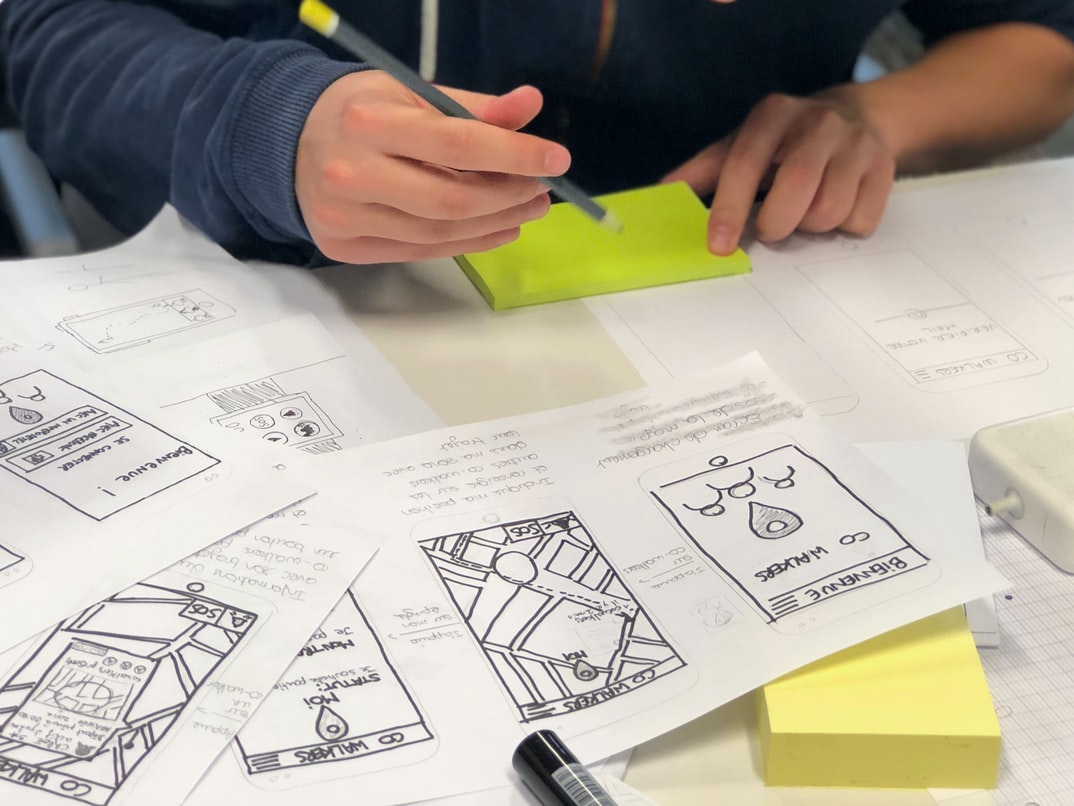
When starting out with app development, it’s important to have a clear idea of what you want your app to do and look like. This means creating high-quality wireframes or prototypes during the early stages of development. These quick sketches can help you visualize how your app will look and work on different devices. Once you have a good understanding of your app’s layout and functionality, it’s time to start designing graphics and user interfaces.
Graphics should be designed in a way that is both visually appealing and functionally effective. For example, buttons should be big enough to easily see but not so big they take up too much space on the screen. The text should also be sized appropriately so that it is readable without having to scroll down or pinch to zoom in on a phone or tablet screen. User interfaces should be easy to navigate while still providing enough information for users unfamiliar with your app’s features.
While visual communication is important throughout the entire mobile app development process, it is especially important during the early stages when you are still testing ideas and refining layout designs.
Visual communication is one of the most important aspects of effective mobile app development. When users interact with an app, they expect a high level of visual design that is cohesive and easy to understand. Poor visual communication can lead to frustration, confusion, and even abandonment of an app.
There are a few key principles to keep in mind when designing for mobile:
1. Use Typography Well
Headlines, subheadings, and other text elements should be sized appropriately and used sparingly. Large blocks of text can be jarring on a small screen and can easily become obstructions instead of helpful content cues.
2. Use Images Wisely
Images should only be included if they add value to the message being conveyed or if they help improve user interaction with the app. Avoid using images that are simply ornamental or that distract from the content onscreen.
3. Keep Navigation Clean & Uncluttered
Navigation should be easy to understand and use without taking up too much screen space. Try to group related elements together so that users can navigate more quickly through your app’s content.









