

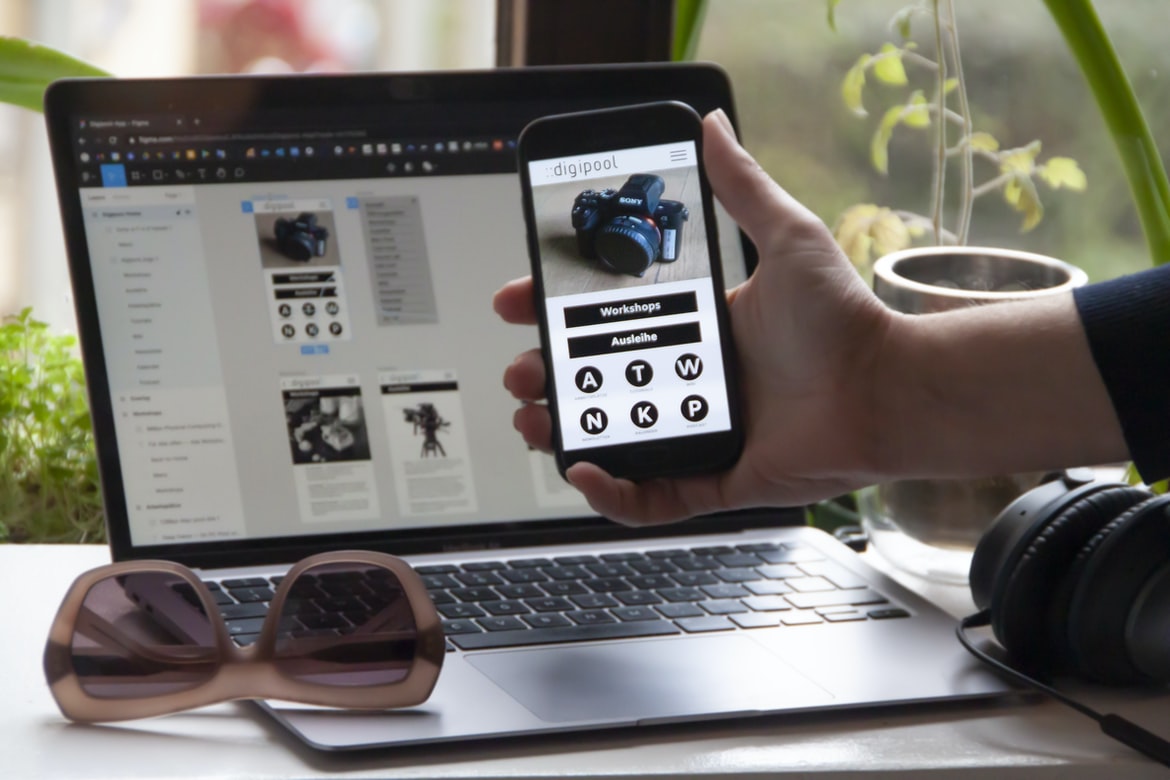
The different types of user interfaces
There are a variety of user interfaces available to users, each with its own advantages and disadvantages. For example, a web browser may be an easy-to-use interface that allows the user to surf the web, while a desktop application may be more complex and require more learning time to use.
Despite the differences in user interfaces, they all share one common goal – providing a good experience for the user. In this article, we’ll discuss three different types of user interfaces – website or desktop applications, mobile apps, and web browsers. We’ll also compare their strengths and weaknesses so that you can decide which one is best for you. User interfaces are a type of design that refers to the way a user interacts with a piece of technology. They can be found in both the digital and physical worlds. Different types of user interfaces exist depending on the task at hand and the designer’s preferences.
Some common user interface designs include information terminals, window displays, command-line interfaces, desktop applications, and web browsers.
The difference between user experience and user interface design
User interface design is the process of creating a design that boils down to making the user experience (UI) as good as possible. User experience is how the users feel when using a product or service. UI design is all about making sure the user interaction feels natural and easy to learn.
There are two types of user experience: cognitive and objective. Cognitive user experience, such as how easily a person can understand what they are doing, is more important to businesses than objective user experience, which is whether or not users are getting what they need from a product or service. Objectively great UI designs will always be more popular with users because they let them know what they need without having to spend time learning how to use a product or service. However, some businesses may find it more important to have both types of user experiences in order to create an overall successful customer relationship. User experience (UX) is the way a user interacts with a product or service. User interface (UI) is how a user sees and interacts with a product or service. UX design is the process of creating an experience that is pleasurable for users and livable for designers. UI design includes creating symbols, icons, designs, and layouts that enable users to interact with products or services.
Grains of nomenclature for user interfaces
User interfaces are the interface that a user sees when interacting with a computer or another electronic device. Many different types of user interfaces have been developed over the years, but a few remain the most common and well-recognized. While users have different preferences for different types of user interfaces, the basic design principles for all user interfaces are the same: clear, concise, and easy to understand. Grains of nomenclature for user interfaces are important in design because they provide a system to Describe how people use a particular interface. The different terms used to describe user interfaces can be confusing, but with this article, you will learn about the different types and how they can be used in the design.
A visual guide to creating a good user interface
User interface design is one of the most important aspects of any software application. By following a few simple tips, you can create a user interface that is both efficient and pleasing to look at. Here are three tips to help you build a user interface that will make your users happy:
1) Make sure your user interface is intuitive and easy to use.
2) Use clear and concise icons to help users understand what they are doing.
3) Use effective typography to match the tone of your user interface. User interfaces are an essential part of any website or application. They should be visually appealing and easy to understand so that users can get the most out of their experience. In this article, we will take a look at five different user interface design techniques that can be used in order to create a successful user interface.
What is design language?
Design is the craft of making things look good. It’s about finding solutions to problems and creating a finished product that can be enjoyed by people who use it. User experience, or how users feel when using a product, is one of the most important aspects of designing a product. For many startups, user experience is their bread and butter. But what does design language really mean? The design language is the way a designer creates a design for a product or system. It can be used in different ways, but most often, it refers to graphic design. There are many different design languages, but some of the most popular ones include Adobe Photoshop, Apple’s Interface Builder, and Microsoft Word.
What is the difference between a design language and a software interface?
Design languages are a way to create and design objects that can be used in the software. User interfaces, or how people interact with programs, are different. User interfaces are designed to make it easy for people to use the program. Design languages don’t typically have this feature. Design Languages are specific designs, whereas Software Interface Designs are a way to build/(interface with) software. Design languages can be more concise and organized than software interface designs, making it easier for designers to create a product that is both easy to use and beautiful.
What are some of the major design languages in the market?
Some of the popular design languages in use are user experience (UX) and user interface (UI). Both have their own advantages and disadvantages, so it’s important to know which one is best suited for your project. Here are tips to help you decide which language is right for you:
1. Research the industry trends first: When looking at any design language, it’s important to research the industry trends first. This will help you understand what features people are seeking in a specific design language and how this can be reflected in the final product.
2. Take into account what users want: The most important thing when choosing a design language is understanding what users want. This means taking into consideration the needs of your target audience and ensuring that your design meets these requirements.
3. Know your audience: Knowing your audience is essential when you’re choosing a design language. This will help you ensure that the language resonates with people and their needs.
How does a design language work?
Design languages are much like recipes. You can’t just toss them together and call it a day. The design process is more complicated than that, and there are a lot of factors to consider when creating a user experience for a site or app. Here’s how user experience (UX) designers work and what they take into account when designing a user interface.
User experience is the process of creating an environment in which users will want to use your product or service. UX designers work on everything from developing the look and feel of the website to designing how users interact with it. They also need to create designs that are easy to navigate and fluid enough so that users will be able to understand what they’re doing at any given moment.
UX design isn’t about finding the perfect solution; it’s about creating an environment in which people will want to use your product or service.
What are the benefits of using a design language?
Designers use a variety of design languages to communicate their ideas and designs. Some of these include visual design, interactive design, motion graphics, and web designing. The benefits of using a specific design language can vary depending on the designer’s experience, capabilities, and goals. Some general benefits of using a specific design language include better organization and communication, increased productivity, easier prototyping and testing, and more accurate visuals.
What are the drawbacks of using a design language?
Design languages are a popular way to create user interfaces. However, there are some drawbacks to using them. One drawback is that they can be difficult to learn. Another drawback is that they can be difficult to use. Design languages can be advantageous when creating user interfaces and designs, but they have some drawbacks. Some of the drawbacks include: making the design more complex than necessary, taking away from the overall clarity of a design, and having shorter load times for users.
Is there a “right” or “wrong” way to use a design language?
“User experience (UX) and user interface (UI) design can be thought of as two different sides of the same coin. While UX is all about how the user interacts with a product, UI is all about how the user sees or experiences the product.”
This dichotomy can be confusing for some people, especially when it comes to creating an effective and intuitive user experience. However, if you want to create a product that both users and designers love, then you should use UX design techniques.
WordPress for Designers
Designers who are familiar with WordPress should understand that the Builder and Security features of the platform make it a great choice for creating websites. However, some designers feel that the interface is too difficult to use. A study by User Experience Research has shown that users do not have a good experience when first using WordPress.
WordPress Elementor for Designers
Designers, especially in web development, should have an understanding of WordPress Elementor. WordPress Elementor is a powerful feature that can be used to create user interfaces for your websites or blogs. The feature is easy to use and can be customized to your needs.
Figma
Figma is a new design tool that has quickly gained a following among developers and designers. Figma is simple to use and provides an intuitive user interface that makes creating designs easy.
Adobe XD
Adobe XD is a new design language that Adobe has released to help improve user experience in its products. Using XD helps designers create stunning, intuitive designs that are easy to use and respond to.
Visual Communication
There are a few types of visual communication which can have different effects on users and the user interface. A user interface is a graphical device used by an individual to interact with a computer or other electronic equipment. User experience (UI) refers to the overall user reaction when using an interface, be it the design or creation of the UI. There is no one type of UI that is universally accepted, as people’s preferences will vary depending on their use case and environment. However, there are some general principles that tend to hold true across all interfaces, regardless of what type of UI they use.
One important principle is that interfaces should be easy to understand and use. Users should not have to decipher complex binary codes in order to interact with them. This can be difficult for many people, especially those who are new to technology or who do not know how computers work.
What is Visual communication in graphic design?
There are many different types of visual communication in graphic design, from the smallest details to large projects. Here are three examples: user experience, user interface, and branding.
User experience is the overall experience a user has when using a product or service. It includes how users feel when interacting with the product or service, as well as how they think the product or service looks and sounds. The user interface is the display of a product or service to users, typically on a screen. It includes all the elements that users need to interact with the product or service, such as navigation buttons and text input fields. Branding is the presentation of a company’s name, logo, and other markings on products or services. It can be done through physical products (such as clothing), digital materials (such as website content), or both.
Application of Graphic Design: Adobe Photoshop, Adobe Illustrator, Adobe InDesign
Since the 1990s, graphic design has become increasingly popular due to its ability to convey messages and emotions in a way that is easy to understand and use. In recent years, people have turned to Adobe Photoshop, Adobe Illustrator, and Adobe InDesign for their graphic design needs.
Adobe Photoshop is more popular than Illustrator and InDesign because it is easier to learn and use. Photoshop allows users to create graphics quickly and easily. It also has a strong user interface that makes it easy to navigate.
Adobe Illustrator is less popular than Photoshop, but it can be used for similar tasks as Photoshop. Illustrator is useful for creating illustrations that are high-quality and professional looking. However, it does not have as many features as Photoshop does.
Adobe Photoshop
Adobe Photoshop is one of the most popular graphic design programs in use today. However, there are a few things that can be improved when using Photoshop. One example is the user interface (UI). Another thing to consider is how users feel about Adobe Photoshop’s overall user experience.
Adobe Illustrator
Adobe Illustrator is a professional graphics editor that has a user interface that is both intuitive and customizable. While the original Adobe Illustrator user interface was designed for artists and designers, the current version is used by many businesses and professionals. While there are some complaints about the new user interface, overall, users seem to be happy with it.
Adobe InDesign
Adobe InDesign is a vector graphic design program that offers users a variety of user interface options. While different options may be ideal for different types of content, the overall user experience in InDesign is generally better than in other programs.
Web Design
As the web design industry continues to evolve, so does the need for better user experience (UX) when using a website. A study by The Guardian found that users often feel frustrated with the design of websites and are more likely to leave them if they don’t find what they’re looking for right away.
While there are many ways to improve UX on websites, one common way is to use graphic design as part of your overall design approach. Graphics can add excitement, intrigue and engagement with your audience, which can help create a more positive user experience.
There are a number of different types of graphic designs you can use on websites, but some popular options include icons, text blocks and vector illustrations. Iconography is a style of graphic design that uses images or symbols to identify specific objects or concepts in a webpage or advertisement.
Design websites
Designing a website is a complex process that involves choosing the right design elements, creating an efficient user experience, and ensuring the site remains consistent with the brand. While there are many different ways to design a website, one of the most important aspects is how users feel when visiting it. By studying user experience (UX) and user interface (UI) design, businesses can better understand how their site could be designed to feel more comfortable and inviting for their customers.
Typography
Today, typography is more than just a way of looking at the text. Typography can also be used to create effective user interfaces and create an overall design that is pleasing to the eye. In this study, we looked at how different types of typography can affect user experience and found that there are some key ways to improve your design in order to make users feel comfortable and engaged. There are pros and cons to using different typography styles in user interfaces. Some people find that using fonts that are very different in size or weight from the norm makes for a more engaging and efficient interface, while others find that typefaces with familiar designs can be more calming and immersive. It all comes down to what works best for the user and their needs.
Theory
User experience (UX) is the overall design of a piece of software that users use to interact with the software. UX is often determined by how the user feels when using a product, such as a website or an app. While many different factors can affect UX, one of the most important aspects is how users feel when interacting with the product. A study conducted by Ipsos MORI found that user experience (UX) is more important than ever before in terms of whether people will be interested in investing in a product.
Colour Theory
Colour theory is the branch of mathematics that deals with the analysis and interpretation of colour. It has been used to interpret user experience (UX) designs, such as those found in a computer system or website. In recent years, UX designers have started to pay more attention to colour theory in order to create designs that are both visually appealing and easy to use.
Graphic design is in demand.
Design jobs are in high demand, with many companies looking to hire Graphic Designers. Some reasons why Graphic Design is in high demand include the following:
– Gaining a strong understanding of how people interact with digital devices and systems.
– Developing user interfaces that are easy to use and navigate.
– Crafting beautiful, concise, and informative graphic design pieces.
Wireframes
User experience (UX) is the user’s perception of the final product, typically delivered through a user interface (UI). UI design is the process of designing an interface that meets or exceeds the needs and expectations of users. While UX can be achieved through a variety of design techniques, wireframes are one of the most effective means for understanding and prototyping designs. User experience (UI) is the overall user interface that a website or application presents to users. User interface design (UID) is the process of designing an overall look and feel for an application or website. In contrast, wireframes are preliminary designs that help understand how a website or application will look and feel.
UX/UI Design Strategies
User experience (UX) design is a critical component in any web or app development project. It’s how your users interact with your application that will determine whether users stick around and continue using it or decide to give it up in favour of a more user-friendly alternative. In order to create an effective UX, designers must first understand their target audience and what makes them want to use their application. Here are the best practices for UX design:
Document your target audience before starting any design process
Before starting any UX design project, it’s important to document who your target audience is. This will help you identify what they need and want from your application and help you create an effective user interface that meets those needs.
UX/UI Design Principles
UX design principles are important to consider when designing a user interface. By following these principles, you can create an interface that is easy to use and will make your users feel comfortable and welcome. UX design principles are important when designing user interfaces. By following these principles, you can create interfaces that are both intuitive and effective.
UX/UI Design Techniques
UX design techniques are important when creating user interfaces. By understanding how users interact with a UI, designers can create interfaces that are both efficient and appealing to the user. There are many different UX design techniques that can be used, but one of the most popular is the use of graphs.
A graph is a visual representation of data that can be used to help understand a situation or problem. Graphs provide a concise way to show how different objects or elements contribute to a system or population. Graphs can also be used as guides for designing user interfaces. By understanding how users interact with a UI, designers can create interfaces that are both efficient and appealing to the user.









