

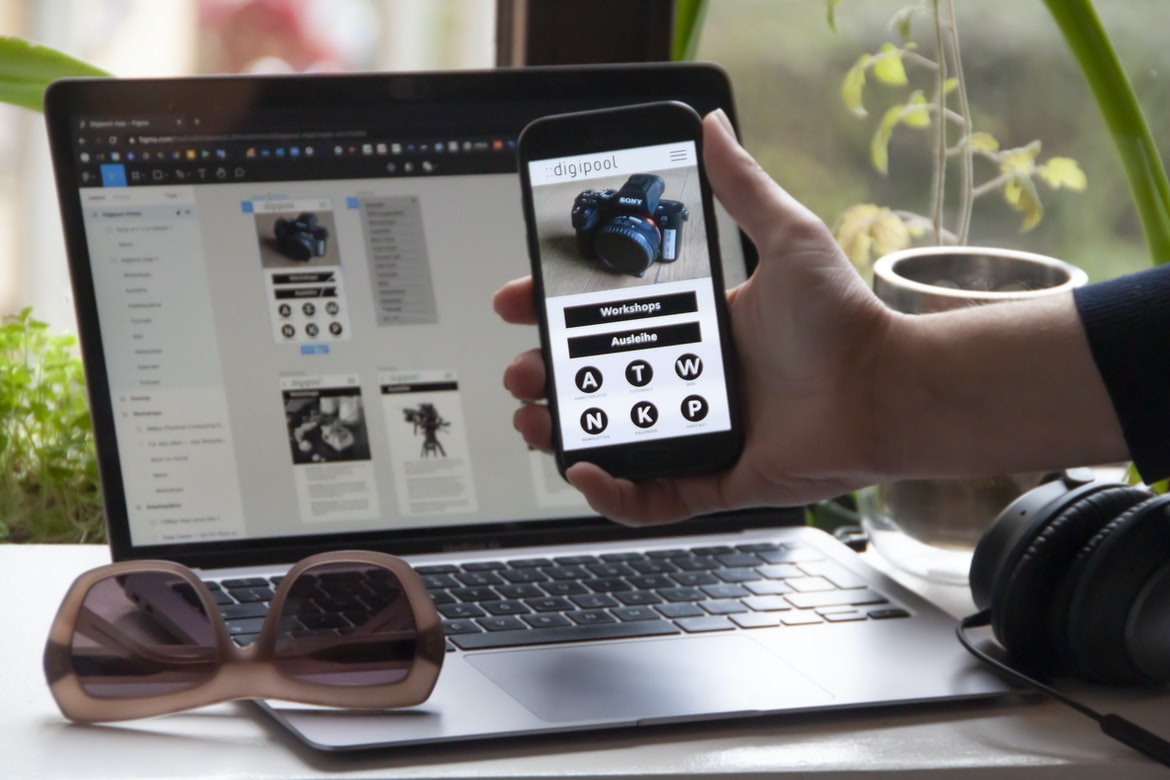
A Comprehensive Guide to Building Apps for Free with Tutorials and Resources – When designing an application, it is important to consider the user interface (UI). UI design is important in order to provide a clear and concise pathway for users to navigate through your app. A well-designed UI will make it easy for users to find what they need and will be visually appealing and intuitive.
What is a web application’s user interface?
A web application’s user interface (Ui) is the foundation on which the rest of the application is built. It provides a way for users to interact with the application and make decisions about it. It can be divided into three main categories: view, input, and output.
The view is what users see when they open the application. It includes all of the content that the application needs to provide, such as user profiles, search results, and contact information. The input is where users enter their data and select actions accordingly. This can include entering new values for fields, selecting options from lists or menus, or clicking on buttons. Finally, the output is where users leave the application – whether that’s to return to another page or close it entirely.
There are many different ways to design a Ui for a web application, but some common elements are shown in Figure 1. The most important thing to remember when designing a Ui is that it should be easy for users to understand and use – it should make working with the app easier than ever before.
The basic structure of a web application’s user interface: navigation menu, toolbar, buttons, text fields, and input boxes.
Web application user interface typically consists of a navigation menu, toolbar, buttons, text fields, and input boxes. The most common type of input box is the text box. Other common types of input boxes are the button and the field.
When creating a web application user interface, it is important to design it in a way that makes it easy for users to navigate. For example, if you want to create a web application with a navigation menu that allows users to navigate between different sections of your application, you should design your navigation menu in such a way that it is easy to use. You should also make sure that your Navigation Menu features are consistent across your applications.
Design principles for creating user interfaces: simplicity, legibility, clarity, typography, and motion.
Design principles for creating user interfaces follow many rules. One of the most important is to use simplicity. Users need to be able to quickly understand what the interface is and how it works. Another rule is to use clear and concise language. This will help users understand what they are interacting with and make it easy to find the information they need. Typography also needs to be used sparingly, as users will eventually learn how to read using only a few types of fonts. Finally, the motion should never be used in user interfaces- it can lead to confusion and fatigue.
Strategies for addressing common usability problems: screen size, layout, orientation, and column widths.
When it comes to designing user interfaces, there are a number of things to keep in mind. Some things that often come into play when designing user interfaces are screen size, layout, orientation, and column widths.
One way to reduce the chances of encountering usability problems is by taking into account these factors when designing your application. Another way to deal with common issues is by using common design patterns and templates that can be applied universally.
Example applications: A small business with limited resources, A website for a high school student, or A personal blog.
A small business with limited resources may find it difficult to create a website that is visually appealing and user-friendly. In contrast, high school student who is hoping to share their thoughts and experiences online may find it difficult to do so without paying for hosting or a professional design team. However, there are many various applications that can be used to help build a web presence for a small business or individual user. Here are three examples:
1. A small business with limited resources could use Shopify as its primary eCommerce platform. This platform offers great features such as simple shopping cart management and low monthly fees. Additionally, Shopify provides an easy-to-use admin interface and quick turnaround times for creating custom pages and menus.
2. A website for a high school student could be built using WordPress as their main content management system. This platform offers great features such as easy customization of pages and posts, drag-and-drop page creation, automatic updates for your blog posts, and Export/Import capabilities for copying posts between your blog and Facebook or Twitter accounts. Additionally, WordPress offers a wide range of plugins available to add extra functionality to your site, including social media integration and email marketing campaigns.
3. A personal blog could be used by an individual in order to share their thoughts, insights, pictures, etc., on an informal basis without having to worry about the budget or time constraints of other online platforms.
Figma
Figma is a user interface design platform that allows developers to create and deploy user interfaces quickly and easily. Figma makes it easy for you to design user interfaces for your web, mobile, or desktop applications. You can also use Figma to create custom designs for specific needs or projects.
Adobe XD
Adobe XD is an amazing application for designing and building user interfaces. It has a lot of features that are perfect for specialities like web design and UI design. Additionally, Adobe XD makes it easy to create beautiful designs with ease.
Design Mobile App
There are many Mobile App design tips available online. However, not all of them can be applied in the same way to create a better-looking and user-friendly Mobile App. So, what are some key tips that can help you build an app that users will love?
1: Start by understanding your target audience and their needs. Once you know what you want your app to do for your users, it’s time to start designing it in a way that is likely to meet those needs. This means taking into consideration how your users interact with the app, what type of device they are using (tablet, phone or desktop), and their personal preferences.
2: Use clean and simple designs. Users prefer apps that look good and feel easy to use, no matter how complex or advanced the feature set may be. Keep this in mind when designing your mobile app interface; make sure all elements are well-organized and easy to understand.
3: Make use of typography and colour choice when necessary. A successful mobile app should look professional but still feel approachable. When using typography and colour selection, make sure they fit comfortably with the overall design theme of your app.
Graphic Design
Designers often focus on the user interface (UI) and how it interacts with the device. However, application building and design (ABD) is a key component of any website or app. In this blog post, we’ll take a look at some basics about ABD in order to help you create applications that are more usable, efficient and visually appealing.
First and foremost, when designing an application, you need to consider the needs of your users. How will they be using your application? Do you want them to be able to access all features quickly, or do you want them to have a longer process? How will your users interact with the interface?
Then, you need to think about how best to present your data. How will users be able to explore your data? Are there ways for users to filter or group data? What are the presentation styles that are most appropriate for different types of users? And finally, what kind of visuals should represent your data?
If you can answer these questions with certainty, then you can begin designing your application. However, if you don’t know what people actually need or how they will use your application, it’s important to consult with experts before starting development.
Many people are familiar with graphic design and understand its basic concepts. However, they may not know how to put these concepts together to create a successful graphic design project. In this blog post, we will explore the basics of creating effective and attractive graphical applications using Adobe Photoshop and Illustrator. We will also learn about some common design principles that can be applied in order to create high-quality user interfaces.
Background: Graphic design is the process of designing and creating graphics. This can be done in a lot of different ways, but most often, it’s a set of instructions that tell someone what to do. In many cases, this involves coming up with ideas for designs and then making them into reality. In terms of application building, it can mean creating an interface for software or a website or coming up with ideas for how people might use the product. And in terms of design UI UX, it can mean coming up with ideas for how people might interact with things like websites and applications.
What is UI design?
There is no specific definition for UI design, as it pertains to different types of applications. However, in general, UI design refers to the design of an application’s interface and user interface – everything from the buttons and icons on a screen to the layout of a document. In addition to designing the interfaces of individual applications, designers also need to take into account how an application will be used by users. For example, a website might be designed for easy navigation and quick loading times, while an app may be designed more for personal use or entertainment purposes. With so many different types of applications and so many different ways that people might use them, UI design is essential in getting an application up and running quickly and having it look great on every device.
What is UX design?
UX design is the creative process of designing an interface that will improve the usability and effectiveness of a product or service. It starts with understanding the user’s needs and wants and then creating a design that meets those needs in an efficient, effective, and appealing way.
In order to create a successful UX design project, it is important to understand both the fundamental principles of user experience and how to apply them in specific situations. With this knowledge in hand, you can begin to develop a plan for how your design will meet the users’ needs. Additionally, taking into account customer feedback is essential for making corrections and updates to your designs as needed.
Visual Communication
If you’re looking to create an even more user-friendly and intuitive user interface for your application, then you need to consider using visual communication techniques. By using visuals correctly and effectively, you can help make users feel more engaged and happy with their use of your application.
One way to communicate effectively with users is by using icons and images in your designs. Use these symbols to communicate important information, show off the design concept, or just add a bit of personality to your applications.
For example, the image above is a simple design that uses icons to represent different aspects of the application. The icons represent different features, such as the Camera Roll, Menu items, and so on. By using this type of visualization in your designs, you can easily convey information that users might need assistance understanding.
Additionally, it’s important to be aware of how users will react when they see unfamiliar or complex designs. When designing for a specific audience – for example, for older or novice users – it’s important to focus on creating interfaces that are both easy and understandable. If you bungle this part of the design process, your users may find it difficult or impossible to use your application as intended.
Visual Communication Vs Graphic Design
Visual Communication Vs Graphic Design: What’s the Difference?
There is a clear difference between visual communication and graphic design. Visual communication is all about visuals, while graphic design is all about graphics. Here are some key differences between them:
1. Visual Communication: The main purpose of visual communication is to communicate information. Graphic design, on the other hand, is used to create a graphical impression that will make the user want to look at or use something. This can be done through colour, layout, typography, images, or even text.
2. Graphic Design: Graphic design focuses on creating an aesthetic impression with graphics and Canvas elements. This can be done in a variety of ways, including using shapes, colours, and patterns. It can also be combined with other elements, such as text or images, to create a unique style.
3. Fonts: Fonts are important for making text look legible and readable. They can be used in various ways, such as setting off elements such as images or font faces from other text or adding gravitas or solemnity to documents. They can also be used as part of a logo or branding strategy.
Application of Graphic Design: Adobe Photoshop, Adobe Illustrator, Adobe InDesign
Adobe Photoshop and Adobe Illustrator are popular graphic design tools used to create beautiful designs. InDesign is a similar tool used for layout and design. This blog will discuss the use of these tools in relation to building and designing user interfaces for websites, apps, and other applications.
Adobe Photoshop: Advantages and Disadvantages
Adobe Photoshop is a widely used application for graphic design. Its advantages include its ease of use, its versatile features, and its ability to create high-quality graphics. However, some users have found that Adobe Photoshop can be difficult to use. Additionally, it has a limited number of features compared to other applications.
Figma, Adobe XD, WordPress, Elementor.
In recent years, there’s been a trend of people wanting to create their own applications. These applications are often built in different programming languages and can include different user interfaces. Many people have started using Figma, Adobe XD, WordPress, and Elementor as their development tools.
Figma is a popular application for building user interfaces. It’s easy to use and can be used for a variety of purposes. Adobe XD is another popular application for building user interfaces. It’s also easy to use and can be used for a variety of purposes. WordPress is an open-source platform that allows you to build websites. Elementor is an application that helps you create 3D designs.
What Is A Prototype?
When most people think of prototypes, they typically think about products. But prototypes can also be used for other purposes, such as trying out new ideas or developing a design for a new product. Prototypes can help identify problems and potential solutions before anything goes into production.
What is A/B testing?
A B testing is a practice used to measure the performance of an application or web page. It is done by randomly selecting a user from a group and asking them to complete some tasks (such asSubmitForm) on the page. The results of this test are then compared to expectations in order to identify any potential issues with the application or web page.
What are the advantages of developing applications?
There are many advantages to developing applications. Some of the most notable advantages include the following:
– increased throughput and efficiency – developing applications can increase the speed and efficiency of tasks by creating and slamming down more, often complex, code. This can lead to improved results in terms of time and productivity.
– fewer errors – when developers are able to create effective, well-structured code, they tend to avoid making common mistakes that can cause errors later on. Additionally, coding standards can help reduce the number of errors caused by poor style or formatting.
– reduced complexity – developing applications tend to be much simpler than creating websites or other web application usage models. This is due in part to the fact that the development process is typically shorter and easier than creating something from scratch. Additionally, it’s often easier and cheaper to buy software or hire developers who already know how to develop web applications than it is to self-develop an application.
What is the best way to plan and architect an application?
Application architecture is the planning and design of an application so that it can be run successfully. Applications can be divided into two categories: single-purpose applications and multi-purpose applications. A single-purpose application is a program or service that is used only once and, therefore, does not need to be designed for multiple uses. Multi-purpose applications are more complex and may be used by several applications of oroyalty. In order to create an effective architecture for an application, it is important to understand the different types of users who will use it, as well as the different types of devices that might be used. Additionally, it is important to consider how best to integrate with other systems in order to provide value to users.
How do you decide which programming language to use for a project?
There are many factors to consider when choosing a programming language for an application building or design project. Ultimately, the decision will be made based on the specific needs of the project and the person working on it. Here is a quick look at some of the key factors:
The target audience: The type of application being created, as well as its specific requirements, will determine which programming language should be used. If the application is for a new business, then Python may be an ideal choice; for example, because it is widely understood and has a well-developed toolset. However, if an existing business relies on legacy code (for example, an online store), then Java may be more appropriate.
The size of the project: Size might also influence which programming language to choose. A small project might use less memory than a larger one, so Python may not be necessary; however, if larger projects are involved, then Java would likely be more appropriate.
The development environment: Another important consideration is the development environment available to your team. If you are working in an open source environment such as GitHub or CodePlex, then any programming language can be used; however, in closed source environments such as Apple’sCupertino Labs or Google’s Android Studio, only Java can be used.
There are many factors to consider when choosing a programming language for an application development or design project. One of the most important factors is the target audience. A programming language that is used specifically for web applications and user interfaces may be more appropriate than one that is used for more general tasks. Additionally, a programming language’s syntax and features can affect the way an application looks and feels.
What considerations should be taken into account when creating a UI/UX design?
When creating an application’s user interface, it is important to take into consideration the following factors:
User needs and preferences.
Design technique.
Layout or layout elements.
Input method (text, images, etc.).
In order to create a user interface that meets the needs and preferences of your users, you will need to take into consideration the user’s needs and preferences as well as the design technique you use. Additionally, your layout or layout elements must be appropriate for the device you are using – for example, the text might not be suitable on the phone, or some devices may not support images. Finally, input methods (such as voice or touch) should be considered when designing UI for users.
How can you ensure the scalability and maintainability of an application?
Many organizations face scalability and maintainability challenges when building their applications. There are a few key factors that can help improve scalability and maintainability:
1. Use the right tools for the job.
2. Make sure your design is capable of scaling to meet the needs of larger data sets.
3. Establish patterns and practices for testing, distribution, and scaling that are applicable to your specific application.









