

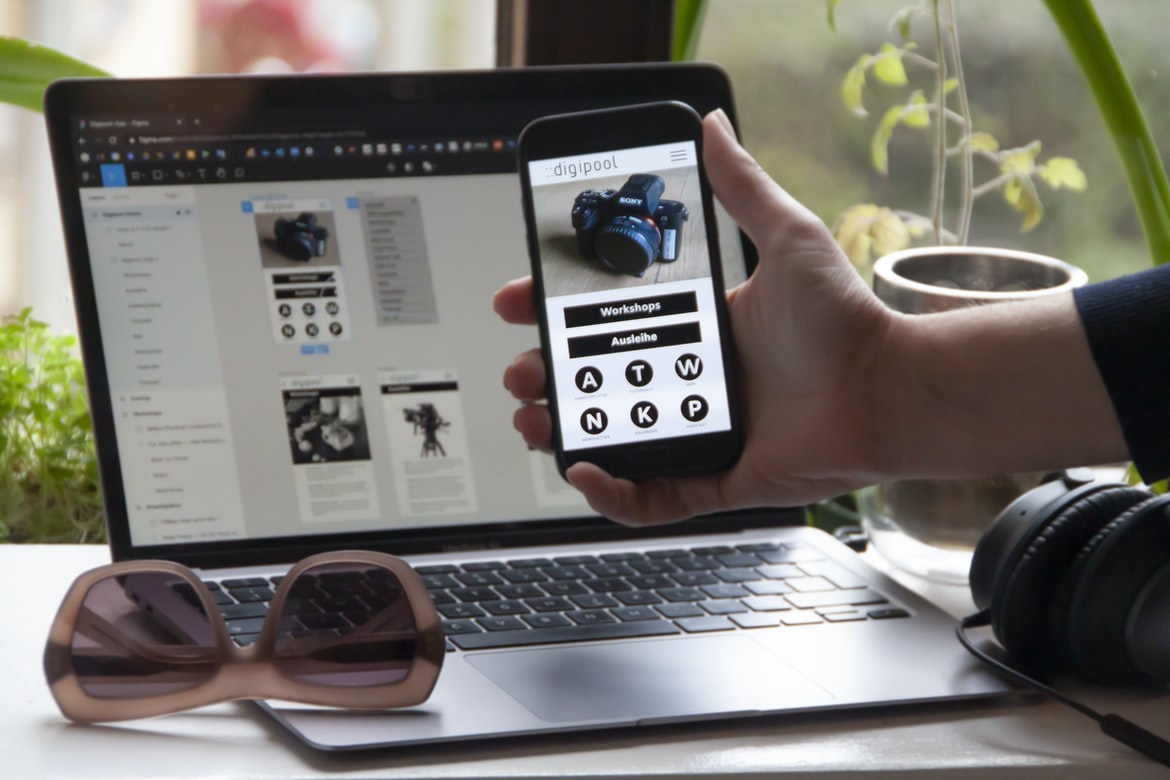
What are Some of the Best Practices When Developing and Designing an App? – What is UI UX, and why is it so important?
UI UX is the design of a user interface, which means it encompasses all aspects of creating a good experience for users when interacting with an application. A good UI UX will make it easy for users to find what they’re looking for, use the features and functions the application offers, and overall have a positive experience. This means that everything from the look and feel of the interface to how easily users can navigate it should be considered when designing an application.
A well-designed UIUX can make all the difference in terms of user satisfaction, retention and even conversion rates. Poor UIUX can frustrate users, leading them to abandon an application or, even worse – rate it poorly on online review sites. On the other hand, well-designed interfaces that focus on simplicity and usability can lead to happy customers who recommend your app to their friends. So if you’re looking to build an application that people will love using – don’t forget about UI UX! UI UX (User Interface Design) is the process and practice of creating an interface that is both effective and appealing to users. The design of a user interface can have a tremendous impact on how users interact with and use an application, whether it’s for personal use or for business purposes. Poor UI design can lead to frustrated users, decreased productivity, and even negative customer feedback.
The goal of UI UX is to create an interface that is easy to use and intuitive while still providing the necessary features and functionality. Users should be able to access all features of the application without having to learn new shortcuts or roll their eyes at superfluous icons. In order to achieve this balance, UI UX professionals must consider many factors, including layout, colour scheme, typography, animation, and user feedback.
UI UX is critical not only for applications that are used by individuals on a daily basis but also for those that are used by large organizations or companies in multiple locations around the world. By creating an intuitive interface that is responsive to users’ needs, companies can save valuable time and money while increasing employee productivity.
Building a Great User Interface: Tips for Designing a User Experience that is Effective and Beautiful
User interface and user experience design are critical parts of any software application. Unfortunately, many developers and designers lack the necessary skills to create effective user interfaces. This can be especially true when it comes to designing mobile applications.
There are several tips that can help you create an effective user interface:
1. Use plain, simple icons and buttons. Don’t clutter your user interface with fancy graphics or animations. Keep things simple and easy to understand.
2. Make sure your user interface is responsive. Make sure that it looks good on all devices, from smartphone screens to large desktop monitors.
3. Think about how users will interact with your application. Do they need to be able to type in long strings of text? Are they likely to use gestures or touch controls? Take all of these factors into account when designing your user interface.
4. Remember that users will be using your application on a daily basis, so make sure it’s easy to use and looks good no matter what environment it’s used in (home, office, car). There are a few things that you can do to ensure that your user interface (UI) is effective and beautiful. First, always keep in mind the users’ needs. Make sure to design your UI in a way that is easy to navigate and understand. Additionally, be sure to use appropriate colours and fonts that are easy on the eyes. Finally, make sure to test your UI before you release it to the public.
Understanding How Users interact with Your App: What you need to know about user behaviour and how to tap into it
When designing and building an app, it is important to understand how users interact with the app. User behaviour can be used to improve the design of the app, as well as identify areas where the user interface or UX could be improved.
Some key factors to consider when understanding user behaviour is how often a user interacts with the app, what tasks they perform in the app, and how happy they are with their experience. By understanding these factors, you can create an engaging and successful application for your users.
Creating an Eye-catching & Functional User Interface: Tips for Making your Application Look Great on all Devices
Creating an eye-catching and functional user interface is essential for any application. Here are a few tips to help make your application look great on all devices:
1. Keep your design consistent across devices. The consistent design makes it easier for users to understand the interface, reduces cognitive load, and helps them navigate the application more quickly.
2. Use typography to create a visually appealing interface. Typography can help set a tone for your application, highlight important information, and create a sense of style. Use typefaces that are legible on all screens size, and make sure you use text correctly – for example, using italics for emphasis rather than just underlining text.
3. Use images wisely. Images can help illustrate your points and add visual appeal to your interface. However, be judicious when including images in your design – too many images can slow down the loading of your application or take up too much space on the screen.
4. Think about how users will interact with your application on different devices. For example, if you have an iPhone app that lets users share photos with their friends, make sure you include buttons that allow users to do this easily without having to leave the app! Similarly, if you have an Android app that lets users chat with other Android users directly through the app, be sure to include features like this in the design so that people will want to use it!
Keeping Users Engaged: Tips for Keeping them Coming Back for More
1. Make sure your application is easy to use and that all of the features are accessible from the first page.
2. Keep your user interface (UI) simple but effective. Avoid overcrowding the screen with too many buttons or menus, and make sure all of the necessary information is visible at a glance.
3. Use visuals to emphasize key points rather than relying on text alone. Try to create a sense of atmosphere and cohesion within your application by using appropriate colours and style choices.
4. Always keep in mind the user’s needs when designing your interface – if they find it difficult to use or understand, they’re likely to give up before even getting started. Keep everything as simple as possible while still meeting your user’s needs! One of the most important things you can do to keep your users engaged is to design a user interface and UX that is easy to use and flows smoothly. Users should be able to find what they are looking for quickly and be able to navigate the site without any confusion. Additionally, it is important to keep the site updated regularly with changes in the application so that users feel like their input matters. If you can do all of these things, you will have a successful application!
The Importance of UI UX in Mobile Development
UX is an important consideration for application design and building. User experience is the process of designing a system or product to make it easy, efficient and satisfying for users. It can be thought of as the overall design of a product or system from beginning to end – including the user interface, navigation, interactions, and overall visual appearance.
In mobile development, good user experience is especially important because users are increasingly interacting with mobile applications through touch screens and keyboards rather than traditional desktop computers. Poor user experience can lead to frustrated users and decreased loyalty in your customer base.
One way to achieve a good user experience in mobile apps is by ensuring that all aspects of the app’s design are well-considered. This includes things like the layout of menus, dialogue boxes, and buttons; the size and placement of elements on screen; as well as how colours are used throughout the app. It’s also important to consider how users will interact with your app – such as how they will navigate between pages or screens or how they will use keyboard shortcuts.
All these factors play into making an effective user interface (UI). A good UI not only looks great but also makes it easy for users to find what they’re looking for, comprehend what they’re seeing, and take action without having to struggle with cumbersome menus or clunky controls.
How to convert a website to an app
When building an app, the process of conversion from a website to an application is often difficult and time-consuming. There are many factors to consider, such as the layout of the website, its functionality, and how it looks on different devices. In order to convert a website into an app, you’ll need to first understand how each part of the process works.
Conversion from Website to App
The first step in converting a website into an app is understanding how devices interact with websites. Different browsers and devices have different capabilities and require different coding techniques in order to display content properly. For example, some browsers may not be able to see JavaScript or other advanced features that are used in apps.
Once you’ve determined which features will work on which device, you’ll need to create separate files for each platform. This means creating mobile versions of all the pages on your website as well as corresponding app files. You can use tools like Adobe XD or Canva to create templates for both platforms and then tweak them as needed.
Another consideration when converting a website into an app is content placement. Websites are typically designed with one main goal in mind—to provide information to users—so it’s important that all content is placed logically within the page layout. When converting a website into an app, you may need to move content around or create new pages altogether in order for it to appear correctly on various devices and browsers.
Application Building
Application building and design is an ever-growing industry, with more developers choosing to build their own applications rather than use pre-made ones. There are many different ways to approach application building and design, but one of the most important things you can do is make sure your app’s user interface (UI) and UX are top-notch.
If your app’s UI or UX isn’t appealing, users likely won’t bother using it. Poorly designed apps can be frustrating to use, making it difficult for people to get work done. In addition, poorly designed apps can also lead to lost customers or even abandonment of a project altogether.
It’s important to pay close attention to both the UI and UX of an app when designing it. A well-designed UI will make your app look good and feel easy to use. On the other hand, a well-designed UX will make sure that all of the features in your app are accessible and easy to use.
By taking these two aspects into account when designing an app, you can ensure that users have a positive experience from beginning to end.
Adobe XD: Building Apps Without Coding Knowledge
Adobe XD is a user interface design tool that allows users without coding knowledge to build and design mobile apps. Adobe XD offers an intuitive drag-and-drop interface, as well as features such as prototyping, collaboration and integrations with other software. Adobe XD has been praised for its ease of use and the ability to create high-quality apps quickly.
E-Commerce Platform
There is no doubt that e-commerce platforms are the key to success for any online business. However, choosing the right platform can be daunting and time-consuming. There are many factors to consider, such as features, pricing, and support. Fortunately, there are a number of great e-commerce platforms available that cater to a variety of needs and budgets.
One of the most popular e-commerce platforms is Shopify. Shopify is perfect for small businesses that want an easy-to-use platform with lots of built-in features. It also has a very user-friendly interface which makes set-up and management easy. Prices start at just $14/month for a basic account which gives you access to all the features the platform has to offer. If you need more capabilities or want to grow your business, then Shopify Plus is perfect for you. It costs $29/month but offers extra features, including unlimited storage space, custom domain names, an extended warranty and more.
Another popular e-commerce platform is Magento. Magento is well known for its high-end customer service and its ability to handle large-scale businesses. It can be expensive upfront but offers great flexibility in terms of customization options and scalability down the road. If you have a complex web store or need more power, then Magento Enterprise may be the ideal solution for you, costing $379/year for an individual account or $2,199/year for a corporate account (which includes 20 users).
Figma
Figma is a powerful 3D graphic design application that allows users to create detailed and accurate designs quickly and easily. Figma is popular for its intuitive interface, which makes it an excellent choice for both experienced and novice graphic designers. Additionally, Figma’s wide range of features makes it an excellent tool for creating more complex designs, as well as user interfaces.
Adobe XD
Adobe XD is a new application development platform that offers users a way to create and manage user interfaces (UI) and user experience (UX) designs from within a single application. Adobe XD makes it easy for users to create, prototype, and test layouts, wireframes, and prototypes. Adobe XD also provides features for animating user interface elements and integrating them with other applications.
Design Mobile App
Designing mobile apps is a process that involves creating a graphical interface and user experience for the app. A designer must take into account many factors when designing an app, including the target audience, the platform it will be released on, and the type of app it is. The design process can be divided into four stages: research, design, development, and testing. In stage 1, research, a designer will gather information about the target audience and the platform on which the app will be released. This information will help them create a unique graphical interface and user experience for the app. In stage 2, design, a designer will create detailed sketches of how the graphical interface and user experience will look. In stage 3, development, code for the app will be created based on designs in stage 2. And in stage 4, testing, final tests are conducted to check if the app functions as intended. Building a mobile app is an expensive and time-consuming process. There are many factors that must be considered when designing an app, including the user interface, user experience (UX), and the overall look and feel of the app.
The UI design of an app should be simple and easy to use. The UX should be designed in a way that makes the app as enjoyable to use as possible. The overall look and feel of the app should be appealing while still being professional.
All these factors must be taken into account when designing a mobile app. If done correctly, a mobile app can become a successful business venture.
Graphic Design
Designers are often thought of as people who create pretty graphics, but there is so much more to it than that. A good designer understands the principles of design, how users interact with a product, and how to build an effective user interface. In addition to making beautiful designs, designers need to be aware of the context in which their work will be used. They need to understand the business and its needs in order to create designs that meet those needs. Graphic design is the process of planning and creating a visual representation of information, such as a logo, website, or advertisement. Graphic designers create designs that are both functional and eye-catching. They must be able to understand what the client wants and create a design that reflects their brand while still being visually appealing. Graphic designers use a variety of tools, including Illustrator, Photoshop, Inkscape, and GIMP, to create graphics.
What is UI design?
UI design is the process of creating a graphical interface for an application, website, or system. It encompasses everything from the overall layout and look of the interface to the specific buttons, menus, and icons used. A skilled UI designer will know how to create an intuitive and easy-to-use environment that meets the needs of both users and administrators. UI design is the process of creating the look and feel of an application or website. This includes everything from the layout and graphics to the user interface (UI) elements. A good UI design can make the user experience on a website or application one of the most enjoyable aspects. It can also be key to keeping users engaged with your product or site, which can lead to increased revenue and customer base growth.
What is UX design?
User Experience (UX) design is the process of designing the user experience for a product or service. The goal is to create an experience that meets the needs of the users while also meeting the requirements of the product or service.
There are many different aspects to UX design, including user research, wireframing, prototyping, and testing. Basically, UX design is all about creating a great user experience for your users.
Visual Communication
Visual communication is one of the most important aspects of design. It can help convey a message to users, help them understand what you are trying to accomplish, and can even improve user experience. Effective visual communication involves using graphics, images, and colours to achieve the desired effect.
Graphics can be used to represent data or information. In applications, graphics can be used to represent elements such as menus and buttons. When designing an application, it is important to consider how users will interact with the interface. For example, if a user has to select multiple items from a list, it is helpful to use graphical representations for the items. Images can also be effective in conveying information. For example, an image that represents a document may contain different types of documents (such as memos and contracts) so that users know what they are looking at.
Colour also plays an important role in visual communication. Colours can be used to signify different feelings or emotions (such as happiness or sadness). They can also be used to represent different types of information (such as text and numbers). When designing an application, it is important to consider which colours will best represent the context of the application and the user’s environment.
Visual Communication Vs Graphic Design
Visual communication is the process of creating and representing information through images. It has been used for centuries to transmit messages, ideas, and emotions. Graphic design is the process of creating a visual composition that expresses an idea or message. It can involve the creation of artwork, logos, and illustrations. Ux (User Experience) encompasses all aspects of designing for people who use a product or service. It includes things like how easy it is to find what you are looking for, how pleasant the user experience is, and how well the product meets users’ needs. There is a lot of confusion between Visual Communication and Graphic Design. They are both involved in creating visuals, but they have different purposes and applications. Visual communication is used to communicate ideas and messages to an audience. Graphic design is used to create beautiful and appealing designs that are effective at communicating a message or idea to an audience.
Visual communication can be used in many different ways, such as website design, app development, or advertising. Graphics Design is most commonly used in the field of advertisement because it allows companies to target their audience more effectively.
Application of Graphic Design: Adobe Photoshop, Adobe Illustrator, Adobe InDesign
Graphic design is used in a variety of applications, but Photoshop, Illustrator and InDesign are the most common. Photoshop is used to create graphics for websites, print media and other digital products. Illustrator is used to creating illustrations, logos and graphics for advertising and marketing materials. InDesign is used to create publications such as brochures and magazines. Graphic designers use a variety of tools to create their designs, including Adobe Acrobat, Inkscape and GIMP. There are three primary graphic design applications in use today: Adobe Photoshop, Adobe Illustrator, and Adobe InDesign. Each application has its own specific strengths and weaknesses, which should be considered when designing a user interface or creating a graphical layout.
Adobe Photoshop is the most popular graphics program on the market and is used for creating simple sketches, photo retouches, and basic illustrations. Adobe Photoshop is free to download and use, though paid versions offer more features and are often preferred by professional graphic designers.
Adobe Illustrator is a more complex application than Adobe Photoshop and is used for creating sophisticated illustrations and 3D models. Like Adobe Photoshop, an Illustrator license can be purchased with a free trial or subscription available. Illustrator also has its own set of support forums where users can ask questions and share tips.
Adobe InDesign is a versatile application that can be used to create both 2D and 3D documents. Unlike the other two applications, InDesign does not have a dedicated graphics editor; instead, it uses layers to organize content like images, text blocks, shapes, objects etc.
Figma, Adobe XD, WordPress, Elementor.
When it comes to application design, there are a lot of different tools out there that can be used. Some of the most popular ones include Adobe Photoshop, Adobe Illustrator, and Inkscape. However, if you’re looking to save time or just want something simpler, there are some other options available.
One such option is Figma. Figma is a user interface design tool that allows you to create custom designs for your applications. It also has features like drag-and-drop functionality, so it’s quick and easy to use.
Another option is Adobe XD. Adobe XD is an app development platform that allows you to create interactive applications using code. This can be helpful if you want more control over your applications or if you want to build them using a specific programming language.
Finally, WordPress also offers users the ability to create custom applications. WordPress is an easy-to-use platform that allows users to create their own websites or blogs with little effort.









