

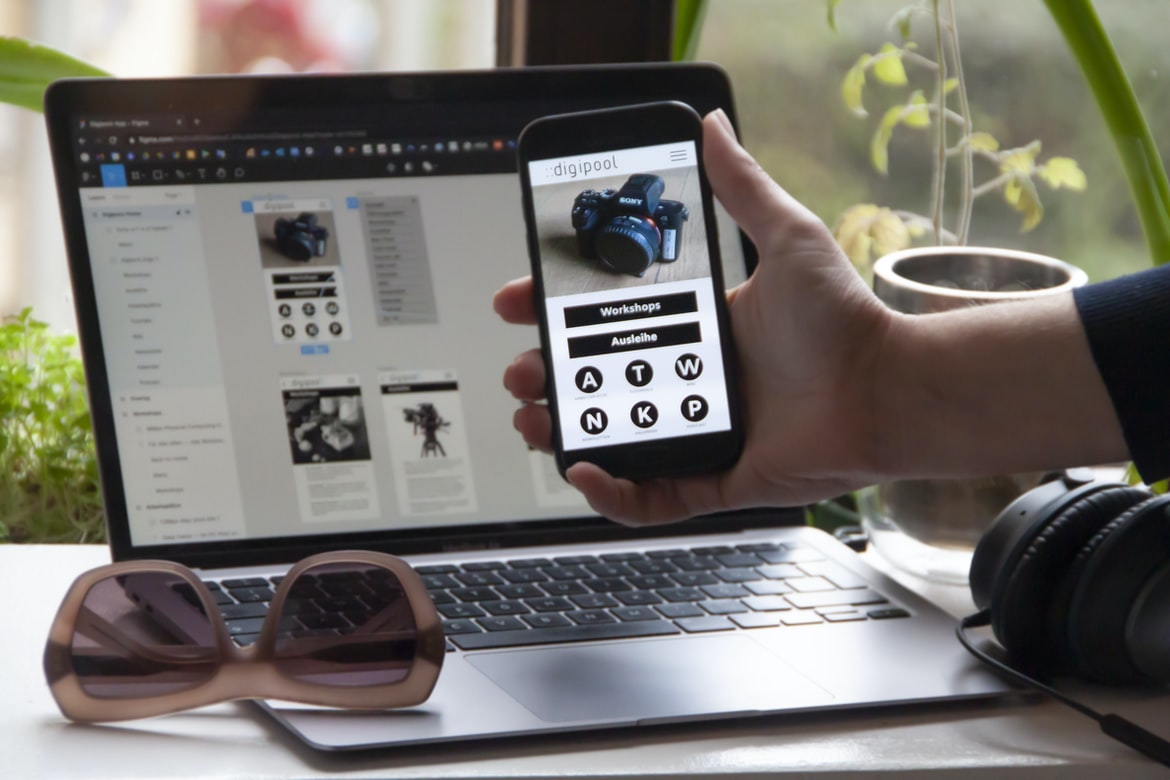
Steps to Build a Professional App with No Coding Required – Since the early 2000s, design UI has become an increasingly important part of user experience. Today, there are a number of different ways to design UI, and it can be difficult to keep all of them in mind when creating a website or application. One way to keep things simple and organized is by using a design UI. By understanding the different types of uis available, you can create more effective and efficient designs that are more likely to be used.
Typically, when it comes to designing user interfaces, designers start with the idea of what the user wants. They then take into account what the user is likely to do or see when using the interface and develop a design that meets that need. Sometimes, however, developers also have to consider how the interface will be used by end users. This requires understanding how users interact with applications and designing interfaces accordingly.
What is UI design, and why should you care?
UI design is the design of any user interface, whether it be for an app or website. It encompasses everything from the layout and typography of a page to how a button should look and feel.
One of the biggest benefits of having a well-designed UI is that users will instinctively want to use it. This makes it easier for developers to create working applications and make changes quickly without needing to experiment with user feedback. Plus, when users see good UI, they are more likely to give you feedback, which can help improve your development process.
What is an application’s user interface (UI)?
There are many different types of user interfaces, from the simplest and most basic to more complex and cluttered interfaces. For example, a website’s homepage might have a simple, white-on-white screen with just a few buttons. But on a more intricate website, such as an online bank application, the user interface may be composed of several layers of screens and menus. The overall layout and design of the UI can determine how inviting and easy it is for users to use the application.
How can you make an application look appealing and user-friendly?
When it comes to designing an application, there are a few things that you can do to make it look appealing and user-friendly. Silhouette your app’s interface using a clean, minimalist design. Use whitespace strategically to avoid cluttering up your design, and use strong typography to create an eye-catching appearance. Avoided using fonts that are too big or small, as they can be difficult to read on small screens. Additionally, use clear callouts and icons to help users find what they need faster. Lastly, make sure that all interactions within the app are easy and intuitive to learn and use. By following these tips, you can create an application that will look great and be easily accessible to everyone.
Principles of UI design: How to think about the user, how to design for users, and how to make your application easy to use.
There are a variety of different principles to consider when designing user interfaces. Some of these include the following:
1. The user is the heart of an application. It’s important to think about how you will make the user interface simple and easy to use, so they can get the most out of your application.
2. Your users have unique needs and preferences. It’s important to understand what those needs are before you design your interface, so you can make sure it’s comfortable and usable for everyone who uses it.
3. Don’t overthink things – just design for people! When you focus on making your interface easy to use, people will be more likely to use it and contribute their thoughts and feedback in a positive way.
User experience (UX): How do you create an intuitive and pleasurable experience for your users?
There are a variety of ways to create an intuitive and pleasurable experience for your users. One way is to create user interfaces that are easy to use and understand. Another way is to create user interfaces that are ergonomic and comfortable. Additionally, it is important to make sure that the user experience is consistent across different devices and browsers.
Tips for improving UX in your applications: How to identify user needs, how to develop effective designs, and how to test and measure the results.
1. Identify user needs
Before you can develop effective designs, it is important to identify your users’ specific needs. Do this by surveys or interviews with customers or end users. Once you have identified your user needs, you can begin to develop your designs accordingly. There are a few key factors to consider:
• The use of graphics and symbols. Users need something to look at while they are using an application, so make sure that the visuals are clear and easy to understand. Use symbols and graphics that are familiar to the user base so they can easily relate to what is happening on-screen.
• The layout of the application. When designing an application, be sure that it is organized in a way that makes it easy for users to access information and navigate around the page. This will help keep the screen space used efficiently and prevent users from getting lost within the content of the application.
• The use of buttons and icons. Users want quick and easy ways to perform actions within an application, so make sure that every button or icon has a clear purpose and is easy to click on without having to search through complex menus or text listings.
What is an application?
In today’s competitive world, many businesses are looking for ways to increase efficiency and reduce costs. One way to do this is by using an application. An application is an online or offline program that helps you do something related to your business or professional life.
There are a number of different types of applications, but one of the most common ones is the web application. A web application lets you access the same content and services that you would on your computer, but it’s published over the internet. This means that anyone can use it, regardless of where they are in the world.
Another type of application is a mobile app. A mobile app is like a desktop app, but instead of being installed on your computer, it’s installed on your phone. This makes it more convenient because you can use it wherever you are – even if you’re out of network range!
Applications can be extremely beneficial for businesses and professionals alike. They make a living and working remotely more manageable, they help reduce costs associated with office space, and they keep information and files safe and secure. If you’re thinking about getting started with applications, there are a few things to keep in mind!
What is a mobile application?
Mobile applications are an essential part of your business. They allow you to access information easily and connect with customers from anywhere. However, building a good mobile application takes some skill and experience.
There are three main aspects to designing a mobile application: the user interface, the user experience, and the system architecture. The user interface is how your users interact with your application. How easy does it feel to use? How common are different types of devices? And how do you make sure that your users have an intuitive experience?
User experience is everything a user experiences when using your app. It includes everything from the way your app looks and feels to how easy it is to find the right information. You need to design for different devices, ensure that users can get what they need quickly, and make sure that there is no confusing or hard-to-use content.
System architecture refers to how your app works together with other apps on your device. This includes everything from how data is organized across devices to how notifications are sent out. You need to create an efficient system so that users can easily access information and make transactions.
What are the benefits of building an application?
There are many benefits to building an application. One of the most important reasons to build an application is to improve the efficiency and security of your business. By developing an application, you can manage your data more securely, reduce expenses associated with processing information, and improve customer service. Additionally, applications can provide a unique user experience that can differentiate your company from its competitors. There are many factors to consider when designing an application, so be sure to ask around for advice before starting development. Some benefits of building an application include the following:
efficient: By creating an application, you can streamline processes and keep data organized. This will free up time for other areas of your business while also reducing costs associated with managing information.
Secure: Building applications protect your data from unauthorized access and theft. In addition, by storing data on a server rather than in the hands of individuals or businesses, you reduce the chances that sensitive information will be lost or mishandled.
Customer service: When customers interact with an application—from browsing through a website to filling out a form—they often want the best possible user experience.
How do you go about building an application?
Applications are built in a variety of ways, from traditional software development models like in-depth design and structure to more holistic processes like agile methodologies. While all applications will have some commonalities, there is no one-size-fits-all approach when it comes to building an application. In this blog post, we’ll begin by discussing the basics of application development using a traditional software development model, followed by exploring some more complex process options when it comes to user experience (UX).
What are some tips for building a successful application?
1. Start with a clear business vision for the application. This will help you to identify the problem that your application is intended to solve and the features that will make it successful.
2. Do your homework: research specific tips, frameworks and tools that will help you build an effective application.
3. Use a plan: create a roadmap for your development cycle and track progress against expectations.
4. Take ownership of your project: give yourself clear ownership of the product and ensure that every step in the process is vocalized and tracked explicitly.
5. Stay organized: keep all data organized by project, feature or feature area so that you can quickly access information when needed and avoid surprises down the road.
How to convert a website to an app
conversions for website conversion
There are various ways to convert a website into an app. But the most common way is to use a platform like Apple’s App Store or Google Play.
The first step is to create a website and then create an account on one of these platforms. Once you have an account, you can search for websites that are similar to your business and download them as an app.
The next step is to design the user interface for the app. This will include designing the buttons, views, and other elements that will make the app more user-friendly.
There are many ways to create an app from a website.
There are many ways to create an app from a website. Here are three basic ways:
1. Download and use a template: Many app developers use templates to get started, but it’s also possible to create your own. You can find templates online or in the app store.
2. Use an online development agency: If you have some experience programming and want to create an app yourself, you can use an online development agency to do it for you. These agencies typically have years of experience in developing apps and can help you with everything from coding to marketing.
3. Use your own coding skills: If you’re not confident in programming, there are plenty of free or low-cost tools that allow you to create apps on your own. For example, CodePen offers free lessons in code so that you can develop app ideas quickly and easily.
Application Building
Applications are the backbone of many businesses. They allow users to interact with content, often through a graphical interface. In order to create an application that is user-friendly and engaging, designers must first understand the user’s needs and develop a design strategy that meets those needs. This article will discuss how to build an application UI using various design patterns and best practices.
Adobe XD: Building Apps Without Coding Knowledge
Adobe XD is a popular cross-platform development platform. While it doesn’t come with coding knowledge, many developers who want to build successful web and mobile apps can use it without any trouble.
One particular advantage of Adobe XD is that you can create complex user interfaces without having to learn coding languages. All you need is an HTML, CSS, and JavaScript skillset. With Adobe XD’s powerful drag-and-drop tools, you can quickly create beautiful user interfaces without much hassle.
E-Commerce Platform
There are many e-commerce platforms on the market today, but the best ones for starting out typically have high-quality applications and design UIs. While there are plenty of other e-commerce platforms to choose from, these two should be your mainstay if you want to start an online store.
First, note that not all e-commerce platforms include a checkout process or payment gateway options. If you want to go this route, it’s important to research which ones do and which ones don’t.
Second, some platforms (like Shopify) allow you to create your own website or store completely within the platform. This means that you can put all of your content on one page and make it easy for customers to purchase products. Other platforms (like Etsy) require customers to use third-party websites or services in order to buy products.
If you want a platform that works well with both online store and mobile app versions, then consider using Shopify as your e-commerce platform of choice. This platform allows you to build an entire site without any coding required, which is great for small businesses that don’t have the time or resources for a full project.
Figma
Figma is a free, open-source design platform that helps you build and design user interfaces. With Figma, you can quickly create beautiful and efficient applications with high levels of flexibility and automation.
Adobe XD
Adobe XD is a powerful tool for building and designing user interfaces. It’s easy to use, and you can create beautiful user interfaces in minutes. Adobe XD can also help you achieve your design goals quickly and easily.
Design Mobile App
In today’s society, with so many options for how to build a mobile app, it can be difficult to know what is the right way to go. Many people choose to build their own mobile apps, but this is not always the best option. There are many successful and popular mobile apps that were built by using the latest design trends and principles. Some of these include Uber, Airbnb, and Spotify. How can you ensure that your own mobile app will be as successful as these? Here are some tips:
1. Make sure your user interface (UI) is intuitive and simple.
2. Use attractive colours and fonts for your user interface elements.
3. Use clean lines and shapes for all of your buttons, menus, and other objects in your UI.
4. Make sure all of your images are high quality and well-resourced for use in your app.
Graphic Design
A few years ago, I decided to go full-time in graphic design. Straightforwardly because the field is growing so rapidly, and there are a lot of great resources out there. The industry has come a long way since then, and now it’s important to keep up with the trends and techniques used by top designers.
One of the most common types of designs used today is the user interface (UI). UI is all about making your users feel comfortable and informed when using your product. It should be easy to navigate, look good, and be intuitive.
In this blog post, I’ll be talking about some general tips for designing UI for web applications. After reading this post, you should be able to create successful user interfaces that will make your customers happy!
What is UI design?
As we move into the 21st century, many people are asking what design is and what it means for an organization. UI design is a type of design that helps to create or improve the user experience of an application or website.
There are many different types of UI design, but the most common one is called the “user interface.” A user interface can be found on websites and applications such as computers, mobile devices, and even cars. It’s important to note that there isn’t one specific kind of UI that everyone needs to use in all situations.
Some common elements of a user interface are keyboards, buttons, menus, pads, slider bars, dropdowns, and checkboxes. There are also many different ways to create a user interface, so there’s no need to be afraid to try something new if you don’t know how to do it. In fact, most organizations should use at least one type of UI every time they start up an application or website because it will make life much easier for their users!
What is UX design?
UX design is the process of designing and creating user interfaces that are appealing, effective, and efficient. It encompasses everything from creating an intuitive user experience for a website or application to finding the right way to display data on a computer screen.
Visual Communication
Visual Communication is a necessary component of any UI design. Whether it’s for an online store, an app or even just a website, the good visual design will make your user experience more positive and pleasant. Here are five tips to help with your next UI project:
1. Make sure the images you use are high quality and properly exposed.
2. Use consistent font types and weights throughout your designs.
3. Use clear, concise text for callouts, notices and other important information.
4. Use contrasting colour palettes to imply different elements or states in your designs.
5. Keep things simple and straightforward when designing user interfaces – this will help users feel more at ease and be able to get the most out of their experience.
Visual Communication Vs Graphic Design
A lot of people think that graphic design is all about designing pretty things. But in reality, graphic design is just one aspect of UI design. And even though it may be seen as a lower priority, it can still play a critical role when it comes to user experience (Ux).
Application of Graphic Design: Adobe Photoshop, Adobe Illustrator, Adobe InDesign
Adobe Photoshop, Adobe Illustrator, and Adobe InDesign are all great tools for application building and design. They’re versatile and can be used for a variety of different tasks. However, there are some things to keep in mind when using these tools.
First, they have a lot of features which can sometimes be overwhelming. Second, they can be expensive to purchase outright. Third, they may not be suitable for everyone. Lastly, it’s important to understand the different options available to them and how each one works before starting to use them.
Figma, Adobe XD, WordPress, Elementor.
Figma is a cross-platform software application development platform, and Adobe XD is a powerful vector graphics editor for web developers. Elementor is an online WordPress site builder that makes creating your own WordPress sites easy and fast.
What Is A Prototype?
Prototypes are a way to test ideas and concepts before you bring them to market. They can also help you get feedback on how people would use your product or service. Prototype designs can be Vertical (upward), Linear (downward), or Mixed Media (background and front-end).
When creating a prototype, the key is to be specific. Make sure your design is unique, accurate, and easy to understand. You don’t want people who build your product to have trouble understanding it when they see it in use.
Remember: prototypes should not be used as the final product. Instead, they should be used as a way of building empathy for the product and helping you understand how users will interact with it.
What is A/B testing?
A B testing is a type of testing that is used to measure the effectiveness of an application in terms of user experience (UX). A B test can also be used to measure the effectiveness of an application in terms of functionality.









