

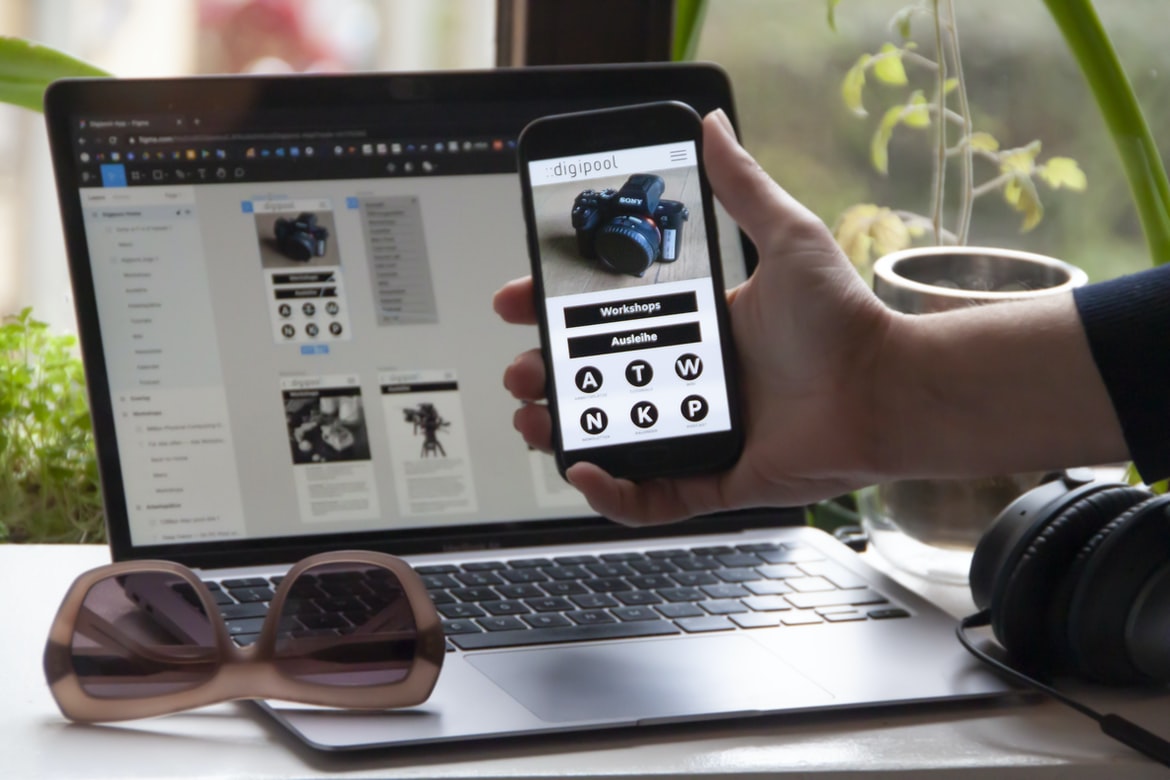
App Development Tutorials – 1. In order to create a great user experience, application developers must focus on the user interface (UI).
When it comes to creating a user interface, application developers must focus on the user experience. This means designing the UI in a way that makes the task of using the app as easy and enjoyable as possible. There are a few key elements that make up a great user experience, and developers need to pay attention to all of them if they want to create an app that users will love.
One of the most important factors is design simplicity. Users should be able to understand how to use the app without having to read any instructions or stare at complex screens for too long. In addition, buttons and other graphical elements should be placed where they’re easy to find and use.
Another important factor is usability. Every element of an app should be designed with this in mind, from the menus and buttons onscreen, to how data is organized and displayed.
2. A well-designed UI can make an application more informative and easy to use.
When designing an application, one of the most important things to consider is how the user interface (UI) can improve the usability and informational value of the application. A well-designed UI can make an application more informative and easy to use, which can lead to increased user satisfaction and loyalty. In order to create a successful UI, it is important to pay attention to a number of factors, including the design principles established by renowned designer Steve Jobs.
3. Proper UX design can help keep customers happy and engaged with your product.
Every business wants customers who are happy and engaged with their product. Proper user experience (UX) design can help keep customers happy and engaged with your product. There are a few things you can do to ensure your UX is top-notch:
– Keep the design simple: Users don’t have time for complex interfaces, so keep them as simple as possible. Your goal should be to make the process as easy as possible for them without sacrificing functionality.
– Use familiar metaphors: When users interact with your product, use familiar metaphors that they will understand. For example, if you’re building a recipe app, show the ingredients and how they work together on a cooking page rather than showing all the steps in detail. This will make it easier for them to search for what they need and jump straight into using the app.
4. There are many different ways to design a UI, so it is important to find the right approach for your product.
There are many different ways to design a UI, so it is important to find the right approach for your product. Choosing the wrong method can lead to a subpar user experience that frustrates users and hinders adoption. The four main methods used in application development are paper-based user interfaces, graphical user interfaces (GUIs), toolbars and menus, and direct manipulation.
Paper-based user interfaces are typically the oldest form of UI design and are still used in some applications today. They work best when there is a simple interface with few buttons or items. Graphical user interfaces (GUIs) were developed in the early 1990s as an alternative to paper-based UIs. GUIs allow for more complex designs with more buttons and items.
There is no one-size-fits-all approach to creating a user interface (UI) for an application. However, there are some general UX principles that should be followed when designing a UI.
1. Keep the user’s focus on the task at hand.
2. Make it easy for the user to find what they are looking for.
3. Make sure all the information the user needs is readily available.
Application Building
Application building has come a long way in recent years, with the advent of frameworks and libraries that make creating robust applications easy. However, one of the biggest challenges in application development is creating a user interface that is both intuitive and appealing to users. In this article, we will explore ways to improve user interface (UI) design for applications using UX techniques.
There are a number of ways to improve UI design for applications. One approach is to focus on providing feedback to users as they interact with the application. This can be done by polling users regularly about their progress or by displaying static feedback throughout the application. Another approach is to use intuitive metaphors in the UI layout and design. This helps users understand how the application works without having to read through complex instructions or descriptions. Finally, it’s important to consider the usability of features within an application before designing them. As web application development becomes more complex, so too does the need for user interface (UI) designs that are both aesthetically pleasing and functionally efficient. This can be a daunting task, but with the right tools and techniques, it’s possible to build user interfaces that are both intuitive and easy to use. In this article, we’ll discuss some of the best practices for building user interfaces using popular UI design frameworks like React and Vue. We’ll also provide tips on creating effective layouts and incorporating responsive design into your applications. By following these guidelines, you’ll be able to create high-quality applications that users will love!
Adobe XD: Building Apps Without Coding Knowledge
Adobe XD is a new app development platform that makes it easy for non-coders to build user interfaces and apps. In this article, we’ll show you how to create a basic app using Adobe XD.
First, we’ll create our project in Adobe XD. Next, we’ll create our user interface and add some basic elements. We’ll also add a few buttons and text boxes to our interface and create an event handler for when the user clicks on one of the buttons. Finally, we’ll save our project and test it out in the browser.
Overall, Adobe XD is an easy platform to use if you don’t have coding experience. It’s perfect if you want to build a simple app or user interface without having to learn any code.
E-Commerce Platform
In today’s world, there are countless e-commerce platforms available to entrepreneurs and businesses of all sizes. Which platform should a business choose when starting out?
There are many e-commerce platforms available, so it can be difficult to decide which one to use. There are two main factors to consider when choosing an e-commerce platform: the features offered and the ease of use.
Some popular e-commerce platforms include Shopify, Magento, and WooCommerce. Each offers different features and different levels of ease of use, so it’s important to research each option carefully before making a decision.
The most important factor is what your business needs. Do you need a basic platform that lets you create a website and sell products online, or do you need more advanced features that let you customize your site design and add additional products?
Figma
Figma is a user interface (UI) design tool that lets users create complex designs quickly and easily. Figma is free to use, and its drag-and-drop interface makes creating UIs easy. The app also has a built-in preview feature that allows users to see how their designs will look before they commit them to paper.
Adobe XD
Adobe XD is a new application development environment that builds user interfaces for mobile and web applications. It has a drag-and-drop interface, and it is free to use. Adobe XD can be used to create standard user interfaces or adaptive user interfaces.
Design Mobile App
Designing a mobile app is an important task that must be taken seriously if you want your app to be successful. If the design of your app is not up to par, it can lead to users not being interested in using it, and eventually, no one will download it. The following tips will help you create a user interface that is both visually appealing and functionally efficient.
1. Take into consideration the target audience of your app. Do research on what features and functions are most important to them and focus on making those available in your app.
2. Use intuitive designs that are easy for users to understand and navigate. Make sure all elements of your UI are clickable so users can get where they need to go quickly.
3. Keep screen sizes in mind when designing your app’s interface.
Graphic Design
Graphic design is a process that can be applied to any design field, from logo design to website layout and even product packaging. Graphic designers create finished products by combining their skills in typography, photography, illustration, and motion graphics. In order to succeed as a graphic designer, it is important to have an eye for detail and the ability to think outside the box. Below are key tips for becoming a better graphic designer.
1. educate yourself: The best way to become a better graphic designer is to learn as much as possible. There are plenty of resources available online, including online courses and tutorials, books, magazine articles, etc. Education will not only help you learn new techniques but will also equip you with the critical thinking skills necessary for problem-solving in the design field.
2. practice: Make sure that you are a good designer by simply practising what you learn. Try out new techniques and designs in the field, work with other designers to get feedback on your work, critique your own work, etc. The more you practice, the better you will become. 3. Draw: Some designers draw their work before they do any type of design. This is a good way to get used to the process, and you can use this as a reference later on. 4. Sketch: This is used to help you visualize your work. 5. Stencil: This is a piece of paper with a grid on it. You can use it to guide the placement of other elements like type or lines 6. Stylus: This is a tool for the digital design only.
What is UI design?
Design is the process of creating a plan and designing the layout, style, and appearance of an object, system, or interface. It typically involves coming up with concepts, drawing inspiration from other design disciplines, researching user needs and trends, sketching out ideas, prototyping working versions of designs with users in mind, and refining the design as feedback is collected. In addition to its visual aspects, good design also takes into consideration user experience and functionality. UI design is the process of creating a user interface for a computer application or website. This involves thinking about how users will interact with the application, designing the layout and graphics, and developing user feedback templates.
UI designers must be able to think both logically and creatively, as well as have an understanding of different types of media. In addition, they must be familiar with web development frameworks, such as HTML and CSS. UI design is the process of designing the user interface for software or a website. This can include anything from creating the overall look and feel of a system to ensuring that the user’s interactions with the system are smooth and easy to understand.
One of the key aspects of UI design is ensuring that all elements of the system work together smoothly. This includes making sure that all buttons, menus, and other graphical elements are logically grouped together, as well as taking into account how users will interact with them.
Another important task in UI design is ensuring that users have an intuitive understanding of how to use a system. This can involve creating tutorials or other helpful materials, as well as designing layout schemes which make sense given how users will be using the system.
Overall, UI design is an essential component of any software or website project.
There is no dispute that UI design is an essential component of any software or website project. From the initial stages of the concept to final delivery, a well-designed user interface can make all the difference in terms of usability and overall user experience. However, designing effective UIs isn’t always easy. There are a number of factors to consider, from layout and presentation to functionality and interaction. With so many different options available, it can be hard to get it right. But if done correctly, a well-designed UI can help your users feel confident and successful using your product. In this article, we’ll look at some of the key considerations when designing UIs for software or websites.
What is UX design?
UX design is all about making sure the user experience in an application is top-notch. This may include things like creating an intuitive user interface, ensuring that all relevant information is easy to find, and ensuring that the overall design looks appealing. It’s important to take into account both the user’s needs and preferences when designing an application so that everyone who uses it feels comfortable and satisfied. UX design is the process of designing user interfaces that are intuitive, helpful, and efficient. It is a critical step in the development of any digital product and can make or break a business’s ability to compete in the global market.
The goal of UX design is to create an experience for users that is both pleasant and functional. This involves understanding the needs of your target audience and developing a coherent design strategy that meets those needs.
There are several key principles behind effective UX design: simplicity, focus, gestalt, empathy, and feedback. These principles help you create an interface that is both easy to understand and use.
Ultimately, good UX design results in happy users who are able to complete tasks quickly and easily.
Visual Communication
There is no question that visual communication plays an important role in user experience (UX). Poor visual design can ruin an otherwise great interface, making it difficult for users to understand and navigate. So, how do you go about creating a well-designed user interface?
First and foremost, consider the target audience. What do they want and need from the interface? Do they prefer simple designs or more complex ones? Once you know this, you can start to build out your interfaces using different types of visuals.
Some popular methods of visual communication include typography, colour, layout, imagery, and motion. To create an effective user interface with these tools, it is essential to understand human psychology. By studying how people process information visually, you can better design your interfaces to be effective and easy to use. Visual communication is an essential part of user experience (UX). Good visual communication can make a user’s experience more enjoyable and efficient. It can also help improve the overall perception of a product or service. Here are tips for improving your visual communication:
1. Use clear, concise design patterns. When designing your interface, use well-known design patterns that users will be familiar with. This will help them understand your interface quickly and make better decisions about how to use it.
2. Use typography to emphasize important information. Typefaces can be used to highlight important elements in your interface, such as navigation menus or dropdown menus. Make sure the typeface is legible in all sizes and formats, and use different typefaces for different types of content to avoid confusion.
3. Use white space wisely.
Visual Communication Vs Graphic Design
There is a lot of debate between visual communication and graphic design when it comes to which is better for user interface (UI) design. Visual communication focuses on how the user sees the information on a screen, while graphic design deals with creating the look and feel of a webpage or application.
Some people believe that visual communication is more important than graphic design because it affects how users perceive an application. Graphic designs can be very detailed and intricate, but if a user cannot understand what is being displayed, then the design may not be successful.
On the other hand, some people believe that graphic design is more important than visual communication because it affects how users interact with an application. A well-designed interface will make using an application easier for users and can make them feel more confident in using the product. Visual communication and graphic design are two different disciplines that focus on the creation of visual content. Visual communication strives to create a message that can be understood through the use of images and layout. Graphic design, on the other hand, is focused on designing visually appealing designs for products and websites.
There are many similarities between visual communication and graphic design. Both disciplines rely heavily on layout, colour, and imagery to convey a message. However, one major difference is that visual communication is focused on creating a message that can be understood by humans, while graphic design is focused on creating visuals that appeal to humans and machines.
Despite these differences, there are many similarities between the two disciplines. Both disciplines use layout, colour, and imagery to communicate a message. Additionally, both disciplines rely heavily on user feedback to improve their work.
Application of Graphic Design: Adobe Photoshop, Adobe Illustrator, Adobe InDesign
Graphic design is an essential skill for any digital designer. But what about the lesser-known applications, like Adobe Photoshop and Adobe Illustrator? In this article, we’re going to explore how these programs can be used to build user interfaces (UI) and UX.
Adobe Photoshop is a ubiquitous graphic design application used by professionals and amateurs alike. Its vector drawing tools make it perfect for creating complex illustrations or logos, while its photo editing capabilities make it ideal for detailed photo collages and graphics. Adobe Illustrator is a powerful vector illustration program that can be used to create complex illustrations or logos, while its ability to export files as PDFs makes it perfect for use in eCommerce websites and other print-friendly environments.
Figma, Adobe XD, WordPress, Elementor.
Figma, Adobe XD, WordPress, and Elementor are all popular application-building tools. They offer different features, but they all have one thing in common: they make it easy to create a user interface. Figma is particularly well-suited for creating complex UIs, while Adobe XD is good for quickly creating simple interfaces. WordPress is a versatile platform that can be used to create any type of website, and Elementor can be used to create custom UI components. Figma and Adobe XD are two of the most popular application development frameworks on the market. They both offer excellent user interface (UI) design capabilities, making them a great option for creating custom applications. WordPress is a popular content management system (CMS) that is used by millions of people around the world. Elementor is a drag-and-drop UI builder that makes it easy to create custom interfaces for your applications.
What Is A Prototype?
A prototype is a graphical representation of the end product. Prototypes are used to test and improve the design before it is finalized. By creating a prototype, you can save time and money while still ensuring that your product is of high quality.
There are a few different types of prototypes. The first type is a low-fidelity prototype which is used to test the basic functionality of the product. A high-fidelity prototype is more complete and reflects the final product. Both low- and high-fidelity prototypes can be digital or physical, but they all have one common goal: to help you learn about your design before you spend any money on it.
One advantage of using a prototype over actual users is that you don’t have to worry about offending people or having conversations that won’t lead anywhere.









