

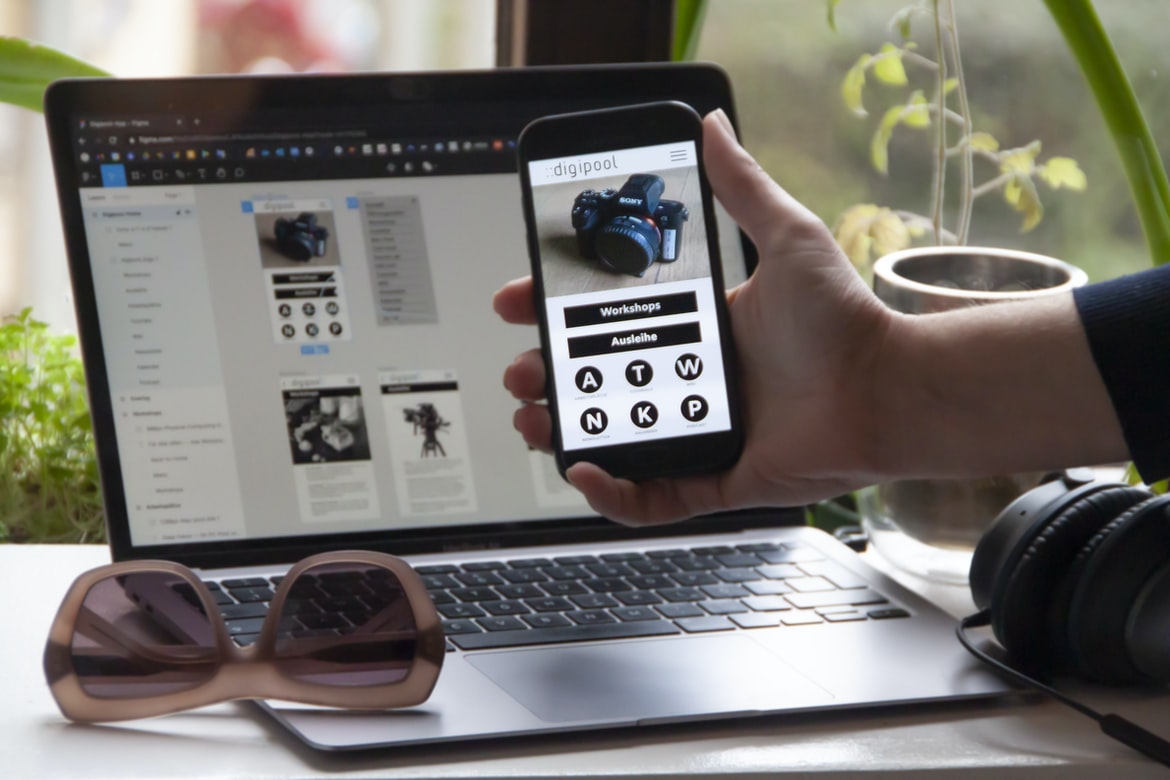
Introduction: What is a Mobile App and How do Tutorials Help Build One? – Successful mobile application UIs often adhere to a few best practices or guidelines that designers should follow. These include ensuring that all screens are logically grouped together, using layered designs where necessary, and employing positive user feedback loops to ensure that users know what they can do next (or if something isn’t working as intended).
It’s also helpful to keep in mind the different screen sizes and form factors that users will encounter when using a mobile app. For example, many apps use vertical space more efficiently than horizontal space, which is why it’s important to design content with an eye toward tap-and-hold gestures. And last but not least, always keep in mind the user’s current context—for example, if the app is being used while commuting on public transportation, make sure it includes transit information prominently displayed.
1. There is a growing trend in application design towards user-friendly interfaces that are easy to use and look good.
2. UI UX designers must take into account a variety of factors when designing an interface, including the type of device users are using, their abilities and preferences, and the company’s brand image.
3. Properly designed user interfaces can positively impact a company’s bottom line by increasing revenue and customer satisfaction.
What is application design UI UX? How do you create a good user experience for your application’s UI?
Application design UI UX is the process of creating a good user experience for your application’s UI. There are many different factors that go into creating a good user experience, but some key ingredients include thoughtful layout and design, intuitive navigation, easy-to-follow instructions, and attractive visuals. By taking these into account when designing your application’s UI, you can make sure that your users have an enjoyable experience, whether they’re using your app for the first time or returning to it frequently.
The Elements of a Good User Experience: What are the necessary elements for creating a good user experience for an application’s UI?
The user experience (UX) for an application’s UI is a critical part of creating a good overall experience for the user. There are several key elements that must be in place in order to create a positive UX for an app:
1. Appropriate Use of Graphics and Colors
One of the most important aspects of effective UX design is using appropriate graphics and colours. For example, if the app is designed to be used by people with diabetes, it would be inappropriate to use bright and cheerful colours that will upset those with diabetes or trigger their symptoms. Similarly, if the app is designed to help people who are blind or have low vision, it would be wrong to use bright colours or patterns that could easily be seen by someone who isn’t seeing well.
2. Appropriate Use of Gestures and Behavior Another important aspect of effective UX design is the use of appropriate gestures and behaviour. For example, using a tap to open an app would be inappropriate if it’s used on a device with a fingerprint sensor because it might accidentally open the camera instead.
Principles of User Interface Design: What are some principles of user interface design that should be taken into account when creating a UI?
User interface design principles can be divided into two main categories: functional and visual. Functional principles deal with how the user interacts with the application, while visual principles focus on how the user perceives the application. Some of the most important functional user interface design principles include creating a well-organized interface, providing clear and concise instructions, and ensuring that all elements of the UI are self-explanatory.
Some of the most important visual principles include using simplistic designs that are easy to understand, using colours that are easily recognizable, and designing elements in a way that flows smoothly together. It is also important to keep in mind the Guidelines for Uniformity of Design when creating UIs, as this will help to create a consistent look and feel across all applications.
Guidelines for Applying Principles of User Interface Design to Application UIs: What are some guidelines that can be applied to improve the user experience for application UIs?
A user interface (UI) is the visible presentation of the functions and features of a computer system or application. A well-designed UI can improve the usability and overall experience of using an application. Guidelines for applying principles of user interface design to application UIs can be summarized as follows:
Keep the layout simple and easy to understand. Use conventions familiar to users, such as common controls on menus and buttons near the top of screens. Make sure all elements are easily accessible and consistent with each other. Use typography to create a sense of order and hierarchy in your UI. Orientate important elements toward the user rather than hiding them away in menus or toolbars. Consider how users will interact with your UI, including their mobility and dexterity limitations. Take advantage of available screen space by designing subpages that can be collapsed or expanded as needed.
Tips and Tricks for Creating a Good User Interface: What are some tips and tricks that can be used to improve the user interface for an application?
User interfaces are an important part of any application, and they can make a big difference in how users interact with the app. Here are some tips and tricks for creating a good user interface:
1. Make your user interface logically organized. Keep everything easy to find and understand, and don’t clutter up the screen with unnecessary information.
2. Use simple, straightforward design elements. Your users will thank you later!
3. Make sure your user interface is responsive to user input. If users need to make changes to the UI, make it simple and easy to do so.
4. Pay attention to detail – every little thing can make a big difference in the usability of your application.
5. Take advantage of technology tools available to you, such as responsive design or drag-and-drop interfaces. They can really help improve the usability of your app!
Why Convert Web App To Mobile App?
There are a number of reasons why businesses might want to convert their web application to a mobile app. For starters, mobile apps are more likely to be used than web applications. In fact, according to Statista, 80% of all internet traffic is now generated through mobile devices. Moreover, since users are more engaged with mobile apps than they are with web applications, conversion can result in increased revenue and reduced customer churn rates. Additionally, using a mobile app allows businesses to better target their customers by tailoring the application experience specifically for each device type (smartphone, tablet, etc.). Finally, converting a web application to a mobile app can improve user experience by streamlining the process of completing tasks and providing a consistent user interface across all devices.
E-Commerce Platform
E-commerce platforms allow businesses of all sizes to sell their products online. These platforms provide a variety of features, including an e-commerce store, an order management system, shipping services, and payment options. They also often include features that make it easy for businesses to manage their online sales, such as customer tracking and reporting.
Some of the most popular e-commerce platforms are Shopify, Etsy, and Amazon Web Services. Each has its own unique features and advantages. Shopify is a popular platform for small businesses because it provides everything they need to start selling online, including an e-commerce store, an order management system, and shipping services. Etsy is popular with artists and craftspeople who want to sell their products online.
Figma
Figma is a user interface design tool that lets users create mockups and prototypes for their applications. The app is easy to use, and its drag-and-drop interface makes it perfect for creating wireframes. Figma also has a wide range of features, such as support for animations and transitions.
Adobe XD
Adobe XD is a powerful design tool that allows users to create user interfaces (UI) and user experiences (UX) for their applications. Adobe XD was created with the goal of providing an intuitive and powerful platform for designing applications.
One of the main benefits of using Adobe XD is its wide range of features. This includes features that allow users to create complex UIs and UXs, as well as features that simplify the creation process. Additionally, Adobe XD provides a wealth of resources that can help users learn how to use the tool efficiently.
Overall, Adobe XD is a powerful design tool that provides users with a wide range of features and tools to help them create user interfaces and user experiences for their applications.
Design Mobile App
Designing a mobile app is not as difficult as one might think. With the right design principles and practices, an app can be created that looks great, is easy to use, and meets all of the requirements of a modern mobile platform. In this article, we will explore some key design principles and discuss how they can be applied to create a user interface that is both intuitive and effective. Finally, we will look at some common UX problems that need to be avoided in order to create an app that users will love.
Graphic Design
Graphic design is the process of creating visual communication for an intended audience. It can encompass everything from logo design to web interface design to motion graphics. The goal of graphic design is to create a powerful and effective message that will be understood by the target audience.
There are many different disciplines within graphic design, including typography, layout, photography, and branding. Each discipline has its own set of principles and techniques that should be used in order to create effective visuals. It’s important to have a clear vision for the project before starting work in order to make sure the final product meets your goals.
Graphic designers must have a strong understanding of both digital and print media in order to create effective visuals.
What is UI design?
UI design is the process of designing the user interface of software or website. It encompasses everything from the look and feel of a user’s experience while using a product to the underlying structure and design of the menus and screens. UI designers must understand both how users interact with digital products and how those products are used in their natural environment.
What is UX design?
What is UX design? UX design is the process of designing user interfaces that are both effective and appealing. User interfaces (UI) are the parts of applications that users see and interact with. They need to be easy to use, look good, and function correctly. A well-designed UI can make an application more user-friendly and successful. UX designers work with developers to create a user interface that meets these goals. They use research, testing, and experience to create a well-rounded design.
UX design is important because it affects how users interact with an application. If the UI is difficult to use or looks bad, users will likely not bother using the application at all. A well-designed UI can make an application more successful by increasing engagement rates and conversion rates.
Visual Communication
Visual communication is critical to the success of any application. Whether a company is looking to create a sleek and modern interface or appeal to a more traditional audience, effective visual communication can make all the difference. Here are tips for creating UI UX that looks great and makes users feel empowered:
1. Keep your design simple. Use clean lines and simple icons to create a minimalist look that is easy on the eyes.
2. Use colour sparingly. Too much colour can be overwhelming, making it difficult for users to find what they’re looking for. Instead, use accent colours or highlights to draw attention to important elements.
3. Use typography carefully. The right typeface can add elegance and sophistication to your design while also providing clarity for users who may not be familiar with popular fonts (like Comic Sans).
4. Use a flat design. Flatter designs are easier on the eyes, and users with low vision find it easier to navigate. 5. Use motion. Using motion in your design can create a more engaging experience for your users. 6. Use typography sparingly.
Visual Communication Vs Graphic Design
The two most popular design disciplines in today’s industry are visual communication and graphic design. Visual communication is focused on creating a message through the use of visuals, while graphic design is focused on creating appealing and usable designs. Both disciplines have their own set of skills and knowledge that need to be put together to create an effective final product.
Designers who want to specialize in either field should take courses in both areas, as well as learn how to use various software programs. This will allow them to create cohesive designs that appeal to different audiences. Additionally, effective visual communication and graphic design can be applied to a variety of fields, from advertising and website design to product packaging and user interface designs.
Application of Graphic Design: Adobe Photoshop, Adobe Illustrator, Adobe InDesign
Graphic design is an essential part of any application. It can make or break the user experience and whether or not a user will stick around for a long. In this article, we take a look at different graphic design applications and how they can be used to create stunning user interfaces (UX) and applications.
Adobe Photoshop has been used for years to create graphical designs for websites, brochures, logos, and other print projects. It’s versatile enough to handle basic layout tasks as well as more complex design needs. Adobe Illustrator is designed specifically for creative types who need to create vector illustrations, icons, and logos. It’s also great for creating flow charts, wireframes, and UIs. Finally, Adobe InDesign is ideal for creating finished print products such as brochures, manuals, newsletters, and magazines.
Figma, Adobe XD, WordPress, Elementor.
Designers are always looking for new tools to help them with their workflow and improve their design skills. This month, we’re taking a look at three powerful application design tools: Figma, Adobe XD, and WordPress.
Figma is a collaborative drawing and diagramming app that’s popular with designers because it allows users to quickly create high-quality illustrations and diagrams. Adobe XD is a vector graphics editor that can be used for everything from creating logos to animating user interface elements. WordPress is the world’s most popular content management system (CMS), which makes it an ideal platform for creating custom applications.
What Is A Prototype?
Prototypes are a valuable tool in the design process. They allow you to test your designs quickly and cheaply before you invest time and money in creating a full product.
Prototypes can be simple sketches or models of your intended design. You can use prototypes to test different user interface designs, user flows, and other elements of your product.
When creating a prototype, make sure it is easy to use and understand. Your users will be your harshest critics if the prototype is difficult to use or difficult to understand.
Make sure your prototypes are accurate representations of the final product. If they are not, you will have to spend time correcting them before you release them to the public.
What is UI/UX design, and how does it affect an application?
User experience (UX) design is the process of designing the user interface for a product or service so that it is both effective and easy to use. It is important because users are the key to success for any application or website. Good UX design makes users feel confident and in control, which leads to increased engagement and conversion rates.
How important is the user experience when designing applications?
User experience (UX) is arguably one of the most important aspects of application design. Poor UX can lead to frustrating and even negative user experiences, which can ultimately damage a company’s reputation. In order to create a positive user experience, it’s important to understand how users interact with your applications and what factors affect their experience. There are many different aspects of UX to consider, but some key considerations include the layout and design of the user interface, how well the data is presented and organized, and the overall flow of the application.
It’s also important to pay attention to non-visual factors such as sound, lighting, and tactile feedback. Providing a good overall user experience requires understanding not only how users use your applications now but also how they might be likely to use them in the future.
How can I ensure users have a good experience when using my application?
There are a few things you can do to make sure that your users have a positive experience when using your application. First, make sure that the user interface (UI) is easy to use and understand. Make sure all of the buttons and controls are where they should be, and don’t clutter the screen with too many options. Try to keep the layout simple so that users can see what they’re dealing with at a glance.
Another important factor is how you handle error messages and user feedback. Make sure that you clearly indicate which actions invalidate current submissions or results and provide helpful tips for correcting mistakes. If possible, offer guided tours or tutorials to help users get started right away.
What are some of the most important principles for designing effective applications?
Application design is an important skill for any software engineer or designer. There are a few key principles that should be followed when designing an application.
1. Follow the users’ needs.
Make sure to figure out what the user wants and needs, and then design the application around that. Users will appreciate a well-designed application that takes their needs into account.
2. Use a clear and consistent interface.
Users should be able to understand what buttons do and how to use the application immediately, no matter how complicated it may seem. Keep everything in one place so users don’t have to search through endless menus or dialogue boxes.
3. Design for easy navigation and visibility of content.
What kind of feedback should I use to determine how successful my application’s UI/UX is?
There are many ways to determine the success of your application’s UI UX, but some of the most popular include user feedback surveys, focus groups, and interviews. Surveys are a simple way to get feedback from a large number of people at once, but they can be time-consuming and difficult to manage. Focus groups are a more expensive option, but they allow you to get feedback from a smaller sample of users who are more likely to be representative of the population as a whole. Interviews offer the best chance for a detailed analysis of user behaviour, but they can be difficult to arrange and costly to carry out. Overall, there is no one right way to measure UI UX success; it depends on the type of information you’re looking for and the resources available to you.
What tools are available to help me create a great UI/UX for my application?
There are a variety of tools available to help you create a great UI UX for your application. Some popular options include wireframing software, interface design software, and prototyping tools. It’s important to choose the right tool for the job, so it’s worth taking time to evaluate your options. Here are some tips for choosing the right tool for your project:
1. Evaluate your needs. What do you want to achieve with your UI UX? Do you need a rough overview of the user experience, or do you need detailed mockups?
2. Choose a software platform. There are many different types of UI UX tools available, so it’s important to choose one that will fit your project requirements. Some common platforms include Adobe Photoshop and Sketch, Axure RP, and InVision Studio.
3. Evaluate the tool s capabilities. What will your team need to be able to accomplish? A great way to evaluate a UI UX tool is by using it for a real project, so you can see what features are available and how they work.
Is there a difference between mobile and web applications when it comes to UI/UX design?
When designing user interfaces for mobile and web applications, there is often a distinction made between the two types of applications. However, are there any real differences in terms of how UIUX should be designed? In this article, we will explore some of the key considerations to keep in mind when designing for both mobile and web applications.
First and foremost, it is important to remember that users have different needs when it comes to interacting with mobile and web applications. For example, touchscreen controls are common on mobile devices but are not as common on web browsers. This means that users must learn new conventions when using a mobile application compared to using a website. Speed is also an important factor to take into account when designing for mobile devices. Users often have shorter attention spans than they do when using desktop or laptop computers, so fast loading times are crucial.
What is the difference between UI and UX design?
There is a big difference between application design UI and UX design. UI design focuses on the physical interface of the app, while UX design concerns the user experience. UI design emphasizes creating a beautiful and easy-to-use interface, while UX design considers how users will interact with the app and how they will feel when using it.
UI designers focus on creating a visually appealing interface that is easy to use. They want to make sure that all of the elements are organized logically and that everything fits within reasonable screen space. They also want to make sure that all button labels are legible and informative and that all buttons work as intended.
UX designers take a different approach. They focus more on how users will interact with the app and how they will feel when using it. They may look at things like layout, usability, content organization, navigation, and feedback mechanisms.
What are the principles of good UI/UX design?
There are many things that go into making a good user interface (UI) design, but there are a few key principles that should always be considered. These principles include making sure the UI is easy to use and understand, creating a layout that is visually appealing, and incorporating effective feedback mechanisms, so users know what actions they need to take. By following these principles, designers can create an intuitive and helpful interface for their users. There are a number of principles that underpin good UI UX design, but some of the most important include making sure the user interface is clear and concise, providing feedback clearly and efficiently, and ensuring that all elements work together harmoniously.
It’s also important to consider how users will interact with the interface – for example, will they be clicking on links or using buttons? – and to make sure the layout looks good both on small screens and in full-screen mode. Finally, it’s essential to think about how users will find information – is it easy to navigate? – and to provide helpful tips or instructions wherever necessary.









