

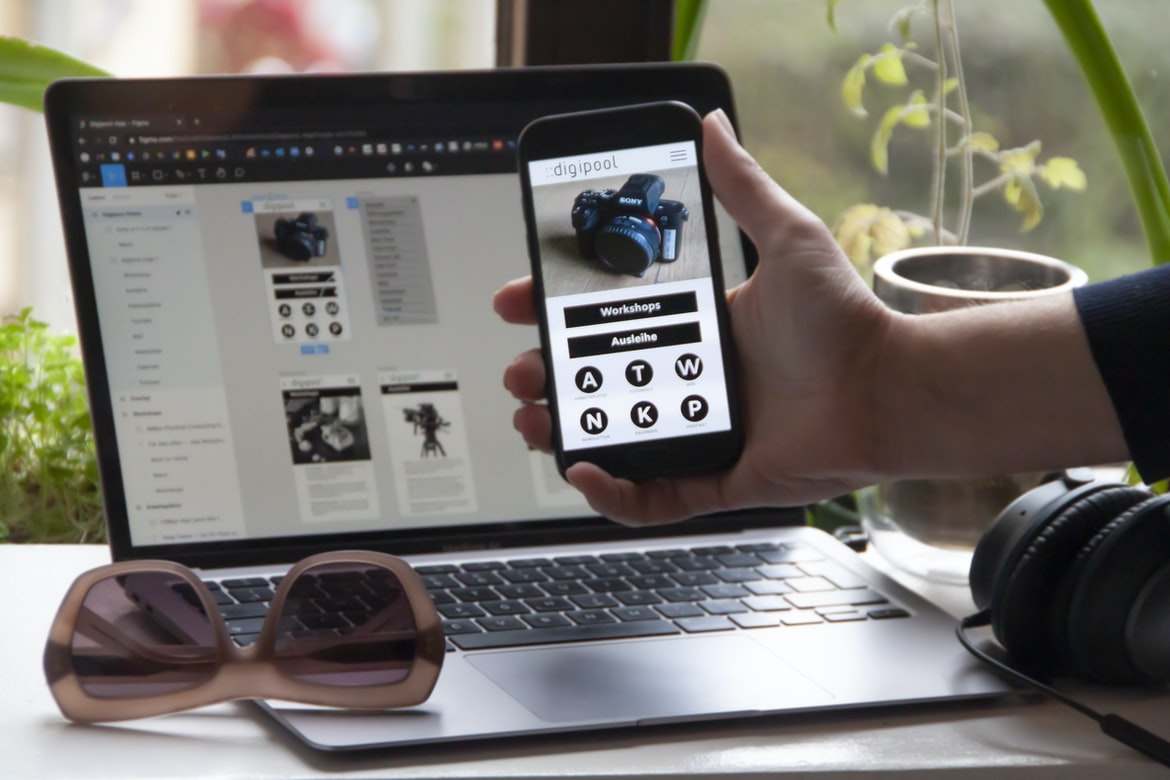
What is web design UI UX?
Web design UI UX is the process of designing and creating a user interface for a website. It involves understanding how users interact with websites and creating a design that is easy to use and looks professional.
Defining UI and UX: What is the difference?
Web design UI UX is the visual design of a user interface, while web design UX is the overall experience a user has when interacting with a website. UI and UX are often confused, but they are actually two different things. UI focuses on the visual aspects of your website, such as colours, fonts, and layout. UX focuses on how users interact with your website and what makes that interaction enjoyable or unpleasant.UI and UX often overlap in their work, but there are some key differences between the two disciplines.UI designers focus on creating an aesthetically pleasing website that meets all technical requirements. They may not spend as much time focusing on how users will interact with the site, preferring to focus on design concepts instead.UX designers spend more time thinking about how users will interact with their websites. They may also use surveys to understand how people use websites and what works well for them.
The Importance of Web Design UI UX: Why is it important?
Web design UI UX is important for a few reasons. First, it impacts how users interact with the site. Good UX ensures that all of the elements on a site are easy to find and use, making navigating and using the site more efficient. Second, a well-designed UI can make a website look more professional and attractive. Third, good UI UX can help users find what they’re looking for on a website faster. Finally, good UI UX can improve user retention rates because it makes the site more user-friendly and provides easier access to important content.
Tips for Improved Web Design UI UX: How to improve it?
Web design UI UX is an important part of any design, and it can often be the difference between a good user experience and a great one. Here are some tips for improving web design UI UX:
1. Use typography to improve readability. Boldfaced titles, headings, and text that’s easy to scan are all good ways to improve readability.
2. Keep navigation simple. Navigation should be easy to find and use, with only the essential options visible at a time. Plus, make sure all buttons are visually appealing and intuitive to click.
3. Make sure your font choices match the rest of your design aesthetic. Fonts should be matched in size, style, and weight; choose fonts that will look consistent throughout your website.
4. Use icons effectively to simplify interaction.
UX Vs Graphic Design
User experience (UX) and graphic design have been considered two very different disciplines for a long time. However, over the last few years, there has been a growing trend of blending the two disciplines together to create more cohesive and user-friendly designs.
Some of the benefits of combining UX and graphic design include creating a more intuitive interface that is easier to use, improving brand recognition, and increasing website traffic. While there are many pros to using both disciplines together, it can be difficult to determine where one ends, and the other begins. This is where a well-trained team of professionals comes in handy.
A skilled UX designer will work with a skilled graphic designer to create an interface that is both visually appealing and easy to use. A good graphic designer will understand how to translate user feedback into designs that are visually appealing and functional.
UI Vs Graphic Design
When it comes to web design, there is a lot of debate between those who believe that the user interface (UI) should be designed first and then the graphic design can be applied, and those who believe that the graphic design should be applied first and then the UI can be created. There are pros and cons to both approaches, so which one is better? In this article, we’re going to look at the pros and cons of each approach so that you can make an informed decision about which way to go.
The Pros of First Designing UI Before Graphic Design:
1. It Can Be Easier To Reuse Designs Across Multiple Sites: If you have a preexisting design for your user interface, it’s much easier to apply this same design to multiple sites. It s also easier to modify and remake the design to fit the needs of other sites. 2. It Can Be Easier To Recognize The Design: Because you’ve already designed the UI, you’ll be able to recognize it easily.
UX Vs Web Design
UX and web design are two important disciplines that need to be well integrated in order to create a successful product. A good user experience requires great attention to detail in the design of the interface as well as in the overall layout and structure of the site. Poor web design can often result in a poor user experience, while good UX can contribute to a site’s success even if it doesn’t have an amazing visual design.
UI Vs Web Design
There is a lot of debate when it comes to which design approach is better: web design UI or web design UX. Web design UI focuses on the look and feel of the user interface, while web design UX takes into account how the user interacts with the website. Both approaches have their pros and cons, but which is right for your business? Let’s take a closer look.
Web design UI focuses on aesthetics and looks. This means that the focus is on making sure the website looks good on all devices, from desktop computers to phones and tablets. This can be tricky because different devices have different input methods (e.g., keyboards and mice), so you need to make sure all elements are accessible no matter what device someone is using.
Web design UX, on the other hand, takes into account how users interact with a website.
Usability User Experience
Usability of User Experience is a critical factor when designing any web-based application. Poor usability can result in a less-than-positive user experience, which can ultimately lead to a decreased website or application traffic and lower conversion rates. In order to ensure that your users have an enjoyable experience while using your site or application, it is important to focus on the following aspects of usability:
1. Clear and concise user interface design
2. Appropriate use of colour and layout
3. Effective use of typography
4. Easily accessible functions and controls
5. Navigation design 6. Usability testing 7. Proper search engine optimization (SEO)
The following sections provide more detail regarding each of the aforementioned aspects of usability.
Web design usability is a critical aspect of creating a user-friendly experience for web users. Good usability ensures that users can navigate the site easily, find what they’re looking for, and understand how to use the site’s features.
There are several factors to consider when designing a website’s UI UX. These include the layout of the website, the colour and font choices, and the overall design. Additionally, effective web design usability relies on proper navigation and search functionality.
Layout: The layout of a website should be easy to understand and use. Navigation menus should be organized in a logical manner, with appropriate titles and sub-menus highlighted with bold text or icons. Graphics should be easy to read at a quick glance, without requiring close inspection.
Colour & Fonts: Colors should be chosen wisely in order to avoid eye fatigue or annoyance. The use of colour should be consistent so that the user can quickly assimilate information from the website. Fonts should be legible and easy to read. Web font selections should be carefully considered for accessibility needs.
Usability User Interface
Web design usability has come a long way in recent years, but there are still many usability issues with web interfaces. In this article, we will discuss three common usability problems with web interfaces and how to fix them.
UX Example
UX Example: A User’s Guide to the Best Web Design UI
Designing a user interface for a website can be tricky, but with the right tools and techniques, it can be a breeze. In this article, we’ll show you how to create the perfect web design UI using some of the best UX design methods available. You’ll learn how to create beautiful and intuitive designs that both your users and search engines will love. So let’s get started!
UI UX Tips
1. When designing a web UI, take into account how users will interact with it. This includes things like the placement of buttons and other components, as well as the layout of pages.
2. Make sure all elements are legible and easy to understand at a glance. Use clear fonts and colours that contrast well against one another.
3. Use animation sparingly; it can be both distracting and confusing for users. Instead, use it to emphasize important information or to help users navigate your interface more easily.
4. Provide feedback to users as they interact with your UI, either through inline messages or pop-up windowing notification boxes. This will help them understand what actions they’re taking and why making the experience more immersive for them overall.
5. Avoid creating complicated interactions with multiple objects. This can be confusing and exasperating for users; they need to know what they’re doing, how much time it will take, and what will happen as a result of their actions. 6. Consider the psychology of user experience when designing your interface.
What Is Bad UX UI?
There are three types of bad web design: unintentional, careless, and malicious. In each case, poor UXUI can lead to frustrating user experiences. Unintentional Bad UXUI can be caused by sloppy coding or design choices, while carelessness often manifests as poorly laid out pages that are difficult to navigate or incorrect information displayed prominently. Malicious UXUI is most often encountered when designers deliberately try to frustrate users with confusing layouts or poorly executed design features. All three types of bad UXUI can have a negative impact on web traffic and conversions, so it’s important to avoid them whenever possible.
What Can I Add To My Website To Make It Better?
People visit websites for different reasons. Some people want to learn about a product or service, others want to find out more about a company, and still, others just want to waste time. No matter the reason, website owners need to make sure their sites are user-friendly and easy to navigate.
There are many things website owners can do to make their sites better. Here are tips:
1. Use layouts that are easy to understand. Make your pages look like a brochure or magazine instead of a confusing web page filled with tiny fonts and overlapping graphics. Layout elements should be placed in logical spots on the page, so users know where they are and what they need to do next.
2. Keep your text short and concise.
Motion Graphic Design
Motion graphic design is a growing field in the world of web design. It involves creating high-quality graphics, animations and videos that can be used on websites, social media and other marketing materials.
Animation Design
Animation design is the process of creating motion graphics for animations in a graphical user interface. It can be used to improve the look and feel of a website or application or to add an element of fun and excitement. Animation can also be used to communicate specific information to users or to help them navigate through a complex interface.
WordPress for Designers
WordPress is one of the most popular content management systems (CMS) in the world. This open-source software is used by designers and developers to create websites, blogs, and e-commerce stores. WordPress has a drag-and-drop interface that makes it easy for users to create custom pages and posts. Additionally, WordPress has a built-in publishing engine that allows users to easily publish their work on the web.
WordPress is a great platform for web designers because it offers a drag-and-drop interface, a built-in publishing engine, and a large community of developers and designers. Additionally, WordPress is free to use and versatile enough for both professional and personal projects.
What Is Elementor Website WordPress Plugin?
Elementor website WordPress plugin is a drag-and-drop web design utility that makes it easy to create custom websites. It has a sleek and modern user interface that makes it easy to customize your website. Elementor also includes features like responsive design, custom post types, drag-and-drop page builder, and more.
Figma
Figma is a web design platform that offers a more intuitive user interface and improves UX. It has been designed for professional designers but can be used by anyone with basic design skills. The platform has a number of features that make it an ideal choice for creating websites and mobile apps.
Adobe XD
Adobe XD is a new UI design tool that has been released by Adobe. It is intended to be a replacement for Adobe Photoshop and Adobe Illustrator. The software is currently in beta, and it has a price of $99 per year.
Adobe XD has several features that are unique compared to other UI design tools. For example, the software can create interactive prototypes using HTML5 and CSS3. This allows designers to test how their designs look in different contexts before they commit them to code.
Another unique feature of Adobe XD is its support for vector graphics. This means that designers can create high-quality illustrations without having to learn programming languages like Illustrator or Inkscape.
There are some drawbacks to using Adobe XD, however.
Design Mobile App
The challenge of designing a mobile app is that the interface has to be easy to use and attractive while still retaining the features and functions needed for the app to be useful. There are several different ways to approach this, but one of the most common is by using a user interface design (UI) style called minimalism. Minimalism is all about making the essential elements of an interface as visible as possible while still providing sufficient information for users to interact with it.
One way to achieve this is by using a flat design style which focuses on creating uniformity across all of an app’s screens. This makes it easier for users to understand what’s happening on screen and reduces the amount of time they need to spend navigating around it.
What is Visual Communication in graphic design?
Visual communication is the use of images, typography, and motion to create a message. In graphic design, visual communication is essential for creating effective user interfaces (UIs) and marketing materials.
Visual communication can be used to draw attention to specific elements on a page or screen or to create a cohesive design. For example, textured backgrounds can help make a website or app more visually appealing and user-friendly. Additionally, well-designed typefaces can add personality and elegance to any project.
In order to create effective visual communication, designers must have an understanding of both traditional and contemporary graphic design principles. Furthermore, they need to be skilled in various software programs such as Photoshop and Illustrator. With the right tools and knowledge at their disposal, designers can create stunning visuals that will help communicate their message effectively.
Application of Graphic Design: Adobe Photoshop, Adobe Illustrator, Adobe InDesign
Adobe Photoshop, Adobe Illustrator, and Adobe InDesign are widely used graphic design software programs. They all have their own unique features that make them great for creating user interfaces and UX designs. Here are a few tips on how to apply graphic design principles to user interface design with these programs: 1) start by designing a rough wireframe or mockup of your desired layout; 2) use realistic colours and high-quality images to create a visually appealing interface; 3) use typography to convey important information; 4) experiment with different layout options to find the best way to present your data; 5) take into account users’ needs and preferences when creating menus, toolbars, and buttons; 6) test your design on a real device before finalizing it; 7) be sure to keep your users in mind while developing your final product.
What Is A Prototype?
The prototype is a design concept that originated in the early days of computer graphics. A prototype is a rendering of the final product or an early version of it. Prototypes are used to test ideas and assumptions before developing more expensive or time-consuming designs. They can also be used to solicit feedback from stakeholders.
How to Create a Great UX/UI Design That Delights Your Customers
There’s no one-size-fits-all answer to this question, as the best UX UI design for your business will vary depending on your specific needs and goals. However, there are a few tips that can help you create a great UX UI design that delights your customers.
First and foremost, always think about the user. What do they need and want? What are their goals? When designing your UI, make sure all elements work together to support these goals.
Second, keep things simple. Don’t overcomplicate your design or add unnecessary visual clutter. This will make it harder for users to find what they’re looking for and ultimately frustrate them.
Finally, be mindful of the time period in which your UI will be used. Some elements may be more appropriate for younger audiences or those who are more technologically savvy than older customers.
Optimize Your UI/UX Design and Increase Conversions
There are a few things you can do to optimize your web design UI UX and increase conversions. First, make sure the colours and layout of your website are appealing to the eye. Second, be sure all your content is easily findable and navigable. Third, use easy-to-use navigation menus that lead users directly to what they need. Finally, keep everything simple and straightforward, so users don’t get bogged down in superfluous details. By following these tips, you’ll be able to create a successful web design UI that converts more visitors into customers.
Optimize Your Content for the Best User Experience
Are you using the right design UI for your content? User experience is essential when it comes to optimizing your website for search engines, browsers, and users. There are a few things to keep in mind when designing your user interface:
-Make sure all elements are legible and accessible from any screen size or device. Use a consistent font size, colour, and layout across all pages. Use contrast ratios to make the text easier to read on a dark background.
-Avoid large images that take up space and slow down page loads. Instead, use smaller images (100×100 pixels or less) that can be embedded in articles or displayed as pop-ups.
-Use simple animations and interactions that are easy to understand and use. Avoid complex motion designs that require users to learn how to navigate the site.
What is UI/UX Design, and How Does it Affect Conversions?
UI UX design is the process of creating a design that meets the needs of users through interface design. It focuses on making sure the user experience is positive and engaging, which can help increase conversions. Good UI UX design can make a website more usable and appealing, which can lead to higher traffic and sales.
Graphic design is in demand.
Graphic design is in demand, and with good reason. A well-designed website or app can help your business stand out from the competition, attract new customers, and even boost your bottom line. But what does that mean for you as a graphic designer?
There’s no one right way to design a user interface (UI) or user experience (UX), but there are some key principles that will help you create a successful product. First and foremost, make sure your designs are easy to use. Your users should be able to find what they need quickly and easily without having to fumble through a confusing menu system.
Another key factor is usability testing. Before you launch your product into the world, make sure it works well on different devices and browsers. Test it on people who have different levels of experience with technology – not just computer experts. Graphic design is in demand, and with good reason. Not only does graphic design provide an aesthetically pleasing look for a website or application, but it can also be instrumental in helping users navigate and interact with the site or application. In fact, according to a report by job search engine Indeed, over 60% of web and app designers are in high demand.
This means that if you have a passion for graphic design, there are plenty of opportunities out there to showcase your skills. Whether you’re looking for full-time employment or simply want to branch out on your own and start your own business, there are a lot of options available to you. So what are you waiting for? Start designing!









