

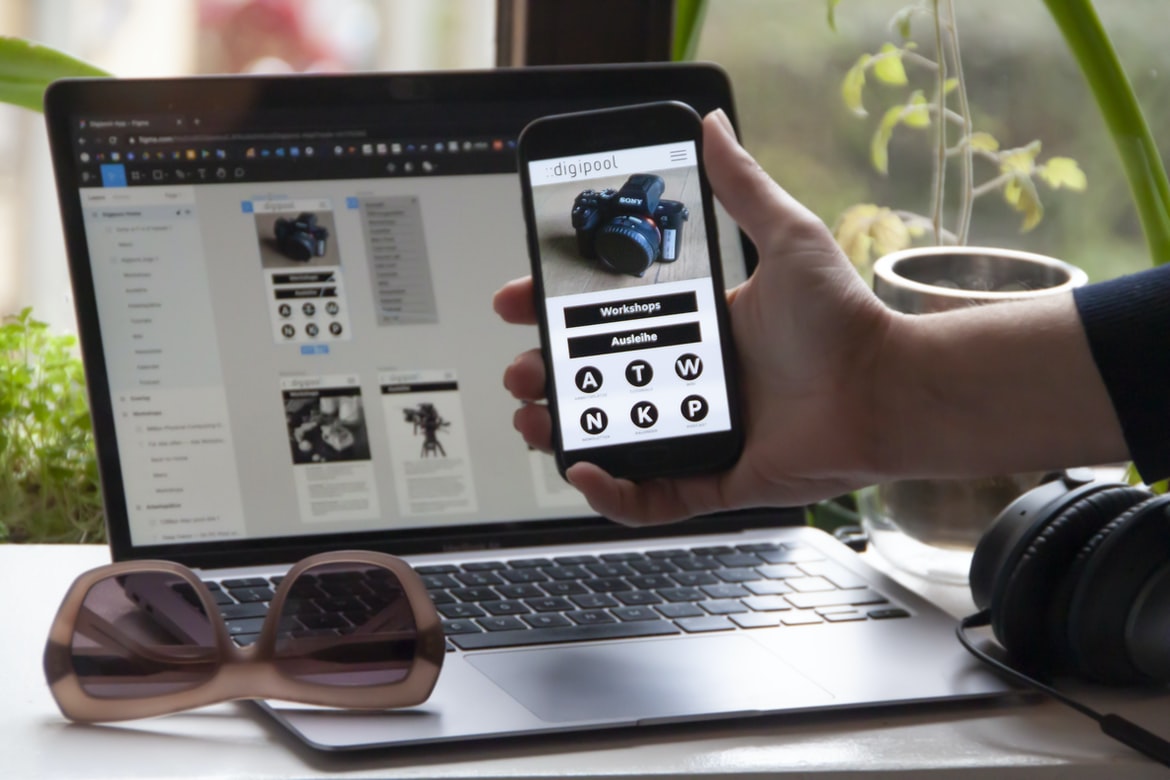
What is UI UX, and how does it differ from web design?
UI UX, or user interface design, is the process of designing the look and feel of an application’s user interface. It can differ significantly from web design, which focuses on creating a well-designed website.
One major difference between UI UX and web design is that web design typically doesn’t involve any visual aspects at all. UI UX, on the other hand, often includes concepts like colour palettes, typography, and layout designs. This means that a good UI UX designer will be able to take a basic website and redesign it to make it more visually appealing.
Another key difference between UI UX and web design is that most users interact with websites through their browsers. With apps, however, most users will use touchscreens or physical buttons to interact with the app.
The importance of good UI UX in a website
Good UI UX is essential in any website. This includes the design of the user interface, as well as how that interface communicates with the user. A well-designed user interface can make a website more efficient and easy to use while also providing an aesthetically pleasing experience. Poor UI UX can lead to frustrated users and even decreased traffic to a website. It’s important for web designers to ensure their websites have good UI UX so that everyone, from casual users to experts, can enjoy using them.
Guidelines for creating good UI UX
There is no single right way to create great user interfaces (UI). However, there are some general principles that can help make your designs effective and appealing.
1. Keep your users in mind. If you design for yourself first, it will be difficult to pay attention to the needs of your users. Make sure to test your designs before you publish them so that you can get feedback from people who will actually be using them.
2. Use simple, clear icons and labels. It’s easy to get lost in a sea of digital clutter, so keep everything as simple and organised as possible. Your users will thank you later!
3. Use typography wisely. Good typography can make a huge difference in the overall look and feel of a website or application.
Tips on how to improve UI UX in your website
Here are effective tips for improving UI UX on your website: 1. Use intuitive design principles. Users should be able to easily understand the controls and features of your site without having to read lengthy instructions or scroll through a lot of content. This means using clear, concise labels and making sure all buttons, menus, and other user interface elements are visually appealing and easy to use. 2. Keep navigation simple. Navigation on a website should be as streamlined as possible so users can quickly find what they’re looking for. Focussing on logical structure rather than superfluous decoration will help make your site more user-friendly. 3. Make sure the text is easy to read and navigate. Clear, legible font sizes and layouts will help users quickly scan through pages of content while minimising the number of clicks necessary to reach the information they need. 4 Use whitespace effectively.
What is UI UX? What are the different types of UIUX?
Web design is an essential part of creating a successful website. User interface (UI)UX is the design of the user interface or the interaction between users and the site. There are many different types of UIUX, but some common ones include the following:
-User goals: What do users want to achieve? How can we make it easier for them?
-Content and structure: How do we display content in a way that is both clear and organised?
-Navigation: How do users move around the site? Is everything easy to find?
-Input methods and feedback: What type of input methods are available, and how do they work? Do users feel confident using them?
-Design patterns and solutions: What have other designers done before, and what can we learn from their successes or failures?
The Importance of User Interface Design: Why is user interface design so important? What are some benefits of good UI design?
User interface design is an important aspect of web design. It can have a big impact on the user experience and can make a website more user-friendly. Here are some benefits of good UI design:
1. User interface design can help users find what they’re looking for faster. Good UI design takes into account the user’s needs and makes it easy for them to navigate the site.
2. User interface designs that are well-organised and consistent help users feel confident about staying on the site. This makes it easier for them to find what they’re looking for and reduces the chance that they’ll get lost.
3. Good UI designs are aesthetically pleasing, which can lead users to spend more time on a site and make them more likely to recommend it to friends or colleagues.
Different Types of User Interface Ux: How do different types of user interfaces affect user experience? What are some examples of user interface types?
Different types of user interfaces have different effects on user experience. The two most common types are desktop and mobile. Desktop UIs often take up a lot of screen space, making them cumbersome to use on smaller devices. Mobile UIs, on the other hand, are designed for handheld devices, so they are usually more compact. They can also be more responsive because they’re designed to work with touchscreens.
There are other types of user interfaces, but these two are the most common. A good example of a mobile UI is the iPhone’s home screen. It’s simple and easy to use. Another example is Google’s search box, which is located at the top of almost every page on the internet. It’s simple and easy to use, and it makes searching for information quick and easy.
Principles of User Interface Design: What are some principles of UI design that should be followed? What are some common mistakes made with user interface design?
When designing a user interface, it is important to adhere to principles of usability. Some principles of UI design that should be followed include using visual cues and feedback effectively, making sure the layout is easy to understand, and creating a system that is easy to use. Additionally, common mistakes made with user interfaces include failing to provide adequate feedback, confusing users, and creating an overwhelming or poorly organised system.
Guidelines for Creating Better User Interface Ux: How can the user interface be improved? What are some guidelines for creating better user interface designs?
User interface design is critical for any web or mobile application. A poor user interface can lead to frustrating experiences and decreased use of the product. There are many guidelines for creating better user interface designs, but these are just a few to get you started.
Keep your goals in mind when designing your user interface. Make sure that the goal of the UI is clear from the beginning and that the design supports that goal. Ensure that all elements of your UI work together to achieve that goal.
Think about how users will interact with your product. What tasks will they need to complete? What information will they need? How can you make it easy for them to find what they’re looking for?
Make sure all elements of your UI are consistent with each other. This means making sure fonts, colours, icons, and layout look the same from one screen to another.
What Is UX Example?
UX Example is a simple and effective way to improve the usability of a website or application. This can be done by creating an example on the homepage or main menu of the website, which users can use as a reference. A well-designed UX example will help users understand how to use the site or application, making it easier for them to get started.
What Is UI Example?
A UI example is a graphical user interface example that is used as a reference for web design. It can be used to improve the design of a website by providing an example of how a specific element should be designed. UI examples are also popular among software developers, who use them to improve their code.
What Is Bad UX?
Web design UI UX is not good when the following are present:
1. Poorly designed menus and buttons.
2. Ineffective navigation bars.
3. Inconsistent spacing between elements on a page.
4. Poor use of colours and textures.
5. Unclear or hard-to-read text labels and icons.
6. Lack of feedback when users interact with the website or app interface.
What Is Bad UI?
The user interface (UI) of a website is part of the design that interacts with the user. Poor UI can make it difficult for users to find what they’re looking for, or even worse, can confuse them and make them feel frustrated. There are a number of different factors that can contribute to a poor UI, from confusing layout to poorly written instructions. Here are some tips on how to create a user interface that will help your users get the most out of your website.
1. Keep your layout simple and easy to understand. Make sure all elements are placed where they’re easily accessible and don’t clutter up the screen unnecessarily. Use clear and concise text instead of elaborate graphics, and keep buttons small, so they’re easy to hit without sacrificing accuracy.
2. Use clear instructions wherever possible.
What Can I Add To My Website To Make It Better?
There are a lot of things you can do on your website to make it more user-friendly and appealing. Here are easy tips to improve your website’s usability:
1. Make sure all text is readable at a small size. This includes headings, main body text, and images. Use a size that is comfortable for reading onscreen with plenty of white space around it.
2. Use simple fonts and colours. Don’t use too many different typefaces or colours, which can be confusing and overwhelming for visitors. Stick to one or two typeface families and shades of colour, which will be easier for visitors to identify and understand.
3. Use clear navigation menus. Make sure all menus are easy to understand and navigate—including the top menu bar, sub-menus, and links within articles or posts.
How Do I Make My Website User-Friendly?
The user interface (UI) and user experience (UX) are two vital aspects of any website. Unfortunately, many websites lack a well-designed UI or UX, which can lead to frustrating experiences for users. Here are tips for making your website user-friendly:
1. Make sure all elements of the UI are easily accessible. Menus, buttons, and links should be placed where they’re easy to access and use.
2. Create a well-organised layout. A cluttered UI is hard to navigate and can lead to frustration on the part of users. Keep everything minimalistic and organised so that users can find what they need quickly.
3. Use clear icons and labels. Icons should be clearly recognisable and labelled for users to understand what they represent.
Motion Graphic Design
Motion graphic design is an important part of web design. It can be used to create beautiful and eye-catching user interfaces and help users understand your site’s content.
Animation Design
Animation has become an essential tool for designing user interfaces (UI) and web applications. By using animation, we can create a sense of motion and dynamism that makes our user interfaces more engaging and appealing.
There are a few key principles to keep in mind when animating user interfaces:
1. Use motion to communicate important UI elements and functionalities.
2. Place animation near the actions users take on your web page or application so they feel intuitive and natural.
3. Use short loops with smooth transitions to avoid jarring users and maintain a fluid feel.
4. Use pre-made animations or create your own custom animations using JavaScript or CSS3 techniques.
5. Test your animations before deploying them to ensure they look great in all browsers and devices.
WordPress for Designers
WP for designers offers a number of features that make creating a great-looking website simpler and more efficient. These include the ability to create custom themes and plugins, an extensive post library with support for custom fields and meta boxes, and a drag-and-drop platform for designing pages. WordPress also makes it easy to manage your content with its built-in SEO tools and monthly updates.
What Is Elementor Website WordPress Plugin?
Elementor is a popular website design WordPress plugin that makes it easy to build custom-designed websites. Elementor provides a drag-and-drop interface for creating pages and posts, as well as built-in features for managing content and SEO. Elementor also includes tools for creating custom forms and surveys, as well as integrations with many other popular website-building plugins.
Elementor is perfect for anyone new to website design or who wants an easy way to improve their existing skills. It’s also great for businesses who want to create simple or more complex websites without having to learn coding languages or spend hours customisation settings.
Figma
Figma is a free and open-source web design UI UX tool that allows users to quickly create mockups of user interfaces. Figma also includes features for wireframing, prototyping, and product exploration.
Adobe XD
Adobe XD is a powerful UX design tool that allows users to create custom interfaces and user experiences for web and mobile applications. With its intuitive drag-and-drop interface, Adobe XD makes it easy to create sleek, professional designs that match your unique brand.
Design Mobile App
Designing a mobile app can be an incredibly daunting task, but with the right approach, it can be simple and easy. This article will outline some of the key considerations for designing a successful mobile app.
First and foremost, make sure the app is easy to use. This means creating menus and screens that are concise and organised. It’s also important to keep things simple when it comes to user interactions. Make sure all controls are intuitively located and easy to use.
Another important consideration is design efficiency. Make sure all screens load quickly and that no unnecessary animations or scrolling occurs. Finally, consider how users will interact with your app on different devices. Designs should be tailored for different screen sizes and resolutions.
What is Visual communication in graphic design?
Visual communication is an important part of graphic design. It can help convey a message to the viewer and make the design more user-friendly. Visual communication can take many forms, including typography, colour, layout, imagery, and motion graphics.
Application of Graphic Design: Adobe Photoshop, Adobe Illustrator, Adobe InDesign
Graphic design is the process of creating an image that communicates a message or conveys information. It involves the use of typography, images, and colour to create a cohesive design. Graphic designers use various software programs to create their designs. Adobe Photoshop, Adobe Illustrator, and Adobe InDesign are three popular graphic design programs. In this article, we will discuss the different applications of these programs and how they can be used to create user interfaces (UI) for websites.
Adobe Photoshop is used to create graphics for websites and advertisements. Its features include layered editing and vector drawing tools that allow for precise control over detail and smooth transitions between layers. Adobe Illustrator is used to creating logos, icons, illustrations, and other graphics with detailed layers and vector illustrations.
Web Design
Web design is more than just creating a pretty site. It’s about making sure the site is easy to use and looks great on all devices. And that includes mobile devices, which are becoming an increasing part of web browsing. Here are some tips for creating a user interface (UI) that works well on mobiles:
Make sure all buttons and icons are large and easily visible.
If you’re using images as part of your UI, make sure they’re sized down, so they look good on small screens.
Use sensible navigation menus that are easy to understand and use.
Make sure the text is easy to read at any size.
Mobile Graphic Design
The mobile web is a fast-growing industry with opportunities for graphic designers. With more people using their phones and tablets to access the internet, there’s a growing demand for creative mobile designs.
Mobile graphic design requires the same skills as traditional web design but takes into account different user interactions and devices. A good mobile graphic designer will have an understanding of typography, layout, and graphics. They’ll also be able to create responsive designs that look good on any device.
There are many online resources and certification programs available to help rising graphic designers learn how to create great mobile designs. If you’re interested in pursuing a career in mobile graphic design, start by studying traditional web design concepts first. With enough practice and experience, you can develop your own unique style and become one of the most sought-after professionals in the field.
Responsive Graphic Design
Responsive Web Design is the practice of designing websites that automatically resize and adapt to different device sizes, making them easier to use on mobile devices as well as desktop computers. Responsive design has become increasingly important in recent years, especially with the increasing popularity of mobile devices.
There are a number of reasons why responsive design is important. For one, it makes websites more accessible. Millions of people use smartphones and other mobile devices every day, which means that businesses have an even greater opportunity to reach consumers. Second, responsive design can improve user experience by making it easier for people to find what they’re looking for. With responsive design, users can access all the content on a website without having to scroll or resize their windows. Finally, responsive design can help businesses save money on web development costs by making their websites more efficient and easier to maintain.
Design websites
Designing websites is an important task that can make a big impact on how people interact with your business. While there are many different ways to design a website, there are some common principles that should always be followed. Here are tips for designing user interfaces that are appealing and usable:
1. Use simple, well-designed visuals. Make sure all elements of your website look professional and attractive. Don’t overcrowd pages with too many graphics or text, and avoid using complex designs that will confuse or frustrate users.
2. Make sure all buttons and links work as expected. Do not hesitate to test different versions of your website with different browsers in order to ensure that everything works as it should.
3. Use intuitive layouts and typography. Try to design pages so that users understand what they need to do without having to read through lengthy instructions first.
Graphic design is in demand.
Graphic design has always been in demand. From businesses and individuals looking for a unique look to create a more cohesive brand to graphic designers who want to perfect their skillset and make an impactful impact on the world, there is no shortage of demand for graphic designers. However, due to the ever-changing digital landscape, graphic design is now more in demand than ever before.
With so many people creating content online and using graphics to enhance their work, it’s no surprise that graphic design has become such a popular field. But what exactly does this mean for the average person looking to enter the field? Well, according to The National Association of Colleges and Employers (NACE), 2016 marked the highest level of job growth for graphic design graduates since 2006.
Is There A Demand For UX Designers?
There is a growing demand for UX designers as the field is constantly evolving. With new technology emerging, businesses need to ensure their websites are user-friendly and look professional. It’s also important to keep in mind the mobile platform when designing, as more and more people are using devices such as smartphones and tablets.
A study by Adecco found that demand for UX designers is on the rise, with an estimated growth of 31% over the next five years. In order to meet this demand, schools should offer courses that teach how to design user interfaces. Additionally, companies should create job opportunities for UX designers who can help them stay ahead of the curve.
Web Design is in demand.
Web design UI UX is in high demand these days. The reason for this is that more and more people are using web browsers to access information rather than using dedicated applications. This means that web designers need to be able to create interfaces that look good and are easy to use.
Design Mobile App is in demand.
Designing a mobile app can be daunting, but it’s in high demand. According to Gartner, by 2017, more than 60% of all business-to-consumer (B2C) online interactions will take place on mobile devices. That means you need to design your app with users in mind from the start. Here are tips for designing a user experience that will make your app stand out:
1. Keep the focus on the user. Make sure all screens and menus are designed to be easily navigated and interactive.
2. Use progressive disclosure for important information. Make sure important details are displayed as users get closer to them without overwhelming them with too much information at once. This will keep them engaged and informed while they’re using your app.
3. Keep content concise and easy to understand.
Designing mobile apps is in high demand these days. There are many reasons for this. First of all, mobile apps are the future. They’re used more and more every day, and people are starting to expect more from them. Second, there are a lot of great mobile app designs out there, and people want to be able to imitate them as closely as possible. And finally, mobile app design is a very lucrative field – you can make a lot of money designing beautiful apps. So if you want to make a name for yourself in the world of web design, start thinking about designing mobile apps too!
What Are The Basic Components Of A Good Process In UX Design?
There are a few key things that go into any good process in user experience design. The first is an understanding of your audience. What do they need and want? What are their biggest challenges? Once you have a solid understanding of who your users are, it’s important to create a process that accommodates them.
Next, it’s important to be organised and efficient in your work. Make sure everything you do is logically structured and follows a framework so you can easily move from one task to the next. Finally, always respect the user’s time! If something takes longer than expected, don’t force the user to wait; instead, find ways to speed up the process.
Designing a good user experience for a website or app can be tricky. There are a lot of different elements that need to come together in order to create an effective UX. In this article, we’ll provide you with the basics of good processes in UX design and outline some key components that make up a successful UX design.
First and foremost, any good UX process should start with user research. You need to know what your users want and need in order to create an effective experience. This can be done through surveys, interviews, or focus groups. Once you have a better understanding of your users, you can start designing the interface based on their needs and wants.
Another important component of a good UX is user feedback. It’s important to constantly evaluate how users are interacting with your content and interface and adapt as needed.









